
MELPO BLFL-LFCA
MELPO LED Flood Light Outdoor Instruction Manual
Model: BLFL-LFCA
Smart RGB Landscape Lighting with APP Control
Product Overview
The MELPO LED Flood Light is a versatile and smart lighting solution designed for both outdoor and indoor use. Featuring 30W power, 3000LM brightness, and 2700K warm white light, it offers 16 million RGB colors and various dynamic modes. Control is seamlessly managed via the "BRmesh" APP, enabling features like DIY scenes, timing functions, and music synchronization. Its robust IP66 waterproof rating ensures durability in various weather conditions.

Image: Four MELPO LED Flood Lights, showcasing their design and the accompanying mobile application interface for color control.
Package Contents
- MELPO LED Flood Light (4 units)
- User Manual

Image: Contents of the MELPO LED Flood Light package, including one flood light unit and the user manual, with additional units visible in the box.
Setup and Installation
1. App Download and Connection
- Scan the QR code provided in the physical user manual or search for "BRmesh" in Google Play Store (Android) or iOS App Store (Apple) to download the application.
- Open the "BRmesh" APP on your smartphone.
- Click the "+" icon located in the upper right corner of the APP to add lights. Note: The lights do not require pairing directly with your phone's Bluetooth settings.
- Follow the "Add guideline" within the app. Check "I have understood" and click "Enter to add," then immediately turn on the flood lights.
- The lights and APP will connect automatically. Once connected, click "Finish" to proceed with controlling the lights.
2. Physical Installation
The MELPO LED Flood Light offers flexible installation options, including wall mounting, ground mounting, and ceiling mounting. The bracket allows for 360-degree multi-angle adjustment for optimal light direction.
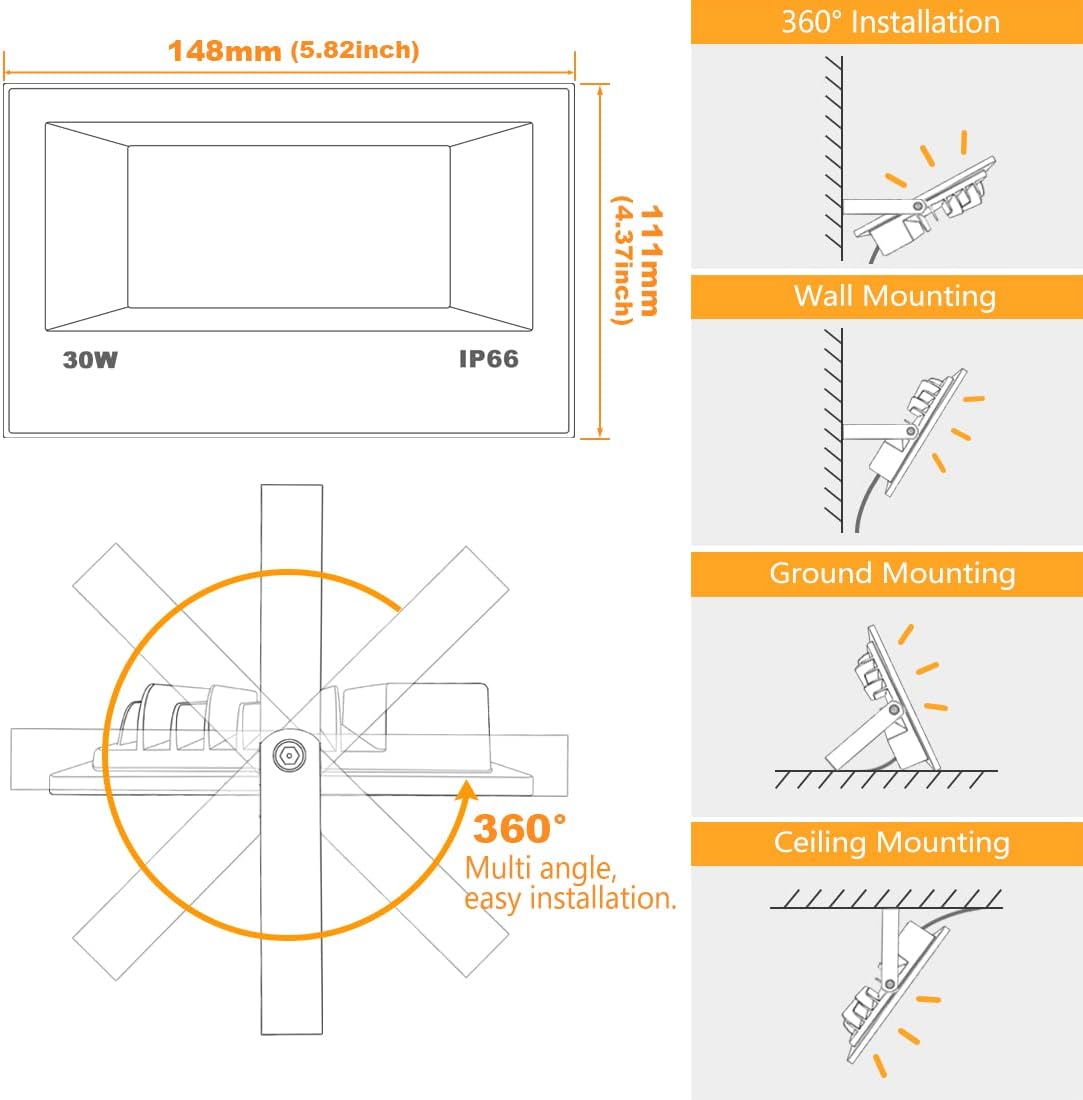
Image: Installation diagram illustrating the 360-degree adjustable bracket and common mounting methods: Wall Mounting, Ground Mounting, and Ceiling Mounting.

Image: Detailed dimensions of the flood light (5.82 inches x 4.37 inches) and information about the US 3-prong plug with a 6.56ft wire length.
Operating Instructions
App Control Features
- Color Changing: Select from 16 million static colors. Adjust Red, Green, and Blue colors independently with pinpoint accuracy (0-255 adjustment).
- Dynamic Modes: Utilize 12 system preset dynamic modes, including "DIY Flash" and "DIY Fade" modes. Customize flashing/fade color, sequence, and speed (up to 7 colors, 5 speed levels).
- Brightness Adjustment: Dimmable via the APP only.
- Timing Function: Set schedules for lights to automatically turn on and off at specific times daily.
- DIY Scenes: Create and save custom lighting scenes by setting individual colors or modes for each lamp. Activate saved scenes with one click.
- Music Sync: Lights can change colors according to the rhythm of music.
- Group Control & Single Control: Control multiple lights simultaneously or manage individual units.
- Memory Function: Lights retain the last setting when turned off and on.
MESH Technology
Equipped with a Bluetooth 5.0 chip and Mesh function, these lights offer enhanced control capabilities. This technology allows for a more stable and extended control distance, enabling management of a large number of floodlights (up to 100 devices) without the need for Wi-Fi or direct Bluetooth pairing for each light. This is particularly beneficial for multi-light operations and outdoor installations.

Image: A comparison table highlighting the advantages of MESH technology over Bluetooth 4.0, IR, and Wi-Fi for light control, emphasizing network independence, mesh connectivity, controllable quantity, control distance, and multi-light sync.
Usage Scenarios

Image: Collage showing various applications of the MELPO LED Flood Lights, including a gaming setup, a party scene, outdoor landscape lighting, and indoor ambient lighting.

Image: Four panels depicting diverse uses for the flood lights: Garden Lighting, Festival Decoration, Landscape Lighting, and Wedding Decoration.
Flicker-Free Technology
The MELPO LED Flood Lights are designed to be flicker-free, ensuring a comfortable viewing experience and preventing strobing effects when taking photos or videos with mobile devices.

Image: A side-by-side comparison demonstrating the flicker-free output of MELPO lights on a mobile phone screen versus visible flickering from other lights.
Maintenance
The MELPO LED Flood Light has an IP66 waterproof rating, making it suitable for outdoor use and resistant to dust and strong jets of water. However, it is important not to immerse the light in water. Regularly inspect the cable and housing for any signs of damage. Clean the glass surface with a soft, damp cloth to maintain optimal light output. Ensure the power is disconnected before any cleaning or inspection.
Troubleshooting
- Light not connecting to APP: Ensure the light is powered on and within Bluetooth range. Re-open the BRmesh APP and follow the "Add guideline" steps carefully. Make sure no other devices are actively connected to the light.
- Light not changing colors: Verify that the light is properly connected to the BRmesh APP. Check if the brightness is set too low. If only one light is affected in a multi-light setup, try re-adding that specific light to the app.
- Intermittent connection: Ensure there are no significant physical obstructions between your smartphone and the lights. While Mesh technology extends range, extreme distances or dense barriers can affect connectivity.
- Light not turning on: Check the power connection and ensure the plug is securely inserted into a working outlet. Verify that the light is not set to an "off" schedule in the timing function.
Specifications
| Brand | MELPO |
| Model Number | BLFL-LFCA |
| Power | 30W (300W Equivalent) |
| Lumens | 3000LM |
| Color Temperature | 2700K (Warm White) |
| Color Options | 16 Million RGB Colors |
| CRI | >85 |
| Beam Angle | 120° |
| Input Voltage | AC 85-265V Universal |
| Cable Length | 2 Meters (6.56 ft) |
| Waterproof Rating | IP66 |
| Control Method | APP Control (BRmesh APP) |
| Connectivity | Bluetooth 5.0 (Mesh Enabled) |
| Product Dimensions | 6.69"L x 4.21"W x 3.82"H |
| Item Weight | 4.83 Pounds (for 4-pack) |
Warranty and Support
MELPO offers a 2-year warranty and a 90-day money-back guarantee for this product. For any issues or inquiries relating to the product, please do not hesitate to contact MELPO customer service. High quality standards and friendly customer service are provided.
Contact Information:
- Email: service@melpo-lighting.com
Ask a question about this manual
Ask about setup, troubleshooting, compatibility, parts, safety, or missing instructions. Manuals+ will review the question and use this page’s manual context to help answer it.