
Introduction
This manual provides detailed instructions for the Onten USB 3.0 to HDMI/VGA Display Adapter, Model 5201b. This adapter allows you to connect your computer or laptop to external displays using either HDMI or VGA ports, supporting simultaneous output to two screens. Please read this manual carefully before using the product to ensure proper operation and to maximize its performance.
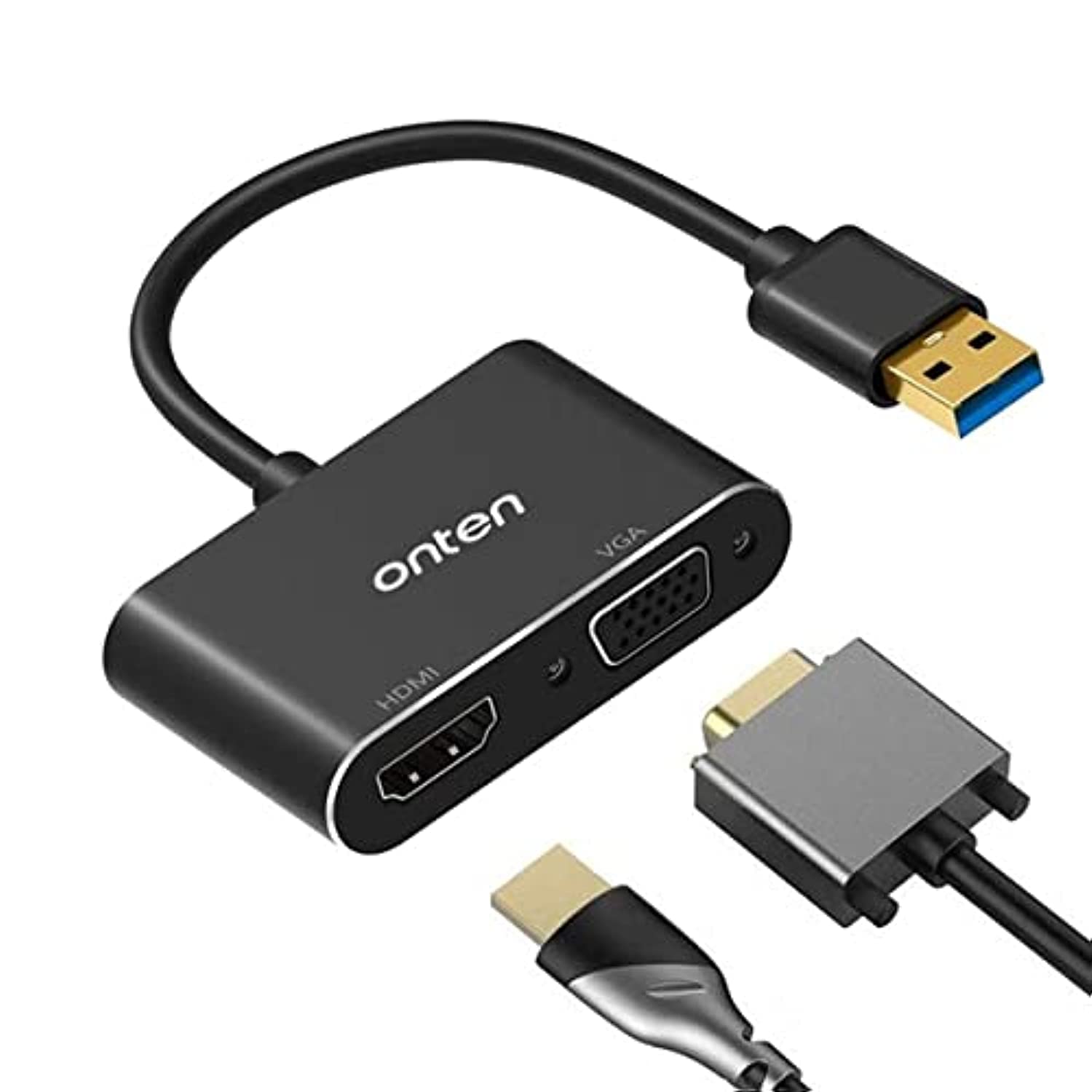
Image: The Onten USB 3.0 to HDMI/VGA Display Adapter, showing its USB 3.0 input and HDMI/VGA outputs.
Safety Information
- Keep the device away from water, fire, and high temperatures.
- Do not attempt to disassemble or repair the device yourself. Refer to qualified service personnel.
- Use only with compatible devices and cables as specified in this manual.
- Avoid dropping or subjecting the device to strong impacts.
Package Contents
Please check the package contents upon opening to ensure all items are present:
- 1 x Onten USB 3.0 to HDMI/VGA Display Adapter (Model 5201b)
- 1 x USB 3.0 Cable (removable)
- 1 x User Manual
Setup
- Connect the USB 3.0 Cable: Attach the removable USB 3.0 cable to the adapter.
- Connect to Computer: Plug the USB 3.0 end of the cable into an available USB 3.0 port on your Windows computer or laptop. For optimal performance and resolution (up to 1920x1080), a USB 3.0 port is highly recommended. Connecting to a USB 2.0 port will limit the resolution to 800x600.
- Connect Displays:
- For HDMI display: Connect an HDMI cable from your display to the HDMI port on the adapter.
- For VGA display: Connect a VGA cable from your display to the VGA port on the adapter.
- Driver Installation: The adapter is designed for plug-and-play functionality on Windows 7, 8, and 10. The necessary drivers should install automatically. If prompted, follow the on-screen instructions. If the display does not activate, you may need to manually install drivers from the manufacturer's website (if available) or check your display settings.
Operating Instructions
- Compatibility: This adapter is compatible exclusively with Windows 7, Windows 8, and Windows 10 operating systems. It does not support Mac OS, Linux, Vista, or Chrome OS.
- Simultaneous Output: The adapter supports simultaneous output to both HDMI and VGA displays. Both external displays will mirror the image from your computer's primary display.
- Resolution:
- When connected to a USB 3.0 port: Supports resolutions up to 1920x1080 (Full HD).
- When connected to a USB 2.0 port: Resolution is limited to 800x600.
- Audio Output: The HDMI port transmits both video and audio. The VGA port also supports audio output. Ensure your display or connected audio system is configured correctly to receive audio.
- Display Settings: After connecting, you may need to adjust your display settings in Windows (e.g., 'Display settings' or 'Screen Resolution') to extend or duplicate your desktop, if not automatically detected.
Troubleshooting
| Problem | Possible Cause | Solution |
|---|---|---|
| No display or low resolution (800x600) | Adapter connected to a USB 2.0 port instead of USB 3.0. | Ensure the adapter is plugged into a USB 3.0 port on your computer. USB 3.0 ports are typically blue or marked with a 'SS' symbol. |
| No display on external monitor | Incorrect connection, incompatible operating system, or driver issue. | 1. Verify all cables are securely connected. 2. Confirm your computer runs Windows 7/8/10. 3. Check Windows display settings. 4. Restart your computer. |
| No audio from VGA display | Audio settings not configured, or display does not support audio input via VGA. | 1. Check your computer's sound output settings. 2. Ensure your VGA display or connected audio system is capable of receiving audio. |
| Adapter not recognized by computer | Driver installation failed or USB port issue. | 1. Try a different USB port. 2. Check Device Manager in Windows for any unrecognized devices and attempt to update drivers. |
Specifications
| Feature | Detail |
|---|---|
| Model | 5201b |
| Input Interface | USB 3.0 |
| Output Interfaces | HDMI, VGA |
| Max Resolution (USB 3.0) | 1920x1080 |
| Max Resolution (USB 2.0) | 800x600 |
| Compatible Operating Systems | Windows 7, Windows 8, Windows 10 |
| Incompatible Operating Systems | Mac OS, Linux, Vista, Chrome OS |
| Simultaneous Output | Yes (mirrored display) |
| Power Source | USB Bus-powered (Plugless) |
| Finish Type | Non-glossy |
| Manufacturer | Onten |
Maintenance
- Clean the adapter with a soft, dry cloth. Do not use liquid cleaners or aerosols.
- Store the adapter in a cool, dry place when not in use.
- Avoid bending or twisting the cables excessively to prevent damage.
Warranty and Support
This Onten USB 3.0 to HDMI/VGA Display Adapter (Model 5201b) comes with a 1-year warranty from the date of purchase, covering manufacturing defects.
For technical support, warranty claims, or any product-related inquiries, please do not hesitate to contact us via email. Refer to your purchase documentation for specific contact details or visit the official Onten support website.


