
PHYSEN CDHW-UK
PHYSEN Wireless Driveway Motion Detector Alarm User Manual
Model: CDHW-UK | Brand: PHYSEN
1. Product Overview
The PHYSEN Wireless Driveway Motion Detector Alarm is a high-precision security system designed to alert you to movement in your driveway, yard, or other monitored areas. Featuring a waterproof PIR motion sensor and a plug-in receiver, this system offers a wide working range and customizable alerts to enhance your property's security.

Image: The PHYSEN Wireless Driveway Motion Detector Alarm, showing the black PIR motion sensor with a red detection beam and the black plug-in receiver with a blue illuminated ring.
2. Package Contents
Please check the package for the following items:
- 1 x PIR Motion Detector (Transmitter)
- 1 x Plug-in Receiver
- Mounting Screws and Anchors
- User Manual (this document)
3. Features
- Waterproof PIR Motion Sensor: High-precision wireless track warning system with low false alarm rate. IP55 waterproof and weather-resistant design ensures the PIR motion sensor works perfectly outdoors and indoors. Suitable for homes, yards, garages, gates, swimming pools, villas, shops, etc. When moving objects are detected in the detection area, the motion sensor can detect a small change with a blue light alarm.
- Large Working Range and Memory Function: The working range from the detector to the receiver can be up to 50 meters (150ft), with a detection range of 4.50 meters (15ft) and a detection angle of 60° in open areas, ideal for driveways and walkways. Powerful memory function: after power failure, no re-pairing is needed; the doorbell automatically starts with the previous ringtone.
- Expandable System: Create your own security warning system by pairing additional motion sensors or receivers. It can expand up to 20 sensors and unlimited receivers for full coverage of your property. Flexible design to meet your actual needs; multiple sensors and receivers can be easily added. You can set different ringtones for each transmitter and use them for various purposes.
- 58 Ringtones and 5 Volume Levels: With 58 unique ringtones, you can freely change them, and 5 volume levels from 0dB to 110dB can meet your needs. It is loud enough to monitor what is happening outside. The LED light indicator flashes to provide a visual alert and is an excellent safety alarm for the hearing impaired. If you do not wish to be disturbed, you can select 0 dB.
- Easy to Install: Plug the receiver into an outlet, pair the motion sensor with the receiver, and mount the detector anywhere with the included screws. Alerts business owners or homeowners with a wireless doorbell. Ability to detect motion through the front or back door.

Image: The receiver unit highlighting its features: 5 adjustable volume levels (0-110dB), 58 chimes and tunes, LED-flash design, and 150m wireless range.
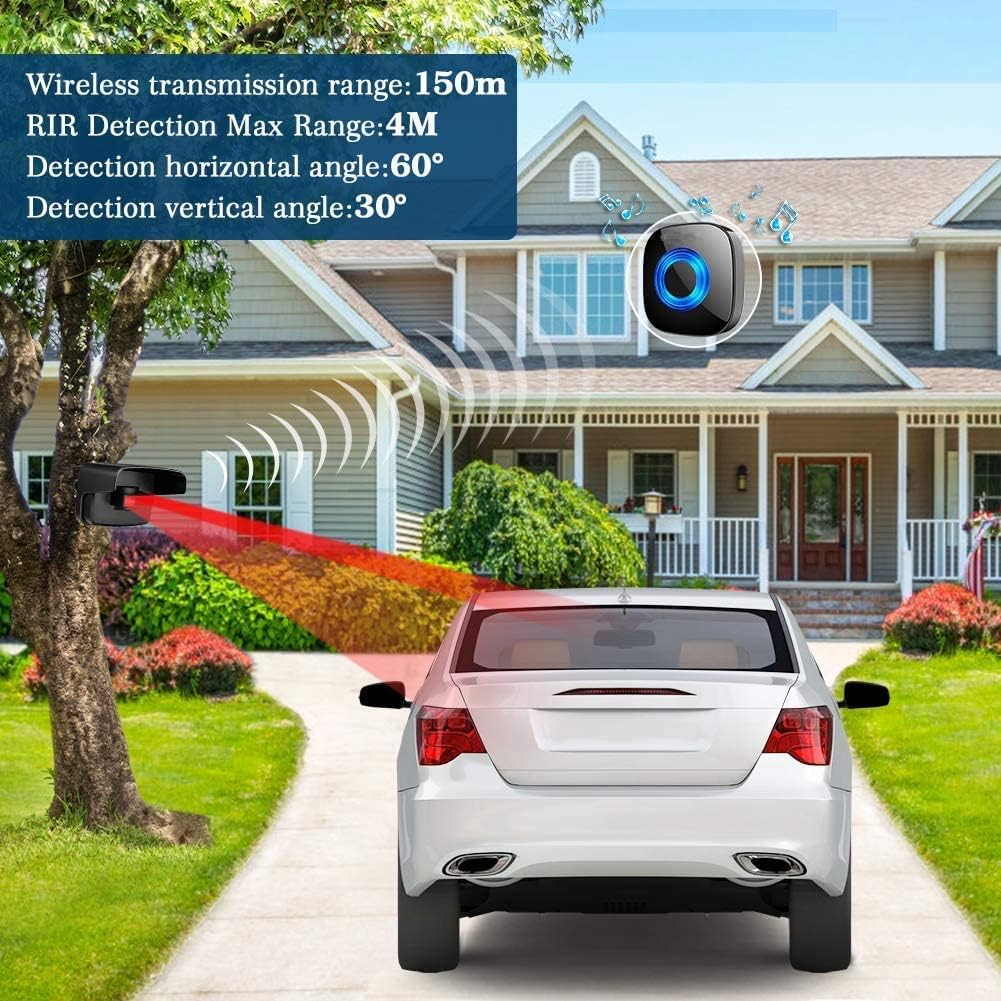
Image: A diagram illustrating the wireless transmission range of 150m, a maximum detection range of 4m, a horizontal detection angle of 60°, and a vertical detection angle of 30° for the motion sensor, with a car on a driveway as an example.
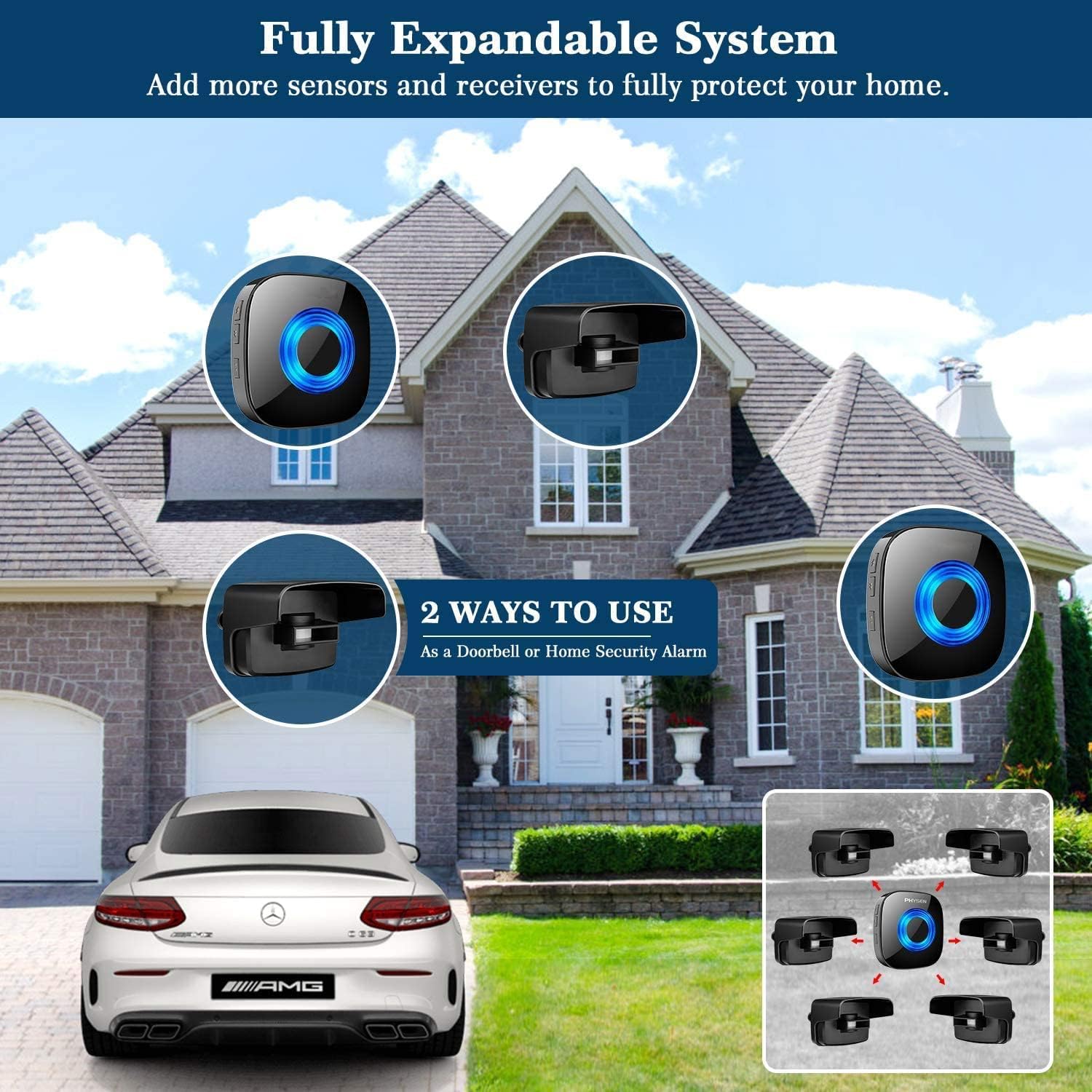
Image: A visual representation of the fully expandable system, demonstrating how multiple sensors and receivers can be added to cover an entire property, functioning as a doorbell or home security alarm.
4. Setup
4.1 Installing Batteries in the Motion Sensor
The motion sensor requires 4 x AA batteries (not included).
- Locate the battery compartment on the PIR motion sensor.
- Open the compartment cover.
- Insert 4 x AA alkaline batteries, ensuring correct polarity (+/-).
- Close the battery compartment cover securely.

Image: The waterproof PIR motion sensor with its battery compartment open, illustrating the insertion of 4 AA batteries. The image also shows the sensor mounted on a tree in rainy conditions, demonstrating its IP55 rating.
4.2 Pairing the Motion Sensor with the Receiver
Follow these steps to pair your motion sensor with the receiver:
- Plug the receiver into a standard electrical outlet.
- Select Ringtone: Press the forward (►►) or backward (◄◄) button on the receiver to choose your preferred ringtone before entering pairing mode.
- Enter Pairing Mode: Press and hold the volume control button (🔊) on the receiver for 5 seconds. You will hear a "ding-dong" sound, and the LED indicator will start flashing, indicating it's in pairing mode.
- Activate Sensor: While the receiver is in pairing mode (within 5 seconds), wave your hand in front of the PIR motion sensor to activate it and send a signal to the receiver.
- Upon successful pairing, the receiver will play the selected ringtone, and the pairing mode will automatically end.
Important Notes:
- The pairing mode on the receiver lasts only 5 seconds. Ensure the transmitter is activated within this timeframe, or you will need to restart the pairing process.
- After successful pairing, the pairing mode will automatically terminate.

Image: A step-by-step guide on how to pair the PHYSEN motion sensor and receiver. It shows pressing the ringtone selection buttons, holding the volume button to enter pairing mode, and activating the PIR sensor by waving a hand in front of it.
4.3 Mounting the Motion Sensor
Choose a suitable location for the motion sensor, such as near your driveway, gate, or entrance. Ensure it has a clear line of sight to the area you wish to monitor.
- Mark the desired mounting position on a wall, fence, or post.
- Use the included screws and anchors to securely mount the sensor.
- Adjust the sensor's angle to optimize the detection area.
5. Operating Instructions
5.1 Adjusting Volume
The receiver has 5 adjustable volume levels, from 0dB (mute) to 110dB.
- Press the volume control button (🔊) repeatedly to cycle through the volume levels.
- Select 0dB if you prefer a silent alert (only the LED indicator will flash).
5.2 Changing Ringtones
The receiver offers 58 unique ringtones.
- Press the forward (►►) or backward (◄◄) button to preview and select a different ringtone.
- The selected ringtone will be saved automatically due to the memory function.
5.3 System Expansion
You can add more motion sensors or receivers to expand your security system.
- To add more sensors, follow the pairing instructions (Section 4.2) for each new sensor.
- To add more receivers, simply plug them in and pair them with your existing sensors.
- Different ringtones can be assigned to different sensors for easy identification of the alert location.
6. Maintenance
- Battery Replacement: Replace the AA batteries in the motion sensor when the detection range decreases or the blue light indicator on the sensor becomes dim. Always use new alkaline batteries.
- Cleaning: Wipe the motion sensor and receiver with a soft, damp cloth. Do not use harsh chemicals or abrasive cleaners. Ensure the PIR lens on the sensor is clean and free of obstructions for optimal performance.
- Environmental Considerations: While the motion sensor is waterproof (IP55), avoid submerging it in water. Ensure it is mounted in a location where it is not constantly exposed to extreme weather conditions if possible, to prolong its lifespan.
7. Troubleshooting
| Problem | Possible Cause | Solution |
|---|---|---|
| Receiver does not sound when motion is detected. |
|
|
| False alarms. |
|
|
| Receiver does not remember ringtone after power cycle. | System reset or malfunction. | Perform a reset:
|
8. Specifications
| Brand | PHYSEN |
| Model Number | CDHW-UK |
| Product Dimensions | 12.45 x 9.4 x 7.62 cm; 310 g |
| Color | Black |
| Power Source (Receiver) | Corded Electric (Plug-in) |
| Batteries Required (Sensor) | Yes (4 x AA Alkaline, not included) |
| Mounting Type | Wall Mount |
| Wireless Range | Up to 50 meters (150 feet) in open area |
| PIR Detection Range | Up to 4.5 meters (15 feet) |
| PIR Detection Angle | 60° (Horizontal) |
| Ringtones | 58 unique melodies |
| Volume Levels | 5 levels (0dB to 110dB) |
| Waterproof Rating (Sensor) | IP55 |
| Compatible Devices | Other motion sensors, other receivers |
| Recommended Use | Home Security, Driveway Alert, Doorbell |
9. Warranty and Support
PHYSEN offers 12 months of customer service for this product. If you encounter any issues or have questions regarding your Wireless Driveway Motion Detector Alarm, please do not hesitate to contact our customer support team.
For support, please refer to the contact information provided with your purchase or visit the official PHYSEN website.
Related documentsCDHW-UK

Ask a question about this manual
Ask about setup, troubleshooting, compatibility, parts, safety, or missing instructions. Manuals+ will review the question and use this page’s manual context to help answer it.