
1. Introduction
1.1 Product Overview
Thank you for choosing the Generic A8 Portable HEPA Air Purifier. This device is designed to improve air quality in your home, office, car, or during travel by effectively removing airborne pollutants. Featuring a 3-stage filtration system and negative ion technology, it provides clean, fresh air in small spaces.
1.2 Intended Use
The A8 Portable Air Purifier is intended for indoor use to filter common airborne particles such as dust, pollen, pet dander, smoke, and odors. Its compact design and rechargeable battery make it suitable for personal spaces, desks, bedrooms, and vehicles.

This image illustrates the Generic A8 Portable Air Purifier's effectiveness against various airborne irritants, including unpleasant odors, pet dander, dust particles, common allergens, pollen, and smoke.
2. Key Features
- 3-Stage Filtration System: Captures 99.95% of airborne particles as small as 0.3 microns, including a fine pre-filter, H13 True HEPA filter, and activated carbon filter.
- Portable Design: Compact (8.8 x 8.3 x 13.7 cm) with an integrated handle and rechargeable battery for use at home, in vehicles, or while traveling.
- Long Battery Life: Built-in rechargeable battery provides up to 10 hours of operation.
- Quiet Operation: Operates at a low noise level (30 dB), ensuring minimal disturbance for sleep or work.
- Two Fan Speeds: Adjustable fan speeds to suit air quality and space requirements.
- Anion Function: Releases negative ions to further enhance air purification.
- Aroma Sponge: Allows for the addition of essential oils (not included) to diffuse fragrance with air movement.
- 360° Deep Air Purification: Efficiently cleans air in small spaces, covering approximately 12m² (129ft²).
- Clear Panel Display: LED display shows fan speed, anion function status, and battery level.
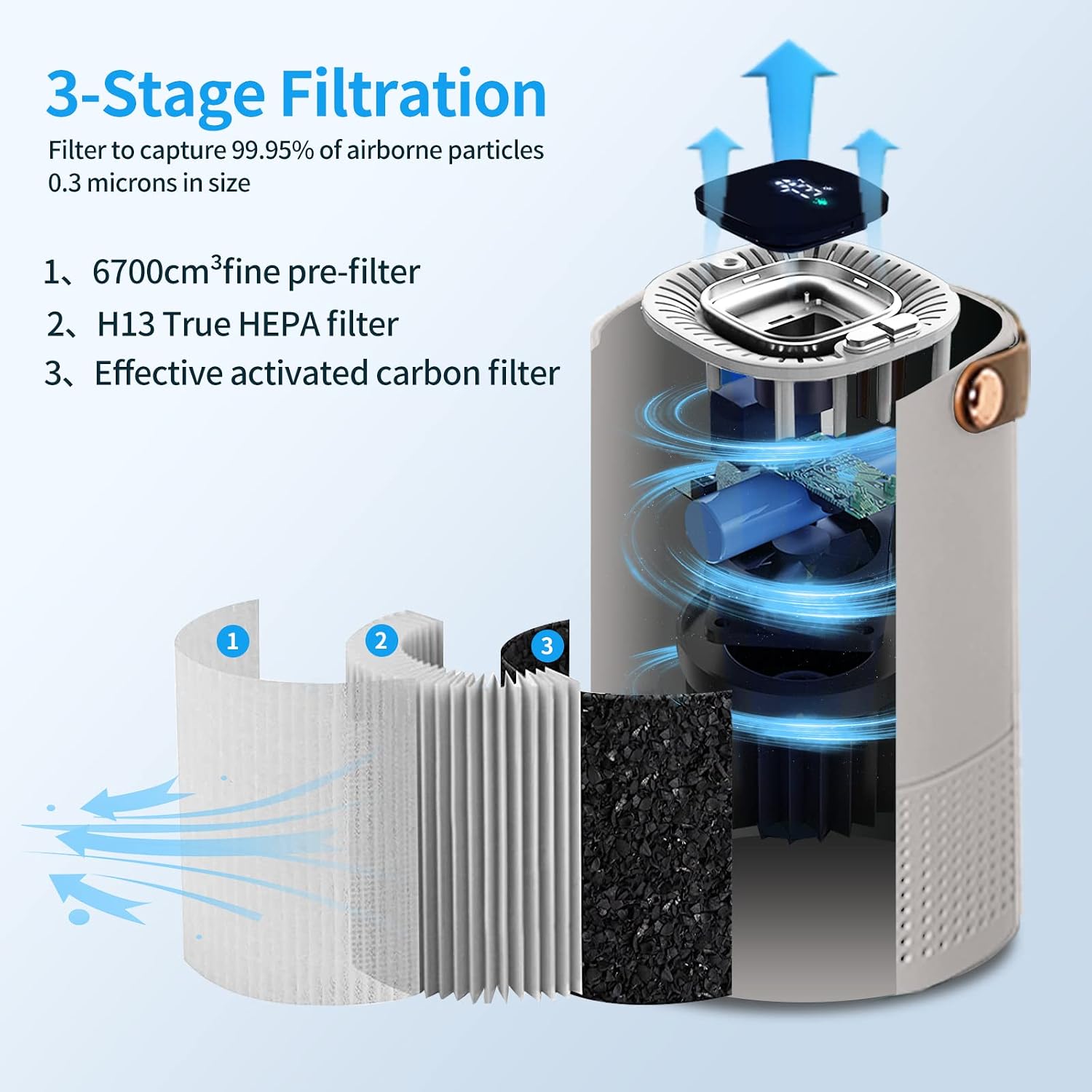
A detailed diagram showcasing the internal 3-stage filtration system of the A8 air purifier. It consists of a fine pre-filter, an H13 True HEPA filter, and an effective activated carbon filter, designed to capture 99.95% of airborne particles.

The image illustrates the negative ion technology of the A8 air purifier, showing negative ions being released to help purify the air and contribute to a healthier environment.
3. Important Safety Instructions
Please read all instructions carefully before using this appliance and retain them for future reference. Failure to follow these instructions may result in electric shock, fire, or serious injury.
- Do not operate any appliance with a damaged cord or plug, or after the appliance malfunctions or has been dropped or damaged in any manner.
- Do not run cord under carpeting. Do not cover cord with throw rugs, runners, or similar coverings. Arrange cord away from traffic area and where it will not be tripped over.
- To reduce the risk of fire or electric shock, do not use this fan with any solid-state speed control device.
- Always unplug the air purifier before moving it, opening the grille, changing filters, cleaning, or whenever it is not in use.
- Do not use outdoors.
- Use only on a firm, level surface.
- Do not insert fingers or foreign objects into any openings and do not obstruct air vents.
- Do not use in wet or damp environments, such as bathrooms.
- Keep the appliance away from heat sources such as radiators, heat registers, stoves, or other heat-producing appliances.
- This appliance is not intended for use by persons (including children) with reduced physical, sensory or mental capabilities, or lack of experience and knowledge, unless they have been given supervision or instruction concerning use of the appliance by a person responsible for their safety.
4. Setup Guide
4.1 Unpacking
Carefully remove the air purifier from its packaging. Check for any signs of damage. Ensure all components are present:
- A8 Portable Air Purifier unit
- USB charging cable
- User Manual
4.2 Initial Charging
Before first use, fully charge the air purifier using the provided USB cable. Connect the USB cable to the charging port on the unit and to a compatible USB power adapter (not included) or computer USB port. The battery indicator on the display will show charging status.
4.3 Filter Installation/Check
The 3-stage filter is pre-installed. Before first use, ensure the filter is securely in place and any protective packaging has been removed from the filter. To access the filter compartment:
- Gently twist the bottom cover of the air purifier counter-clockwise to unlock it.
- Remove the bottom cover and check the filter. Remove any plastic wrapping from the filter if present.
- Place the filter back into the unit, ensuring it sits correctly.
- Replace the bottom cover and twist clockwise to lock it securely.
4.4 Placement
Place the air purifier on a stable, flat surface. Ensure there is adequate space around the unit (at least 15 cm or 6 inches) for proper air circulation. Avoid placing it directly against walls or furniture that might obstruct air intake or output.
5. Operating Instructions
The A8 air purifier features a simple control panel for easy operation.

A close-up view of the A8's clear panel display, which provides visual feedback on the device's status. It shows the battery level, indicators for the two fan speeds, and the button for activating the anion function.
5.1 Power On/Off and Fan Speed Adjustment
- To power on the unit, press the Fan Speed button (usually indicated by a fan icon or '1/2'). The unit will start at Fan Speed 1.
- Press the Fan Speed button again to switch to Fan Speed 2.
- Press the Fan Speed button a third time to turn the unit off.
5.2 Anion Function
The anion function helps to further purify the air by releasing negative ions.
- To activate the anion function, press the Anion button (usually indicated by an ion icon). An indicator light or symbol on the display will confirm activation.
- Press the Anion button again to deactivate the function.
5.3 Aroma Sponge Use
To add fragrance to your environment:
- Locate the aroma sponge compartment, typically under the air outlet or near the filter.
- Add a few drops of your preferred essential oil (not included) directly onto the sponge.
- Ensure the sponge is properly placed back in its compartment. The aroma will diffuse with the air movement when the purifier is operating.
5.4 Battery Status
The LED display shows the current battery level, allowing you to monitor when recharging is needed. When the battery is low, the indicator will typically flash or change color.
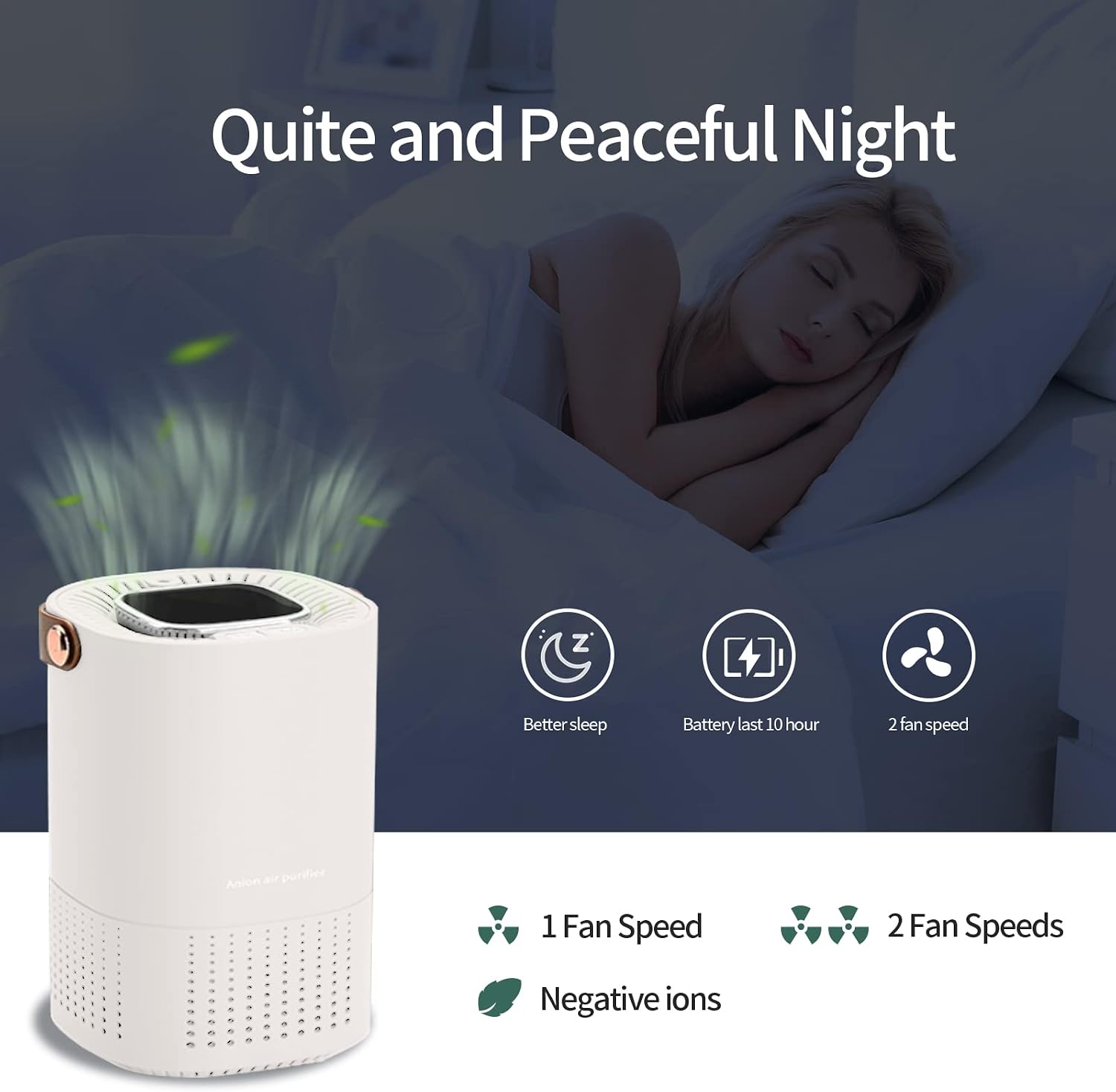
This image depicts the A8 air purifier in a bedroom setting, emphasizing its quiet operation for an undisturbed night's sleep. Icons indicate features such as improved sleep, a 10-hour battery life, and the availability of two fan speeds.
6. Maintenance
Regular maintenance ensures optimal performance and extends the lifespan of your air purifier.
6.1 Filter Replacement
The 3-stage composite filter should be replaced periodically, typically every 3-6 months, depending on usage and air quality. A dirty filter will reduce purification efficiency.
- Ensure the air purifier is turned off and unplugged.
- Twist the bottom cover counter-clockwise to unlock and remove it.
- Carefully remove the old filter. Dispose of it properly.
- Unpack the new filter and insert it into the unit, ensuring it fits snugly.
- Replace the bottom cover and twist clockwise to lock it.
- After replacing the filter, it is recommended to reset the filter life indicator (if applicable, refer to specific model instructions if a reset button is present).
6.2 Cleaning the Unit
- Always turn off and unplug the unit before cleaning.
- Wipe the exterior of the air purifier with a soft, dry cloth.
- Do not use abrasive cleaners, waxes, or solvents.
- Periodically clean the air intake and outlet vents with a soft brush or vacuum cleaner to remove dust buildup.
6.3 Aroma Sponge Cleaning
If using essential oils, the aroma sponge may need occasional cleaning or replacement to prevent oil buildup or mixing of scents. Remove the sponge and rinse it with mild soap and water, then allow it to air dry completely before reinserting.
7. Troubleshooting
If you encounter any issues with your air purifier, please refer to the following common problems and solutions:
| Problem | Possible Cause | Solution |
|---|---|---|
| Unit does not turn on. | No power or low battery. | Ensure the unit is charged or connected to a power source. Check the USB cable connection. |
| Weak airflow or no air coming out. | Blocked air intake/outlet or dirty filter. | Check for obstructions around the air intake and outlet. Clean the vents. Replace the filter if it's heavily soiled. |
| Unusual noise during operation. | Loose filter or foreign object inside. | Turn off and unplug the unit. Check if the filter is properly installed. Carefully inspect for any foreign objects. |
| Air quality does not seem to improve. | Filter needs replacement or unit is too small for the space. | Replace the filter. Ensure the unit is used in an appropriately sized room (up to 12m²). |
| Aroma is not diffusing. | No essential oil added or sponge is dry. | Add more essential oil to the aroma sponge. Ensure the sponge is clean and not saturated with old oil. |
8. Product Specifications
| Feature | Specification |
|---|---|
| Model Number | A8 |
| Dimensions (L x W x H) | 8.8 x 8.3 x 13.7 cm |
| Weight | 360 grams |
| Power Source | Battery Powered (USB rechargeable) |
| Filter Type | HEPA (3-stage filtration) |
| Noise Level | 30 Decibels |
| Purification Area | Up to 12 m² (129 ft²) |
| Battery Life | Up to 10 hours |
| Color | White |
| UPC/GTIN | 761325464273 |
9. Warranty and Support
This product is covered by a standard manufacturer's warranty. Please refer to the retailer's policy or contact the seller for specific warranty terms and conditions. For technical support or inquiries, please contact your point of purchase or the manufacturer's customer service.
Keep your purchase receipt as proof of purchase for warranty claims.


