
1. Introduction
Thank you for choosing the Mediashop Fur Daddy Deluxe. This device is designed for efficient removal of pet hair, lint, and dust from various surfaces. It utilizes microsonic technology and specialized microfibre bristles to lift and collect embedded hair. Please read this manual thoroughly before first use to ensure proper operation and maintenance.

Image 1: The Mediashop Fur Daddy Deluxe pet hair remover, shown with a golden retriever, a cat, and a black dog looking over a white surface, illustrating its purpose for pet owners.
2. Product Overview
The Fur Daddy Deluxe is a reusable and environmentally friendly solution for pet hair removal. Key features include:
- Microsonic Technology: An innovative combination of 10,000 vibrations per minute and specialized microfibre bristles to effectively lift and remove hair.
- Dual-Direction Cleaning: Designed to work in both directions for efficient hair collection.
- Self-Cleaning Mechanism: Hair is deposited into an internal storage box during use.
- Rechargeable Battery: Provides wireless operation for convenience.
- Extra-Large Collection Container: For easy disposal of collected pet hair.
3. Setup and Charging
3.1 Initial Charging
Before first use, fully charge the Fur Daddy Deluxe. Connect the provided charging cable to the device and a suitable power source. A full charge takes approximately 30 minutes and provides up to 3 hours of operating time.
3.2 Powering On/Off
Press the power button located on the handle to turn the device on or off. An indicator light will illuminate when the device is active.
4. Operating Instructions
The Fur Daddy Deluxe is suitable for use on various surfaces including clothing, cushions, blankets, sofas, and chairs.
4.1 Hair Removal Process
- Ensure the device is charged and powered on.
- Place the Fur Daddy Deluxe onto the surface requiring cleaning.
- Move the device back and forth quickly with light pressure. The microsonic vibrations and microfibre bristles will work together to loosen and collect pet hair.
- Observe the indicator light, which may assist in illuminating the cleaning path.
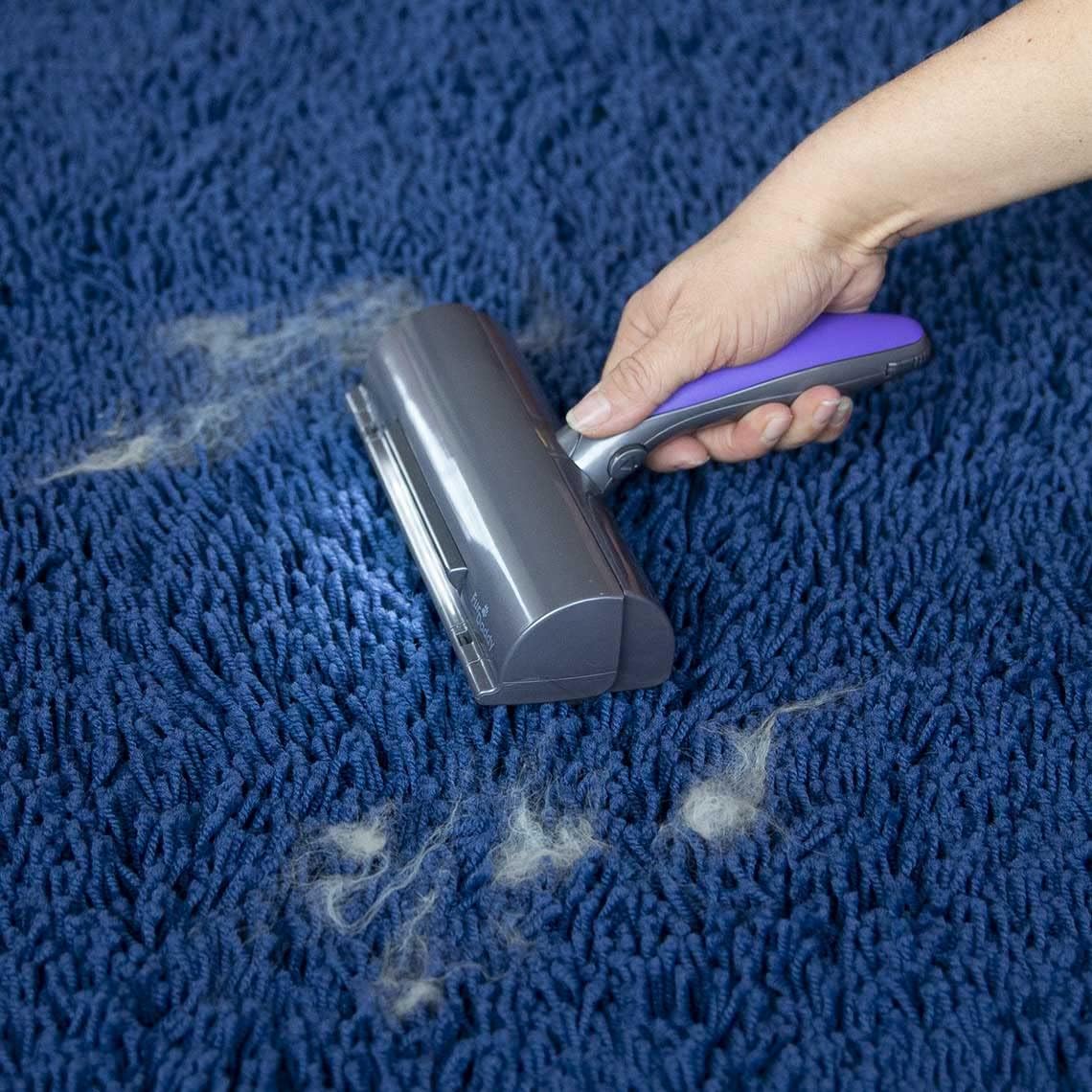
Image 2: A hand demonstrating the use of the Fur Daddy Deluxe on a blue carpet, with visible clumps of pet hair being collected by the device.

Image 3: The Fur Daddy Deluxe being used on a dark suit jacket, illustrating its effectiveness in removing pet hair from clothing.
5. Maintenance
5.1 Emptying the Collection Container
The Fur Daddy Deluxe features a self-cleaning mechanism that deposits collected hair into an internal storage box. To empty the container:
- Locate the release mechanism for the collection container (typically a button or latch).
- Open the container.
- Dispose of the accumulated pet hair with a single click or tap.
- Close the container securely before next use.

Image 4: A close-up view of the purple microfibre bristles on the Fur Daddy Deluxe, highlighting the texture responsible for hair collection.
5.2 Cleaning the Device
Periodically wipe the exterior of the device with a soft, damp cloth. Do not submerge the device in water or use harsh chemical cleaners.
6. Troubleshooting
If you encounter issues with your Fur Daddy Deluxe, consider the following:
- Device not turning on: Ensure the battery is fully charged. Connect the device to its charger and allow sufficient time for charging.
- Reduced hair collection: Check if the collection container is full and needs emptying. Ensure the bristles are clean and free from excessive debris. Apply light pressure and move the device back and forth as instructed.
- Unusual noises: Discontinue use and inspect the device for any obstructions in the bristle area or collection mechanism.
7. Specifications
| Feature | Detail |
|---|---|
| Product Dimensions | 18.7 x 5.73 x 20.95 cm |
| Item Weight | 0.22 Kilograms |
| Model Number | M33672 |
| Batteries | 1 Lithium Ion battery required (included) |
| Charging Time | Approximately 30 minutes |
| Operating Time | Up to 3 hours (max.) |
| Material | Microfibre |
| Color | Purple, Grey |
| Operation Mode | Automatic |
| UPC | 727156830229, 727156830236 |
8. Warranty and Support
For warranty information or technical support, please refer to the product packaging or contact the manufacturer directly. Keep your proof of purchase for any warranty claims.