
Jadfezy J-03series
Jadfezy WiFi Action Camera User Manual
Model: J-03series
1. Introduction
Thank you for choosing the Jadfezy WiFi Action Camera. This camera is designed to capture high-quality videos and photos of your adventures, whether on land or underwater. With its compact design, 1080P video recording, 12MP photo capabilities, and built-in WiFi, it is an ideal companion for sports enthusiasts and travelers. Please read this manual carefully before use to ensure proper operation and to maximize the camera's performance.
2. Safety Information
- Do not expose the camera to extreme temperatures or direct sunlight for prolonged periods.
- Ensure the waterproof case is properly sealed before submerging the camera in water.
- Use only specified batteries and chargers. Improper use may lead to fire, explosion, or other hazards.
- Keep the camera and accessories out of reach of children.
- Avoid dropping or subjecting the camera to strong impacts.
- Do not attempt to disassemble or modify the camera.
3. Package Contents
The standard package includes the following items:
- Jadfezy 1080P Action Camera
- Waterproof Case
- 2 x 1050mAh Rechargeable Lithium-Ion Batteries
- Helmet Mounting Kit
- Bicycle Mounting Kit
- USB Charging Cable
- Various Mounting Accessories and Straps

Image: Contents of the Jadfezy Action Camera accessories kit, including the camera, waterproof housing, two batteries, various mounts, and a USB cable.
4. Product Overview
The Jadfezy Action Camera features a compact design with a 2-inch LCD screen for easy viewing and navigation. It is capable of recording Ultra HD 1080P video at 30 frames per second and capturing 12-megapixel still photos. The camera comes with a durable waterproof case, allowing for underwater use up to 30 meters (98 feet).

Image: The Jadfezy WiFi Action Camera shown with its transparent waterproof case, two rechargeable batteries, and a display screen illustrating a skydiving scene.

Image: An overview of the Jadfezy Action Camera highlighting its key features: FHD 1080P/30FPS video, Wi-Fi connectivity, Time-lapse/Loop video modes, 2x 1050mAh batteries, 30m/98ft waterproof capability, and a wide-angle lens.
5. Setup
5.1. Battery Installation and Charging
The camera uses 1050mAh rechargeable Lithium-Ion batteries. Ensure batteries are fully charged before first use.
- Open the battery compartment cover on the bottom of the camera.
- Insert the battery according to the polarity indicators.
- Close the battery compartment cover securely.
- Connect the camera to a USB power source using the provided USB cable to charge. The charging indicator will show the charging status.

Image: Two Jadfezy rechargeable Lithium-Ion batteries, highlighting their compact size and design.
5.2. Micro SD Card Insertion
A Micro SD card (not included) is required for storing videos and photos. The camera supports Micro SD cards up to 32GB (though some users report success with 64GB cards, 32GB is officially supported).
- Locate the Micro SD card slot on the side of the camera.
- Insert the Micro SD card with the gold contacts facing the back of the camera until it clicks into place.
- To remove, gently push the card in until it springs out.
5.3. Using the Waterproof Case
The waterproof case allows the camera to be used underwater up to 30 meters (98 feet).
- Ensure the camera is dry before placing it inside the waterproof case.
- Place the camera firmly into the case.
- Close the latch securely to ensure a watertight seal.
- Before first use in water, it is recommended to test the waterproof case without the camera inside to ensure no leaks are present.

Image: The Jadfezy Action Camera enclosed in its waterproof case, submerged in clear blue water with colorful fish and coral, demonstrating its 30m/98ft waterproof capability.
5.4. Attaching Mounting Accessories
The camera comes with various mounts for different activities, including helmet and bicycle mounting kits.
- Identify the appropriate mount for your intended use (e.g., helmet mount, bicycle mount).
- Attach the camera (with or without the waterproof case, depending on the activity) to the chosen mount using the provided screws and adapters.
- Securely fasten the mount to your helmet, bicycle, or other desired surface. Ensure all connections are tight to prevent the camera from falling during activity.
6. Operating the Camera
6.1. Power On/Off
- To power on: Press and hold the Power/Mode button for a few seconds.
- To power off: Press and hold the Power/Mode button again until the screen turns off.
6.2. Mode Selection
Press the Power/Mode button repeatedly to cycle through different modes: Video Recording, Photo Mode, Playback Mode, and Settings.
6.3. Video Recording
- In Video Recording mode, press the OK button to start recording. A red indicator light will flash, and a timer will appear on the screen.
- Press the OK button again to stop recording.
6.4. Photo Capture
- In Photo Mode, press the OK button to take a photo.
6.5. Playback
- In Playback Mode, use the Up/Down buttons to navigate through your recorded videos and photos.
- Press the OK button to play a video or view a photo in full screen.
6.6. WiFi Connection and App Control
The built-in WiFi allows you to connect the camera to your smartphone for remote control, live view, and file transfer.
- Download the designated app (refer to the camera's screen or packaging for the app name) from your smartphone's app store.
- On the camera, enter WiFi mode (usually by pressing a dedicated WiFi button or cycling through modes). The WiFi icon will appear on the screen.
- On your smartphone, go to WiFi settings and connect to the camera's WiFi network (SSID and password will be displayed on the camera screen).
- Open the app on your smartphone. You can now control the camera, view live footage, and download files. The WiFi signal range is up to 33 feet.

Image: A smartphone displaying a live view from the Jadfezy Action Camera, with a skier in the background, illustrating the camera's WiFi connectivity feature for remote control and sharing.
6.7. Special Features: Time-Lapse, Dash Cam, Burst Photo
The camera supports various shooting modes to enhance your recording experience.
- Time-Lapse: Capture a series of photos at set intervals to create a time-lapse video.
- Dash Cam: Functions as a car dashboard camera, often with loop recording.
- Burst Photo: Take multiple photos in quick succession, ideal for fast-moving action.
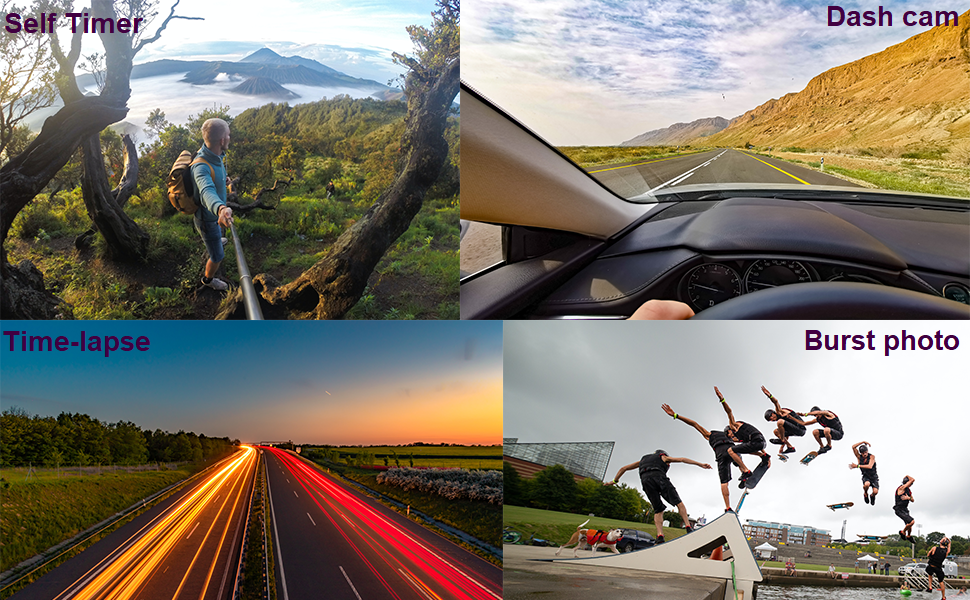
Image: Four panels demonstrating the camera's versatile features: a self-timer shot of a person on a mountain, a dash cam view from inside a car, a time-lapse image of city lights at night, and a burst photo sequence of a skateboarder.
7. Maintenance
- Cleaning: Use a soft, lint-free cloth to clean the camera lens and screen. For the waterproof case, rinse with fresh water after saltwater use and allow to air dry.
- Battery Care: Store batteries in a cool, dry place. If not using the camera for an extended period, remove the batteries.
- Storage: Store the camera in a dry, dust-free environment away from direct sunlight and extreme temperatures.
8. Troubleshooting
If you encounter issues with your Jadfezy Action Camera, please refer to the following common solutions:
| Problem | Possible Solution |
|---|---|
| Camera does not power on. | Ensure the battery is fully charged and correctly inserted. Try using a different charged battery. |
| Cannot record video or take photos. | Check if a Micro SD card is inserted and has sufficient free space. Ensure the card is formatted correctly (FAT32 recommended). The camera may stop recording after 15-minute segments; ensure loop recording is enabled if continuous recording is desired. |
| Poor video/photo quality. | Ensure the lens is clean. Check the selected resolution settings in the camera menu. Ensure adequate lighting conditions. |
| WiFi connection issues. | Ensure the camera's WiFi is enabled. Restart both the camera and your smartphone. Ensure you are within the 33-foot WiFi range. Check that the correct app is installed and updated. |
| Water leakage in waterproof case. | Ensure the case is properly sealed and the latch is fully closed. Check the rubber gasket for any debris or damage. Replace the gasket if necessary. |
9. Specifications
| Feature | Detail |
|---|---|
| Brand | Jadfezy |
| Model Number | J-03series |
| Video Resolution | Up to 1080P / 30fps |
| Photo Resolution | 12MP |
| Screen Size | 2 inches |
| Waterproof Depth | Up to 30m (98ft) with waterproof case |
| Battery Type | 2 x 1050mAh Lithium Ion (included) |
| Storage | Micro SD (up to 32GB recommended) |
| Connectivity | WiFi, USB |
| Dimensions | 2.35 x 1.55 x 1.2 inches |
| Item Weight | 12.3 ounces |
10. Warranty and Support
For warranty information and technical support, please refer to the documentation provided with your purchase or contact the seller directly. Keep your proof of purchase for warranty claims.
Ask a question about this manual
Ask about setup, troubleshooting, compatibility, parts, safety, or missing instructions. Manuals+ will review the question and use this page’s manual context to help answer it.