
1. Introduction and Overview
The Mi-Heat WT8 WiFi room controller is designed for precise temperature regulation of various heating systems. It is optimized for electric underfloor heating systems and electric heating devices such as infrared heating panels, convectors, and fan heaters. Additionally, it supports cooling modes, allowing for the operation of cooling devices like fans or air conditioning split systems.
Control is intuitive and convenient, either directly via the touch-sensitive buttons and illuminated display on the device or remotely through the free TuyaSmart app. This enables worldwide temperature management and adjustment of all critical parameters. The thermostat includes a pre-programmed weekly schedule for energy efficiency, which can be customized to individual needs. An adjustable frost protection function enhances safety by activating heating if the room temperature drops below 5 °C. The device is designed for installation in standard flush-mounted boxes with a 60 mm spacing.
2. Safety Information
- Always disconnect the main power supply before attempting any installation, wiring, or maintenance procedures.
- Installation should only be performed by a qualified electrician in accordance with local electrical codes and regulations.
- Do not expose the device to moisture, water, or extreme temperatures.
- Ensure all connections are secure and properly insulated to prevent electrical hazards.
- Keep the device out of reach of children.
3. Package Contents
Verify that all items are present in the package:
- 1 x Mi-Heat WT8 WiFi Thermostat
- 1 x NTC 10 kOhm Floor Sensor
- 1 x User Manual (English)
- 1 x Mounting Accessories (screws)

Image: Mi-Heat WT8 WiFi Thermostat, NTC floor sensor, user manual, and mounting screws.
4. Product Features
- WiFi/WLAN Connectivity: Remote control via the free TuyaSmart smartphone app (iOS and Android).
- Versatile Control: Optimized for electric underfloor heating, electric heating devices, air conditioning, and fans.
- User-Friendly Interface: Illuminated color display and touch control buttons for ease of use.
- Programmable Weekly Schedule: Individually adjustable with up to 3 heating periods per day. Supports 5+2, 6+1, and 7-day programming modes.
- Frost Protection Function: Automatically activates heating when the room temperature drops below 5 °C.
- Dual Sensor System: Features both an internal room temperature sensor and an external NTC 10 kOhm floor sensor for precise control.
- Adaptive Control: Intelligent temperature regulation for optimal comfort and energy efficiency.
- Heating and Cooling Modes: Switch between heating and cooling operations.
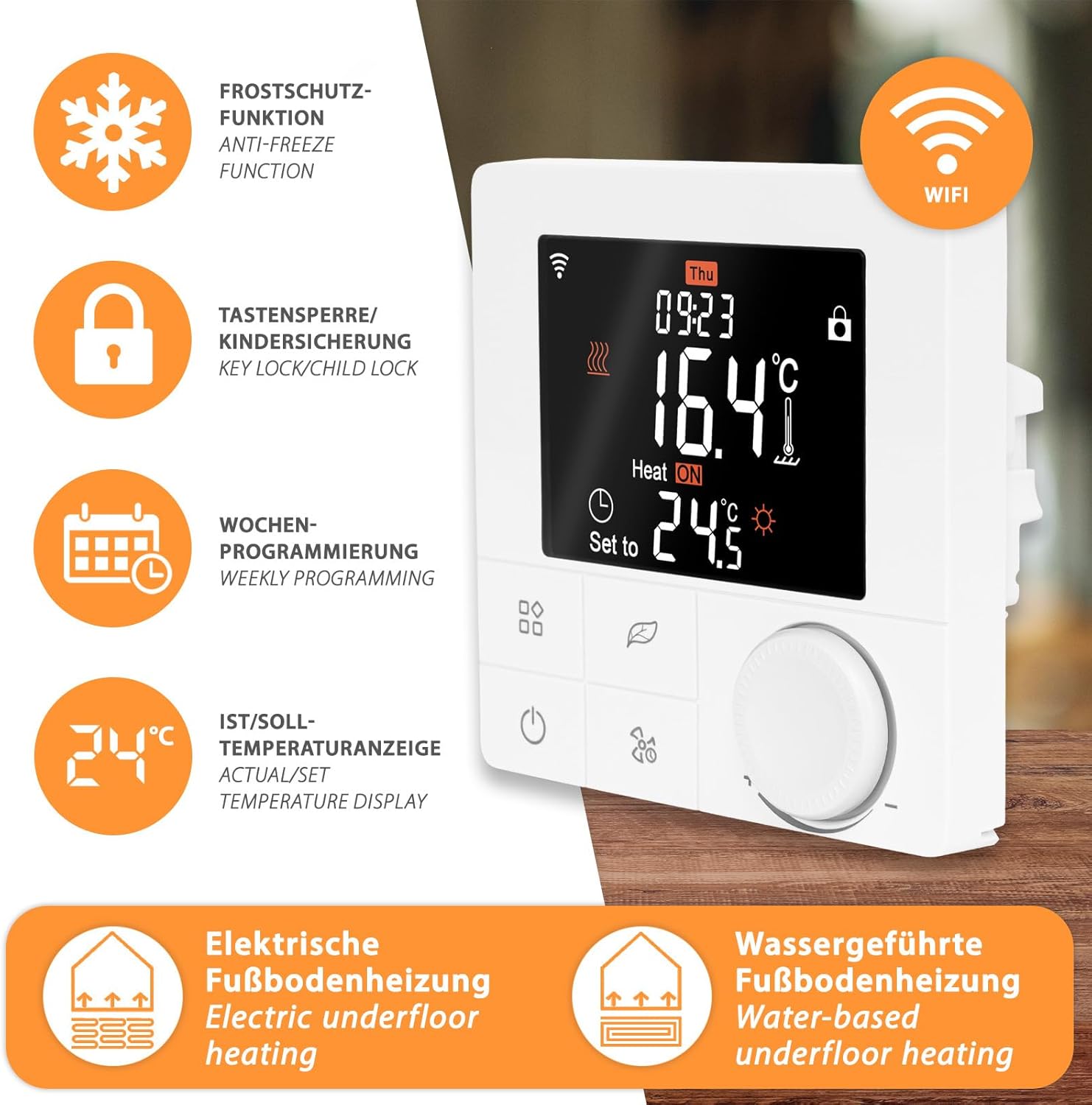
Image: Overview of Mi-Heat WT8 features: Anti-freeze function, Key lock/Child lock, Weekly programming, Actual/Set temperature display, Electric underfloor heating, Water-based underfloor heating, and WiFi connectivity.
5. Installation and Setup
5.1 Mounting
The Mi-Heat WT8 thermostat is designed for flush-mounted installation in standard electrical wall boxes with a 60 mm spacing. Ensure the mounting location is free from direct sunlight, drafts, or other heat sources that could affect temperature readings.
5.2 Wiring
Important: Disconnect the main power supply before proceeding with wiring. Incorrect wiring can cause damage to the device or electrical shock.
- Open the thermostat casing carefully.
- Connect the live (L) and neutral (N) wires from your power supply to the corresponding terminals on the thermostat.
- Connect the heating element wires (e.g., electric underfloor heating, infrared heater) to the designated output terminals (Load L and Load N).
- If using the external floor sensor, connect its wires to the NTC sensor terminals. The external sensor cable length is 3 meters.
- Ensure all connections are tight and secure.
- Close the thermostat casing and secure it to the wall box.

Image: Wiring diagrams for connecting the WT8 thermostat to electric underfloor heating and infrared heating systems. Shows L and N power inputs, load outputs, and external sensor connection.
5.3 App Connection (TuyaSmart)
- Download the TuyaSmart app from your smartphone's app store (iOS or Android).
- Register or log in to your TuyaSmart account.
- Follow the in-app instructions to add a new device. The thermostat will typically enter pairing mode when first powered on or by holding a specific button (refer to the full manual for exact pairing instructions).
- Ensure your smartphone is connected to a 2.4 GHz WiFi network during the pairing process.
6. Operating Instructions
6.1 Display Overview
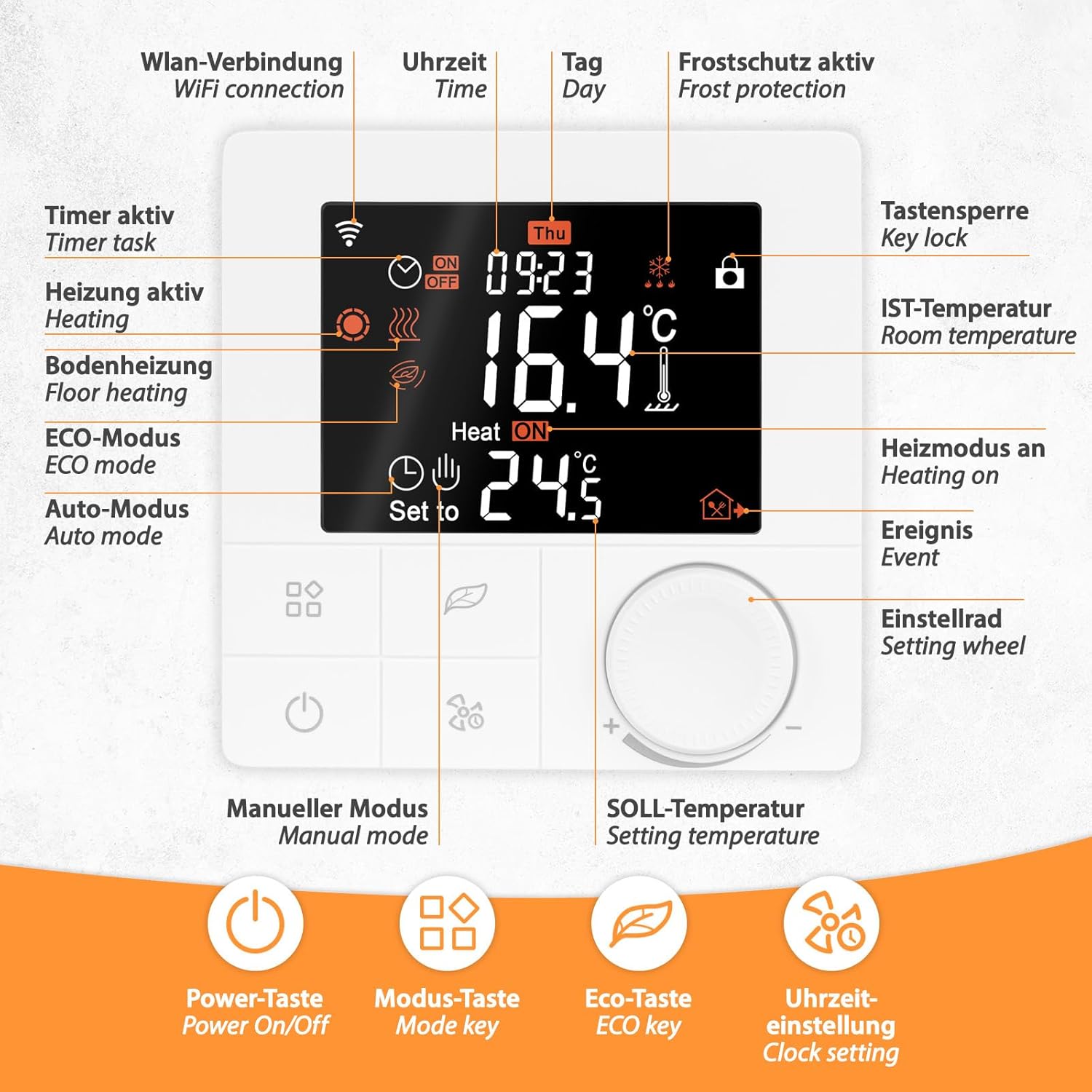
Image: Detailed view of the WT8 thermostat display and control buttons. Indicators include WiFi connection, time, day, frost protection, key lock, room temperature, heating status, event, timer task, floor heating, ECO mode, Auto mode, manual mode, and setting temperature. Buttons include Power On/Off, Mode key, ECO key, and Clock setting.
The illuminated display shows current room temperature, set temperature, time, day, operating mode, and various status icons (e.g., WiFi connection, heating active, key lock).
6.2 Basic Controls
- Power On/Off: Press the power button (U) to turn the thermostat on or off.
- Temperature Adjustment: Use the setting wheel to increase or decrease the desired temperature.
- Mode Key: Press the mode key (square icon) to cycle through different operating modes (e.g., Manual, Auto, ECO).
- ECO Key: Activates or deactivates the energy-saving ECO mode.
- Clock Setting: Use the clock setting key (fan icon) to adjust time and date.
- Key Lock: The key lock icon indicates if the controls are locked (e.g., child lock). Refer to the full manual for instructions on how to activate/deactivate.
6.3 Weekly Programming
The WT8 thermostat supports flexible weekly programming with 5+2, 6+1, or 7-day modes. This allows you to set different temperature schedules for weekdays and weekends, or a consistent schedule for all seven days.

Image: Example of a weekly program (5+2 mode) showing time and temperature settings for Monday-Friday and Saturday-Sunday, with three heating periods per day. Also shows the thermostat's compatibility with Tuya Smart app, Alexa, and Google Assistant.
To set up a weekly program:
- Access the programming menu (refer to the full manual for specific button combinations).
- Select the desired programming mode (5+2, 6+1, or 7 days).
- For each day or group of days, set the start time and desired temperature for up to three heating periods.
- Save your settings.
6.4 Frost Protection
The frost protection function is active by default and set to 5 °C. If the room temperature falls below this threshold, the heating system will automatically activate to prevent freezing, regardless of the current operating mode or schedule.
7. Maintenance
- Cleaning: Clean the thermostat's surface with a soft, dry cloth. Do not use abrasive cleaners, solvents, or chemical agents, as these can damage the display or casing.
- Inspection: Periodically check the wiring connections for any signs of wear or loosening. Ensure the external sensor (if used) is free from obstructions and damage.
- Software Updates: Ensure your TuyaSmart app is up to date to benefit from the latest features and security enhancements.
8. Troubleshooting
- Thermostat not powering on: Check the main power supply to the thermostat. Verify all wiring connections are secure and correct according to the installation diagram.
- No heating/cooling: Ensure the thermostat is in the correct operating mode (heating or cooling). Check the set temperature is above/below the current room temperature. Verify the heating/cooling system connected to the thermostat is functioning correctly.
- WiFi connection issues: Ensure your home WiFi router is powered on and broadcasting a 2.4 GHz network. Restart the thermostat and attempt the pairing process again via the TuyaSmart app. Check your router's settings for any restrictions.
- Inaccurate temperature readings: Ensure the internal sensor is not obstructed or exposed to direct heat/cold sources. If using an external floor sensor, check its connection and ensure it is properly installed in the floor.
- Controls unresponsive: Check if the key lock/child lock function is active (indicated by a lock icon on the display). Deactivate it if necessary.
9. Technical Specifications
| Specification | Value |
|---|---|
| Mounting | Flush-mounted |
| Type | Wired |
| Operating Voltage | 230 Volt |
| Max. Switching Capacity | 16A / 3680 Watt |
| Control Type | Adaptive control |
| Operating Temperature | 5-50 °C |
| Sensors | Internal and External (NTC 10 kOhm at 25°C) |
| Temperature Control Range (Internal/Room) | 5-60 °C |
| Temperature Control Range (External/Floor) | 5-60 °C |
| Frost Protection | Yes, 5 °C |
| Floor Limiting Range | 5-47 °C |
| IP Protection Class | IP20 |
| Display/Illumination | Yes/Yes |
| Dimensions (WxHxD) | 86x86x44 mm |
| External Sensor Cable Length | 3 m |

Image: Detailed measurements of the Mi-Heat WT8 thermostat (front and back) and the external temperature sensor cable length.
10. Warranty Information
The Mi-Heat WT8 WiFi Thermostat comes with a standard manufacturer's warranty. Please refer to your purchase documentation, retailer's terms and conditions, or the official Mi-Heat website for specific details regarding warranty duration, coverage, and claims procedures.
11. Support and Contact
For further assistance, technical support, or inquiries regarding your Mi-Heat WT8 WiFi Thermostat, please contact Mi-Heat customer support. You can typically find contact details on the official Mi-Heat website or within the documentation provided with your purchase. Support is generally available Monday to Friday during business hours.


