
1. Introduction
Welcome to the user manual for your Gracioso Portable Cassette Player and Recorder, Model 6502. This device is designed to provide a versatile audio experience, allowing you to play and record audio on cassette tapes, listen to AM/FM radio, and record external audio through its built-in microphone. Please read this manual thoroughly before operating the device to ensure proper use and to maximize its lifespan.
2. Safety Information
To prevent fire, electric shock, or product damage, please observe the following safety precautions:
- Do not expose the device to rain or moisture.
- Do not disassemble or modify the device. Refer all servicing to qualified personnel.
- Avoid placing the device near heat sources such as radiators, heat registers, stoves, or other apparatus (including amplifiers) that produce heat.
- Use only the power supply specified by the manufacturer.
- Do not use the device in extremely hot, cold, dusty, or humid environments.
- Keep the device away from strong magnetic fields.
- Remove batteries if the device will not be used for an extended period.
3. Package Contents
Please check that all items are present in your package:
- Gracioso Portable Cassette Player and Recorder (Model 6502)
- AC Power Cord
- User Manual
4. Product Overview
Familiarize yourself with the main components and controls of your Gracioso Portable Cassette Player and Recorder.
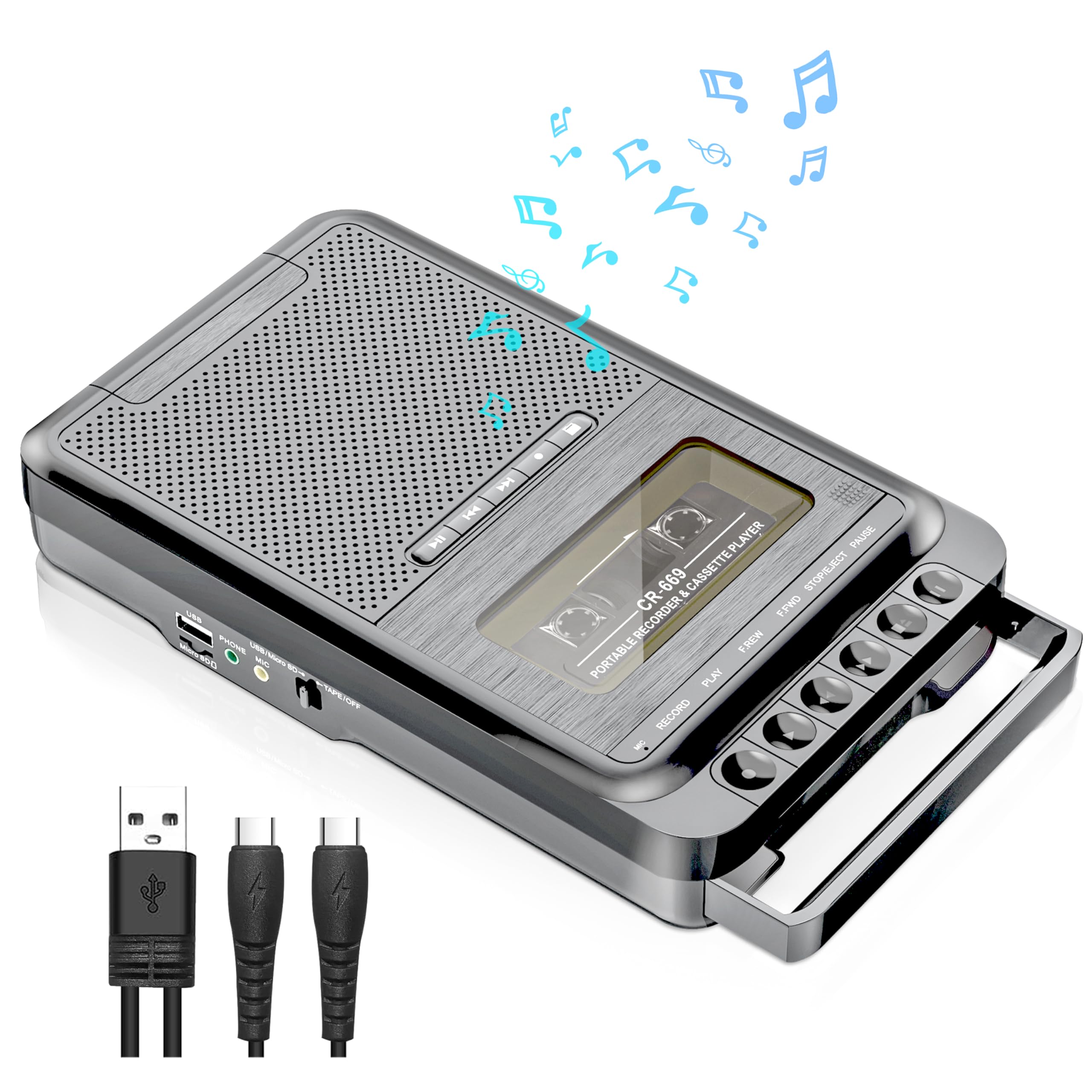
Image: Front view of the Gracioso Portable Cassette Player and Recorder, Model 6502. It features a cassette compartment, various control buttons for playback and recording, a speaker grille, and a radio tuning dial.
Key Components:
- Cassette Compartment: For inserting and removing cassette tapes.
- Control Buttons: Play, Fast Forward, Rewind, Stop/Eject, Record.
- Built-in Speaker: For audio output.
- AM/FM Tuner: Dial and switch for radio frequency selection.
- Telescopic Antenna: For improving radio reception.
- Built-in Microphone: For recording external audio.
- 3.5mm Headphone Jack: For private listening.
- AC Power Input: For connecting the AC power cord.
- Battery Compartment: For inserting AA batteries.
5. Setup
5.1 Powering the Device
Your Gracioso cassette player can be powered by either an AC power cord or AA batteries.
5.1.1 AC Power
- Ensure the device is switched off.
- Insert the small end of the AC power cord into the AC input jack on the device.
- Plug the other end of the AC power cord into a standard wall outlet.
5.1.2 Battery Power
For portable use, the device requires 4 AA batteries (not included).
- Ensure the device is switched off.
- Locate the battery compartment on the back or bottom of the device.
- Open the battery compartment cover.
- Insert 4 AA batteries, ensuring correct polarity (+/-) as indicated inside the compartment.
- Close the battery compartment cover securely.
6. Operating Instructions
6.1 Playing Cassettes
- Press the STOP/EJECT button to open the cassette compartment.
- Insert a cassette tape with the open edge facing upwards and the desired side facing you.
- Close the cassette compartment firmly until it clicks.
- Press the PLAY button to start playback.
- Use the FAST FORWARD or REWIND buttons to navigate through the tape.
- Press the STOP/EJECT button to stop playback.
6.2 Recording
Ensure you have a blank or recordable cassette tape inserted before attempting to record.
6.2.1 Recording External Audio (via Built-in Microphone)
- Insert a blank cassette tape.
- Press the RECORD button. The PLAY button will also engage simultaneously.
- Position the device near the sound source you wish to record. The built-in microphone will capture the audio.
- Press the STOP/EJECT button to end the recording.
6.2.2 Recording Radio Programs
- Insert a blank cassette tape.
- Switch the function selector to AM or FM mode.
- Tune to your desired radio station using the tuning dial.
- Press the RECORD button. The radio program will now be recorded onto the cassette.
- Press the STOP/EJECT button to end the recording.
6.3 AM/FM Radio Operation
- Switch the function selector to AM or FM mode.
- Extend the telescopic antenna for better FM reception. For AM, try rotating the unit for optimal signal.
- Rotate the TUNING dial to select your desired radio station.
- Adjust the VOLUME knob to your preferred listening level.
6.4 Using the Headphone Jack
For private listening, you can connect standard 3.5mm headphones (not included) to the headphone jack. When headphones are connected, the built-in speaker will be muted.
7. Maintenance
7.1 Cleaning
- Wipe the exterior of the unit with a soft, dry cloth.
- Do not use abrasive cleaners, waxes, or solvents.
- Periodically clean the tape head and pinch roller with a cotton swab lightly dampened with isopropyl alcohol to ensure optimal sound quality and prevent tape damage.
7.2 Storage
- Store the device in a cool, dry place away from direct sunlight and extreme temperatures.
- If storing for an extended period, remove the batteries to prevent leakage.
8. Troubleshooting
If you encounter issues with your device, please refer to the following common problems and solutions:
| Problem | Possible Cause | Solution |
|---|---|---|
| No power | AC cord not connected; Batteries drained or incorrectly inserted. | Check AC cord connection; Replace batteries or ensure correct polarity. |
| Poor sound quality from cassette | Tape head dirty; Worn-out tape; Volume too low. | Clean tape head; Try a different tape; Adjust volume. |
| Radio static/poor reception | Antenna not extended; Weak signal; Interference. | Extend telescopic antenna; Rotate unit for AM; Try tuning to a stronger station. |
| Recording not working | No blank tape; Tape's write-protect tab removed; Microphone blocked. | Insert a blank tape; Ensure write-protect tab is present; Clear microphone area. |
9. Specifications
| Feature | Detail |
|---|---|
| Brand | Gracioso |
| Model Number | 6502 |
| Product Dimensions (D x W x H) | 5.3D x 21.3W x 10.4H centimetres |
| Item Weight | 1 Pounds (approx. 0.45 kg) |
| Power Source | AC Power Cord or 4 AA batteries |
| Headphone Jack | 3.5 millimeters |
| Microphone Form Factor | Built-in (Mono) |
| Speaker Output | 5W |
| Compatible Devices | Speaker, Smartphone, Laptop, MP3 Players (for recording external audio) |
10. Warranty and Support
Gracioso provides a 12-month warranty for this product from the date of purchase. Additionally, a 30-day money-back guarantee is offered. For any product-related inquiries, technical assistance, or warranty claims, please contact our customer service team. We offer 24/7 customer service to assist you.
Please retain your proof of purchase for warranty purposes.

