
1. Product Overview
The Euker E2 Wireless In-Ear Bluetooth 5.0 HiFi Stereo Earbuds offer a high-quality audio experience with convenient features. This manual provides essential information for setup, operation, and maintenance.

Image: Euker E2 Wireless Earbuds and their charging case, highlighting key features such as intelligent touch control, automatic pairing, voice assistant support, HiFi stereo sound, Bluetooth 5.0, and IPX5 water resistance.
2. Setup
2.1 Initial Pairing
- Remove both the left and right earbuds from the charging case. They will automatically power on. Ensure pairing is completed within 5 minutes, otherwise, the earbuds will automatically power off.
- Activate the Bluetooth pairing function on your desired device (e.g., smartphone, tablet).
- Search for and select "Euker-E2" from the list of available Bluetooth devices to establish the connection.
2.2 Reconnecting Bluetooth
If the Bluetooth connection is lost or you wish to reconnect:
- Remove the earbuds from the charging case.
- On your device, delete "Euker-E2" from your Bluetooth device list and then deactivate Bluetooth.
- Activate Bluetooth again on your device, search for "Euker-E2", and select it to reconnect.
3. Operating Instructions
3.1 Touch Controls
The Euker E2 earbuds feature smart touch controls for managing music playback and calls. Refer to the diagram below for specific functions:

Image: A visual guide to the touch controls on the Euker E2 earbuds, illustrating actions for volume adjustment, play/pause, previous/next track, answering/rejecting calls, and activating voice assistant.
- Volume Control: Tap the left earbud twice to decrease volume, tap the right earbud twice to increase volume.
- Play/Pause: Tap either earbud once.
- Previous Track: Tap the left earbud three times.
- Next Track: Tap the right earbud three times.
- Answer/End Call: Tap either earbud once.
- Reject Call: Press and hold either earbud for 2 seconds.
- Activate Voice Assistant (Siri, etc.): Press and hold either earbud for 2 seconds.
3.2 Power On/Off
- Power On: The earbuds automatically power on when removed from the charging case.
- Power Off: The earbuds automatically power off and begin charging when placed back into the charging case.
4. Maintenance
4.1 Charging the Earbuds and Case
To ensure optimal performance and battery life:
- Before first use, remove any protective film from the charging contacts on the earbuds.
- Place the earbuds correctly into their respective slots in the charging case.
- Connect the USB-C charging cable to the charging case and a power source. The charging case has a 450 mAh battery capacity, providing multiple charges for the earbuds. A fully charged case can extend earbud playtime up to 20 hours.
- Ensure the charging case has sufficient power for the earbuds to charge.
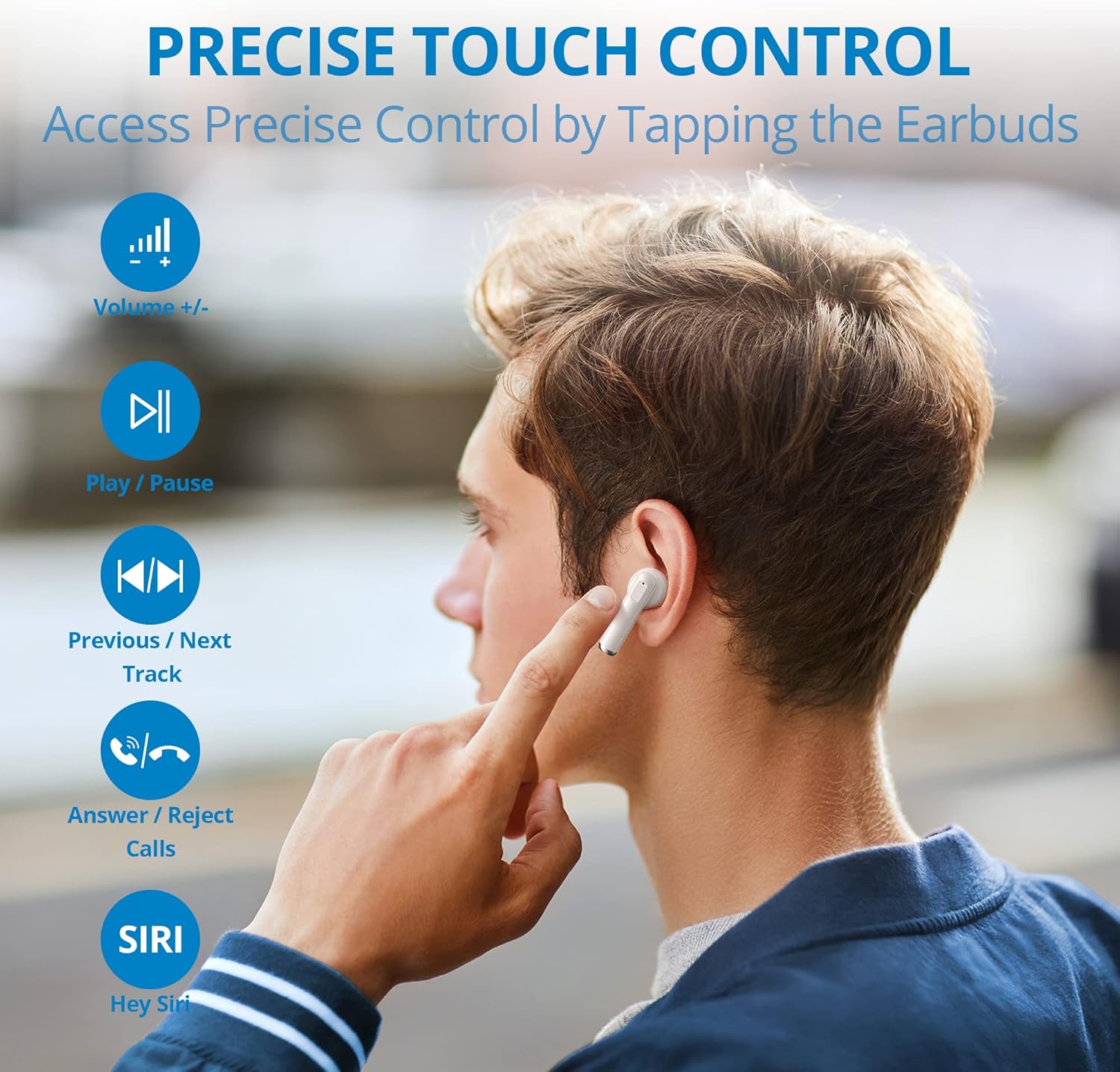
Image: The Euker E2 earbuds seated within their open charging case, ready for charging or use.
4.2 Water Resistance (IPX5)
The Euker E2 earbuds are rated IPX5 water-resistant, meaning they can withstand splashes and sweat. This makes them suitable for workouts and outdoor activities in light rain.
- Do not submerge or soak the earbuds in water.
- Avoid exposing the charging case to water, as it is not water-resistant.
- Dry the earbuds thoroughly before placing them back into the charging case to prevent damage.
5. Troubleshooting
5.1 Earbuds Not Charging
- Protective Film: Ensure any protective film on the earbud charging contacts has been removed.
- Case Power: Verify that the charging case has sufficient power. Connect the case to a power source if necessary.
- Proper Placement: Confirm that the earbuds are correctly seated in their charging slots within the case.
5.2 Connection Lost or Unstable
- Bluetooth Range: Ensure the earbuds are within the effective Bluetooth range of your connected device.
- Low Battery: Earbuds with low battery may experience connection issues. Charge the earbuds fully.
- Obstacles: Physical obstacles between the earbuds and your Bluetooth device can interfere with the connection. Try to maintain a clear line of sight.
- Reconnection Steps: Follow the "Reconnecting Bluetooth" steps in Section 2.2.
6. Specifications
| Feature | Specification |
|---|---|
| Model Number | E2 |
| Bluetooth Version | 5.0 |
| Water Resistance Rating | IPX5 (Splash-proof) |
| Charging Port | USB Type C |
| Charging Case Battery Capacity | 450 mAh |
| Total Playtime (with case) | Up to 20 hours |
| Control Type | Touch Control, Volume Control |
| Form Factor | In-Ear |
| Special Features | HiFi Stereo Sound, Lightweight |
| Material | Plastic |
| Included Components | USB-C Charging Cable |
7. Warranty and Support
Specific warranty information for the Euker E2 earbuds is not available in the provided product details. For warranty claims or technical support, please refer to the retailer or manufacturer's official website where the product was purchased.

Image: A person comfortably using the Euker E2 earbuds while working on a laptop, illustrating their suitability for various environments.