Introduction
The Crosley Brio Record Player is a comprehensive audio system designed to play vinyl records and stream digital music. It features a three-speed turntable, integrated Bluetooth connectivity, and a pair of 32-watt bookshelf speakers. This system combines classic vinyl playback with modern audio options, making it suitable for various listening preferences.
The turntable supports 33 1/3, 45, and 78 RPM records and includes an auto-stop function for convenience. Its Bluetooth capability allows for wireless streaming from mobile devices directly through the included speakers. Additionally, RCA output and auxiliary input ports provide options for connecting to external audio systems or other devices.
What's in the Box
Upon unpacking your Crosley Brio Turntable Shelf System, please ensure all the following components are present:
- Turntable Unit
- 45 RPM Adapter
- Power Adapter
- Bookshelf Speakers (2 units)
- Clear Dust Cover
Setup Guide
1. Unpacking and Placement
Carefully remove all components from the packaging. Place the turntable unit on a stable, level surface. Position the bookshelf speakers on either side of the turntable, ensuring they are within reach of the speaker cables.

Image: Front view of the Crosley Brio Turntable with its two accompanying bookshelf speakers.
2. Connecting Speakers
Connect the included bookshelf speakers to the 'SPEAKER OUT' ports on the rear of the turntable unit. Ensure the left speaker is connected to the 'L' terminal and the right speaker to the 'R' terminal. The speaker cables are typically color-coded (e.g., red for right, white for left) or marked with '+' and '-' for correct polarity.

Image: Rear panel of the turntable showing AUX, AUDIO OUT, SPEAKER OUT, and DC 12V connections.
3. Power Connection
Plug the power adapter into the 'DC 12V' port on the rear of the turntable unit, then plug the other end into a standard wall outlet.
Operating Instructions
1. Playing Vinyl Records
- Lift the dust cover.
- Place a vinyl record on the turntable platter.
- Select the desired speed (33 1/3, 45, or 78 RPM) using the speed selection switch. For 45 RPM records, place the included 45 adapter on the center spindle.
- Release the tonearm clip. Gently lift the tonearm using the cueing lever and position the stylus over the desired track on the record.
- Lower the cueing lever to gently drop the stylus onto the record. The record will begin to play.
- The auto-stop function will automatically stop the platter when the record finishes. If auto-stop is off, the record will continue spinning.

Image: Angled view of the turntable with a vinyl record spinning and the tonearm in position.

Image: Top-down view of the turntable's control panel, showing speed selection, pitch, volume, and power knobs.
2. Bluetooth Connectivity
- Turn the turntable on.
- Rotate the mode knob to the Bluetooth setting. The Bluetooth indicator light will begin to flash, indicating it is in pairing mode.
- On your mobile device, enable Bluetooth and select 'Crosley Brio' from the list of available devices.
- Once paired, the Bluetooth indicator light will stop flashing and remain solid. You can now stream audio from your device through the turntable's speakers.
3. Auxiliary Input
- Connect an external audio device (e.g., smartphone, MP3 player) to the 'AUX IN' port on the rear of the turntable using a 3.5mm audio cable (not included).
- Rotate the mode knob to the AUX setting.
- Play audio from your connected device. The sound will be output through the turntable's speakers.
4. Official Product Video
Watch this official video for a visual overview of the Crosley Brio Bluetooth Turntable Shelf System.
Video: An official product video showcasing the features and design of the Crosley CR6043A-NA Brio Bluetooth Turntable Shelf System.
Features
- Three-Speed Belt-Drive Turntable with Auto Stop: Plays 33 1/3, 45, and 78 RPM records. Includes a 45 adapter and a clear dust cover.
- Bluetooth Record Player: Bluetooth connectivity allows you to stream music from your mobile device through the matching full-range bookshelf speakers. 32W Peak, 16W RMS, 8W RMS x 2 - 24.5W Max Power Consumption - Frequency response 85Hz -15KHz.
- Versatile Connections: Connect your personal stereo system using the RCA output or use the aux input to connect external devices to the bookshelf speakers.
- Easy Setup: Setting up this vinyl record player is easy. Ready in minutes to enjoy vinyl listening with modern technology.
- Classic Design: Inspired by 100 years of Crosley innovations, our products blend vintage looks with modern technology. Crosley Radio products are proudly designed in the USA.
Specifications
| Specification | Value |
|---|---|
| Item Weight | 8.8 pounds |
| Product Dimensions | 12.25 x 24 x 8 inches |
| Item Model Number | CR6043A-NA |
| Color | Natural |
| Compatible Devices | Speaker |
| Signal Format | Phono, Line-level |
| Material Type | Plastic, Wood |
| Power Source | Corded Electric |
| Voltage | 12 Volts |
| Maximum Rotational Speed | 78 RPM |
| Special Feature | Dust Cover |
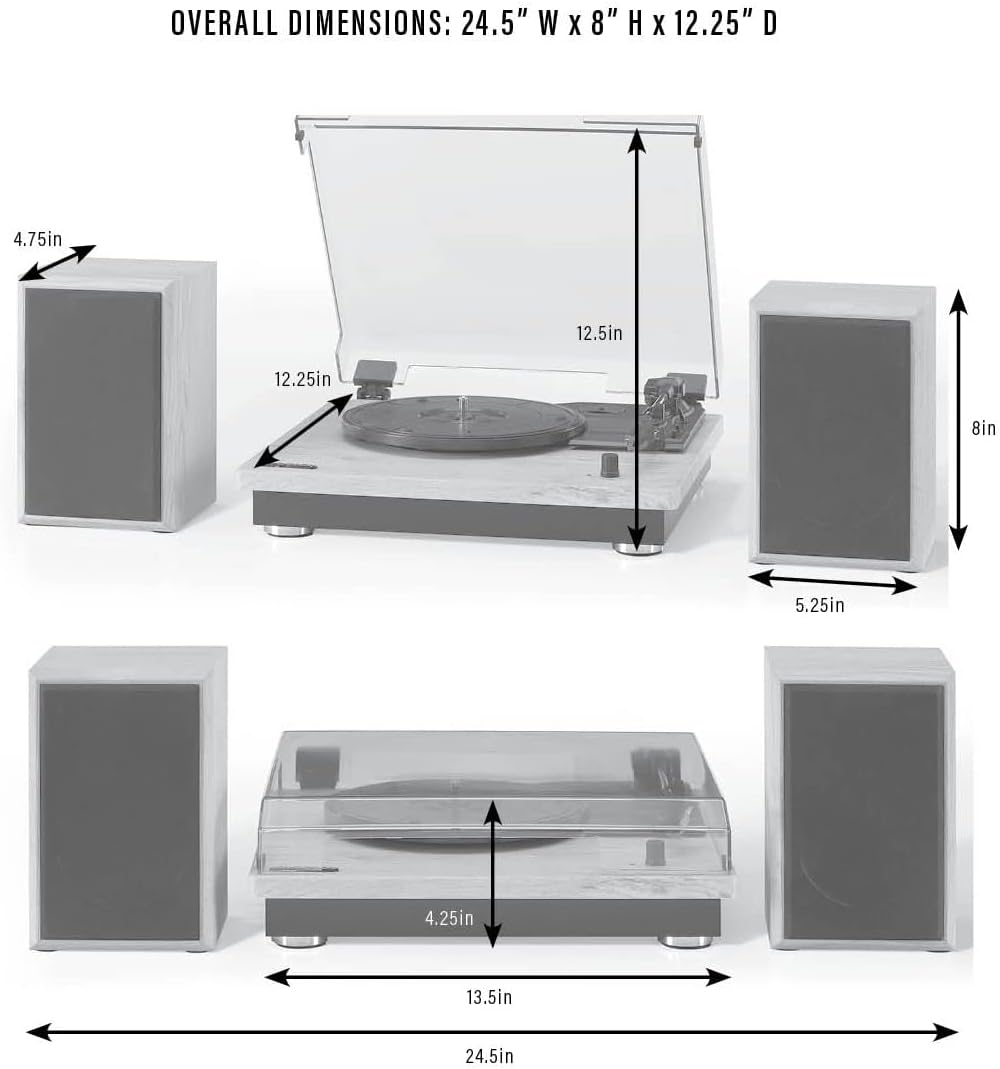
Image: Diagram illustrating the overall dimensions of the turntable and its speakers.
Maintenance
1. Dust Cover Care
Keep the clear dust cover closed when the turntable is not in use to prevent dust accumulation on the platter and stylus. Clean the dust cover with a soft, dry cloth. Avoid abrasive cleaners that may scratch the surface.
2. Stylus Maintenance
The stylus (needle) is a delicate component. Handle it with care. Periodically check the stylus for dust or debris and gently clean it with a soft brush designed for stylus cleaning. A worn or dirty stylus can damage your records and degrade sound quality. Replace the stylus if it appears damaged or if sound quality diminishes significantly.
Troubleshooting
- No Power: Ensure the power adapter is securely connected to both the turntable and a working wall outlet.
- No Sound: Verify that the speakers are correctly connected to the 'SPEAKER OUT' ports. Check the volume knob and ensure it is turned up. If using Bluetooth or AUX, confirm the correct mode is selected and the external device's volume is also up.
- Skipping or Distorted Sound: Check that the record is clean and free of scratches. Ensure the turntable is on a stable, level surface to prevent vibrations. Inspect the stylus for damage or debris.
- Bluetooth Pairing Issues: Make sure no other devices are currently paired with the turntable. Turn off and on your mobile device's Bluetooth, then try pairing again. Ensure the turntable is in Bluetooth pairing mode (flashing indicator light).
Warranty and Support
For warranty information or technical support, please refer to the documentation included with your product or visit the official Crosley website. Keep your purchase receipt as proof of purchase for any warranty claims.


