
1. Introduction
Thank you for choosing the Gimars RGB Gaming Mouse Pad with 15W Wireless Charging. This extended mouse pad is designed to enhance your gaming and work experience with its smooth surface, vibrant RGB lighting, and convenient wireless charging capabilities. This manual provides detailed instructions for setup, operation, maintenance, and troubleshooting to ensure optimal performance and longevity of your product.
2. Product Features
- 15W Qi Wireless Charging: Built-in fast wireless charging compatible with Qi-enabled devices such as iPhone X/XR/XS/11/11 Pro/12/13/14/15/16, Samsung Galaxy S22/S21/S20/S9/S8 Plus, Galaxy Note 9/8, etc. (Note: 15W, 10W, 7.5W requires corresponding power adapter 9V 2A / 5V 2A / 5V 2.4A, not included). Features a raised charging platform for easy and precise positioning, increasing charging success rate.
- 10 RGB LED Lighting Modes: Customizable lighting with 7 static modes and 3 dynamic effects to create a unique atmosphere. Includes a memory function to recall the last selected light mode.
- Charging Mode Indicators: Three distinct indicators: Red for charging, Green for fully charged, and Yellow for standby mode.
- XXL Desk Mat Size: Measures 800x300x4mm (31.5x11.8x0.16 inches), providing ample space for your keyboard, mouse, and other desktop items.
- Premium Smooth Surface: Ultra-high-density micro-textured fabric ensures accurate tracking and calibration for all mouse types, resulting in smoother mouse movements.
- Waterproof Material: The surface is water-resistant, making it easy to clean and resistant to spills and crumbs.
- Anti-Slip Rubber Base: Made of natural rubber with a textured surface to firmly grip the desktop, preventing movement.
- Ultra-Thin 4mm Thickness: Allows the keyboard to be placed without any slope, ensuring a comfortable working and gaming environment.
- Type-C Interface: Newly upgraded Type-C interface for improved charging performance. A Type-C data cable is included.
- Great Edging & No Curling: High-quality edging with a double pressing process ensures the mouse pad lies flat without curling.
3. Package Contents
- Gimars RGB Gaming Mouse Pad with 15W Wireless Charging
- Type-C Data Cable
- User Manual
4. Setup Instructions
- Unroll the Mouse Pad: Carefully unroll the mouse pad and place it on your desired desktop surface. If the pad temporarily curls due to long-term transportation, allow it to stand for 12 hours or press it with heavy objects to flatten.
- Connect Power: Insert the included Type-C data cable into the Type-C interface on the mouse pad. Connect the other end of the cable to a suitable power adapter (9V 2A / 5V 2A / 5V 2.4A recommended for fast charging, adapter not included) or a USB port on your computer.
- Power On: The RGB lighting will automatically illuminate upon connection.
5. Operating Instructions
5.1. RGB Lighting Control
The mouse pad features a one-touch switch for controlling the RGB lighting modes.
- Change Light Mode: Short press the control button to cycle through the 10 available lighting modes (7 static and 3 dynamic effects).
- Turn Off Lights: Long press the control button for 3 seconds to turn off the light bar.
- Memory Function: The mouse pad will remember the last selected light mode when powered off and on again.
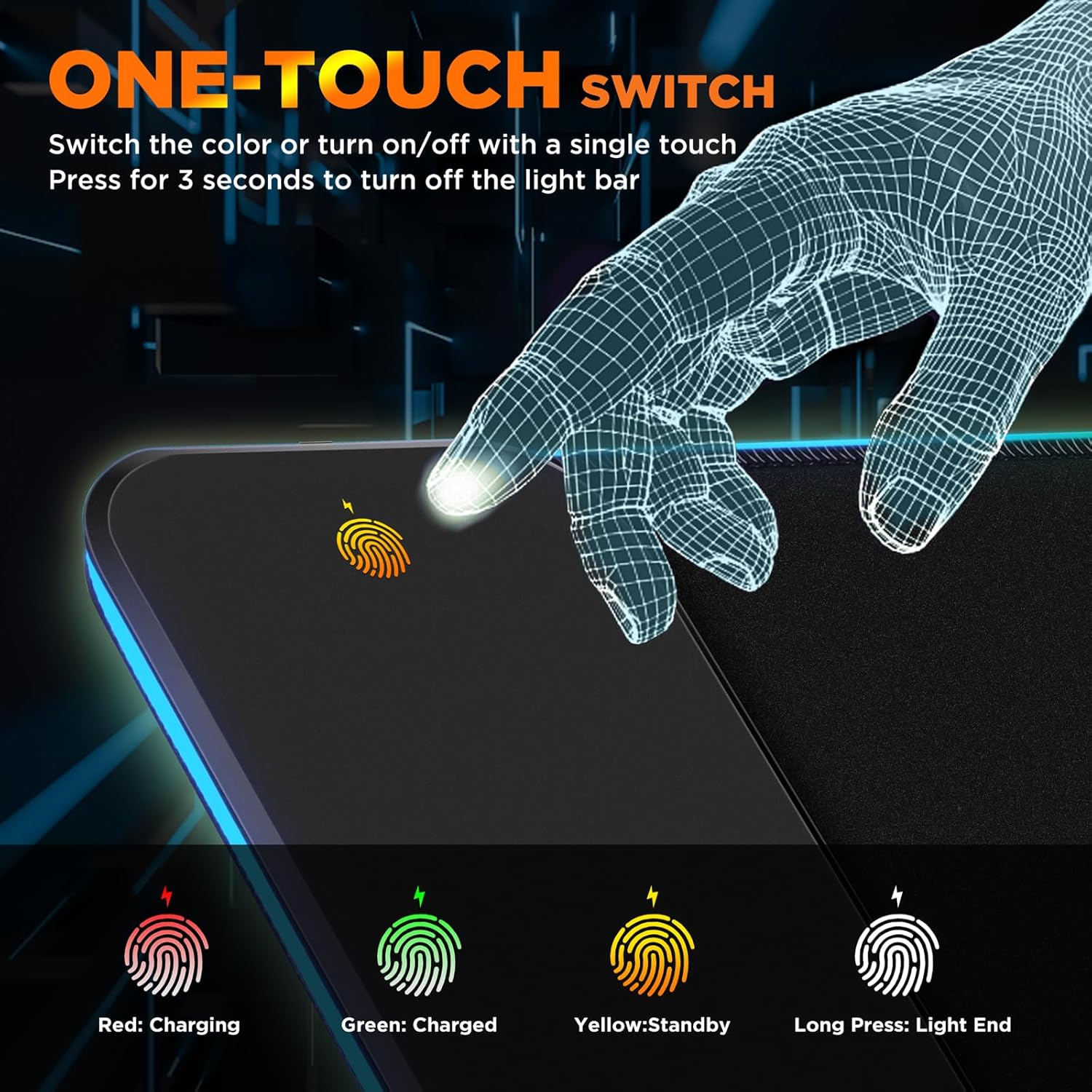
Image: One-touch control button for RGB lighting and charging indicators.
5.2. Wireless Charging Operation
The integrated 15W Qi wireless charging pad allows for convenient charging of compatible devices.
- Place Device: Place your Qi-enabled smartphone or other compatible device onto the raised charging platform on the mouse pad. The raised design assists with precise alignment.
- Monitor Charging: Observe the charging mode indicators:
- Red: Device is currently charging.
- Green: Device is fully charged.
- Yellow: Standby mode (no device detected or not charging).
- Fast Charging: For 15W, 10W, or 7.5W fast charging, ensure you are using a compatible power adapter (9V 2A / 5V 2A / 5V 2.4A) connected to the mouse pad.

Image: Wireless charging in progress on the mouse pad.

Image: Detail of the raised charging platform for optimal device alignment.

Image: Phone case friendly wireless charging.
6. Wireless Charging Compatibility
The 15W Qi wireless charging is compatible with a wide range of Qi-enabled devices, including but not limited to:
- Apple iPhone: iPhone X/XR/XS/11/11 Pro/12/13/14/15/16 series.
- Samsung Galaxy: S22/S21/S20/S9/S8 Plus, Galaxy Note 9/8 series.
- Other Qi-enabled smartphones and devices.

Image: Universal compatibility for wireless charging.
7. Maintenance
- Cleaning: The mouse pad's water-resistant surface allows for easy cleaning. Use a damp cloth to wipe away spills or crumbs. Avoid harsh chemicals.
- Flattening: If the mouse pad temporarily curls due to storage or transportation, lay it flat and place heavy objects on it for 12 hours, or allow it to naturally flatten over time.
- Storage: When not in use, store the mouse pad rolled up loosely to prevent creasing.
8. Troubleshooting
| Problem | Possible Cause | Solution |
|---|---|---|
| RGB lights not turning on. | No power or loose connection. | Ensure the Type-C cable is securely connected to both the mouse pad and a powered USB port or adapter. Try a different USB port or power source. |
| Wireless charging not working. | Device not Qi-enabled, improper placement, or incompatible power adapter. | Verify your device supports Qi wireless charging. Ensure the device is centered on the raised charging platform. Use a power adapter of at least 5V 2A for optimal charging. Remove thick phone cases or cases with metal/magnets. |
| Mouse pad surface is not flat. | Curling from packaging/storage. | Lay the mouse pad flat and place heavy, flat objects on it for 12-24 hours. The material is designed to flatten over time. |
9. Specifications
- Brand: Gimars
- Model Number: G-RGB-W03
- Color: Black-RGB+Wireless Charging
- Special Features: Non-slip, RGB, Type-C Interface, Waterproof, Wireless Charging
- Recommended Uses: Gaming, Office
- Material: Rubber, Fabric
- Shape: Rectangular
- Item Dimensions (L x W): 11.81"L x 31.5"W (800x300mm)
- Item Thickness: 4 Millimeters
- Wireless Charging Output: 15W (requires compatible adapter)
- UPC: 850063561365
10. Warranty & Support
This Gimars product comes with a 1-year warranty from the date of purchase. If you encounter any issues or have questions regarding your product, please contact Gimars customer support. Our team is dedicated to assisting you within 24 hours.
For further assistance, please visit the official Gimars website or contact our support team via the contact information provided with your purchase.
11. Product Videos
Gimars RGB Gaming Mouse Pad with 15W Wireless Charging Overview
This video provides a comprehensive overview of the Gimars RGB Gaming Mouse Pad, highlighting its 15W wireless charging capabilities, various RGB lighting modes, and overall design. It demonstrates the product in use within a desk setup, showcasing its functionality and aesthetic appeal.