
1. Introduction
Thank you for choosing the Magnat SBW 280 2.1 Active Home Cinema Soundbar. This system is designed to enhance your audio experience for movies, music, and more. This manual provides essential information for the safe and efficient operation of your device. Please read it thoroughly before use and keep it for future reference.
2. Safety Instructions
Always observe the following safety precautions to prevent electric shock, fire, or damage to the unit:
- Do not expose the unit to rain or moisture.
- Do not open the casing. Refer all servicing to qualified personnel.
- Ensure proper ventilation around the unit. Do not block ventilation openings.
- Avoid placing the unit near heat sources or in direct sunlight.
- Use only the power supply specified for this device.
- Keep the unit away from strong magnetic fields.
- Clean only with a dry cloth.
3. Package Contents
Verify that all items are present in the package:
- Magnat SBW 280 Soundbar
- Wireless Subwoofer
- Remote Control
- Power Cable(s)
- HDMI Cable
- Optical Digital Cable
- 3.5mm Audio Cable
- Wall Mounting Brackets and Screws
- User Manual (this document)
4. Product Overview
4.1 Soundbar Components and Controls
The soundbar features front-facing speakers and top-mounted controls for easy access.

Image: Front view of the Magnat SBW 280 Soundbar, showcasing its sleek design and speaker grilles.

Image: Close-up of the top panel controls on the soundbar, including power, volume, Bluetooth, and source selection buttons.
4.2 Rear Connections
The rear panel provides various input and output options for connecting to your TV and other devices.

Image: Rear view of the soundbar, displaying the HDMI, Optical, USB, and AUX input ports.

Image: Detailed view of the soundbar's connection panel, highlighting the HDMI ARC, Optical, USB, and 3.5mm AUX inputs, along with the AC power input.
4.3 Wireless Subwoofer
The wireless subwoofer provides deep bass and connects automatically to the soundbar.

Image: Front view of the wireless subwoofer, showing the bass reflex port and Magnat logo.
5. Setup
5.1 Placement
Place the soundbar centrally below your TV. The subwoofer can be placed anywhere in the room, ideally near a wall for enhanced bass, but avoid corners to prevent booming.

Image: Diagram showing the dimensions of the soundbar: 1050 mm (width) x 75 mm (height) x 90 mm (depth).
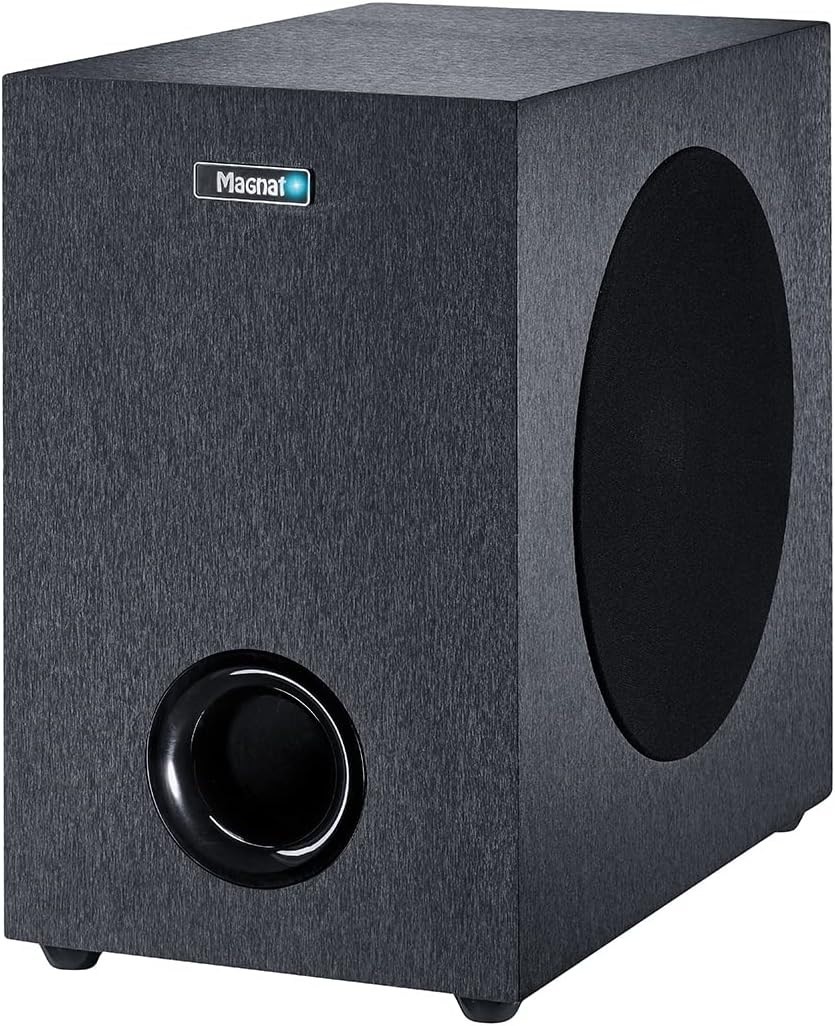
Image: Diagram showing the dimensions of the wireless subwoofer: 200 mm (width) x 370 mm (height) x 364 mm (depth).
5.2 Wall Mounting (Optional)
The soundbar can be wall-mounted using the included brackets. Ensure the wall material can support the weight of the soundbar.
- Mark the desired mounting positions on the wall.
- Drill pilot holes and insert wall anchors if necessary.
- Attach the mounting brackets to the wall using screws.
- Carefully hang the soundbar onto the brackets.

Image: Close-up of a wall mounting bracket attached to the rear of the soundbar.
5.3 Connections
Connect the soundbar to your TV and power source.
- HDMI (ARC): For the best audio quality and control, connect an HDMI cable from the soundbar's HDMI ARC port to your TV's HDMI ARC port. This allows your TV remote to control the soundbar's volume.
- Optical Digital: If your TV does not have an HDMI ARC port, connect an optical digital cable from your TV's optical output to the soundbar's OPTICAL input.
- AUX (3.5mm): Use the 3.5mm audio cable to connect to devices with an analog audio output.
- USB: Insert a USB drive for MP3/WMA playback.
- Power: Connect the power cable to the soundbar and the subwoofer, then plug them into a wall outlet.
5.4 Wireless Subwoofer Pairing
The subwoofer should automatically pair with the soundbar upon powering on. If pairing fails:
- Ensure both the soundbar and subwoofer are powered on.
- Press and hold the 'Pairing' button on the rear of the subwoofer (refer to the subwoofer diagram in the full manual for exact location).
- The indicator light on the subwoofer will flash, then turn solid blue once connected.
6. Operating
6.1 Basic Controls
Use the remote control or the top panel buttons to operate the soundbar.
- Power: Press to turn the unit on or off.
- Volume +/-: Adjusts the master volume.
- Source: Cycles through input sources (HDMI, Optical, AUX, USB, Bluetooth).
- BT (Bluetooth): Selects Bluetooth input and initiates pairing mode.
6.2 Input Selection
Press the 'Source' button on the remote or soundbar to switch between connected devices.
6.3 Bluetooth Pairing
To connect a Bluetooth device:
- Press the 'BT' button on the remote or soundbar. The Bluetooth indicator will flash.
- Enable Bluetooth on your mobile device and search for 'Magnat SBW 280'.
- Select the soundbar to pair. The indicator will turn solid blue upon successful connection.
6.4 Sound Modes and Enhancements
The SBW 280 offers various sound modes for an optimized listening experience:
- Dolby Digital: Automatically activated when a Dolby Digital signal is detected via HDMI or Optical.
- Equalizer Presets: Use the remote to select between 'Movie', 'Music', and 'Voice' modes for tailored audio.
- 3D Sound: Activates a DSP-controlled 3D sound program for a more immersive experience.
- Night Mode: Reduces dynamic range for quieter listening, ideal for late-night viewing.
6.5 USB Playback
Insert a USB drive containing MP3 or WMA audio files into the USB port. The soundbar will automatically switch to USB input and begin playback. Use the remote for playback controls (play/pause, skip track).
7. Maintenance
To ensure the longevity and performance of your Magnat SBW 280:
- Cleaning: Wipe the surfaces with a soft, dry cloth. Do not use liquid cleaners or abrasive materials.
- Ventilation: Ensure the ventilation openings are clear of dust and obstructions.
- Storage: If storing the unit for an extended period, disconnect it from power and store it in a cool, dry place.
8. Troubleshooting
If you encounter issues, refer to the following table before contacting support:
| Problem | Possible Cause | Solution |
|---|---|---|
| No power | Power cable not connected; Power outlet faulty | Check power connections; Try a different outlet |
| No sound | Incorrect input selected; Volume too low; Cables loose | Select correct source; Increase volume; Check all cable connections |
| Subwoofer not pairing | Out of range; Interference; Pairing failed | Move subwoofer closer; Re-initiate pairing process (Section 5.4) |
| Bluetooth connection issues | Device too far; Interference; Already connected to another device | Ensure device is within range; Disconnect from other devices; Re-pair (Section 6.3) |
| Remote control not working | Batteries depleted; Obstruction; Remote not aimed at sensor | Replace batteries; Remove obstructions; Aim remote directly at soundbar |
9. Specifications
Technical specifications for the Magnat SBW 280 system:
| Feature | Specification |
|---|---|
| Model Name | SBW 280 |
| Soundbar Dimensions (W x H x D) | 105 cm x 7.5 cm x 9 cm (41.3 x 3.0 x 3.5 inches) |
| Subwoofer Dimensions (W x H x D) | 20 cm x 37 cm x 36.4 cm (7.9 x 14.6 x 14.3 inches) |
| Total Power Output (RMS/Peak) | 130 W / 260 W |
| Soundbar Power Output (RMS/Peak) | 2 x 30 W / 2 x 60 W |
| Subwoofer Power Output (RMS/Peak) | 70 W / 140 W |
| Subwoofer Driver Diameter | 200 mm (8 inches) |
| Connectivity | HDMI (ARC), Optical Digital, 3.5mm AUX, USB, Bluetooth 5.0 aptX |
| Sound Modes | Dolby Digital, 3 EQ Presets (Movie, Music, Voice), 3D Sound, Night Mode |
| Control Method | Remote Control |
| Power Source | AC Power Cable |
| ASIN | B09Q61BCBQ |
| Item Model Number | 4018843712802 |
10. Warranty and Support
This product comes with a limited warranty. For detailed warranty terms and conditions, please refer to the documentation included in your product packaging or visit the official Magnat website. For technical support, troubleshooting assistance, or service inquiries, please contact Magnat customer service through their official channels.
Manufacturer: MAGNAT


