
1. Product Overview
This document provides instructions for the REES52 600TVL 170 Degree Mini FPV AV Camera with Audio, model RS2967. This compact camera is designed for use with various mini quad-copters, including Mini 200, 250, and 300 models. It features a wide-angle lens, audio capability, and is suitable for FPV (First Person View) applications.

REES52 600TVL Mini FPV AV Camera with included instruction sheet.
2. Key Features
- High Resolution: 600TVL (Television Lines) for clear video output.
- Wide-Angle Lens: 1.8mm lens with a 170-degree field of view.
- Audio Capability: Integrated microphone for audio transmission.
- Low Light Performance: Illumination of 0.5 LUX for operation in varied lighting conditions.
- Dual Format Support: Compatible with both PAL and NTSC video systems.
- Compact Design: Tiny and lightweight, ideal for mini drones.
- Power Requirement: Operates on DC 3.7-5V.
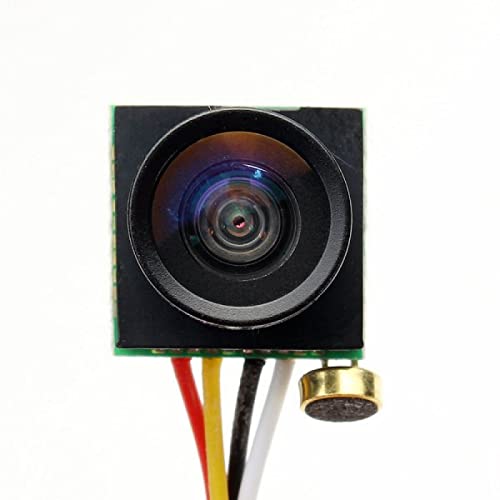
Front view of the REES52 600TVL Mini FPV AV Camera, showing the wide-angle lens and integrated microphone.
3. Package Contents
Verify that all items are present in your package:
- 1 x REES52 600TVL Wide Angle Lens Camera with Microphone
4. Setup and Installation
4.1 Wiring Diagram
The camera features a 4-pin connector for power and video/audio output. Connect the wires according to your drone's flight controller or video transmitter specifications. The standard color coding is as follows:
- Red: Positive Power (VCC)
- Black: Ground (GND)
- Yellow: Video Output
- White: Audio Output
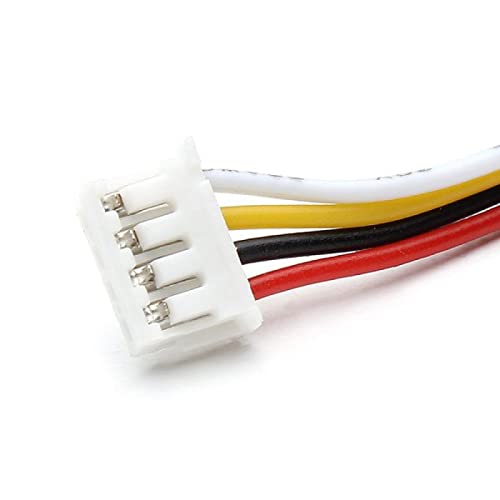
Close-up of the 4-pin connector and colored wires for the REES52 600TVL Mini FPV AV Camera.
4.2 Mounting
Mount the camera securely on your drone using appropriate mounting hardware (not included). Ensure the lens has a clear, unobstructed view. The camera's small size allows for flexible placement within your drone's frame.
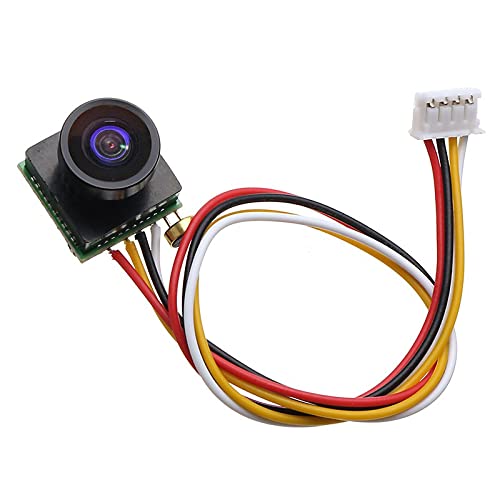
Angled view of the REES52 600TVL Mini FPV AV Camera, highlighting the connected wiring harness.
5. Operating Instructions
5.1 Powering On
Once correctly wired and connected to a compatible power source (DC 3.7-5V), the camera will power on automatically. There is no separate power button.
5.2 Video Output
The camera outputs a standard PAL/NTSC analog video signal. Connect the yellow video output wire to your FPV video transmitter or monitor's video input. Ensure your receiver/monitor is configured to the correct video format (PAL or NTSC) to match the camera's output for optimal display.
5.3 Audio Output
The integrated microphone provides audio output via the white wire. Connect this to your FPV video transmitter or audio receiver if audio transmission is desired for your FPV setup.
6. Maintenance
- Lens Cleaning: Gently clean the camera lens with a soft, lint-free cloth. Avoid using abrasive materials or harsh chemicals that could scratch the lens coating.
- Storage: When not in use, store the camera in a dry, dust-free environment to protect its sensitive electronic components.
- Power Supply: Always ensure the camera is powered within its specified voltage range (DC 3.7-5V) to prevent damage to the internal circuitry.
7. Troubleshooting
7.1 No Video Signal
- Check all wiring connections for proper polarity and secure contact.
- Verify the camera is receiving power within the specified 3.7-5V DC range.
- Ensure your FPV receiver/monitor is set to the correct video format (PAL/NTSC) matching the camera's output.
7.2 Poor Image Quality
- Clean the camera lens for any smudges, dust, or debris.
- Check for any physical obstructions in front of the lens.
- Ensure adequate lighting conditions; extreme low light can affect image quality.
7.3 No Audio
- Verify the white audio wire is correctly connected to your audio receiver/transmitter.
- Check audio settings on your receiving device.
8. Technical Specifications
| Specification | Value |
|---|---|
| Brand | REES52 |
| Model Number | RS2967 |
| Photo Sensor Technology | CMOS |
| Video Capture Resolution | 720p |
| Maximum Focal Length | 1.8 mm |
| Maximum Aperture | 1.8 f |
| Connectivity Technology | Wire |
| Color | Black |
| Product Features | 170 Degree Capture |
| Water Resistance Level | Not Water Resistant |
| Form Factor | Compact |
| Item Weight | 0.02 Kilograms |
| Lens Type | Wide Angle |
| Focus Type | Auto Focus |
| Illumination | 0.5 LUX |
| Video Format | PAL / NTSC |
| Sensitive Area | 3.5964mm x 2.7084mm |
| Pixels | 648 (horizontal) x 488 (vertical) |
| Power Supply | DC 5V ±10% (70mA ±10%) |
| Operating Temperature Range | -10°C ~ 60°C (RH95% Max) |
9. Warranty and Support
For warranty information and technical support, please contact REES52 customer service through your purchase platform or refer to the official REES52 website. Please have your model number (RS2967) and purchase details available when seeking support.