
Important Safety Instructions
Please read and understand all instructions before assembling and using this product. Keep this manual for future reference.
- Ensure the power supply voltage matches the lamp's requirements (240 Volts).
- Do not expose the lamp to water or high humidity.
- Unplug the lamp from the power outlet before cleaning or performing any maintenance.
- Do not attempt to modify or repair the lamp yourself. Contact qualified service personnel for assistance.
- Keep the lamp away from heat sources and direct sunlight.
- This lamp is for indoor use only.
Package Contents
Verify that all components are present before assembly:

This image displays all components included in the FIMEI Floor Lamp package: the main lamp body (disassembled poles and light heads), the round base, the power adapter (EU plug shown), the remote control, and the user manual.
- Lamp Body (multiple pole sections and light heads)
- Round Base
- Power Adapter (EU Plug)
- Remote Control
- User Manual
Assembly Instructions
The FIMEI Floor Lamp is designed for easy assembly without additional tools.
- Carefully unpack all components from the packaging.
- Place the round base on a flat, stable surface.
- Hold the main light pole section and begin assembling the lamp poles from top to bottom, screwing each section clockwise until secure. Ensure the wire is not damaged by excessive pulling during this process.
- Connect the power adapter to the lamp and then plug it into a suitable electrical outlet.

This diagram illustrates the lamp's dimensions (187 cm height, 25 cm base diameter) and the flexibility of its light heads. The main semi-rings can rotate 330 degrees vertically and horizontally, while the smaller reading lamp is freely adjustable.
Operating Instructions
Power On/Off
The lamp can be turned on or off using either the touch control panel on the lamp pole or the remote control.
- Touch Control: Tap the power icon on the lamp pole.
- Remote Control: Press the Power (⏻) button.
Adjusting Brightness (Dimming)
The lamp supports continuous dimming from 5% to 100% brightness.
- Touch Control: Use the brightness adjustment icons on the lamp pole.
- Remote Control: Use the Brightness Up (☀) and Brightness Down (☼) buttons.

This image illustrates the stepless dimming capability, showing the lamp's light output ranging from a low 5% brightness to a full 100% brightness, allowing for precise light intensity adjustment.
Adjusting Color Temperature
The lamp offers four color temperature settings: 3000K, 4000K, 5000K, and 6000K.
- Touch Control: Use the color temperature adjustment icons on the lamp pole.
- Remote Control: Use the CCT+ and CCT- buttons to cycle through or fine-tune color temperatures.

This visual demonstrates the four distinct color temperature settings available: 3000K for a warm, cozy ambiance; 4000K for a balanced warm white; 5000K for a bright natural white; and 6000K for a cool, slightly blue daylight white.
Using Touch Control
The touch control panel is located on the main lamp pole. It allows independent control of the main lamp and the reading light.
- Tap the respective power icon to turn on/off the main lamp or reading light.
- Use the dedicated brightness and color temperature icons for each light source.
Using Remote Control
The remote control allows convenient operation from up to 32 feet (10 meters) away. It features a magnetic design for easy storage on the lamp pole.
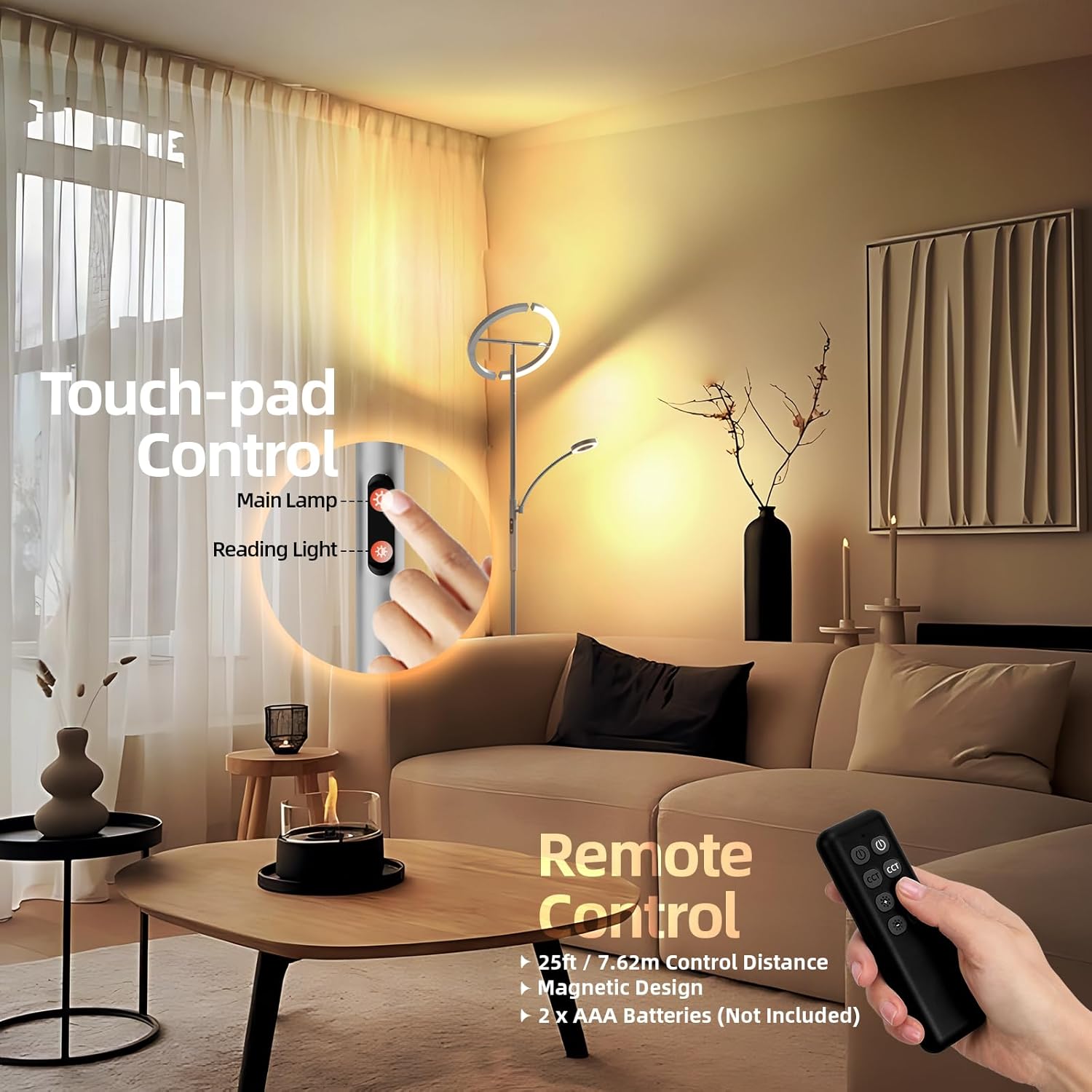
This image highlights the dual control options: a touch-sensitive panel located on the lamp's main pole for direct adjustments, and a remote control for convenient operation from a distance. The remote control has a magnetic design for easy storage on the lamp.
The remote control requires 2x AAA batteries (not included).
Pairing the Remote Control
If the remote control does not respond, it may need to be paired with the lamp:
- Ensure the lamp is plugged in but turned off.
- Turn on the lamp.
- Immediately after turning on (within 3 seconds), press and hold the Power (⏻) button on the remote control.
- The lamp will flash to indicate successful pairing.

This image shows the steps to pair the remote control with the lamp. To pair, turn off the lamp, then turn it on and immediately press and hold the 'ON' button on the remote within 3 seconds until the lamp flashes, indicating successful pairing.
Adjusting Lamp Heads
The main semi-rings and the reading light are adjustable:
- The main semi-rings can be rotated 330 degrees vertically and horizontally to direct light as desired.
- The smaller reading light is freely adjustable on its flexible arm.
Maintenance
- Cleaning: Disconnect the power before cleaning. Use a soft, dry cloth to wipe the lamp. Do not use abrasive cleaners or solvents.
- Bulb Replacement: The LED light source is integrated and not user-replaceable. If the light source fails, contact customer support.
- Storage: If storing the lamp, disassemble it carefully (from base to main light) and store in its original packaging in a dry place.
Troubleshooting
| Problem | Possible Cause | Solution |
|---|---|---|
| Lamp does not turn on. | No power supply. Lamp not properly assembled. |
Check if the power adapter is securely plugged into the wall outlet and the lamp. Ensure all pole sections are tightly screwed together. |
| Remote control not working. | Batteries are dead or incorrectly inserted. Remote is not paired with the lamp. Obstruction between remote and lamp. |
Replace batteries (2x AAA) and ensure correct polarity. Follow the "Pairing the Remote Control" instructions. Ensure a clear line of sight to the lamp's receiver. |
| Light flickers or is unstable. | Loose connection. Power fluctuations. |
Check all connections. Try plugging the lamp into a different outlet. If the problem persists, contact support. |
Specifications
| Feature | Detail |
|---|---|
| Brand | FIMEI |
| Model Number | 1 (MF18813) |
| Product Dimensions (L x W x H) | 30 x 30 x 175 cm |
| Item Weight | 4 Kilograms |
| Material | Metal (Base), Plastic (Shade) |
| Color | Grey |
| Voltage | 240 Volts |
| Wattage | 20 Watts |
| Bulb Type | Integrated LED |
| Color Temperature | 3000K (Warm), 4000K (Cool White), 5000K (Daylight White), 6000K (Slightly Blue Daylight White) |
| Special Features | Dimmable, Adjustable Color Temperature, Remote Control, Touch Control, Rotatable Light Heads |
| Switch Style | Push Button (Touch Control) |
| Energy Efficiency Class | F |
| Energy Consumption | 27 kWh/1000h |
For more detailed energy information, please refer to the EU EPREL database: https://eprel.ec.europa.eu/qr/1500204

This is the official EU energy label for the FIMEI Floor Lamp, model MF18813. It indicates an energy efficiency class of F and an energy consumption of 27 kilowatt-hours per 1000 hours of operation. A QR code is also present for more information.
Warranty and Support
FIMEI products are designed for quality and durability. For warranty information or technical support, please contact your retailer or visit the official FIMEI website.
Please retain your proof of purchase for any warranty claims.
For further assistance, please refer to the contact information provided with your purchase or on the FIMEI brand store page.
