
Introduction
Thank you for choosing the MAXPOWER 16-inch Tool Box. This portable toolbox is designed for efficient organization and transport of your tools, featuring a removable tray, durable construction, and secure metal latches. This manual provides essential information for the proper use, maintenance, and care of your new tool box.

Image: The MAXPOWER 16-inch Tool Box in its closed state, showcasing its compact design and stainless steel handle.
Product Features
- Tool Box Size: 16-inch tools box ideal for household use, lightweight for carrying. Outside dimensions: 15.7" x 6.7" x 6.9". Internal dimensions: 14.2"X5.5" X5.1".
- Storage Space: Removable inner trays provide storage while keeping the tool kit organized. The top transparent storage box can store small screws, nuts, etc. Provides ample storage space.
- High-quality Material: This tool storage box is made of high quality PP plastic, resistant to falling and not easy to damage. Stainless steel handle, ergonomically designed non-slip handle, comfortable grip and durable.
- Double Lock Buckle Design: The lock buckle is made of stainless steel, which is not easy to deform, and is strong and durable; the padlock hole can be locked to ensure safety.
- Wide Applications: Tool organizer box suitable for household and industrial maintenance.
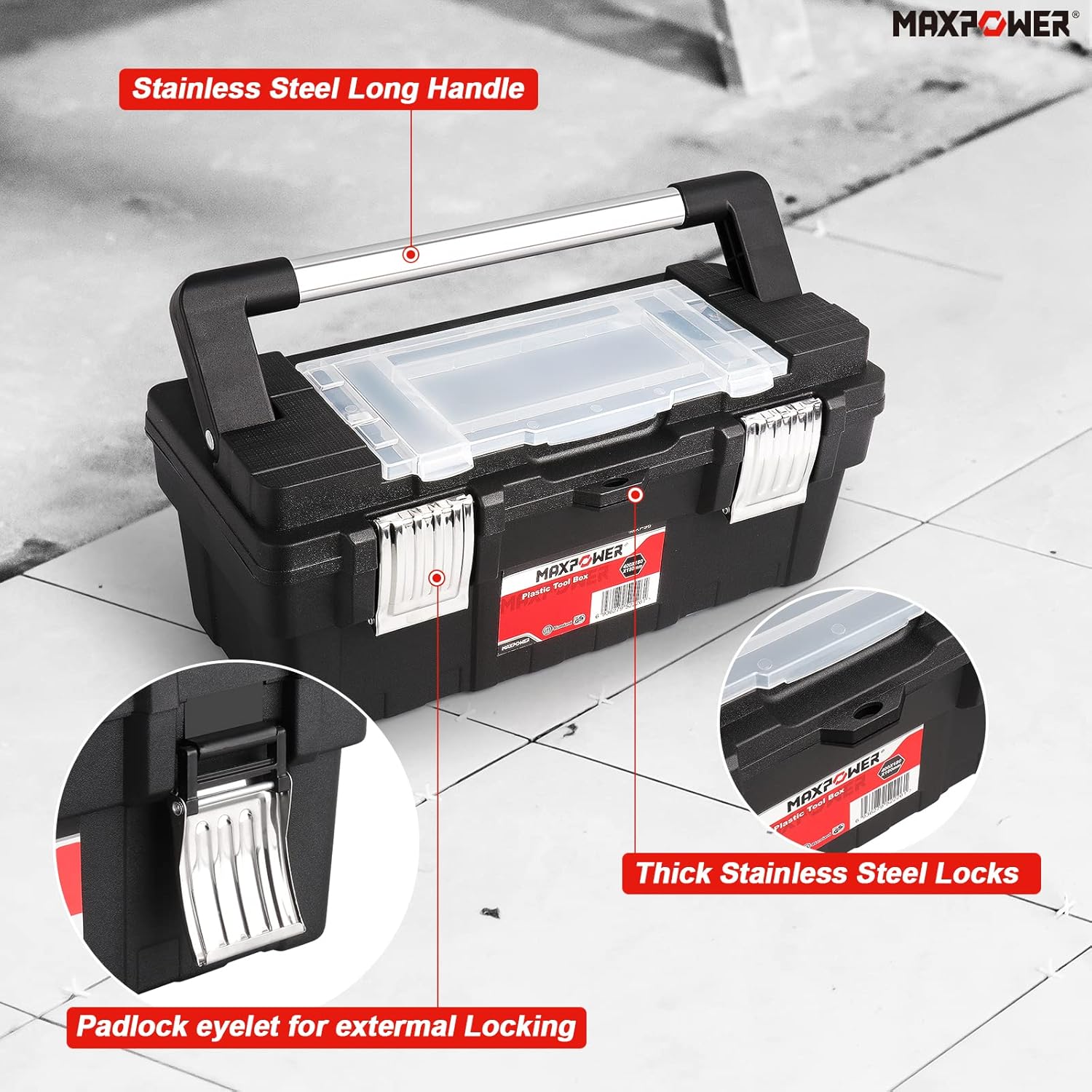
Image: Detailed view highlighting the stainless steel long handle, thick stainless steel locks, and the padlock eyelet for external locking.
Setup and Organization
The MAXPOWER tool box is designed for quick setup and efficient organization of your tools. Follow these steps to prepare your tool box for use:
- Unlatch and Open: Release the two stainless steel latches on the front of the tool box and lift the lid.
- Access Top Organizers: The clear lid on top provides access to small compartments ideal for screws, nuts, and other small parts. Simply flip open the clear cover to access these.
- Remove Tray: The tool box includes a removable inner tray. Lift this tray out to access the main storage compartment below.
- Organize Tools: Place frequently used tools in the removable tray for easy access. Larger tools can be stored in the main compartment.
- Secure: Once tools are organized, place the tray back (if used), close the lid, and secure both stainless steel latches.
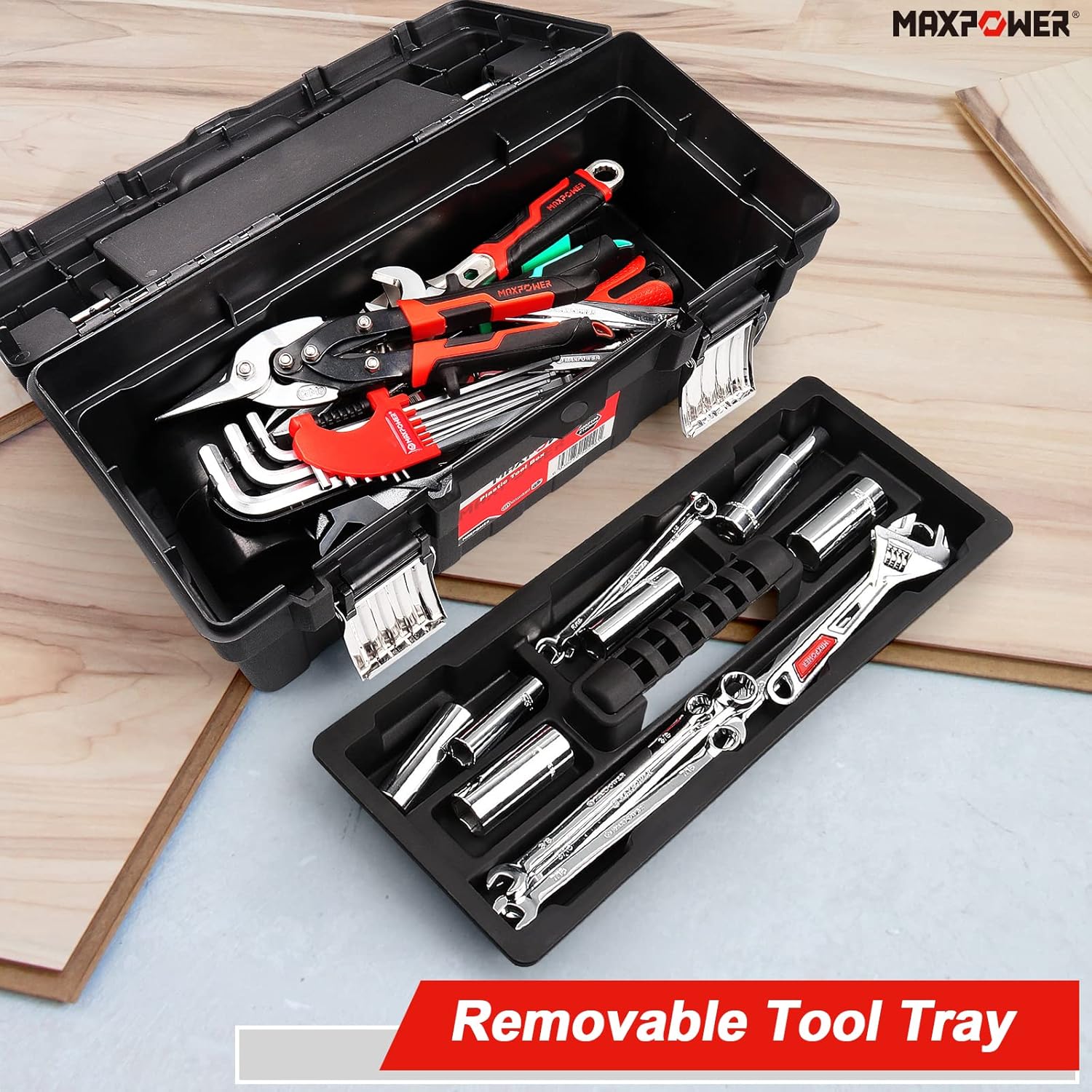
Image: The tool box with its lid open, showing the removable tool tray and the main storage area. The tray is designed to hold various hand tools.

Image: The tool box with its top transparent storage organizers open, demonstrating their use for small items like screws and bolts.
Visual Guide: Setup and Tool Storage
Video: This video demonstrates the process of opening the MAXPOWER tool box, removing the inner tray, and organizing various tools within its compartments. It also shows the top storage for small parts and how to secure the box.
Operating Instructions
The MAXPOWER tool box is designed for ease of use and portability. Its robust construction ensures your tools are protected during transport and storage.
- Carrying: Use the ergonomically designed stainless steel handle for comfortable and secure carrying. The handle is built to support the rated weight capacity of the tool box.
- Accessing Tools: To access tools, simply unlatch the metal buckles and open the lid. The removable tray allows for quick access to frequently used items without disturbing the contents of the main compartment.
- Security: For added security, a padlock can be attached through the padlock eyelet located near the latches.

Image: A person carrying the MAXPOWER tool box, demonstrating its portability and the comfortable grip of the stainless steel handle.

Image: The MAXPOWER tool box open with tools, positioned next to a person performing car maintenance, illustrating a practical application.
Maintenance
To ensure the longevity and optimal performance of your MAXPOWER tool box, follow these simple maintenance guidelines:
- Cleaning: Wipe the tool box regularly with a damp cloth to remove dust, dirt, and debris. For stubborn grime, a mild soap solution can be used. Avoid abrasive cleaners or solvents that may damage the plastic.
- Drying: Ensure the tool box is completely dry before closing and storing, especially if tools inside are susceptible to rust.
- Storage: Store the tool box in a dry environment, away from direct sunlight and extreme temperatures, to prevent material degradation.
- Latches and Handle: Periodically check the stainless steel latches and handle for any signs of wear or damage. Ensure they operate smoothly and securely.
Troubleshooting
If you encounter any issues with your MAXPOWER tool box, consider the following common solutions:
| Problem | Possible Cause | Solution |
|---|---|---|
| Lid does not close properly. | Tools are overfilling the box or obstructing the lid. | Rearrange tools to ensure they fit within the box's dimensions. Remove any items preventing the lid from seating correctly. |
| Latches are difficult to secure. | Obstruction or misalignment. | Check for any debris in the latch mechanism. Ensure the lid is fully closed and aligned before attempting to latch. |
| Handle feels loose. | Wear and tear or manufacturing defect. | Inspect the handle's attachment points. If loose, contact customer support. Avoid overloading the tool box. |
If the issue persists after attempting these solutions, please contact MAXPOWER customer support for further assistance.
Specifications
| Attribute | Detail |
|---|---|
| Brand | MAXPOWER |
| Model Number | MXP96 |
| Material | High-quality PP Plastic |
| Color | Black |
| Product Dimensions (L x W x H) | 15.7" x 6.7" x 6.9" (400mm x 170mm x 175mm) |
| Internal Dimensions (L x W x H) | 14.2" x 5.5" x 5.1" (360mm x 140mm x 130mm) |
| Item Weight | 3.39 pounds |
| Water Resistance Level | Not Water Resistant |
| Number of Compartments | 1 (plus removable tray and top organizers) |

Image: A diagram illustrating the external and internal dimensions of the MAXPOWER tool box, including the removable tray.
Warranty and Support
MAXPOWER stands behind the quality of its products. For information regarding warranty coverage, product support, or to report any issues, please visit the official MAXPOWER website or contact their customer service department. Keep your purchase receipt as proof of purchase for warranty claims.
For more information, visit the MAXPOWER Store on Amazon.