
Geepas Rechargeable LED Bulb GESL55093 User Manual
Model: GESL55093
1. Introduction
Thank you for choosing the Geepas Rechargeable LED Bulb GESL55093. This manual provides essential information for the safe and efficient use of your LED bulb. Please read these instructions carefully before installation and operation, and retain them for future reference.
2. Safety Information
- Always ensure the power supply is switched off before installing, removing, or handling the bulb to prevent electric shock.
- Do not attempt to disassemble, modify, or repair the bulb. This may cause damage and void the warranty.
- This bulb is designed for indoor use in dry locations. Avoid exposure to water, high humidity, or extreme temperatures.
- Ensure the bulb is securely screwed into a compatible E27 socket.
- Keep the bulb away from flammable materials.
- If the bulb or its components appear damaged, do not use it. Contact customer support.
- Dispose of used batteries and the bulb according to local regulations.
3. Package Contents
The package for your Geepas Rechargeable LED Bulb GESL55093 should contain the following items:
- 1 x Geepas Rechargeable LED Bulb (Model: GESL55093)
- 1 x User Manual
4. Product Overview
The Geepas GESL55093 is an 18W LED bulb designed for energy efficiency and extended operational life. It features 36 high-brightness LED pieces and includes a rechargeable battery for emergency lighting during power outages. The bulb provides a 6500K cool white light and is suitable for various indoor applications.

Figure 1: Geepas Rechargeable LED Bulb GESL55093 (Packaged View)
5. Setup and Installation
Follow these steps to install your Geepas Rechargeable LED Bulb:
- Power Off: Before installation, ensure the power supply to the light fixture is completely switched off at the main switch or circuit breaker.
- Remove Old Bulb: Carefully unscrew and remove the existing bulb from the light fixture.
- Install New Bulb: Screw the Geepas Rechargeable LED Bulb GESL55093 into the E27 socket. Turn it clockwise until it is firmly seated, but do not overtighten.
- Power On: Restore power to the light fixture. The bulb should illuminate.
6. Operating Instructions
The Geepas Rechargeable LED Bulb operates as both a standard LED bulb and an emergency light.
Standard Operation
When connected to a powered E27 socket, the bulb functions like a regular LED bulb. Use your wall switch to turn the light on or off. During this time, the internal lithium battery will charge automatically.
Emergency Lighting Function
In the event of a power outage, the bulb will automatically switch to battery power, providing illumination for up to 12 hours. To activate or deactivate the emergency light function when the main power is off, use the wall switch. The bulb will draw power from its internal rechargeable battery.
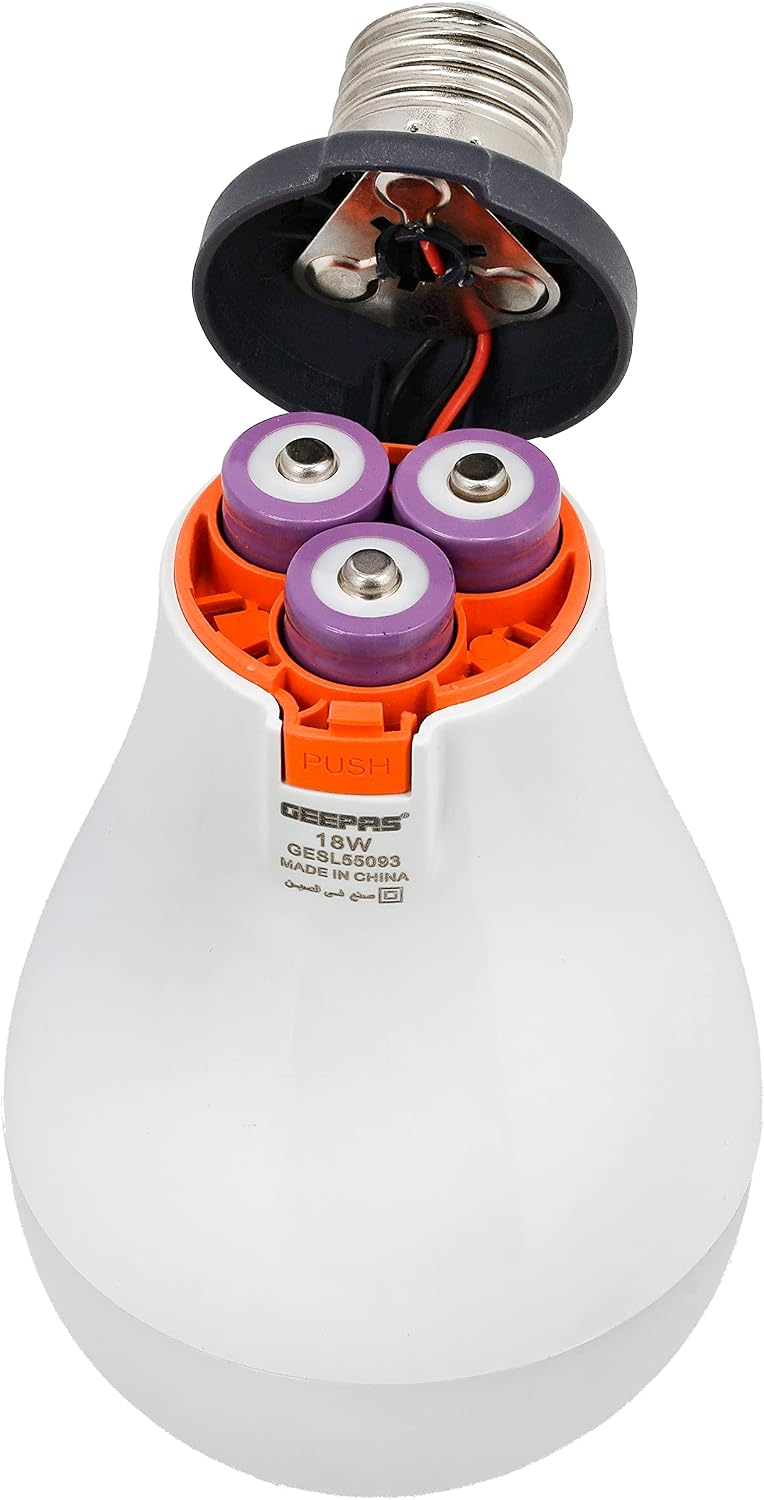
Figure 2: Internal view showing rechargeable batteries
7. Maintenance
Cleaning
To clean the bulb, ensure the power is off and the bulb has cooled down. Wipe the exterior with a soft, dry cloth. Do not use liquid cleaners or abrasive materials.
Battery Care and Replacement
The bulb contains rechargeable lithium batteries. While designed for long life, if you notice a significant decrease in emergency lighting duration, the batteries may need replacement. Refer to Figure 2 for the battery compartment. To replace batteries:
- Ensure the bulb is completely disconnected from power and cooled.
- Carefully unscrew the bulb from the fixture.
- Press the 'PUSH' button (as shown in Figure 2) to access the battery compartment.
- Replace the old batteries with new 3.7V/1200mAh rechargeable lithium batteries (3 pieces). Ensure correct polarity.
- Close the battery compartment securely.
- Dispose of old batteries responsibly according to local regulations.

Figure 3: Rechargeable Lithium Batteries
8. Troubleshooting
| Problem | Possible Cause | Solution |
|---|---|---|
| Bulb does not light up (standard mode) | No power to the fixture; Bulb not screwed in properly; Faulty bulb. | Check power supply/circuit breaker; Ensure bulb is securely screwed in; Test bulb in another working fixture. |
| Emergency light function not working or short duration | Battery not charged; Battery life depleted; Faulty battery. | Ensure bulb is connected to power for several hours to charge; Replace batteries if they are old or not holding a charge. |
| Bulb flickers | Loose connection; Incompatible dimmer switch (this bulb is not dimmable); Power fluctuations. | Tighten the bulb in the socket; Ensure not used with a dimmer; Check household wiring for stability. |
9. Specifications
| Feature | Detail |
|---|---|
| Model Number | GESL55093 |
| Brand | Geepas |
| Light Type | LED |
| Power Consumption | 18 Watts |
| Equivalent Incandescent Wattage | 18 Watts |
| Voltage | 240V AC |
| Color Temperature | 6500 Kelvin (Cool White) |
| Lamp Shape Size | A19 |
| Power Source | AC/DC (Rechargeable Battery) |
| Battery Type | 3 x 3.7V/1200mAh Rechargeable Lithium Battery |
| Emergency Working Time | Up to 12 hours |
| Special Features | Energy Efficiency, Lightweight |
| Product Dimensions | 8.8 x 8.8 x 17.6 cm |
| Item Weight | 250 grams |
Figure 4: Product Dimensions
10. Warranty and Support
This Geepas Rechargeable LED Bulb GESL55093 comes with a two-year manufacturer's warranty from the date of purchase. This warranty covers defects in materials and workmanship under normal use.
The warranty does not cover:
- Damage caused by improper installation or misuse.
- Damage caused by unauthorized repairs or modifications.
- Damage due to natural disasters or accidents.
For warranty claims or technical support, please contact your retailer or the official Geepas customer service. Please have your purchase receipt and product model number (GESL55093) available when contacting support.