
PAXCESS ROCKMAN 300
PAXCESS Portable Power Station User Manual
Model: ROCKMAN 300
Brand: PAXCESS
1. Introduction
The PAXCESS Portable Power Station (Model: ROCKMAN 300) is a versatile and reliable power solution designed for various applications, including outdoor activities, RV/van camping, fishing, travel, and emergency backup. This manual provides essential information on the safe and efficient operation, maintenance, and troubleshooting of your power station.
With a substantial 288Wh/78000mAh capacity, this power station can charge up to 8 devices simultaneously, offering a convenient and portable energy source wherever you need it.
2. Product Overview
2.1 Unit Components
Familiarize yourself with the various ports and features of your PAXCESS Portable Power Station.

Image: Front view of the PAXCESS Portable Power Station, highlighting its various output ports. These include two USB-A ports (5V/3.1A), one QC 3.0 USB port (18W), one USB-C PD port (20V/1.5A, 30W), one AC outlet (110V, 300W running, 500W peak), one car outlet (12V/10A, 120W max), and two DC outputs (12V/5A, 60W max). The display screen shows input, output, and battery percentage.
- AC Outlet: 110V Pure Sine Wave (300W running, 500W Peak)
- Car Outlet: 12V/10A, 120W Max
- DC Outputs: 2 x 12V/10A
- USB Ports: 1 x QC 3.0 (18W Max), 2 x 5V/3A
- Type C PD Port: 20V/1.5A, 30W Max
- Display Screen: Shows input, output, and battery level.
- Handle: Foldable for easy transport and storage.
2.2 Capacity and Usage Examples
The 288Wh/78000mAh capacity provides ample power for various devices.

Image: An infographic demonstrating the 288Wh 78000mAh capacity of the power station. It shows estimated recharges or runtimes for common devices: Phone (2000mAh) - 25 charges, GoPro (4000mAh) - 17 charges, Laptop (60Wh) - 4 charges, Mini Fridge (50W) - 4-5 hours, Fan (40W) - 5-6 hours, Tablet (30Wh) - 8 charges, Drone (60Wh) - 4 charges, Camera (16Wh) - 15 charges, Lamp (10W) - 22-24 hours. The image also depicts people using the power station in an outdoor camping setting.
2.3 Portability and Design
Designed for ease of transport and use in various environments.

Image: Two individuals hiking outdoors with the PAXCESS Portable Power Station. The image highlights its compact size (10.6"L x 7.1"W x 6.5"H) and light weight (7.3 lbs), emphasizing its portability and travel-friendly design for outdoor adventures.

Image: A detailed view of the PAXCESS Portable Power Station with its dimensions clearly labeled: 10.6 inches in length, 7.1 inches in width, and 6.5 inches in height. This image provides a clear understanding of the unit's physical size.
3. Setup
3.1 Initial Charging
Before first use, it is recommended to fully charge your PAXCESS Portable Power Station. This ensures optimal battery performance and longevity.
- Connect the provided AC adapter to the DC input port on the power station.
- Plug the AC adapter into a standard wall outlet.
- The display screen will indicate charging status. The unit is fully charged when the battery indicator shows 100%.
Initial charging typically takes 5-6 hours using the AC adapter.
4. Operating Instructions
4.1 Turning On/Off
- To turn on the power station, press and hold the main power button until the display screen illuminates.
- To turn off the power station, press and hold the main power button until the display screen turns off.
4.2 Using AC Output
- Press the "AC" button to activate the AC outlet. The AC indicator on the display will light up.
- Plug your AC-powered device into the 110V AC outlet. Ensure the device's power consumption does not exceed 300W (500W peak).
- After use, press the "AC" button again to turn off the AC output and conserve battery.
4.3 Using DC and USB Outputs
- The DC and USB outputs are typically active when the main power station is on.
- Plug your USB-powered devices into the USB-A, QC 3.0, or USB-C PD ports.
- Plug your 12V DC devices into the DC output ports or the car outlet.
4.4 Safety Features
The power station incorporates several safety features to protect both the unit and your devices.

Image: A visual representation of the safety features integrated into the PAXCESS Portable Power Station. These include Multifunction protection, BMS (Battery Management System) Protection, Pure Sine Wave output for stable power, MPPT (Maximum Power Point Tracking) Controller for efficient solar charging, FC Safety Certificate, and Overheat Alarm. The power station is shown next to a mini-fridge in an outdoor setting, emphasizing its stable and safe power supply.
- Battery Management System (BMS): Provides short circuit protection, voltage control, and temperature control.
- Pure Sine Wave: Ensures stable and clean power output, suitable for sensitive electronics.
- Overheat Alarm: Alerts the user if the unit's temperature exceeds safe operating limits.
5. Recharging the Power Station
Your PAXCESS Portable Power Station offers multiple recharging options to suit various situations.
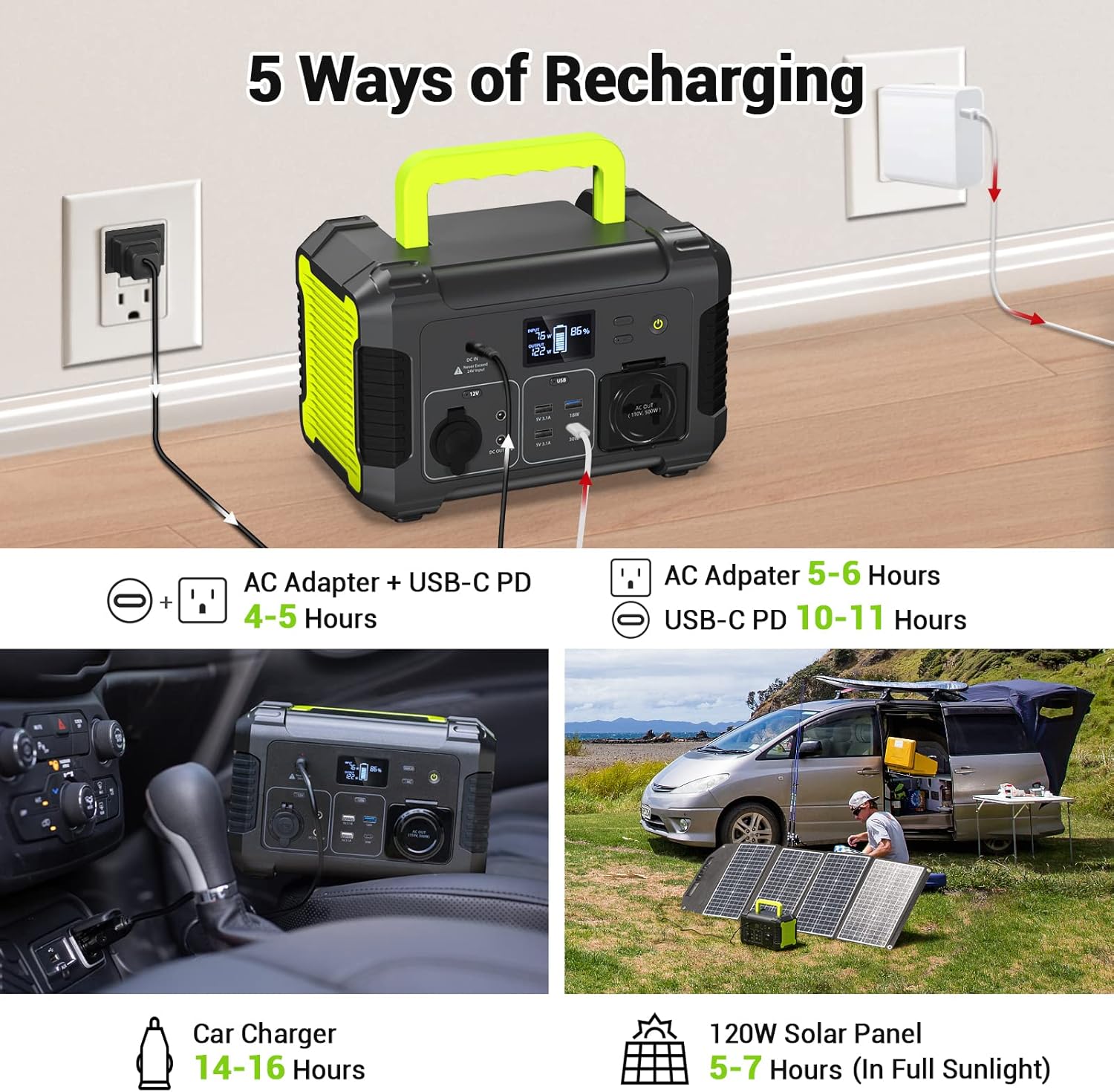
Image: An illustration detailing the five different methods to recharge the PAXCESS Portable Power Station. These methods include: 1. AC Adapter + USB-C PD (4-5 hours), 2. AC Adapter only (5-6 hours), 3. USB-C PD only (10-11 hours), 4. Car Charger (14-16 hours), and 5. 120W Solar Panel (5-7 hours in full sunlight, solar panel sold separately). The image shows visual examples for each charging method.
- AC Wall Outlet: Use the included AC adapter. Full charge in approximately 5-6 hours.
- AC Wall Outlet + USB-C PD: Combine the AC adapter with a 30W USB-C PD input for faster charging. Full charge in approximately 4-5 hours.
- USB-C PD Input: Charge via the 30W USB-C PD port. Full charge in approximately 10-11 hours.
- Car Port: Use the included car charging cable to recharge from your vehicle's 12V car outlet. Full charge in approximately 14-16 hours.
- Solar Panel (Sold Separately): Connect a PAXCESS 120W Solar Panel (not included) for environmentally friendly charging. Full charge in approximately 5-7 hours in full sunlight.
6. Specifications
| Feature | Detail |
|---|---|
| Brand | PAXCESS |
| Model Number | ROCKMAN 300 |
| Battery Capacity | 288Wh / 78000mAh |
| AC Output | 110V, 300W (500W Peak), Pure Sine Wave |
| Car Outlet | 12V/10A, 120W Max |
| DC Outputs | 2 x 12V/10A |
| USB-A Output | 2 x 5V/3A |
| QC 3.0 USB Port | 18W Max |
| USB-C PD Port | 20V/1.5A, 30W Max |
| Recharging Input (DC) | 24V (Max 24V input) |
| Dimensions (L x W x H) | 10.6" x 7.1" x 6.5" |
| Weight | 7.3 Pounds |
| Operating Temperature | 0°C to 40°C (32°F to 104°F) |
| Charging Temperature | 0°C to 40°C (32°F to 104°F) |
7. Maintenance
7.1 Storage
- Store the power station in a cool, dry place away from direct sunlight and extreme temperatures.
- For long-term storage, charge the unit to approximately 50-80% every 3-6 months to maintain battery health.
- Avoid storing in environments with high humidity or corrosive substances.
7.2 Cleaning
- Use a soft, dry cloth to clean the exterior of the power station.
- Do not use abrasive cleaners or solvents.
- Ensure all ports are free of dust and debris.
7.3 Battery Care
- Avoid fully discharging the battery frequently, as this can reduce its lifespan.
- Charge the unit regularly, even if not in frequent use.
- Do not expose the unit to temperatures outside its recommended operating range.
8. Troubleshooting
If you encounter issues with your PAXCESS Portable Power Station, refer to the following common problems and solutions.
| Problem | Possible Cause | Solution |
|---|---|---|
| Unit does not turn on. | Battery is completely discharged; Power button not held long enough. | Charge the unit using the AC adapter; Press and hold the power button for 3-5 seconds. |
| AC output not working. | AC output not activated; Device power consumption too high; Overload protection triggered. | Press the "AC" button to activate; Check device wattage; Disconnect device, turn off AC, then restart. |
| Unit not charging. | Charging cable/adapter faulty; Input port loose; Extreme temperature. | Ensure connections are secure; Try a different charging method; Move unit to a suitable temperature environment. |
| Display screen is blank. | Unit is off; Battery is critically low. | Turn on the unit; Charge the unit immediately. |
If the problem persists after attempting these solutions, please contact PAXCESS customer support for further assistance.
9. Warranty and Support
PAXCESS provides an 18-month warranty for the Portable Power Station (Model: ROCKMAN 300) from the date of purchase. This warranty covers manufacturing defects and workmanship under normal use.
Additionally, PAXCESS offers life-long technical support for this product. If you have any questions, require assistance, or experience issues not covered in this manual, please do not hesitate to contact our customer service team.
Contact Information:
- Please refer to the contact details provided on the PAXCESS official website or your purchase documentation.
- For the quickest support, have your model number and purchase date ready.
Related documentsROCKMAN 300

Ask a question about this manual
Ask about setup, troubleshooting, compatibility, parts, safety, or missing instructions. Manuals+ will review the question and use this page’s manual context to help answer it.