1. Introduction
This manual provides essential information for the safe and efficient operation, maintenance, and troubleshooting of your SEYVUM C11 12V Cordless Drill Set. Please read this manual thoroughly before using the product and retain it for future reference.
2. Safety Information
Always follow basic safety precautions to reduce the risk of fire, electric shock, and personal injury when using power tools.
- Wear Eye Protection: Always wear appropriate eye protection when operating the drill.
- Secure Workpiece: Clamp or otherwise secure the workpiece to prevent movement during drilling.
- Keep Work Area Clean: Cluttered areas and benches invite injuries.
- Avoid Dangerous Environment: Do not use power tools in damp or wet locations, or expose them to rain.
- Maintain Tool: Keep tools clean and in good working condition. Follow instructions for lubricating and changing accessories.
- Disconnect Power: Disconnect the battery pack from the drill before making any adjustments, changing accessories, or storing the tool.
3. Package Contents
Your SEYVUM C11 Cordless Drill Set includes the following items:
- SEYVUM C11 12V Cordless Drill
- 12V Lithium-Ion Battery (1.5Ah)
- 1-Hour Fast Charger
- Tool Bag
- Assorted Drill Bits (for wood and metal)
- Assorted Screwdriver Bits with Bit Holder
- Instruction Manual

Image: SEYVUM C11 Cordless Drill Set with included battery, charger, tool bag, and various drill and screwdriver bits.
4. Product Overview and Features
The SEYVUM C11 is a compact and powerful 12V cordless drill designed for various drilling and driving tasks.

Image: Diagram showing key components of the SEYVUM C11 drill, including the 3/8 inch keyless chuck, 21 torque settings, LED light, variable speed trigger, forward/reverse switch, and 12V Max Li-Ion battery.
Key Features:
- Brushless Motor: Provides higher efficiency, longer runtime, and extended tool life compared to brushed motors.
- Compact & Lightweight Design: Weighs only 1.7 pounds and measures 5.5 inches long, ideal for working in tight spaces and reducing user fatigue.
- 20+1 Torque Adjustment: Offers precise control for various materials and applications, preventing screw stripping. Maximum torque of 350 in-Lbs (40N.M).
- 2 Variable Speed Settings: (0-450 RPM for screws driving, 0-1500 RPM for drilling) allows for optimal speed control.
- 3/8-inch Keyless Chuck: For quick and easy bit changes.
- LED Work Light: Illuminates the work area for improved visibility.
- Forward/Reverse Switch: For driving and removing fasteners.
- Battery Life Indicator: Displays remaining battery charge.

Image: Cutaway view highlighting the powerful brushless motor, which offers longer life and higher torque.
5. Setup
5.1 Battery Charging
The 12V Lithium-Ion battery requires approximately 1 hour for a full charge using the provided fast charger.
- Connect the charger to a standard power outlet. The charger indicator light will show its status.
- Plug the barrel connector of the charger into the charging port on the battery.
- The indicator light on the charger will change to indicate charging status (e.g., red for charging, green for fully charged).
- Once fully charged, disconnect the charger from the battery and the power outlet.

Image: Illustration of the 1-hour fast charging process for the SEYVUM C11 battery, showing the charger connected to the battery and the battery being inserted/removed from the drill.
5.2 Battery Installation and Removal
- Installation: Align the battery with the base of the drill handle and slide it in until it clicks securely into place.
- Removal: Press the two release buttons on the sides of the battery pack and pull the battery downwards to remove it from the drill.
5.3 Chuck Adjustment and Bit Installation
The SEYVUM C11 features a 3/8-inch keyless chuck for easy bit changes.
- Open Chuck: Rotate the chuck counter-clockwise until the jaws are wide enough to insert your desired drill bit or screwdriver bit.
- Insert Bit: Insert the bit into the chuck, ensuring it is centered and fully seated.
- Tighten Chuck: Rotate the chuck clockwise to securely tighten the jaws around the bit. Ensure the bit is firmly held to prevent slippage during operation.

Image: Visual guide on how to adjust the keyless chuck: factory status, drilling (clockwise rotation), and releasing (counter-clockwise rotation).
6. Operating Instructions
6.1 Powering On/Off and Variable Speed
The drill is activated by pressing the variable speed trigger. The speed of rotation is controlled by the amount of pressure applied to the trigger. Releasing the trigger turns the drill off.
6.2 Forward/Reverse Switch
The forward/reverse switch is located above the trigger. Push the switch to the left for forward rotation (clockwise) for drilling and driving screws. Push it to the right for reverse rotation (counter-clockwise) for removing screws or freeing stuck bits. Ensure the switch is in the center position to lock the trigger and prevent accidental startup.
6.3 Torque Adjustment (Clutch Settings)
The 20+1 position clutch allows you to select the appropriate torque setting for your task, preventing over-driving screws or damaging materials. Rotate the numbered ring behind the chuck to adjust the torque. The higher the number, the greater the torque. The drill icon setting is for maximum torque, suitable for drilling.

Image: Close-up of the drill's torque adjustment ring, showing settings from 1 to 20 for driving screws into various materials like wood, marble, brick, and metal, plus a dedicated drill mode.
6.4 Speed Selection
The drill features a 2-speed gearbox. Use the switch on top of the drill to select between:
- Speed 1 (0-450 RPM): Lower speed, higher torque, ideal for driving screws and larger diameter drilling.
- Speed 2 (0-1500 RPM): Higher speed, lower torque, ideal for smaller diameter drilling in wood or metal.
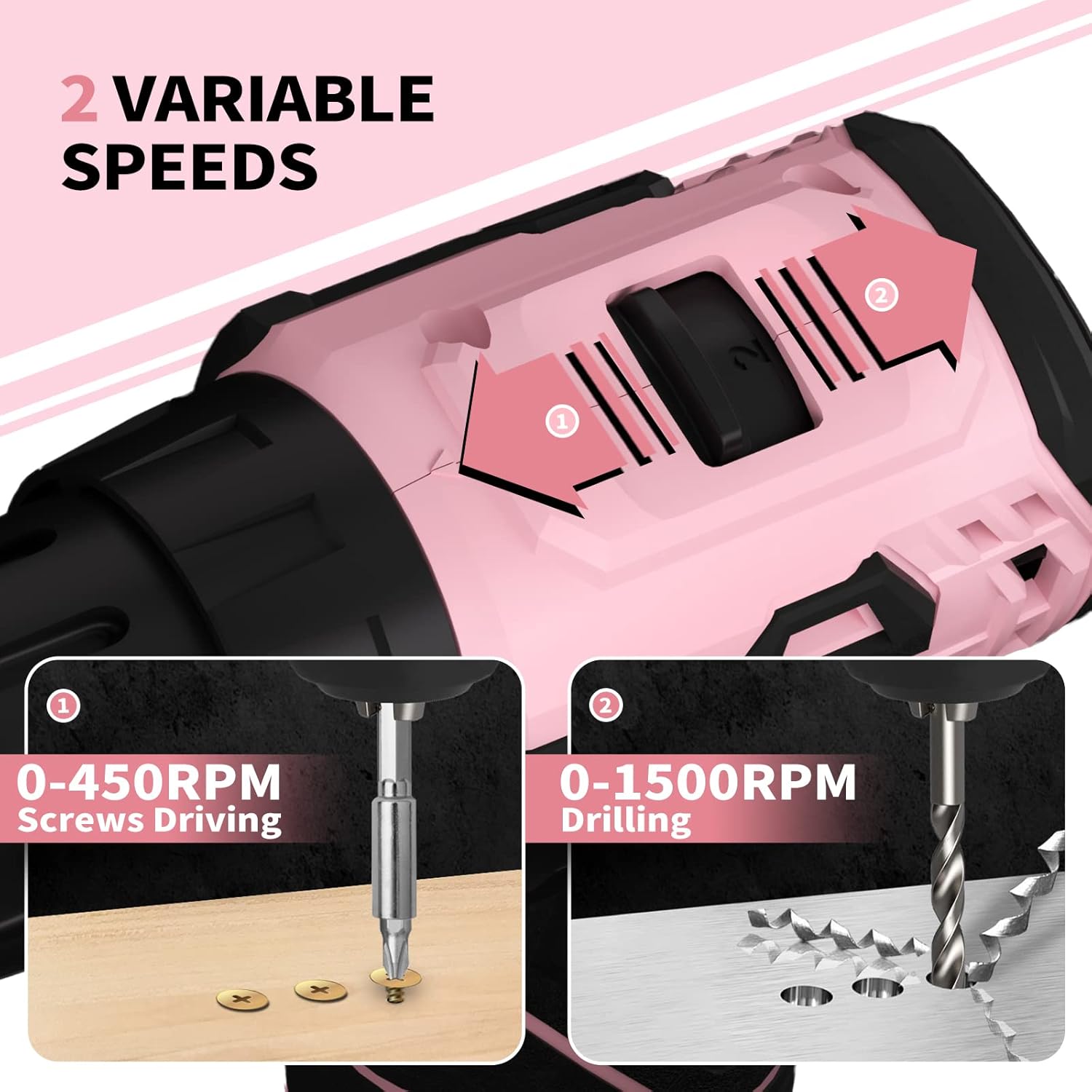
Image: Visual representation of the two variable speed settings: 0-450 RPM for screws driving and 0-1500 RPM for drilling.
6.5 Drilling and Driving Techniques
- General Use: Apply steady, even pressure. Do not force the drill.
- Screws Driving: Use lower speed (Speed 1) and adjust torque to prevent stripping.
- Wood Drilling: Use appropriate wood drill bits. Higher speeds (Speed 2) are generally suitable.
- Metal Drilling: Use appropriate metal drill bits. Start with a pilot hole for larger bits. Use lower speeds (Speed 1) and apply cutting oil to prevent overheating.
Video: This video demonstrates the SEYVUM C11 Cordless Drill in action, showcasing its capabilities in drilling through wood and metal, driving screws, and its compact design for working in tight spaces. It also highlights the 1-hour fast charging feature.
6.6 Working in Tight and Dark Areas
The compact and lightweight design of the SEYVUM C11 allows for easy maneuverability in confined spaces. The integrated LED light illuminates the work surface, providing clear visibility when working in dimly lit environments.

Image: A person using the SEYVUM C11 drill, demonstrating its lightweight and ergonomic design for comfortable use.
7. Maintenance
7.1 Cleaning
Regularly clean the ventilation slots of the drill to prevent overheating. Use a soft, damp cloth to wipe down the exterior. Do not use harsh chemicals or abrasive cleaners.
7.2 Storage
Store the drill and its accessories in the provided tool bag or original packaging in a dry, secure location away from direct sunlight and extreme temperatures. Ensure the battery is removed from the drill before storage.
7.3 Battery Care
To maximize battery life, store the battery in a cool, dry place. Avoid fully discharging the battery before recharging. If storing for extended periods, charge the battery to approximately 50% capacity every few months.
8. Troubleshooting
- Drill Not Starting: Ensure the battery is fully charged and properly installed. Check the forward/reverse switch is not in the locked (center) position.
- Reduced Power/Performance: The battery may be low on charge. Recharge the battery. Ensure the correct speed and torque settings are selected for the task.
- Bit Slipping in Chuck: Ensure the chuck is tightened securely around the bit. The bit shank might be worn; replace if necessary.
- Overheating: Allow the drill to cool down. Avoid continuous heavy-duty use. Ensure ventilation slots are clear.
9. Specifications
| Feature | Specification |
|---|---|
| Brand | SEYVUM |
| Model Number | C11 |
| Power Source | Battery Powered |
| Voltage | 12 Volts |
| Amperage | 2 Amps |
| Battery Type | Lithium Ion (1.5Ah) |
| Motor Type | Brushless |
| Maximum Torque | 350 Inch Pounds (40 N.M) |
| No-Load Speed (Speed 1) | 0-450 RPM |
| No-Load Speed (Speed 2) | 0-1500 RPM |
| Chuck Size | 3/8 Inches (Keyless) |
| Torque Settings | 20+1 |
| Item Weight | 1.7 pounds (drill only) / 2.86 pounds (with battery) |
| Product Dimensions | 5.5"L x 2.2"W x 8"H |
| Material | Steel, Plastic |
| Charger Input | 100-240V~50/60Hz |
| Charger Output | 13.5V 1.2A |
10. Warranty and Support
SEYVUM provides lifetime technical support for the C11 Cordless Drill Set. For any questions, issues, or technical assistance, please contact SEYVUM customer service.


