
technaxx TX-165
Full HD Birdcam TX-165 User Manual
Brand: Technaxx | Model: TX-165
Video camera with short lens focus for bird observation.
1. Introduction
The Technaxx Full HD Birdcam TX-165 is designed for recording and observing birds with its short lens focus (2" to 6") and wide viewing angle (100°). It features fast trigger time, slow motion video capabilities, and night recording with 940 nm LEDs. This manual provides detailed instructions for setting up, operating, and maintaining your birdcam.

Figure 1.1: Technaxx Full HD Birdcam TX-165 in its protective feeder housing.
2. What's in the Box
Upon opening the package, you should find the following components:
- Technaxx FULL HD Birdcam TX-165
- Micro USB cable
- Mounting belt
- Wall mount
- Railing mount
- 3 x screws & 3 x dowels
- 4 x AA batteries
- User Manual
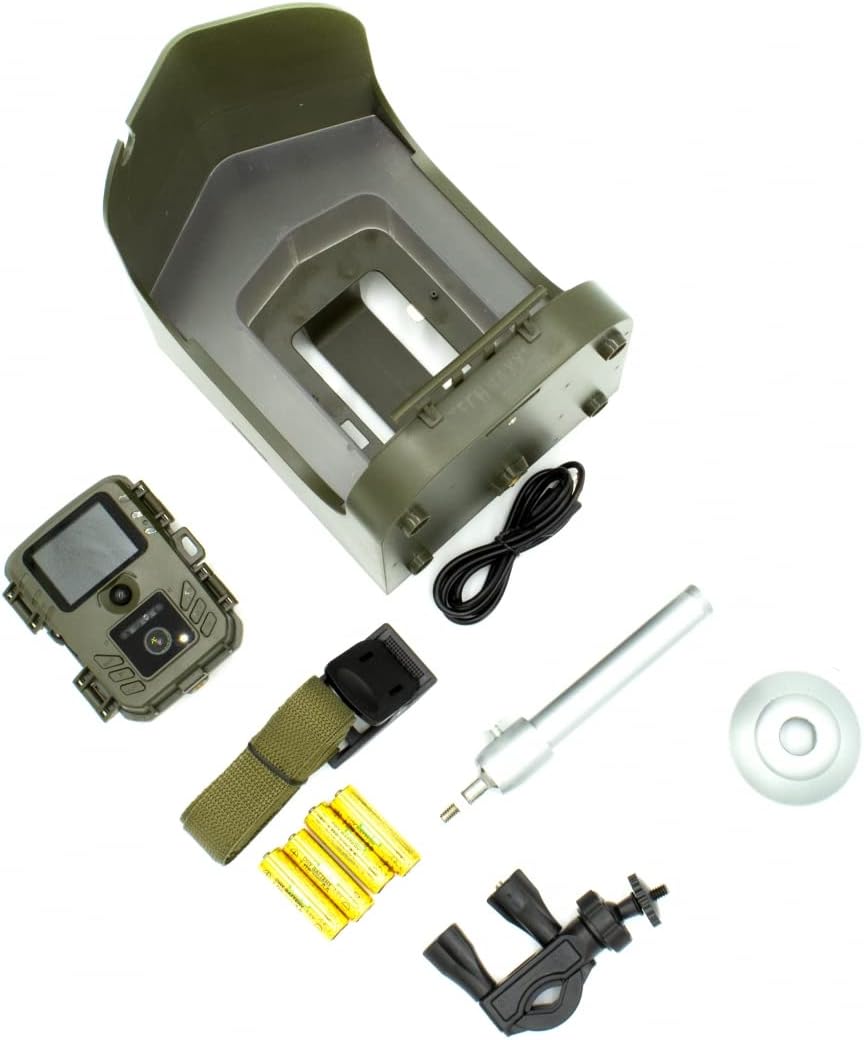
Figure 2.1: Overview of all included accessories and the birdcam unit.
3. Setup
3.1. Battery and MicroSD Card Installation
- Open the battery compartment on the back of the birdcam unit.
- Insert 4 AA batteries, ensuring correct polarity. The camera is battery-operated for both indoor and outdoor use.
- Locate the MicroSD card slot. Insert a MicroSD card (up to 512GB, not included) into the designated slot.
- Close the battery compartment securely to maintain the IP56 water resistance.


Figure 3.1: Battery and MicroSD card installation.
3.2. Mounting Options
The birdcam offers versatile mounting options:
- Tree Mount: Use the provided mounting belt and wall mount accessory to secure the feeder to a tree.
- Railing Mount: Attach the feeder to a railing using the railing mount accessory.
- Wall Mount: Utilize the wall mount and screws to fix the feeder to a wall.
- Tripod Mount: The camera unit itself has a standard 1/4" screw site at the bottom, allowing it to be mounted on a tripod.
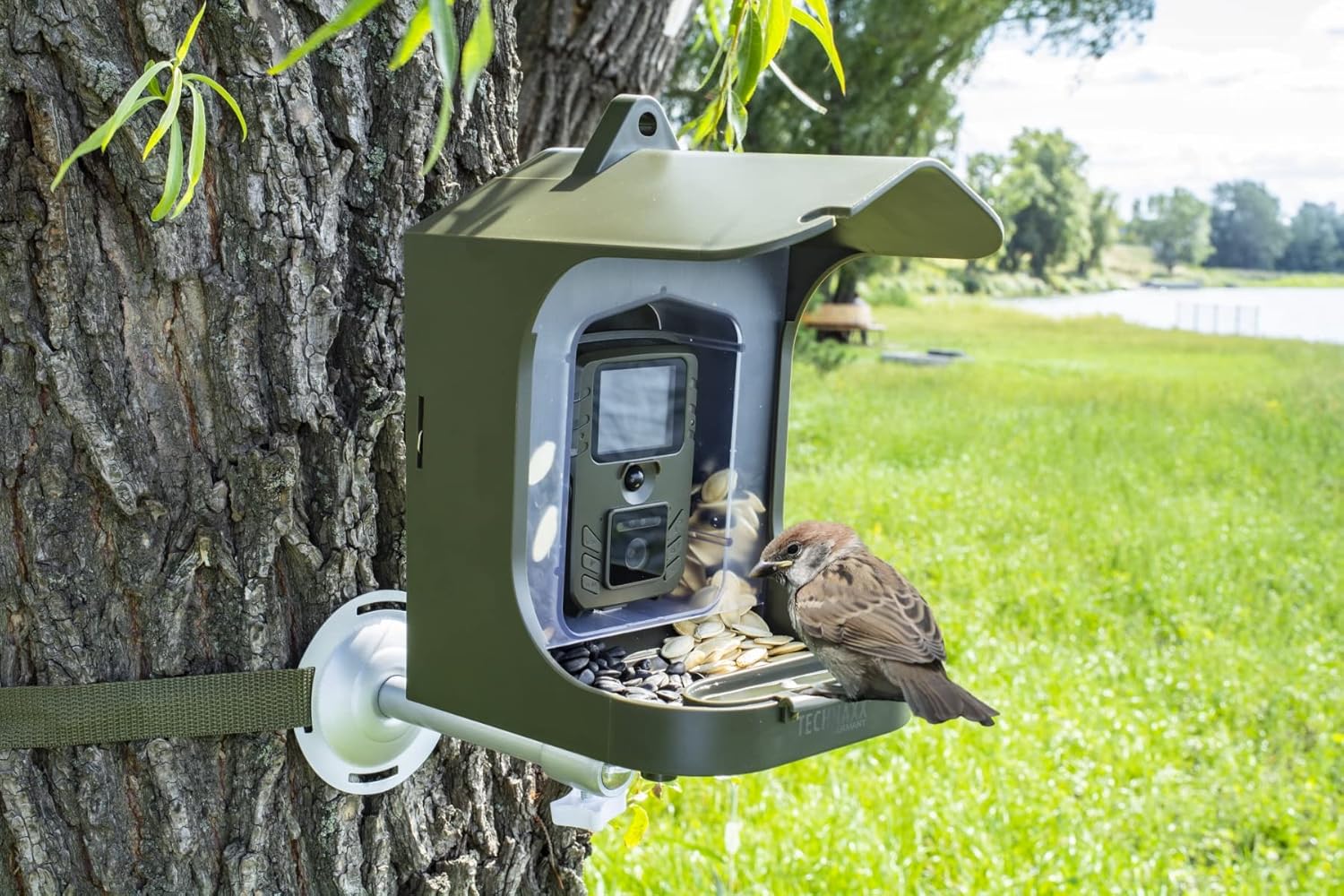

Figure 3.2: Examples of tree and railing mounting.
Video 3.1: Official product video demonstrating various mounting options for the Technaxx Full HD Birdcam TX-165.
3.3. Filling the Bird Food Container
The birdcam features a removable bird food container for approximately 150g of bird food and a removable water basin.
- Open the locks on the back of the feeder housing.
- Take the clear food container out.
- Fill the container with your desired bird food (e.g., sunflower seeds, pumpkin seeds).
- Place the food container back inside the housing and lock the locks.
- Open the food flap with a lock in the front to allow food to flow into the feeder tray.
- Fill the removable water basin with fresh water.

Figure 3.3: Visual guide for filling the bird food container.
4. Operating Instructions
4.1. Camera Modes and Features
The Birdcam TX-165 offers several recording functions:
- Video Mode: Records Full HD 1080p video.
- Photo Mode: Captures 8 Megapixel photos (3264x2448 resolution).
- Video and Photo Mode: Takes a photo first, then records video upon motion detection.
- Slow Motion: Records videos with up to 25 frames per second for detailed observation of bird movements.
The camera features a built-in microphone and speaker for audio recording and playback.


Figure 4.1: The 2.0" TFT LCD display (528x220) allows for easy setup and viewing.
4.2. Motion Detection and Night Vision
The birdcam is equipped with a PIR sensor (7.7") for motion detection and an IR range (19.7") with 940 nm LEDs for clear night recordings.
- The fast trigger time of 0.3 seconds ensures you capture quick movements.
- The 940 nm LEDs provide invisible infrared light for discreet night vision without disturbing the birds.

Figure 4.2: Day and Night mode comparison, highlighting the night vision capability.
5. Maintenance
- Regularly clean the bird food container and water basin to ensure hygiene for the birds.
- Check battery levels periodically. The working time is up to 6 months depending on usage. Consider using rechargeable AA batteries for sustainability.
- Ensure the MicroSD card has sufficient space. Transfer recordings to a computer and format the card regularly.
- Keep the camera unit's lens and PIR sensor clean for optimal performance.
6. Troubleshooting
- No images/videos recorded:
- Check if batteries are correctly inserted and charged.
- Ensure a MicroSD card is inserted and has free space.
- Verify the camera mode is set correctly (Video, Photo, or Video and Photo).
- Check PIR sensor for obstructions or dirt.
- Poor image/video quality:
- Clean the camera lens.
- Ensure sufficient lighting during daytime recordings.
- For night recordings, ensure no objects are too close to the IR LEDs causing reflection.
- Difficulty viewing images/videos:
- Remove the MicroSD card and view content on a computer or compatible device.
7. Specifications
| Feature | Detail |
|---|---|
| Brand | Technaxx |
| Model Number | TX-165 |
| Video Resolution | Full HD 1080p |
| Photo Resolution | 8 Mpixels (3264x2448) |
| Slow Motion | Up to 25 fps |
| Lens Focus | 2" to 6" (6-15cm) |
| Viewing Angle | 100° |
| Trigger Time | 0.3 seconds |
| PIR Sensor Range | 7.7" |
| IR Range | 19.7" with 940 nm LEDs |
| Display | 2.0" TFT Color Display (528x220) |
| Storage | MicroSD Card up to 512GB (not included) |
| Power Source | 4 AA batteries (included) |
| Working Time | Up to 6 months |
| Protection Class | IP56 (Water Resistant) |
| Product Dimensions | 9.25"L x 8.25"W x 6.25"H |
| Item Weight | 2.9 pounds |
| Material | Acrylonitrile Butadiene Styrene |

Figure 7.1: Product dimensions.
8. Safety Information
Please read and adhere to the following safety guidelines:
- Handle batteries with care.
- Keep the device away from water except as specified (IP56 rating indicates resistance to water jets, not submersion).
- Do not attempt to disassemble or modify the device.
- Dispose of batteries and electronic components responsibly according to local regulations.
9. Warranty & Support
For warranty information and technical support, please refer to the official Technaxx website or contact their customer service. Keep your purchase receipt as proof of purchase.
Visit the Technaxx Store for more products and information.
Related documentsTX-165


Ask a question about this manual
Ask about setup, troubleshooting, compatibility, parts, safety, or missing instructions. Manuals+ will review the question and use this page’s manual context to help answer it.