
Ajazz K685T
Ajazz K685T Wireless Mechanical Keyboard User Manual
Model: K685T
Introduction
The Ajazz K685T is a versatile 60% mechanical keyboard designed for multi-device compatibility and flexible connectivity. It supports three connection modes: Bluetooth, 2.4G wireless, and USB wired. Featuring RGB backlighting with 18 effects, N-Key rollover, and hot-swappable switches, this 68-key keyboard offers a customizable and responsive typing experience across various operating systems including Windows, Mac, iOS, and Android.

Image: The Ajazz K685T mechanical keyboard showcasing its compact 60% layout and vibrant RGB backlighting.
Package Contents
- Ajazz K685T Mechanical Keyboard
- USB Cable
- User Manual (this document)
Setup
Initial Charging
Before first use, it is recommended to fully charge the keyboard. Connect the provided USB cable to the keyboard's USB-C port and the other end to a USB power source (e.g., computer USB port, wall adapter). The keyboard has a built-in 1900mAh high-capacity lithium battery.
Connection Modes
The Ajazz K685T supports three distinct connection modes: Bluetooth, 2.4G wireless, and USB wired. You can switch between wired and wireless modes using Fn + Tab.

Image: A visual representation of the three connection modes: Bluetooth (no USB ports required), 2.4G wireless (USB receiver required), and wired (USB cable required).
1. Bluetooth Mode
This mode is ideal for connecting to mobile devices, tablets, and laptops without available USB ports. The keyboard can memorize up to 3 Bluetooth devices.
- Ensure the keyboard is in wireless mode (Fn + Tab).
- Press and hold Fn + Q, Fn + W, or Fn + E for 3-5 seconds until the indicator light flashes, indicating pairing mode.
- On your device, search for Bluetooth devices and select "Ajazz K685T" to connect.
- Once connected, the indicator light will stop flashing.
2. 2.4G Wireless Mode
This mode provides a stable wireless connection for PCs and laptops with a USB port, offering a tidy desktop experience without cables.
- Ensure the keyboard is in wireless mode (Fn + Tab).
- Plug the 2.4G USB receiver into an available USB port on your computer.
- Press Fn + R to connect to the 2.4G receiver. The keyboard should automatically connect.
3. USB Wired Mode
For the most responsive and fast connection, or to charge the keyboard while in use, connect via USB cable.
- Connect the provided USB cable to the keyboard and your computer's USB port.
- Press Fn + Tab to switch to wired mode. The keyboard will be ready for use.
Operating Instructions
Device Switching and Memory
The K685T can memorize up to 5 devices (1 wired, 3 Bluetooth, 1 2.4G wireless) for quick switching.
- Fn + Tab: Switch between wired mode and wireless mode.
- Fn + Q / W / E: In wireless mode, quickly switch between paired Bluetooth devices (up to 3).
- Fn + R: In wireless mode, connect to the 2.4G receiver.
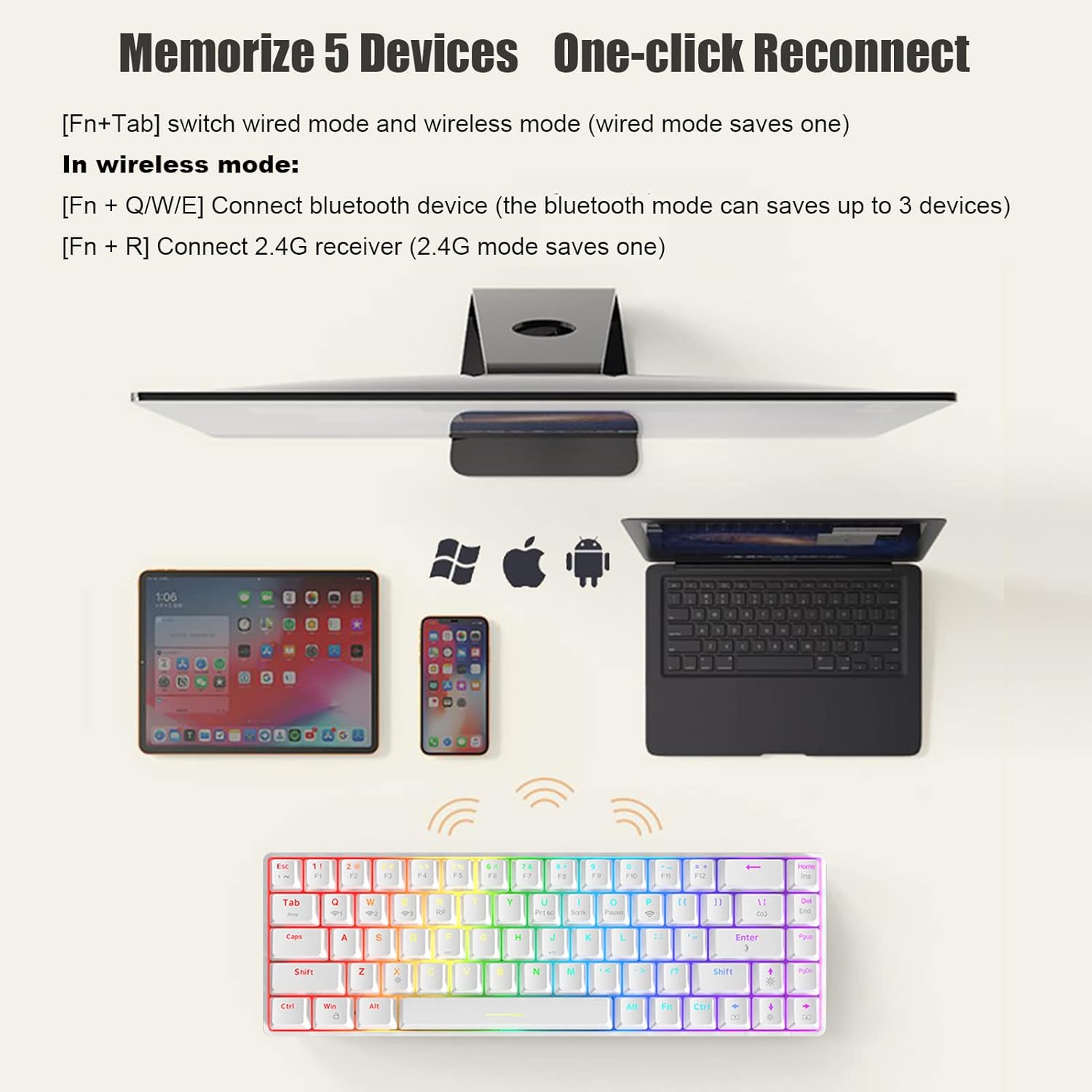
Image: The Ajazz K685T keyboard demonstrating its ability to connect and switch between multiple devices like tablets, smartphones, and laptops.
Backlight Settings
The keyboard features 18 RGB backlight effects. Use the following key combinations to customize the lighting:
- Fn + |: Switch between 18 different backlight effects.
- Fn + Enter: Adjust the light color (RGB and 7 monochrome colors).
- Fn + ↑ / ↓: Adjust backlight brightness (5 levels). When at the darkest/brightest, the Caps Lock and WIN key indicators will flash.
- Fn + ← / →: Decrease/Increase the speed of the backlight effect (5 levels). When at the slowest/fastest, the Caps Lock and WIN key indicators will flash.
- Fn + X: Turn the backlight on or off. In wireless mode, the backlight is initially off by default to conserve battery.
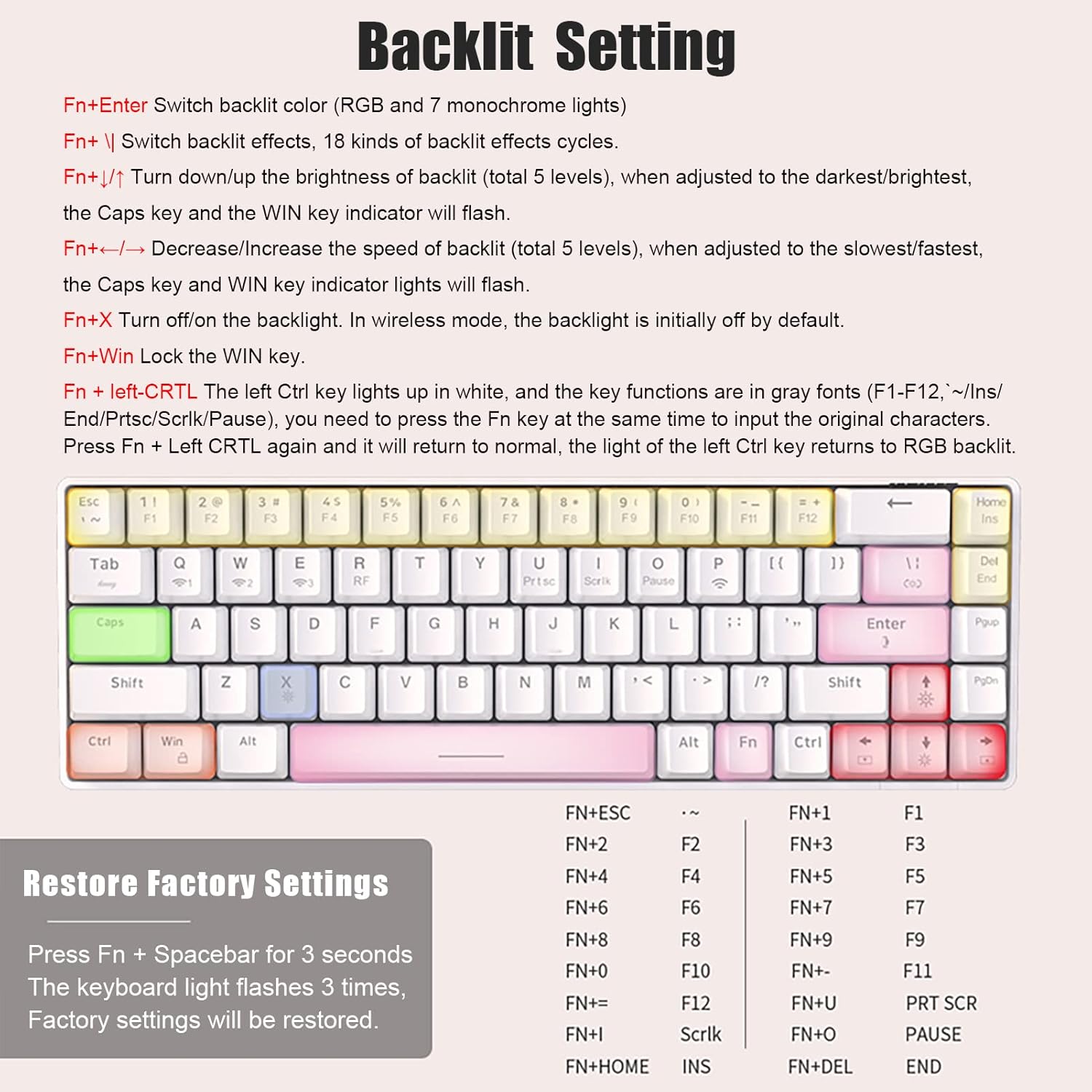
Image: A detailed diagram of the keyboard layout highlighting keys used for backlight adjustments and other functions.
Special Key Functions (Fn Combinations)
The 68-key layout integrates full-size keyboard functions via the Fn key:
- Fn + F1-F12: Access corresponding F-key functions.
- Fn + Prtsc: Print Screen.
- Fn + Scrlk: Scroll Lock.
- Fn + Pause: Pause/Break.
- Fn + Ins: Insert.
- Fn + End: End.
- Fn + Win: Lock/Unlock the Windows key.
- Fn + Left Ctrl: The left Ctrl key lights up in white, and the key functions are in gray fonts (F1-F12, ~/Ins/End/Prtsc/Scrlk/Pause). Press Fn + Left Ctrl again to return to normal RGB backlight.
Hot-Swap Functionality
The Ajazz K685T features hot-swappable switches, allowing you to easily change switches without soldering. This keyboard is compatible with 3-pin switches.

Image: A close-up view of a red mechanical switch, illustrating the hot-swap capability of the keyboard, compatible with 3-pin switches.
Maintenance
Battery Information and Power Saving
The keyboard is equipped with a 1900mAh high-capacity lithium battery. Battery life varies with usage intensity:
- Approximately 15 hours with backlight turned on.
- Approximately 100 hours with backlight turned off.
- Up to 2700 hours of standby time.
To conserve power, the keyboard has two power-saving modes:
- Backlight turns off after 1 minute of no operation.
- Enters sleep mode after 30 minutes of no operation.
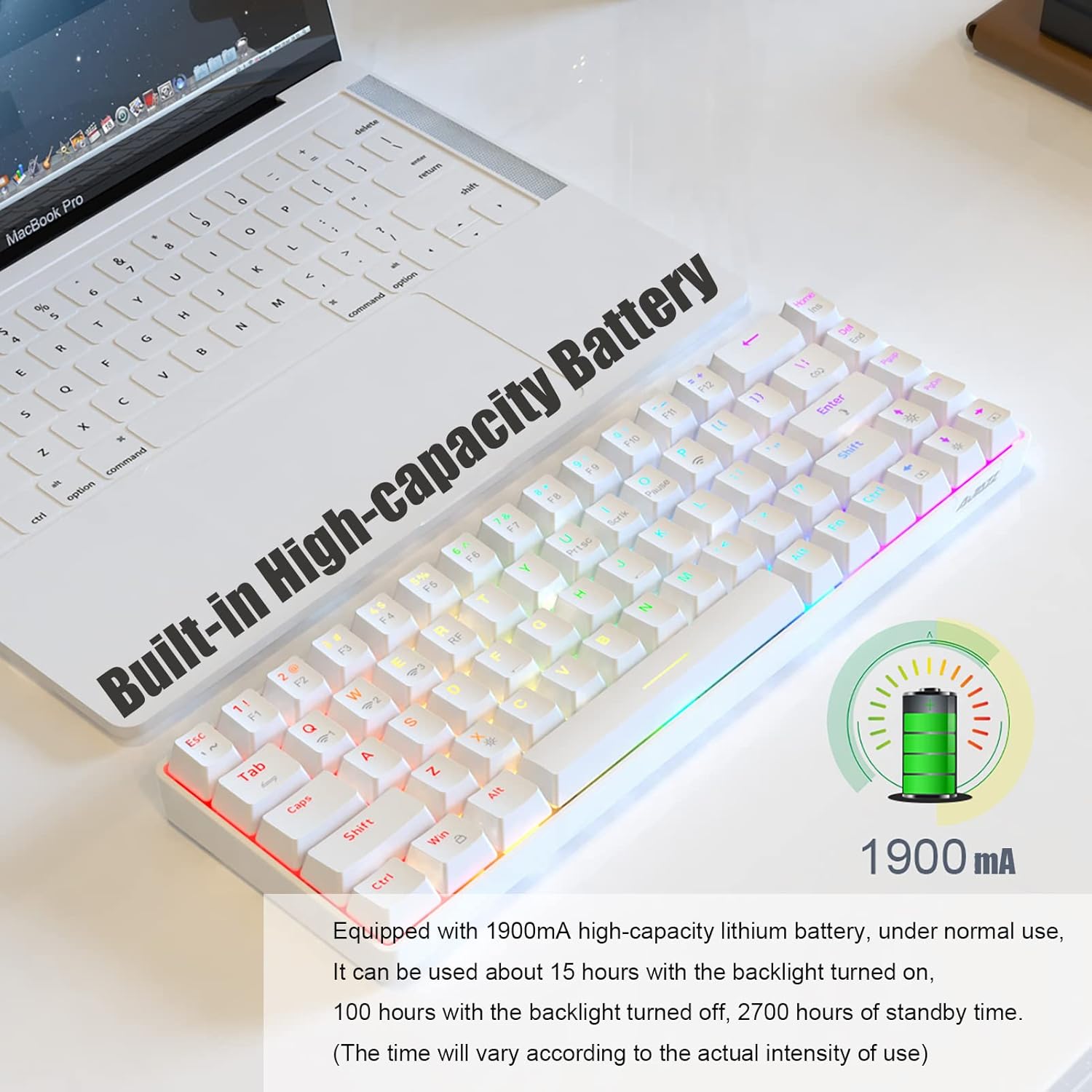
Image: An illustration of the keyboard's 1900mAh high-capacity battery, indicating its long-lasting power.
Cleaning
To clean your keyboard, gently wipe the keycaps and chassis with a soft, damp cloth. For deeper cleaning, you may carefully remove keycaps using a keycap puller (not included) and use compressed air to clear debris from underneath.
Switch Replacement
To replace a switch, use a switch puller (not included) to carefully remove the existing switch. Align the pins of the new 3-pin switch with the holes on the PCB and gently press it into place until it clicks. Ensure pins are not bent before insertion.
Troubleshooting
Common Issues
- Keyboard not connecting in wireless mode:
Ensure the keyboard is charged. Verify you are in the correct wireless mode (Bluetooth or 2.4G) using Fn + Tab. For Bluetooth, ensure the keyboard is in pairing mode (Fn + Q/W/E held for 3-5 seconds). For 2.4G, ensure the receiver is properly plugged in and Fn + R is pressed.
- Backlight not working:
Check if the backlight is turned off using Fn + X. Adjust brightness with Fn + ↑ / ↓. Ensure the keyboard has sufficient battery charge, especially in wireless mode.
- Keys not responding:
Try switching to wired mode to rule out wireless connectivity issues. If a specific key is not responding, ensure the switch is properly seated. If hot-swapping, ensure the switch pins are not bent.
Restore Factory Settings
If you encounter persistent issues or wish to reset all settings, you can restore the keyboard to its factory defaults:
- Press and hold Fn + Spacebar for 3 seconds.
- The keyboard backlight will flash 3 times, indicating that factory settings have been restored.
Specifications

Image: A visual summary of the Ajazz K685T's product parameters, including dimensions and key features.
| Feature | Detail |
|---|---|
| Brand | AJAZZ |
| Model | K685T |
| Connection Method | Bluetooth, 2.4Ghz wireless, USB wired |
| Product Size | 311 x 102 x 35 mm (12.24 x 4.02 x 1.38 inches) |
| Product Weight | 580 grams (1.28 pounds) |
| Backlit Effect | RGB backlit, 18 effects in total |
| Number of Keys | 68 keys |
| Compatible With | Windows, Mac, IOS, Android |
| Battery Capacity | 1900mAh Lithium Battery |
| Switch Type | Hot-swappable (3-pin compatible) |
| First Available Date | January 4, 2022 |
Warranty and Support
This product comes with a standard manufacturer's warranty. For detailed warranty information, technical support, or service inquiries, please visit the official Ajazz store or contact their customer service through the platform where the product was purchased.
You can visit the Ajazz Store on Amazon for more information: Ajazz Amazon Store
Related documentsK685T


Ask a question about this manual
Ask about setup, troubleshooting, compatibility, parts, safety, or missing instructions. Manuals+ will review the question and use this page’s manual context to help answer it.