
CREATE 94089_184240
CREATE UPWIND SAIL Ceiling Fan User Manual
Model: 94089_184240
1. Introduction
The CREATE UPWIND SAIL Ceiling Fan is designed to provide efficient and quiet air circulation for rooms up to 37 m². Featuring an exclusive aviation propeller-inspired design, this fan integrates a powerful AC copper motor with three speed settings and a programmable timer. It also includes an integrated light with selectable warm, neutral, and cold color options, all controllable via a convenient remote.

Image: The CREATE UPWIND SAIL Ceiling Fan in white, shown with its accompanying remote control.
2. Safety Instructions
Please read all safety instructions carefully before installation and use. Failure to follow these instructions may result in electric shock, fire, or serious personal injury.
- Ensure the power supply is disconnected before installation, maintenance, or cleaning.
- Installation must be performed by a qualified electrician in accordance with all local and national electrical codes.
- The mounting structure must be capable of supporting the weight of the fan (approximately 11.5 kg).
- Do not insert objects into the path of the rotating blades.
- Keep children and pets away from the fan during operation.
- Do not use the fan in damp or wet locations.
- Use only the remote control provided with the fan.
3. Package Contents
Verify that all components are present and undamaged before beginning installation.
- CREATE UPWIND SAIL Ceiling Fan Unit
- Remote Control
- Batteries for Remote Control
- 15cm Support Rod
- 25cm Support Rod
- Mounting Hardware
- User Manual (this document)
- Assembly Manual (separate document for detailed installation)
4. Setup and Installation
The CREATE UPWIND SAIL Ceiling Fan offers flexible installation options with two included support rods to adjust the fan's height from the ceiling. For detailed step-by-step assembly and wiring instructions, please refer to the separate Assembly Manual provided with your product.
4.1 Choosing the Support Rod
Two support rods are provided: a 15cm rod and a 25cm rod. Select the rod that provides the most suitable distance from your ceiling, ensuring adequate clearance for the fan blades.
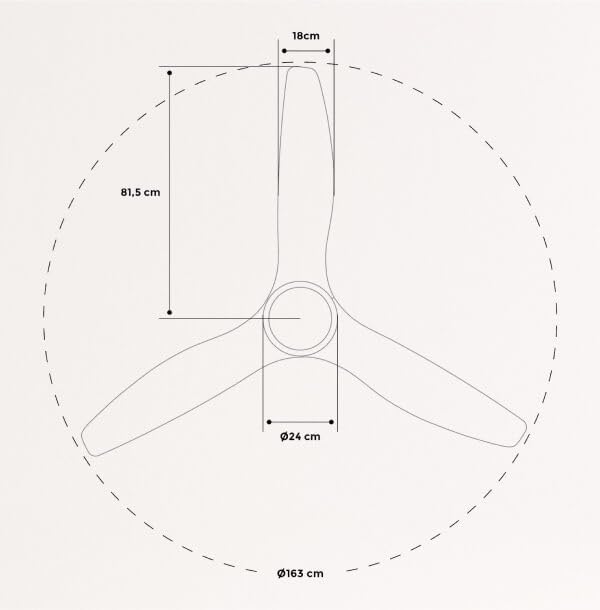
Image: Diagram illustrating the two available support rod lengths (15cm and 25cm) and their impact on the fan's overall height from the ceiling.
4.2 Dimensions
Understanding the fan's dimensions is crucial for proper placement and installation. The fan has a diameter of 163 cm.

Image: Technical diagram detailing the fan's dimensions, including its 163 cm diameter and blade measurements.
5. Operating Instructions
The CREATE UPWIND SAIL Ceiling Fan is operated using the included remote control.
5.1 Fan Speed Control
The fan features three distinct speed settings to adjust airflow according to your preference. Use the fan speed buttons on the remote control to cycle through low, medium, and high speeds.
5.2 Light Control
The integrated light offers three color temperature options: warm, neutral, and cold. Use the light control button on the remote to switch between these settings.

Image: Visual representation of the fan's integrated light displaying warm, neutral, and cold color temperatures.
5.3 Programmable Timer
The fan includes a programmable timer function, allowing you to set the fan to automatically turn off after a specified duration. The timer can be set for 1, 2, 4, or 8 hours.

Image: Diagram illustrating the programmable timer feature, with options for 1, 2, 4, and 8 hours.
6. Maintenance
Regular maintenance ensures optimal performance and longevity of your ceiling fan.
- Cleaning: Before cleaning, ensure the fan is turned off and the power supply is disconnected. Use a soft, damp cloth to wipe down the fan blades and motor housing. Do not use abrasive cleaners or solvents.
- Blade Inspection: Periodically check the fan blades for any signs of damage or warping. Ensure all blade screws are securely tightened.
- Light Source: The integrated LED light source is designed for long life and typically does not require replacement. If issues arise, consult the troubleshooting section or contact customer support.
7. Troubleshooting
Refer to the following table for common issues and their potential solutions.
| Problem | Possible Cause | Solution |
|---|---|---|
| Fan does not turn on. | No power supply; Remote control battery low/dead; Wiring issue. | Check circuit breaker; Replace remote control batteries; Consult a qualified electrician to check wiring. |
| Fan makes excessive noise. | Loose screws; Unbalanced blades; Motor issue. | Tighten all screws; Check blade balance (refer to assembly manual); Contact customer support if noise persists. |
| Light does not work. | Power issue; LED module fault. | Check power supply; Ensure light function is activated on remote; Contact customer support. |
| Remote control not responding. | Low/dead batteries; Remote not paired; Obstruction. | Replace batteries; Refer to assembly manual for remote pairing instructions; Ensure no obstructions between remote and fan. |
8. Specifications
Detailed technical specifications for the CREATE UPWIND SAIL Ceiling Fan.
| Feature | Detail |
|---|---|
| Brand | CREATE |
| Model Number | 94089_184240 |
| Color | White |
| Electric Fan Design | Ceiling Fan |
| Power Source | Corded Electric |
| Style | With light |
| Product Dimensions (D x W x H) | 163D x 163W x 50.5H Centimeters |
| Room Type | Dining Room (suitable for rooms up to 37 m²) |
| Special Feature | Timer (1-8 hours) |
| Recommended Uses | Ventilating |
| Noise Level | 48 dB |
| Wattage | 90 Watts |
| Voltage | 240 Volts |
| Item Weight | 11 kg 500 g |
| Included Components | Remote, Battery |
9. Warranty and Support
Your CREATE UPWIND SAIL Ceiling Fan is covered by a manufacturer's warranty. Please refer to the warranty card included in your product packaging for specific terms and conditions, including warranty duration and coverage details.
For technical support, troubleshooting assistance, or to inquire about replacement parts, please contact CREATE customer service. Contact information can typically be found on the manufacturer's official website or on the product packaging.
Website: www.create-store.com (This is a placeholder, please refer to actual manufacturer website)
Related documents94089_184240


Ask a question about this manual
Ask about setup, troubleshooting, compatibility, parts, safety, or missing instructions. Manuals+ will review the question and use this page’s manual context to help answer it.