
1. Introduction
This manual provides comprehensive instructions for the installation, operation, and maintenance of your REIGY 3MP WiFi PTZ Security Camera. Please read this manual thoroughly before using the product to ensure proper functionality and safety.
Package Contents
- REIGY 3MP WiFi PTZ Security Camera
- Power Adapter
- Mounting Screws and Anchors
- User Manual

Figure 1.1: REIGY 3MP WiFi PTZ Security Camera
2. Safety Information
- Ensure the power supply matches the camera's requirements.
- Do not expose the camera to extreme temperatures or humidity beyond its operating range (-4℉ to +140℉).
- Avoid placing the camera near strong electromagnetic interference.
- Disconnect power before cleaning or performing maintenance.
- Keep out of reach of children.
3. Product Overview
The REIGY 3MP WiFi PTZ Security Camera is designed for both indoor and outdoor surveillance, offering high-definition video, pan-tilt-zoom capabilities, two-way audio, and advanced motion detection.
Key Features
- Pro HD 3MP Resolution (2304*1296): Provides clear and detailed video footage.
- Color Night Vision: Equipped with 4 IR LEDs and 4 white LEDs for enhanced night visibility.
- 355° Pan & 90° Tilt: Wide field of view with remote control.
- Two-Way Audio: Built-in microphone and speaker for communication.
- Motion Detection & Alerts: Real-time notifications with snapshots.
- IP66 Waterproof: Durable design for outdoor use.
- 2.4GHz Wi-Fi Support: Wireless connectivity (5GHz Wi-Fi not supported).

Figure 3.1: Overview of REIGY Camera Features
4. Setup Guide
4.1 App Installation
Download the official mobile application (e.g., "iCSee" or similar, as commonly used with such cameras) from your smartphone's app store (iOS or Android). Search for "REIGY" or refer to the QR code on the product packaging for direct download.
4.2 Powering On and Initial Connection
- Connect the camera to the power adapter and plug it into an electrical outlet.
- Wait for the camera to initialize. You may hear a prompt indicating it's ready for connection.
- Open the installed mobile application and follow the on-screen instructions to add a new device.
- Select the Wi-Fi connection method. Ensure your smartphone is connected to a 2.4GHz Wi-Fi network. 5GHz Wi-Fi is not supported.
- Enter your Wi-Fi password when prompted. The app will guide you through pairing the camera with your Wi-Fi network.
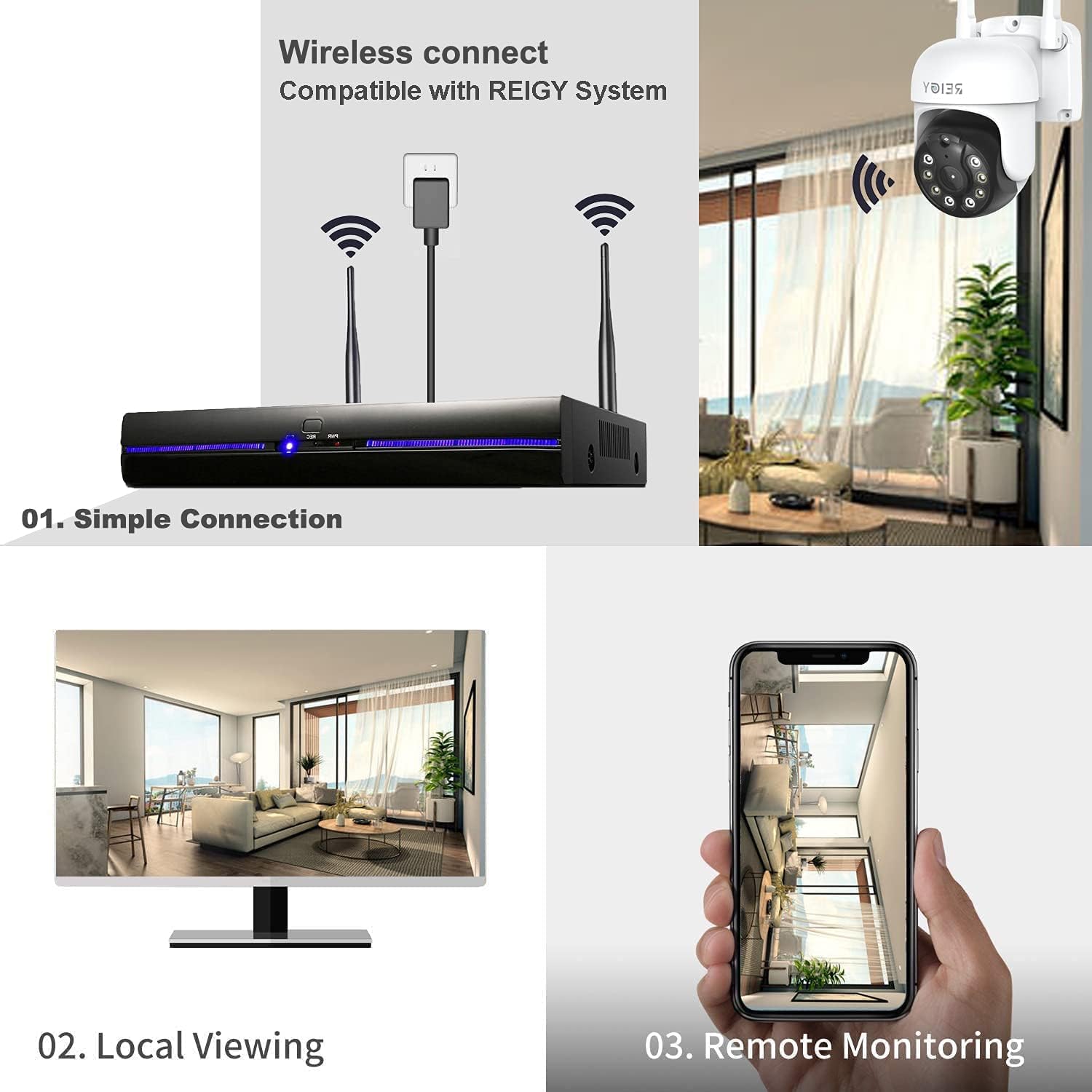
Figure 4.1: Wireless Connection and Remote Monitoring Setup
4.3 Connection Types
The camera supports various connection methods for flexible deployment:
- Wireless Transmission: Connects directly to your Wi-Fi router.
- Wire Transmission: Can be connected via a LAN cable for a stable wired connection.
- NVR Transmission: Compatible with REIGY NVR systems for integrated surveillance.

Figure 4.2: Various connection methods for the camera.
4.4 Mounting the Camera
Choose a suitable location for mounting, ensuring a clear field of view and access to a power source. The camera can be wall-mounted.
- Mark the drilling points on the wall using the mounting template (if provided) or the camera base.
- Drill holes and insert the wall anchors.
- Secure the camera base to the wall using the provided screws.
- Adjust the camera angle as needed after mounting.

Figure 4.3: Camera designed for outdoor installation with IP66 waterproof rating.
5. Operating Instructions
5.1 Pan and Tilt Control
From the mobile application, you can remotely control the camera's pan (horizontal) and tilt (vertical) movements. The camera offers a 355° horizontal pan and 90° vertical tilt range, minimizing blind spots.
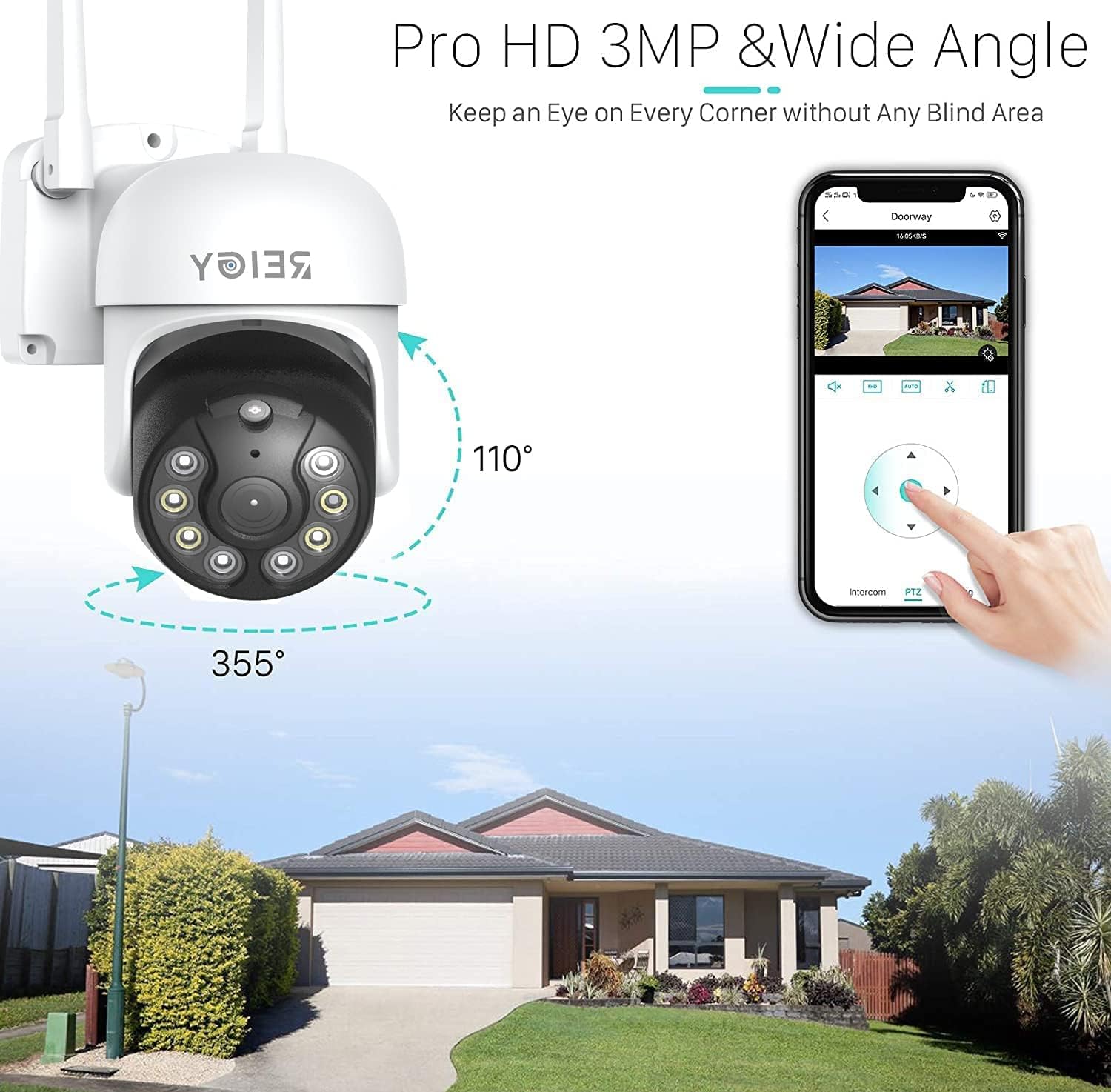
Figure 5.1: Camera Pan (355°) and Tilt (90°) Capabilities
5.2 Two-Way Audio
The built-in microphone and speaker allow for real-time two-way communication. Tap the microphone icon in the app to speak, and listen through the camera's speaker.

Figure 5.2: Using Two-Way Audio to communicate through the camera.
5.3 Motion Detection and Alerts
Enable motion detection in the app settings. When motion is detected, the camera will send an accurate, real-time alert with a snapshot to your phone.

Figure 5.3: Motion detection triggering app notifications.
5.4 Night Vision Modes
The camera supports multiple night vision modes:
- Infrared Night Vision: Standard black and white night vision using IR LEDs.
- Full Color Night Vision: Utilizes white LEDs to provide full-color video even in low light conditions.
- Smart Night Vision: Automatically switches between IR and color night vision based on detected motion or light conditions.

Figure 5.4: Comparison of different night vision modes.
5.5 Recording and Storage
The camera supports local storage via a MicroSD card (up to 128GB, not included) and cloud storage options (subscription may be required). Insert the MicroSD card into the designated slot on the camera.
6. Maintenance
- Cleaning: Gently wipe the camera lens and body with a soft, dry cloth. Do not use harsh chemicals or abrasive cleaners.
- Firmware Updates: Periodically check the mobile application for available firmware updates to ensure optimal performance and security.
- Power Cycle: If the camera becomes unresponsive, disconnect and reconnect the power adapter to restart it.
7. Troubleshooting
| Problem | Possible Cause | Solution |
|---|---|---|
| Camera offline | No power; Wi-Fi disconnected; Router issue | Check power connection; Verify Wi-Fi signal strength; Restart router and camera. |
| Cannot connect to Wi-Fi | Incorrect Wi-Fi password; 5GHz Wi-Fi network; Camera too far from router | Double-check password; Ensure connection to 2.4GHz Wi-Fi; Move camera closer to router or use a Wi-Fi extender. |
| Motion alerts not received | Motion detection disabled; App notifications off; Network issues | Enable motion detection in app; Check phone notification settings; Ensure stable internet connection. |
| Poor image quality | Dirty lens; Low light conditions; Network bandwidth | Clean the lens; Ensure adequate lighting or proper night vision mode; Check internet speed. |
8. Specifications
| Feature | Detail |
|---|---|
| Model | REIGY 3MP PTZ Security Camera |
| Effective Video Resolution | 3 MP (2304*1296) |
| Connectivity Technology | Wireless (2.4GHz Wi-Fi) |
| Pan Range | 355 Degrees |
| Tilt Range | 90 Degrees |
| Night Vision | IR Night Vision, Full Color Night Vision, Smart Night Vision |
| Audio | Two-Way Audio |
| Storage | MicroSD Card (up to 128GB), Cloud Storage |
| Weatherproof Rating | IP66 |
| Operating Temperature | -4℉ to +140℉ (-20℃ to +60℃) |
| Wattage | 20 watts |
| Dimensions | 7.01 x 6.02 x 4.49 inches |
| Item Weight | 1.28 pounds |
9. Warranty and Support
REIGY products come with a standard manufacturer's warranty. For detailed warranty information, technical support, or service inquiries, please refer to the contact information provided on the product packaging or visit the official REIGY website. Please retain your proof of purchase for warranty claims.