
HOMCOM 824-037V70
HOMCOM Portable Air Cooler User Manual
Model: 824-037V70
Brand: HOMCOM
Product Overview
The HOMCOM Portable Air Cooler is a versatile unit designed to enhance your indoor comfort. It combines ventilation, ice cooling, humidification, and anion features to provide a refreshing environment. Equipped with a 10L water tank, multiple speed and mode settings, and convenient remote control, this unit is ideal for home use, particularly in bedrooms.
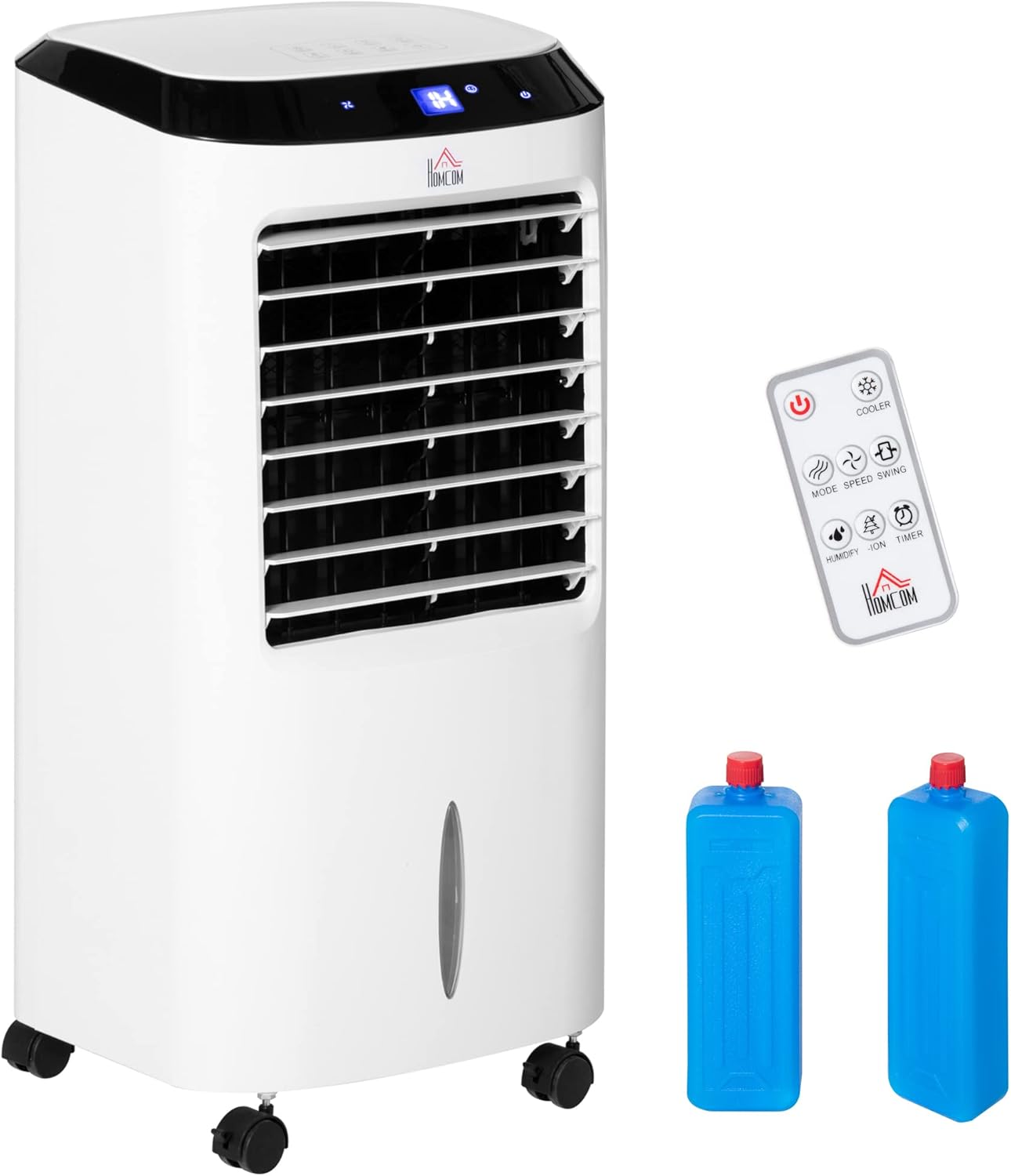
Image: The HOMCOM Portable Air Cooler, showcasing its sleek white design, control panel, remote control, and two blue ice packs.

Image: A woman relaxing on a sofa in a living room, with the HOMCOM air cooler positioned nearby, illustrating its cooling effect.
Safety Instructions
- Always place the unit on a stable, level surface to prevent tipping, especially when the water tank is full.
- Ensure the power supply matches the voltage specified on the product label (240 Volts).
- Do not block the air inlets or outlets during operation.
- Unplug the unit from the power outlet before cleaning, refilling, or performing any maintenance.
- Keep the unit away from direct sunlight and heat sources.
- Do not immerse the unit or its electrical components in water or other liquids.
- Keep out of reach of children and pets.
Setup and Assembly
The HOMCOM Portable Air Cooler requires minimal assembly. Ensure all components are present before beginning.
Unpacking
- Carefully remove the air cooler and all accessories from the packaging.
- Check for any damage during transit. If damage is found, do not operate the unit and contact customer support.
- Retain the packaging for future storage or transport.
Water Tank Filling
The unit features a 10L water tank for humidification and ice cooling functions. For optimal cooling, use cold water or add ice packs.

Image: An illustration demonstrating how to easily fill the 10L water tank of the air cooler with water or ice boxes.
- Locate the water tank at the bottom of the unit.
- Carefully pull out the water tank.
- Fill the tank with clean water. Do not exceed the maximum fill line.
- For enhanced cooling, place the provided ice packs (after freezing) into the water tank.
- Gently push the water tank back into its position until it clicks securely.
Placement
Position the air cooler on a flat, stable surface. The swivel casters allow for easy mobility, so you can move it to your desired location.

Image: A diagram showing the dimensions of the HOMCOM Portable Air Cooler, which are 76 cm in height, 31.6 cm in depth, and 38.2 cm in width.
Operating Instructions
The HOMCOM Air Cooler offers multiple functions and settings for customized comfort. Control the unit using the LED display on top or the included remote control.
Control Panel and Remote

Image: A detailed view of the air cooler's LED display and the remote control, illustrating the buttons for On/Off, Modes, Swing, Timer, Cooling, Speed, Anion, and Humidification functions.
The LED display shows current operational settings. The remote control provides convenient access to all functions from a distance. Remember that the remote requires 1 CR2 battery (not included).
Functions and Modes

Image: A visual representation of the air cooler's four primary functions: Fan, Fan and Humidifier, Independent Humidifier, Air Cooler, and Anion feature for air purification.
- Ventilation (Fan): Operates as a standard fan without water.
- Humidification: Adds moisture to the air when water is in the tank.
- Ice Cooling: Provides enhanced cooling when ice packs or cold water are used in the tank.
- Anion: Releases negative ions to help purify and freshen the air.
Speed and Wind Modes

Image: A graphic detailing the three wind modes (Sleep, Natural, Normal) and three speed settings (Low, Medium, High) available on the air cooler.
- Speed Levels: Choose from Low, Medium, or High fan speeds.
- Normal Mode: Provides a consistent airflow.
- Natural Mode: Simulates natural breeze with varying fan speeds.
- Sleep Mode: Operates quietly with reduced fan speed for undisturbed rest.
Oscillation and Timer

Image: A visual explanation of the swing feature, demonstrating how the unit oscillates horizontally and how the blades can be manually adjusted for vertical airflow.
- Oscillation: Activate the oscillating function to distribute cool air across a wider area. The unit swings horizontally.
- Manual Vertical Adjustment: The vertical direction of airflow can be adjusted manually by tilting the louvers.
- Timer: Set the operating time for up to 8 hours in 1-hour increments. This is useful for overnight use or when you want the unit to turn off automatically.
Official Product Video
Video: An official product video demonstrating the features and operation of the HOMCOM 824-037V70 Air Cooler. This video provides a visual guide to the unit's capabilities and how it functions in a home environment.
Maintenance
Regular maintenance ensures the longevity and efficient operation of your HOMCOM Air Cooler.
Cleaning the Water Tank
- Empty any remaining water from the tank after each use, especially if the unit will not be used for an extended period.
- Clean the water tank regularly with a mild detergent and water to prevent mold and mildew buildup. Rinse thoroughly.
- Ensure the tank is completely dry before reinserting it into the unit.
Air Filter System

Image: A diagram illustrating the air filter system, emphasizing its role in keeping the circulating air fresh and clean, and showing how to access the filter for maintenance.
The air filter helps maintain air quality and reduce operational noise. Clean the filter periodically.
- Turn off and unplug the unit before accessing the filter.
- Locate the air filter panel, typically at the rear of the unit.
- Remove the filter and gently clean it with a soft brush or vacuum cleaner to remove dust and debris. For deeper cleaning, rinse with water and mild soap, then allow it to air dry completely before reinserting.
- Reinstall the dry filter securely.
Troubleshooting
If you encounter issues with your HOMCOM Air Cooler, refer to the following common problems and solutions:
| Problem | Possible Cause | Solution |
|---|---|---|
| Unit does not turn on. | No power supply; power cord not properly plugged in; power button not pressed. | Ensure the unit is plugged into a working electrical outlet. Press the power button firmly. Check the circuit breaker. |
| Weak airflow. | Air filter is dirty; air inlets/outlets are blocked; fan speed is too low. | Clean the air filter. Ensure nothing is obstructing the air vents. Increase the fan speed setting. |
| No cooling effect. | Water tank is empty; ice packs not used or not frozen; unit is not an air conditioner. | Fill the water tank. Use frozen ice packs for enhanced cooling. Note that this is an evaporative cooler, not an air conditioner, and provides cooling through evaporation, which is less intense than refrigerant-based AC units. |
| Unusual noise. | Unit is not on a level surface; foreign object inside; water pump issue. | Place the unit on a flat, stable surface. Turn off and unplug the unit, then check for any obstructions. If the noise persists, contact customer support. |
| Water leakage. | Water tank not properly seated; tank overfilled. | Ensure the water tank is correctly inserted and securely closed. Do not overfill the water tank beyond the maximum fill line. |
Specifications
| Feature | Detail |
|---|---|
| Model Number | 824-037V70 |
| Dimensions (L x W x H) | 31.6 x 38.2 x 76 cm |
| Item Weight | 7 kg |
| Water Tank Capacity | 10 Litres |
| Power | 60W |
| Voltage | 240 Volts |
| Recommended Room Area | Up to 20㎡ |
| Control Type | LED Display, Remote Control |
| Speed Levels | 3 (Low, Medium, High) |
| Wind Modes | 3 (Normal, Natural, Sleep) |
| Timer | 8-hour (1-hour increments) |
| Special Features | Ventilation, Ice Cooling, Humidification, Anion, Oscillation, Portable (with casters) |
| Included Components | Remote Control |
| Batteries Required (for remote) | 1 CR2 (not included) |
Warranty and Support
Specific warranty details and direct support contact information are not available in the provided product data. Please refer to your purchase documentation or the retailer's website for warranty terms and customer service contact details.
For general inquiries or assistance, you may visit the HOMCOM brand store on Amazon: HOMCOM Store.
Related documents824-037V70


Ask a question about this manual
Ask about setup, troubleshooting, compatibility, parts, safety, or missing instructions. Manuals+ will review the question and use this page’s manual context to help answer it.