
WEN 3921
WEN 16-Inch Two-Direction Variable Speed Scroll Saw and Foot Pedal Switch User Manual
Model: 3921 (Scroll Saw) & WA0392 (Foot Pedal Switch)
1. Introduction
This manual provides essential information for the safe operation, setup, maintenance, and troubleshooting of your WEN 16-Inch Two-Direction Variable Speed Scroll Saw and its accompanying Foot Pedal Switch. Please read and understand all instructions before using the product to ensure safety and optimal performance.
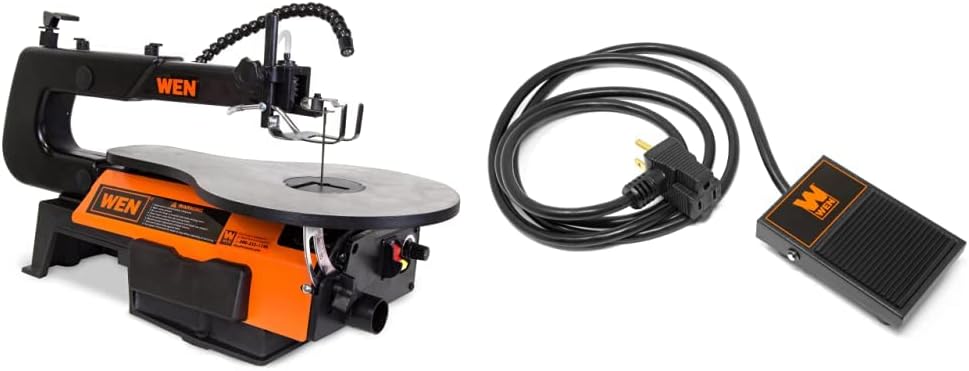
WEN 16-Inch Two-Direction Variable Speed Scroll Saw and Foot Pedal Switch Bundle. This image displays the complete scroll saw unit alongside the included foot pedal switch, illustrating the full product package.
2. General Safety Instructions
Always follow basic safety precautions when operating power tools to reduce the risk of fire, electric shock, and personal injury.
- Work Area Safety: Keep the work area clean and well-lit. Cluttered or dark areas invite accidents. Do not operate power tools in explosive atmospheres, such as in the presence of flammable liquids, gases, or dust.
- Electrical Safety: Power tool plugs must match the outlet. Never modify the plug in any way. Do not expose power tools to rain or wet conditions. A 6-foot power cord is provided for the foot pedal switch.
- Personal Safety: Always wear eye protection. Use hearing protection when operating for extended periods. Dress properly; avoid loose clothing, jewelry, or long hair that can get caught in moving parts.
- Tool Use and Care: Do not force the power tool. Use the correct power tool for your application. Disconnect the plug from the power source before making any adjustments, changing accessories, or storing power tools.
- Foot Pedal Safety: Ensure the foot pedal is placed on a stable, non-slip surface. The textured surface is designed to prevent slipping during operation.
3. Components and Features
Your WEN Scroll Saw and Foot Pedal Switch bundle includes several features designed for precision and ease of use.
3.1 Scroll Saw Features (Model 3921)
- Two-Direction Cutting: Unique blade holder accepts both pinned and pinless blades, allowing for directional changes to accommodate various workpieces.
- Variable Speed Control: Adjust speed from 550 to 1600 strokes per minute (SPM) for optimal cutting across different materials.
- Work Table: Spacious 16-by-10-inch table bevels up to 45 degrees for angled cuts.
- Throat Depth: 16-inch throat depth allows for cutting larger workpieces.
- Cutting Capacity: Saws through hardwoods up to two inches thick.
- Air Pump: Adjustable air pump clears sawdust from the work area for clear visibility.
- Dust Port: 1-1/2-inch dust port for connecting to a dust collection system, keeping the work area clean.
- Hold-Down Foot Clamp: Secures your project in place during operation.
- Flexible Work Light: Bends and adjusts to illuminate the cutting area.
- Cast Iron Base: Prevents vibration and walking during operation.
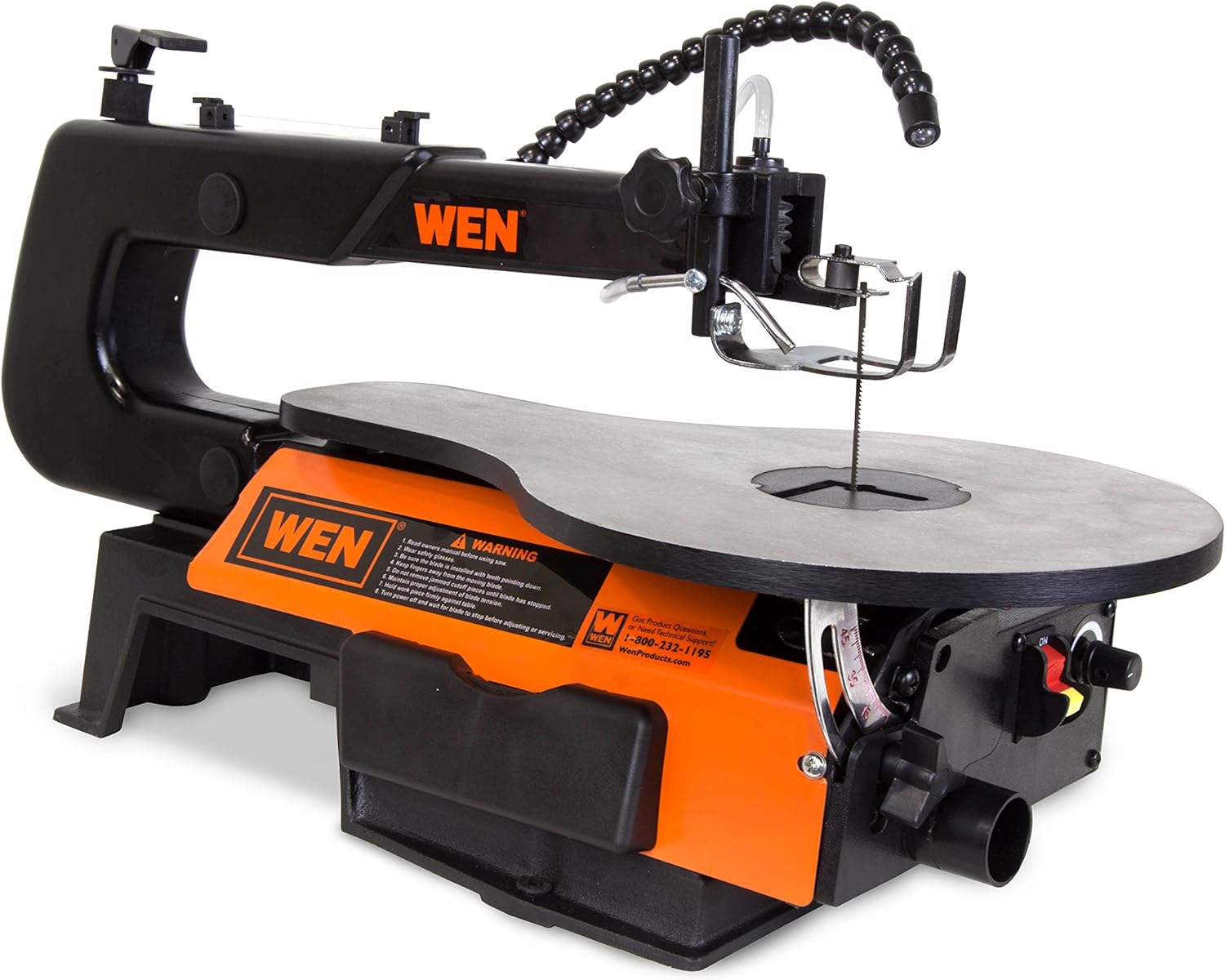
Front-right view of the WEN 16-Inch Scroll Saw. This image highlights the work light, blade area, and the hold-down foot clamp, providing a clear view of the cutting mechanism.

Side view of the WEN 16-Inch Scroll Saw. This image shows the overall profile of the scroll saw, including the main body, work table, and the warning label on the side.
3.2 Foot Pedal Switch Features (Model WA0392)
- Hands-Free Operation: Allows for momentary power control, pressing to start and lifting to stop.
- Compatibility: Designed for 120V machines up to 15 amps.
- Power Cord: Features a 6-foot power cord for flexible placement.
- Textured Surface: Prevents slipping during use.

Close-up of the WEN Foot-Operated Power Switch (Model WA0392). This image shows the top surface of the foot pedal with the WEN logo and the textured anti-slip design.
4. Setup
Proper setup is crucial for safe and effective operation.
4.1 Work Area Preparation
- Place the scroll saw on a stable, level workbench.
- Ensure adequate lighting and ventilation.
- Keep the area clear of debris and obstructions.
4.2 Blade Installation
The scroll saw accepts both pinned and pinless blades.
- For Pinned Blades: Loosen the thumb screw on the front holder. Insert the blade pins into the upper and lower blade holders. Ensure the blade teeth point downwards. Tighten the thumb screw. For two-direction cutting, pop the pins out of the front holder and turn the blade 90 degrees before re-securing.
- For Pinless Blades: The removable pinless blade holder design tightly grips blades. Follow the specific instructions in your scroll saw's detailed manual for secure installation.
4.3 Foot Pedal Connection
- Plug the scroll saw's power cord into the female receptacle of the WEN Foot Pedal Switch.
- Plug the foot pedal's male plug into a standard 120V wall outlet.
- Place the foot pedal on the floor in a comfortable and stable position, ensuring its textured surface provides grip.
5. Operating Instructions
Familiarize yourself with the controls before beginning any cutting operation.

Rear-left view of the WEN 16-Inch Scroll Saw. This image focuses on the variable speed control knob, the power switch, and the dust port connection, essential for operation and maintenance.
5.1 Powering On/Off
- Ensure the scroll saw's main power switch is in the 'ON' position.
- To start the scroll saw, press down on the WEN Foot Pedal Switch.
- To stop the scroll saw, lift your foot from the pedal.
5.2 Adjusting Speed
- Locate the variable speed control knob on the scroll saw.
- Turn the knob to adjust the strokes per minute (SPM) between 550 and 1600. Higher speeds are generally for softer materials, while lower speeds are for harder materials or intricate cuts.
5.3 Adjusting Table Bevel
- Loosen the table locking knob located beneath the work table.
- Tilt the table to the desired angle, up to 45 degrees.
- Tighten the table locking knob securely before operation.
5.4 Using the Air Pump and Work Light
- The adjustable air pump nozzle can be positioned to direct air towards the cutting line, clearing sawdust.
- The flexible work light can be bent and adjusted to illuminate your workpiece for better visibility.

Top-down view of the WEN 16-Inch Scroll Saw's work table. This image provides a perspective of the spacious 16-by-10-inch table, the blade opening, and the adjustable air pump nozzle.
5.5 Cutting Techniques
- Always secure your workpiece using the hold-down foot clamp to prevent movement during cutting.
- Feed the material slowly and steadily into the blade. Do not force the material, allow the blade to do the work.
- Utilize the two-direction cutting capability for intricate patterns or when the throat depth limits traditional cuts.
6. Maintenance
Regular maintenance ensures the longevity and safe operation of your scroll saw.
- Blade Replacement: Replace dull or broken blades promptly. Refer to Section 4.2 for blade installation.
- Dust Collection: Connect a dust collection system to the 1-1/2-inch dust port to keep the motor and moving parts free of sawdust buildup. Regularly empty your dust collection system.
- Cleaning: Keep the scroll saw and foot pedal clean. Wipe down surfaces with a dry cloth. Do not use solvents or harsh chemicals.
- Inspection: Periodically inspect all moving parts, fasteners, and electrical cords for wear or damage. Tighten any loose fasteners.
7. Troubleshooting
This section addresses common issues you might encounter.
- Excessive Vibration: Ensure the scroll saw is securely mounted to a stable workbench. Check that all components, especially the blade and its holders, are properly installed and tightened. A cast iron base is designed to minimize vibration.
- Blade Getting Stuck/Slow Cutting: This often indicates a dull blade or forcing the material too quickly. Replace the blade if dull. Reduce the feed rate and allow the blade to cut at its own pace. Ensure the variable speed is set appropriately for the material being cut.
- Saw Not Starting: Check that the scroll saw's main power switch is in the 'ON' position. Verify that the foot pedal is properly connected and plugged into a live outlet. Ensure the foot pedal is fully depressed.
- Inaccurate Cuts: Check the blade for straightness and proper tension. Ensure the work table bevel is correctly set and locked. Verify the workpiece is securely held by the clamp.
8. Specifications
8.1 WEN 16-Inch Two-Direction Variable Speed Scroll Saw (Model 3921)
| Brand | WEN |
| Model Number | 3921 |
| Power Source | Corded Electric |
| Voltage | 120 Volts |
| Wattage | 1.8E+3 |
| Blade Length | 16 Inches |
| Cutting Angle | 90 Degrees (Table bevels up to 45 degrees) |
| Variable Speed | 550 to 1600 SPM |
| Throat Depth | 16 Inches |
| Max Cutting Thickness | 2 Inches |
| Table Size | 16 x 10 Inches |
| Included Components | Bare Tool (Scroll Saw), Foot Pedal Switch |
8.2 WEN Foot Pedal Switch (Model WA0392)
| Brand | WEN |
| Model Number | WA0392 |
| Voltage Compatibility | 120V |
| Amperage | 15 Amps (Max) |
| Cord Length | 6 Feet |
| Feature | Momentary Power Control, Textured Anti-Slip Surface |

Underside view of the WEN Foot-Operated Power Switch. This image displays the product label with electrical specifications (120V, 15A) and the 6-foot power cord connection.
9. Warranty and Support
WEN products are designed for reliability and performance. Your WEN 16-Inch Two-Direction Variable Speed Scroll Saw and Foot Pedal Switch are backed by comprehensive support.
- Warranty: Both the scroll saw and the foot switch come with a two-year limited warranty. Please refer to the warranty card included with your product for full terms and conditions.
- Customer Support: For product questions, technical assistance, or warranty claims, please contact WEN customer service.
- Service Technicians: WEN maintains a nationwide network of skilled service technicians to assist with product servicing.
For further assistance, please visit wenproducts.com or call the customer help line at 1-800-232-1195.
Related documents3921


Ask a question about this manual
Ask about setup, troubleshooting, compatibility, parts, safety, or missing instructions. Manuals+ will review the question and use this page’s manual context to help answer it.