
1. Introduction
Thank you for choosing the LEICKE DJ Roxxx Portable Bluetooth Speaker. This manual provides essential information for setting up, operating, and maintaining your speaker. Please read it carefully before use to ensure optimal performance and longevity of your device.
2. Safety Instructions
- Do not expose the speaker to extreme temperatures, direct sunlight, or high humidity.
- Avoid dropping or subjecting the speaker to strong impacts.
- Do not disassemble or attempt to repair the speaker yourself. This will void the warranty.
- Keep the speaker away from water and liquids. While splashproof, it is not waterproof and should not be submerged.
- Use only the provided charging cable or a certified equivalent.
3. Package Contents
Please check the package for the following items:
- LEICKE DJ Roxxx Portable Bluetooth Speaker
- USB Charging Cable
- Auxiliary Audio Cable (3.5mm Stereo Plug)
- Carabiner
- Instruction Manual
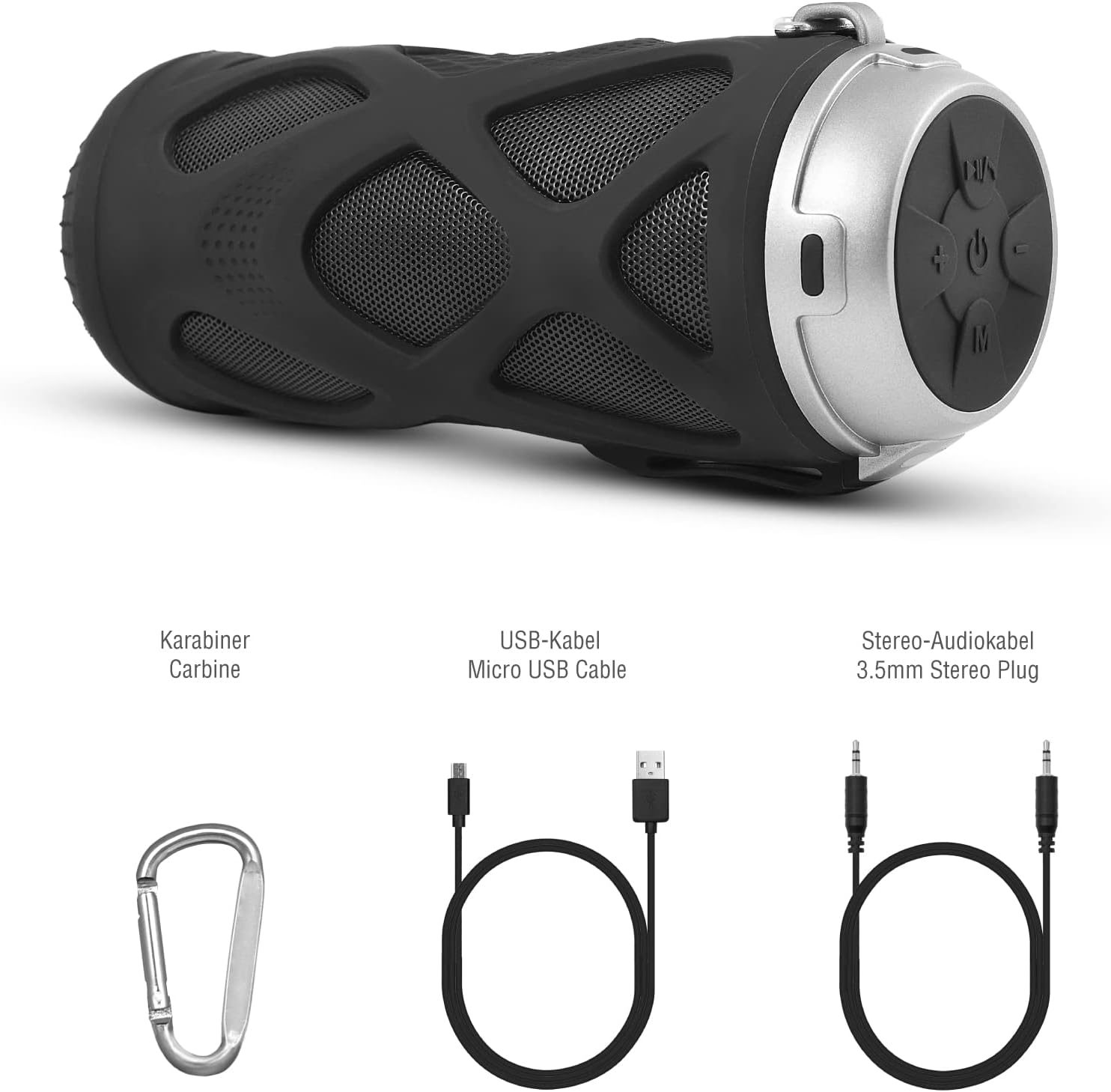
Figure 3.1: Included Accessories
4. Product Overview
4.1 Control Panel

Figure 4.1: Control Panel Layout
- On/Off Button: Powers the speaker on or off.
- Play/Pause/Call/Voice Assistant Button: Controls music playback, answers/ends calls, and activates voice assistant (Siri/Google Assistant).
- Volume Down / Previous Track Button: Decreases volume or skips to the previous track.
- Volume Up / Next Track Button: Increases volume or skips to the next track.
- Mode Button: Switches between Bluetooth, MicroSD/TF, Aux, and FM Radio modes.
4.2 Ports and Indicators
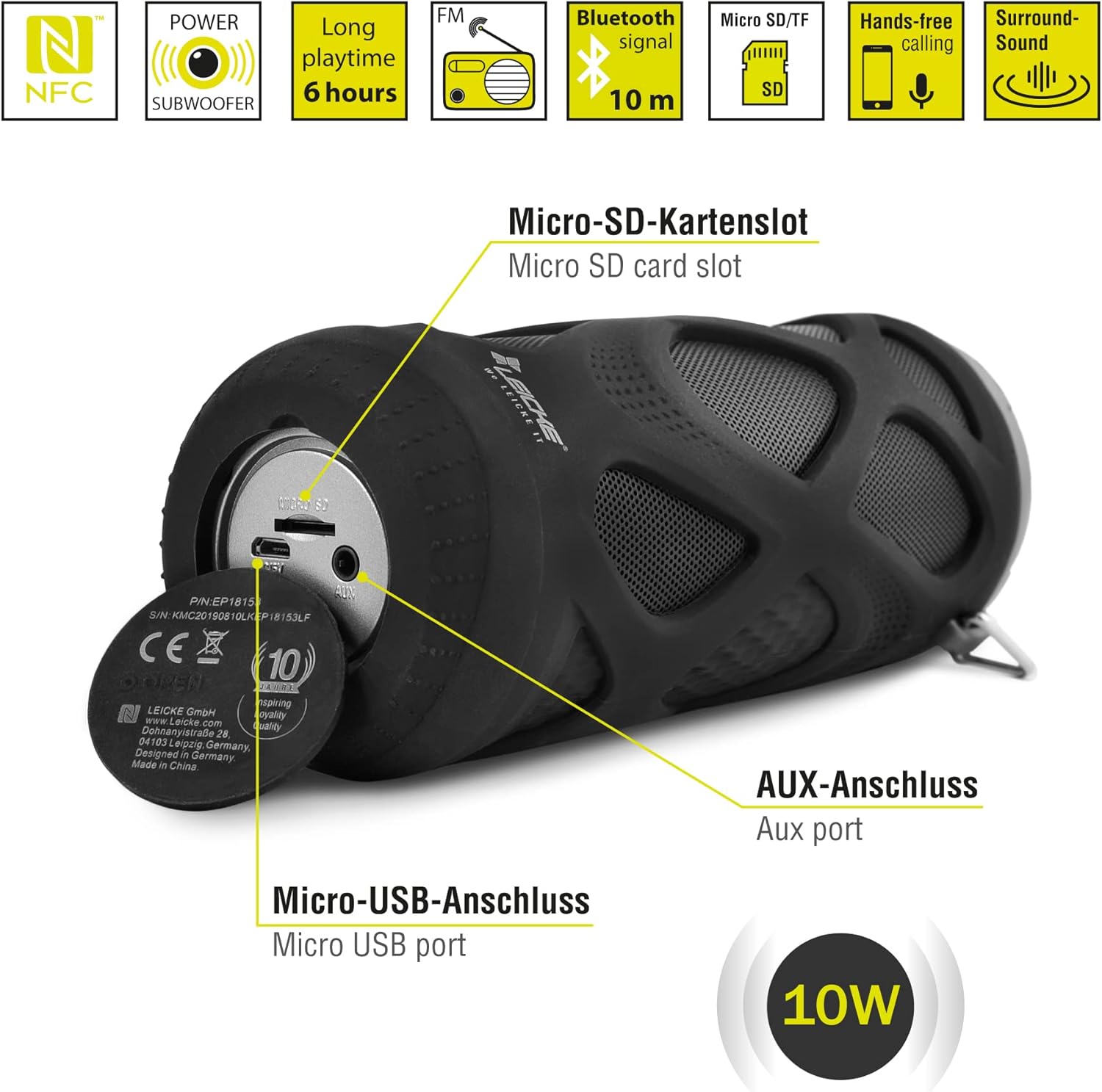
Figure 4.2: Ports Overview
- Micro SD/TF Card Slot: Insert a Micro SD or TF card for MP3 playback.
- AUX Port: Connect external audio devices using the 3.5mm auxiliary cable.
- Micro USB Port: Used for charging the speaker.
- LED Indicator: (Typically near the charging port or control panel) Indicates power status, charging status, and Bluetooth pairing status.
5. Setup and Operation
5.1 Charging the Speaker
- Connect the Micro USB end of the charging cable to the speaker's Micro USB port.
- Connect the USB-A end to a USB power adapter (not included) or a computer's USB port.
- The LED indicator will typically show red while charging and turn off or change color when fully charged.
- A full charge takes approximately 2-3 hours and provides up to 6 hours of playtime.
5.2 Powering On/Off
- To Power On: Press and hold the On/Off button for a few seconds until you hear an audible prompt and the LED indicator lights up.
- To Power Off: Press and hold the On/Off button again for a few seconds until you hear an audible prompt and the LED indicator turns off.
5.3 Bluetooth Pairing
- Ensure the speaker is powered on and in Bluetooth mode (the LED indicator will typically flash blue). If not, press the Mode button to switch to Bluetooth mode.
- On your smartphone, tablet, or other Bluetooth-enabled device, go to the Bluetooth settings.
- Search for available devices and select "LEICKE DJ Roxxx" from the list.
- Once paired, the LED indicator will stop flashing and remain solid blue, and you will hear a confirmation sound.
- The speaker will automatically reconnect to the last paired device when powered on, if the device is within range and Bluetooth is enabled.
5.4 MicroSD/TF Card Playback
- Insert a Micro SD or TF card (pre-loaded with MP3 audio files) into the Micro SD/TF card slot.
- The speaker will automatically switch to MicroSD/TF mode and begin playing music. If not, press the Mode button to select MicroSD/TF mode.
- Use the Play/Pause, Volume Up/Next Track, and Volume Down/Previous Track buttons to control playback.
5.5 AUX Input
- Connect one end of the 3.5mm auxiliary cable to the speaker's AUX port.
- Connect the other end to the headphone jack of your audio device (e.g., MP3 player, laptop).
- The speaker will automatically switch to AUX mode. If not, press the Mode button to select AUX mode.
- Volume can be controlled via the speaker or your connected device. Track control must be done from the connected device.
5.6 FM Radio Operation
- Press the Mode button repeatedly until you enter FM Radio mode.
- In FM mode, press the Play/Pause button once to automatically scan and save available FM stations. The speaker will then play the first saved station.
- Use the Volume Up/Next Track and Volume Down/Previous Track buttons to switch between saved stations.
5.7 True Wireless Stereo (TWS) Function
The LEICKE DJ Roxxx speaker supports TWS pairing, allowing you to connect two DJ Roxxx speakers for a stereo sound experience (20W total output).

Figure 5.1: True Wireless Stereo (TWS) Pairing
- Ensure both DJ Roxxx speakers are powered on and in Bluetooth pairing mode (LED flashing blue).
- On one of the speakers, press and hold the Mode button for a few seconds until you hear a pairing tone. The speakers will attempt to connect to each other.
- Once successfully paired, you will hear a confirmation sound, and the LED indicator on one speaker will flash blue (master), while the other will be solid blue (slave).
- Now, connect your device to the master speaker via Bluetooth as described in section 5.3. Both speakers will play audio in stereo.
6. Operating Instructions
6.1 Music Playback
- Play/Pause: Press the Play/Pause button once.
- Next Track: Press and hold the Volume Up / Next Track button.
- Previous Track: Press and hold the Volume Down / Previous Track button.
- Volume Up: Press the Volume Up / Next Track button briefly.
- Volume Down: Press the Volume Down / Previous Track button briefly.
6.2 Hands-Free Calling
- Answer Call: When a call comes in, press the Play/Pause/Call button once.
- End Call: During a call, press the Play/Pause/Call button once.
- Reject Call: When a call comes in, press and hold the Play/Pause/Call button for 2 seconds.
- Redial Last Number: In standby mode, double-press the Play/Pause/Call button.
6.3 Voice Assistant Activation
- With one click, you can activate Siri (iOS) or Google Assistant (Android) on your connected smartphone. Press the Play/Pause/Call/Voice Assistant button once to activate.
7. Maintenance
7.1 Cleaning
- Wipe the speaker with a soft, dry, or slightly damp cloth.
- Do not use abrasive cleaners, alcohol, or chemical solvents, as these may damage the surface.
- Ensure all ports are dry before charging or connecting other devices.
7.2 Storage
- Store the speaker in a cool, dry place away from direct sunlight and extreme temperatures.
- If storing for an extended period, charge the battery to about 50% every few months to maintain battery health.
7.3 Water Resistance
The LEICKE DJ Roxxx speaker is designed to be splashproof, offering protection against light rain or splashes. It is not waterproof and should not be submerged in water or exposed to heavy rain. Ensure the port cover is securely closed to maintain splash resistance.

Figure 7.1: Splashproof Design for Outdoor Use
8. Troubleshooting
| Problem | Possible Cause | Solution |
|---|---|---|
| Speaker does not turn on. | Low battery. | Charge the speaker for at least 30 minutes. |
| Cannot pair via Bluetooth. | Speaker not in pairing mode; device Bluetooth off; too far from device. | Ensure speaker is in Bluetooth mode (flashing blue LED). Turn on Bluetooth on your device. Move speaker closer to device (within 10m). Forget previous pairings on your device and try again. |
| No sound. | Volume too low; incorrect mode; device not playing. | Increase speaker and device volume. Ensure correct mode (Bluetooth, AUX, MicroSD). Check if audio is playing on your source device. |
| Poor FM radio reception. | Weak signal; interference. | Move the speaker to a different location. Re-scan for stations. |
| MicroSD card not recognized. | Card not inserted correctly; unsupported format; corrupted files. | Reinsert the card. Ensure files are in MP3 format. Try a different MicroSD card. |
9. Specifications
| Model Name | DJ Roxxx |
| Model Number | B09P4Z5MN5 |
| Brand | LEICKE |
| Connectivity Technology | Bluetooth |
| Wireless Communication Technology | Bluetooth |
| Speaker Type | Portable Bluetooth Speaker |
| Maximum Speaker Output Power | 10 Watts |
| Control Method | Tactile Buttons |
| Special Features | Integrated Microphone, Portable Wireless, MicroSD/TF Player, Aux Input, FM Radio, Hands-Free Calling, Voice Assistant Support, TWS Function, Splashproof |
| Power Source | Cable Electric (Rechargeable Battery) |
| Product Dimensions (L x W x H) | 7 x 7 x 18 cm |
| Item Weight | 400 grams |
| Recommended Uses | For smartphone or tablet |
| Compatible Devices | Laptop, Smartphone |
| Is Waterproof | False (Splashproof only) |
10. Warranty and Support
LEICKE products come with a standard manufacturer's warranty. For detailed warranty information, please refer to the warranty card included in your package or visit the official LEICKE website.
If you encounter any issues or have questions regarding your LEICKE DJ Roxxx speaker, please contact LEICKE customer support:
- Manufacturer: LEICKE
- Seller: LEICKE - Leipzig (as per Amazon listing)
- Support: Refer to the official LEICKE website or contact information provided with your purchase for the most up-to-date support channels.


