
1. Introduction
This manual provides detailed instructions for the safe and efficient operation, maintenance, and troubleshooting of your FRIZCOL Portable Clip-on Fan. Please read this manual thoroughly before using the product and retain it for future reference.
2. Product Features

Figure 2.1: FRIZCOL Portable Clip-on Fan with remote control and phone charging capability.
- High Capacity Battery: Equipped with a 12000mAh rechargeable battery, providing 12 to 65 hours of operation depending on speed settings.
- Remote Control: Includes an RF wireless remote controller with a maximum range of 12ft (3.7m) for convenient operation.
- Integrated LED Lights: Features 9 LED lights with 2 adjustable brightness levels for illumination.
- Timer Functionality: Offers 1-hour, 3-hour, and 5-hour timer settings for automated shutdown.
- Power Bank Function: Two charging ports (in/out) allow the fan to serve as a power bank for mobile devices.
- Versatile Mounting: Strong grip clamp can attach to surfaces up to 3 inches thick. Humanized hook design allows for hanging.
- Adjustable Airflow: 360-degree angle rotation for directing airflow vertically or horizontally.
- Quiet Operation: Designed for ultra-quiet performance, less than 23 dB.
- Efficient Motor: High-performance brushless DC motor, smooth and efficient at 2500 RPM.
- Optimized Blades: Enhanced wing-shaped 3-blade design for powerful and efficient airflow.
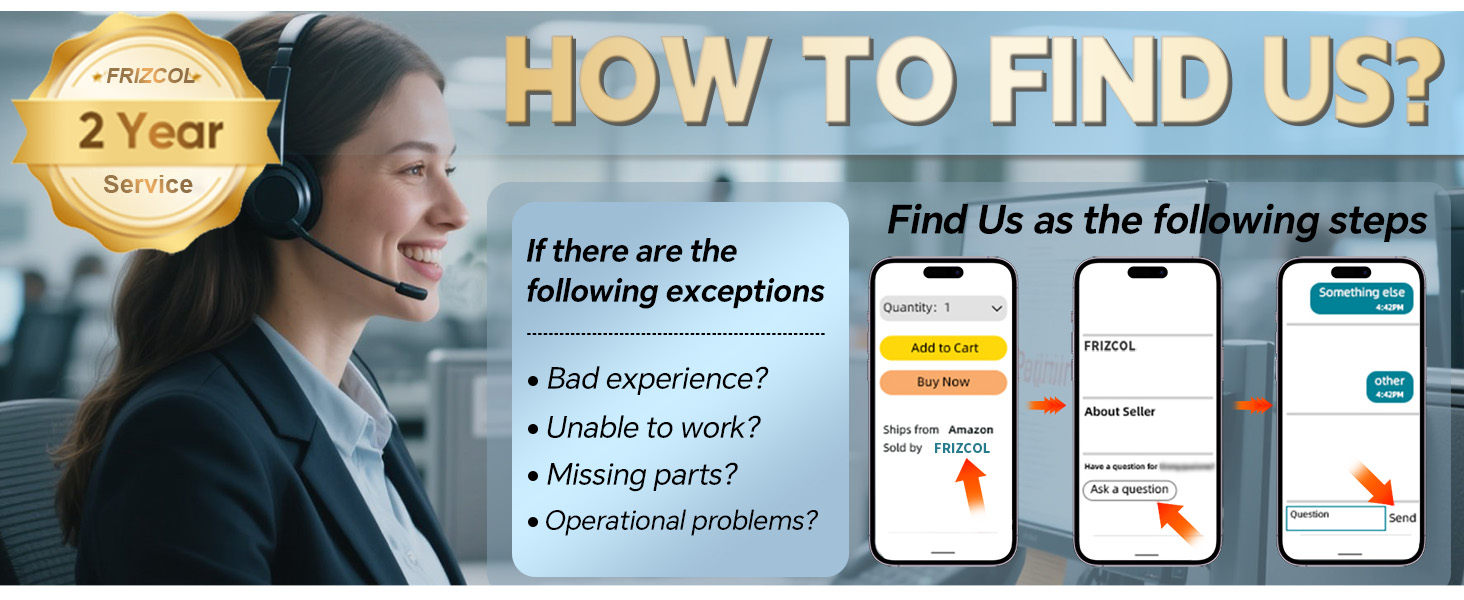
Figure 2.2: Key features of the FRIZCOL Portable Clip-on Fan.
3. Package Contents
Verify that all items are present and in good condition upon opening the package.
- FRIZCOL Portable Clip-on Fan (Model: XF-TENTFAN-BLACK-01)
- RF Wireless Remote Controller
- USB-C Charging Cable
- User Manual (This document)

Figure 3.1: Outer packaging and included components.
4. Setup
4.1 Charging the Fan
Before first use, fully charge the fan. The fan requires approximately 4.5 hours for a full charge.
- Connect the provided USB-C charging cable to the fan's charging port.
- Connect the other end of the cable to a compatible USB power source (e.g., wall adapter, computer USB port, power bank).
- The indicator lights on the fan will show charging progress. All lights will be solid when fully charged.

Figure 4.1: Charging the fan and its large battery capacity.
4.2 Mounting the Fan
The fan offers multiple mounting options:
- Clip-on: Use the strong grip clamp to attach the fan to surfaces up to 3 inches thick, such as desks, tent poles, strollers, or golf carts.
- Hanging: Utilize the integrated hook design to hang the fan from tent ceilings, branches, or other suitable fixtures.
- Freestanding: Place the fan on any flat surface for stable operation.

Figure 4.2: Fan hanging in a tent, demonstrating the hook design.
5. Operating Instructions
5.1 Power On/Off and Fan Speed Adjustment
The fan can be operated using the buttons on the unit or the wireless remote control.
- Power On/Off: Press the power button on the fan or the remote control to turn the fan on or off.
- Fan Speed: Press the fan speed button repeatedly to cycle through 3 speed settings (Low, Medium, High).

Figure 5.1: Fan speed settings and 360-degree adjustability.
5.2 LED Light Operation
The fan features integrated LED lights with adjustable brightness.
- Turn On/Off: Press the light button on the fan or the remote control to activate or deactivate the LED lights.
- Adjust Brightness: Press the light button repeatedly to cycle through 2 brightness levels.

Figure 5.2: Ambiance-boosting light feature.
5.3 Timer Settings
Set a timer for automatic fan shutdown.
- Activate Timer: Press the timer button on the remote control to select 1-hour, 3-hour, or 5-hour shutdown.
- The fan will automatically turn off after the selected duration.
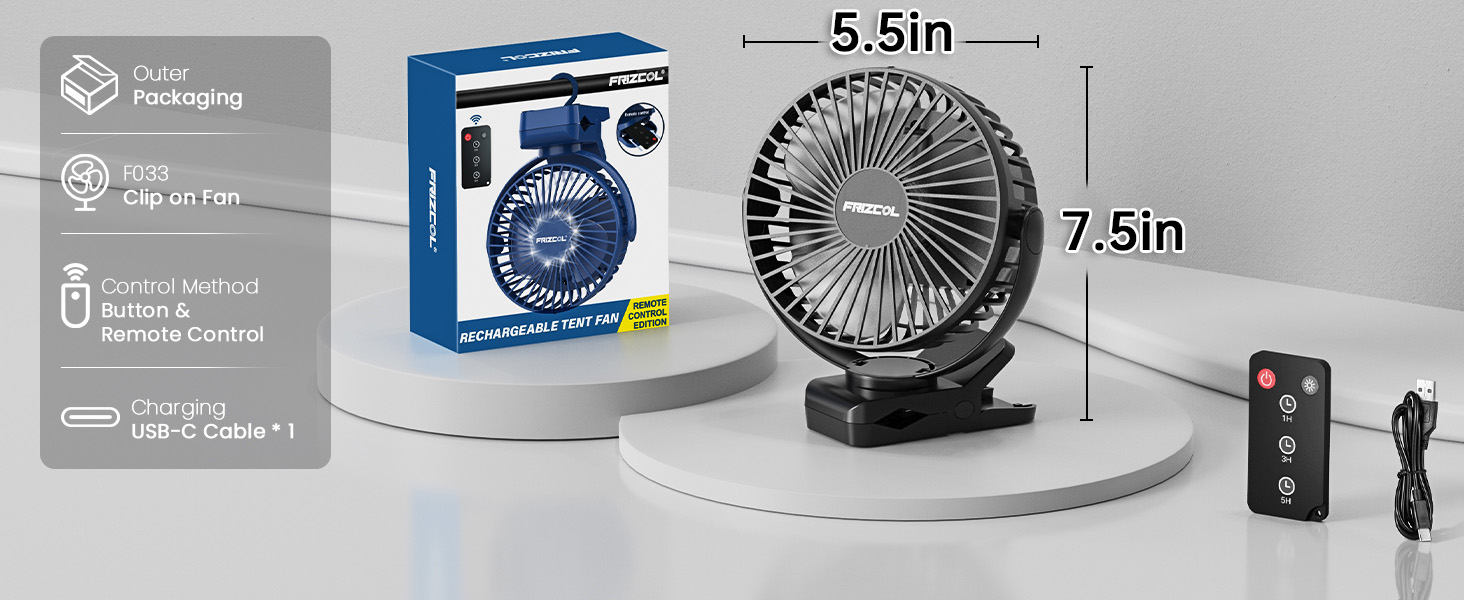
Figure 5.3: Timer functionality for scheduled operation.
5.4 Using as a Power Bank
The fan can provide emergency power to your mobile devices.
- Connect your mobile device's charging cable to the fan's USB output port.
- The fan will begin charging your device.

Figure 5.4: Fan providing power to a smartphone.
6. Maintenance
Regular maintenance ensures optimal performance and longevity of your fan.
- Cleaning: Ensure the fan is turned off and unplugged before cleaning. The front grill can be removed without tools for easy cleaning of the blades. Use a soft, dry cloth to wipe down the exterior and blades. Do not use abrasive cleaners or immerse the fan in water.
- Storage: When not in use for extended periods, store the fan in a cool, dry place away from direct sunlight and extreme temperatures. Ensure the battery is partially charged (around 50%) before storage to prolong battery life.
7. Troubleshooting
If you encounter issues with your fan, refer to the following common problems and solutions:
| Problem | Possible Cause | Solution |
|---|---|---|
| Fan does not turn on. | Low battery; Power button not pressed correctly. | Charge the fan fully. Ensure the power button is pressed firmly. |
| Weak airflow. | Low speed setting; Obstruction in front/back of fan; Dirty blades. | Increase fan speed. Clear any obstructions. Clean the fan blades. |
| LED lights not working. | Light button not pressed; Low battery. | Press the light button. Charge the fan. |
| Remote control not working. | Out of range; Battery in remote is dead. | Ensure remote is within 12ft (3.7m) of the fan. Replace remote battery if applicable (check remote specifications for battery type). |
| Fan makes unusual noise. | Obstruction hitting blades; Loose components. | Turn off and unplug the fan. Check for and remove any obstructions. If noise persists, contact customer support. |
If the problem persists after attempting these solutions, please contact FRIZCOL customer support.
8. Specifications
| Feature | Detail |
|---|---|
| Brand | FRIZCOL |
| Model Name | XF-TENTFAN-BLACK-01 |
| Color | Black |
| Power Source | Battery Powered |
| Battery Capacity | 12000mAh (Lithium Polymer) |
| Working Hours | 12 to 65 hours (depending on speed) |
| Charging Time | Approx. 4.5 hours |
| Product Dimensions | 8"D x 3.43"W x 6.73"H |
| Item Weight | 15.2 ounces |
| Number of Fan Speeds | 3 |
| LED Lights | 9 LEDs, 2 brightness levels |
| Timer Settings | 1H / 3H / 5H |
| Control Method | Remote Control, Buttons on unit |
| Max Clamp Thickness | 3 inches |
| Motor Speed | Up to 5000 RPM |
| Noise Level | <23 dB |
| Indoor/Outdoor Usage | Indoor, Outdoor |
9. Warranty and Support
FRIZCOL offers a 2-year service warranty for this product. For any inquiries, operational problems, missing parts, or to report a bad experience, please contact our customer support team.
How to Contact Us:
You can typically find our contact information through your purchase platform or by visiting the official FRIZCOL store page.

Figure 9.1: Steps to contact FRIZCOL customer support.