
Introduction
This manual provides detailed instructions for the installation, operation, and maintenance of the EHO Caliber RMD 579DAB-BT 1-DIN Bluetooth DAB+ car radio and its associated mounting kit. This kit is specifically designed for Volkswagen Golf VI models manufactured between 2003 and 2013. Please read this manual thoroughly before installation and use to ensure proper function and safety.
Safety Information
- Always disconnect the vehicle's battery before beginning any electrical installation.
- Ensure all wiring connections are secure and properly insulated to prevent short circuits.
- Do not operate the device in a manner that distracts you from driving.
- Consult a professional installer if you are unsure about any part of the installation process.
- Avoid exposing the unit to extreme temperatures, direct sunlight, or moisture.
Setup
1. Installation of the Mounting Kit
The provided mounting kit includes a radio bezel and necessary accessories for integrating the 1-DIN car radio into the dashboard of your Volkswagen Golf VI (2003-2013). The bezel is finished in piano black to match your vehicle's interior.

Image: The radio mounting frame and associated wiring components.
Carefully remove the original radio and dashboard trim. Install the new radio bezel, ensuring it fits securely and flush with the dashboard. The kit is compatible with 2/3-door, 4/5-door, Variant, Plus, and Compactvan models of the Golf VI.
2. Wiring Connections
Connect the radio to your vehicle's electrical system using the supplied connection cable. This includes power, ground, speaker wires, and antenna connections. An external microphone is included for hands-free calling.
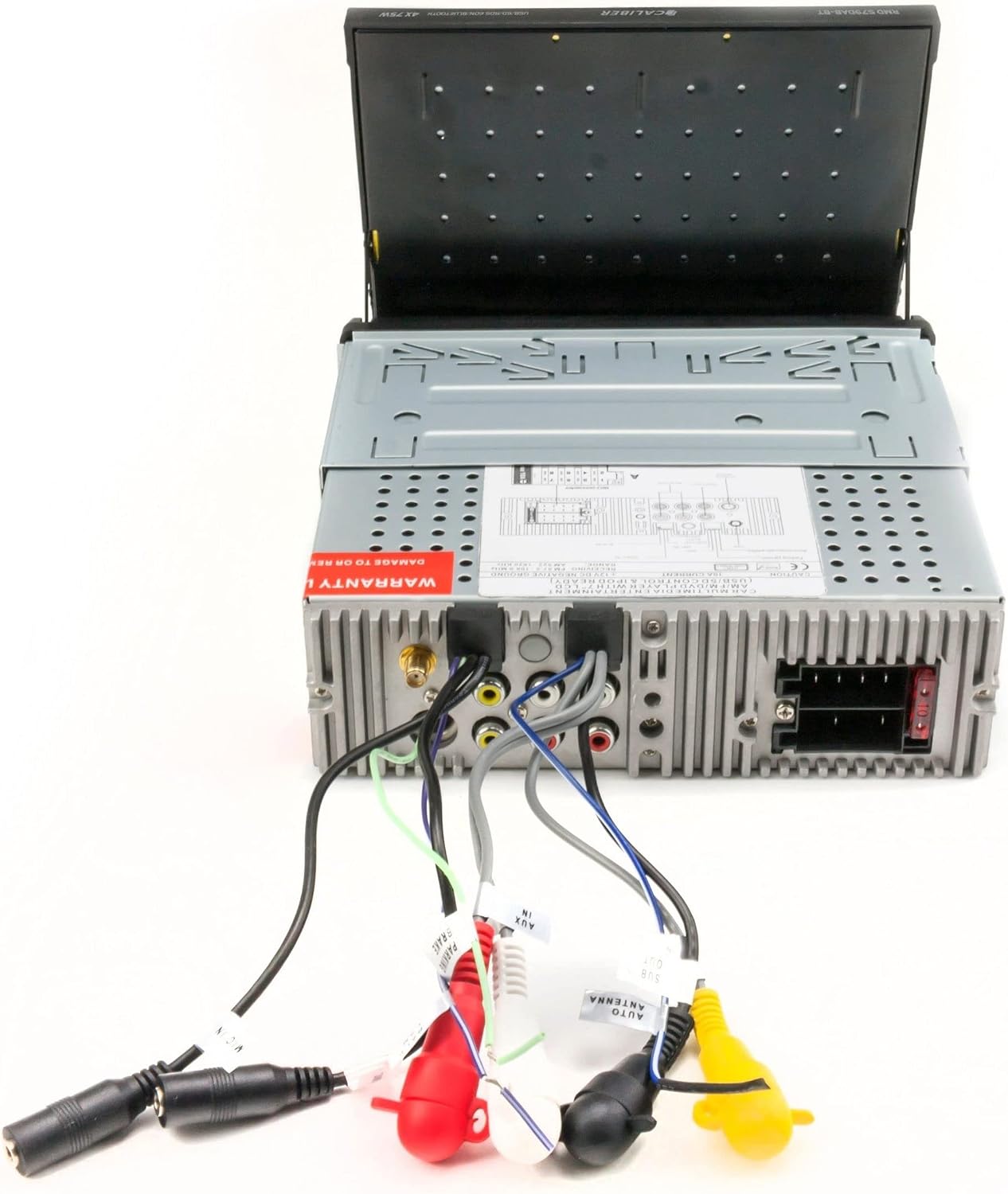
Image: Rear view of the Caliber RMD 579DAB-BT unit, illustrating the various input and output ports for wiring.
The unit features dual RCA outputs, a video output, a subwoofer output, a video input, and an RCA camera input for additional connectivity. Ensure all connections are firm and correctly matched to prevent damage or malfunction. Note that support for CANbus, active systems, steering wheel controls, or vehicle displays typically requires an additional adapter, which is not included in this standard kit.
Operating Instructions
1. Power On/Off and Display
Press the power button to turn the unit on or off. The unit features a motorized 7-inch TFT LCD touchscreen display. The display panel is removable for security.

Image: Front view of the Caliber RMD 579DAB-BT car radio with its 7-inch touchscreen display extended, showing the user interface.
2. DAB+ Digital Radio
Select the DAB+ mode to access digital radio stations. The unit provides superior radio signal quality compared to traditional FM radio. Perform a station scan to find available DAB+ broadcasts in your area.
3. Bluetooth Connectivity
Activate Bluetooth on your smartphone (Android or iOS) and search for the RMD 579DAB-BT. Pair your device to enable wireless audio streaming (e.g., from Spotify, Deezer) and hands-free calling. The external microphone ensures clear call quality.
4. Media Playback
The unit supports various media formats including MP3, MPEG-4, WMA, and JPEG. You can play media from USB drives or SD cards. Please note, this unit does not include a CD player.
5. Audio Settings
Adjust sound preferences using the integrated 3-band equalizer. The unit delivers 4 x 75 Watts of power output. Utilize the dual RCA outputs and subwoofer output for connecting external amplifiers or subwoofers.
6. Remote Control
A remote control is included for convenient operation of the radio. An adapter for steering wheel remote control (LFB) can be purchased separately if desired.
Maintenance
- Cleaning the Screen: Use a soft, lint-free cloth to gently wipe the touchscreen. Do not use abrasive cleaners or solvents.
- General Cleaning: Wipe the unit's exterior with a dry or slightly damp cloth. Ensure no liquids enter the unit.
- Panel Care: When removing the detachable panel, handle it carefully to avoid damage to the connectors. Store it in a protective case.
Troubleshooting
- No Power: Check all power connections and the vehicle's fuse box. Ensure the battery is properly connected.
- No Sound: Verify speaker connections. Check volume levels and equalizer settings. Ensure the mute function is not active.
- Bluetooth Connection Issues: Ensure Bluetooth is enabled on both the radio and your device. Delete previous pairings and attempt to re-pair. Move devices closer to each other.
- Poor DAB+ Reception: Check the antenna connection. Ensure you are in an area with DAB+ coverage. Perform a new station scan.
- Screen Malfunction: If the motorized screen does not extend or retract properly, check for obstructions. If the touchscreen is unresponsive, try resetting the unit (refer to the main unit's specific reset procedure, if available).
- General Issues: If problems persist, consult a qualified technician. The manufacturer creates these offers with care; if an error occurs, contact the seller for a solution.
Specifications
| Brand | EHO |
| Model Number | RMD 579DAB-BT |
| Connectivity Technology | Bluetooth |
| Controller Type | iOS, Android |
| Special Features | SD Card, Android Compatible, USB, Extendable Screen, No CD Player |
| Compatible Devices | Android, iPhone, Smartphones |
| Connector Type | RCA |
| Color | Piano Black |
| Output Wattage | 4 x 75 Watts |
| Display | 7-inch (17.8 cm) TFT LCD Touchscreen |
| Supported Formats | MP3, MPEG-4, WMA, JPEG |
| Radio Type | Digital DAB+ |
| Equalizer | 3-band |
| Outputs | Dual RCA, Video Out, Sub Out |
| Inputs | Video In, RCA Camera In |
| Included Accessories | Remote control, External microphone, Radio bezel, Connection cable |
Warranty Information
Specific warranty details for this product are not explicitly provided in the available documentation. For information regarding warranty coverage, duration, and claims, please contact the seller or manufacturer directly. Information on spare parts availability and software update guarantees is also not available.
Customer Support
Should you encounter any issues or require further assistance with your Caliber RMD 579DAB-BT car radio and mounting kit, please contact the retailer or the manufacturer, EHO. When contacting support, please have your product model number (RMD 579DAB-BT) and purchase details readily available.