
1. Introduction
Thank you for choosing the Concept ZV2021 Smart Air Humidifier. This device is designed to improve air quality in your home by maintaining optimal humidity levels, diffusing aromas, and purifying the air with UVC and plasma technology. Please read this manual carefully before use to ensure safe and efficient operation.
The ZV2021 combines humidification with an aroma diffuser, UVC lamp, and plasma function. It features 4 operating modes, 7 mist intensity levels, a 4.6-liter water tank, and can operate for up to 34 hours on a single fill. It is suitable for rooms up to 50 m².
2. Safety Instructions
- Always place the humidifier on a firm, flat, and waterproof surface.
- Do not place the unit near heat sources, direct sunlight, or in areas with high humidity.
- Keep out of reach of children and pets.
- Use only clean, cool tap water. Distilled or demineralized water is recommended to prevent mineral buildup.
- Do not add essential oils directly into the water tank; use the dedicated aroma drawer.
- Unplug the humidifier before filling, cleaning, or performing any maintenance.
- Do not immerse the unit in water or other liquids.
- If the power cord is damaged, it must be replaced by the manufacturer, its service agent, or similarly qualified persons to avoid a hazard.
- Do not block the air inlets or outlets.
- The unit automatically shuts off when the water tank is empty.
3. Product Components
Familiarize yourself with the main parts of your Concept ZV2021 humidifier.

Figure 3.1: Front view of the Concept ZV2021 Humidifier, highlighting the aroma drawer being filled.

Figure 3.2: Exploded view showing the top lid, water tank, and main unit base.

Figure 3.3: Detailed view of the LED touch control panel.
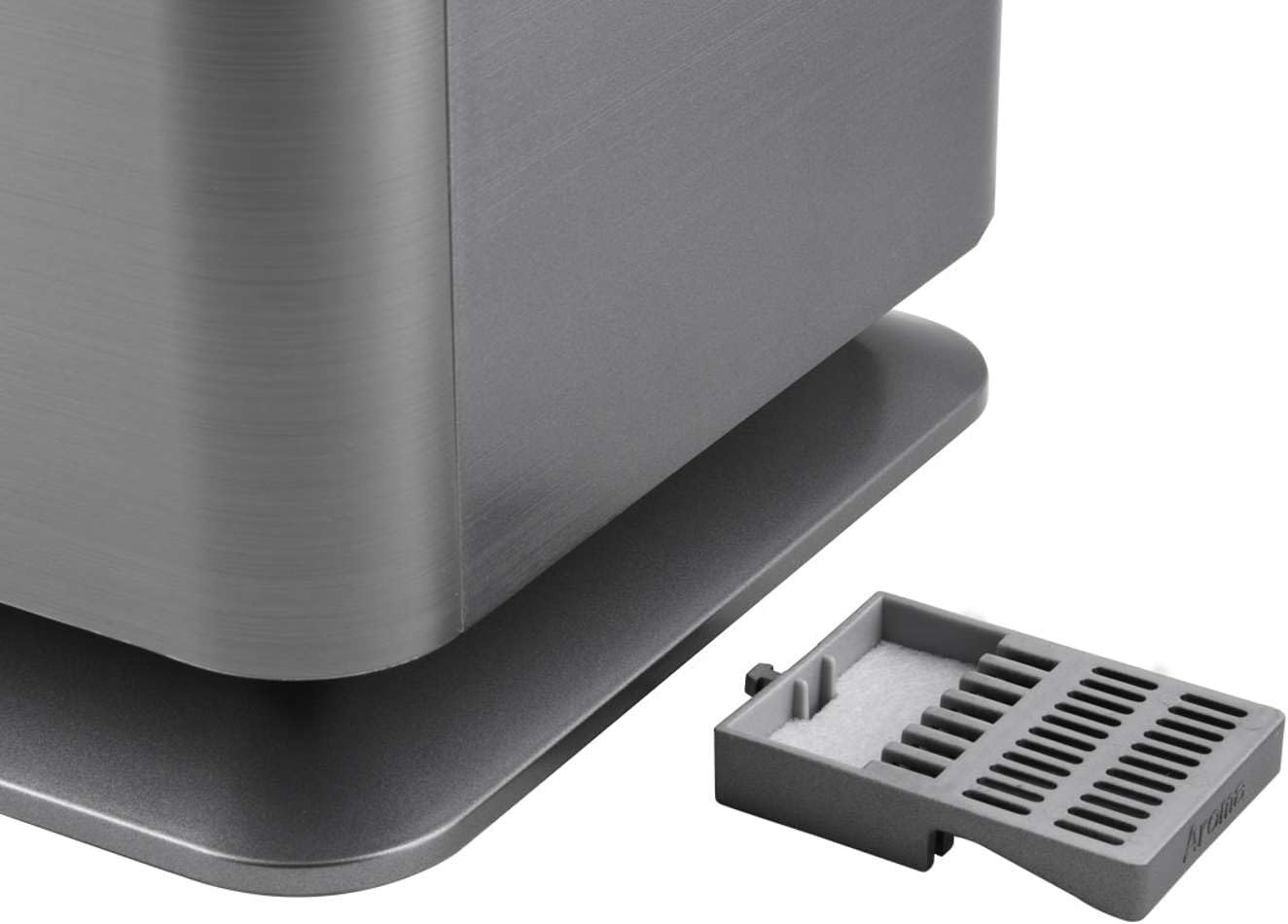
Figure 3.4: Close-up of the aroma drawer, where essential oils are added.
- Water Tank: 4.6-liter capacity for extended operation.
- Control Panel: LED touch display showing current humidity and temperature, with various function icons.
- Aroma Drawer: A dedicated compartment for adding essential oils for aromatherapy.
- Mist Nozzle: Top outlet for releasing humidified air.
- Base Unit: Contains the ultrasonic transducer, UVC lamp, and plasma generator.
4. Setup
- Unpack: Carefully remove all packaging materials and place the humidifier on a stable, level surface.
- Fill Water Tank:
- Remove the top lid and lift the water tank by its handle.
- Unscrew the cap at the bottom of the water tank.
- Fill the tank with clean, cool tap water. Do not exceed the MAX fill line.
- Securely screw the cap back on.
- Place the filled water tank back onto the base unit, ensuring it is seated correctly.
- Replace the top lid.
- Aroma Diffuser (Optional): Pull out the aroma drawer located at the bottom side of the unit. Add a few drops of your preferred essential oil onto the felt pad. Slide the drawer back in.
- Power Connection: Plug the power cord into a suitable electrical outlet. The unit will beep, and the LED display will light up briefly.
5. Operating Instructions
The Concept ZV2021 humidifier features a touch-sensitive LED display and can also be controlled via Wi-Fi or a remote control.
5.1 Control Panel Overview
Figure 5.1: LED Touch Control Panel.
The LED display shows current room humidity and temperature. Touch icons allow control over various functions:
- ON/OFF: Power button.
- MODES: Cycle through Auto, Health, Baby, and Night modes.
- TIMER: Set operation time from 1 to 12 hours.
- WARM MIST: Activate warm mist function.
- HUMIDITY: Manually set desired humidity level (30-75%).
- PLASMA: Activate plasma air purification.
- UV: Activate UVC sterilization lamp.
5.2 Operating Modes

Figure 5.2: Mode selection icons.
- Auto Mode: The humidifier automatically adjusts mist output to maintain optimal humidity based on room temperature.
- Health Mode: Maintains humidity at an optimal 60% while activating humidification and UVC functions.
- Baby Mode: Maintains humidity at 55% and activates humidification, plasma, and UVC functions.
- Night Mode: Operates with all LED lights on the control panel turned off for undisturbed sleep.
5.3 Special Features
- UVC Lamp: Minimizes harmful bacteria, viruses, fungi, and absorbs odors by disrupting their DNA structure.
- Plasma Function: Emits positive and negative ions to neutralize airborne viruses, reduce dust, decompose harmful gases, and refresh the air.
- Aroma Diffuser: Use the dedicated drawer to add essential oils for a pleasant fragrance and therapeutic benefits.
- Timer: Set the humidifier to operate for 1 to 12 hours, after which it will automatically shut off.
- Warm/Cold Mist: Choose between cool mist or warm mist output.
- 7 Mist Intensity Levels: Adjust the mist output to your preference.
5.4 Wi-Fi and App Control

Figure 5.3: Wi-Fi connectivity and app control.
The ZV2021 is compatible with the Concept Home app, allowing you to control all functions remotely via Wi-Fi. Download the app from your smartphone's app store and follow the in-app instructions for pairing your device.
6. Maintenance
Regular cleaning ensures optimal performance and extends the lifespan of your humidifier.
- Daily Maintenance: Empty and rinse the water tank daily. Refill with fresh water.
- Weekly Cleaning:
- Unplug the unit.
- Remove the water tank and empty any remaining water.
- Clean the water tank with a soft brush and mild detergent. Rinse thoroughly.
- Clean the ultrasonic transducer (the small disc in the base unit) with a soft brush or cotton swab. Do not use abrasive materials.
- Wipe the base unit with a damp cloth.
- Clean the aroma drawer and replace the felt pad if necessary.
- Descaling: If mineral deposits accumulate, fill the water tank with a mixture of white vinegar and water (1:1 ratio) and let it sit for 30 minutes. Rinse thoroughly.
- Storage: When not in use for an extended period, clean and dry the unit thoroughly, then store it in a cool, dry place.
7. Troubleshooting
If you encounter issues with your humidifier, refer to the table below for common problems and solutions.
| Problem | Possible Cause | Solution |
|---|---|---|
| No mist or low mist output | Lack of water; water tank not properly seated; mineral buildup on transducer; mist nozzle blocked. | Refill water tank; ensure tank is correctly placed; clean transducer; clear mist nozzle. |
| Unusual noise | Water level too low; unit not on a flat surface; foreign object in water tank. | Refill water tank; place on a stable surface; check for and remove any foreign objects. |
| Water leakage | Water tank cap not tightened; water tank damaged; unit overfilled. | Tighten water tank cap; inspect tank for damage (replace if necessary); do not overfill. |
| Humidifier turns off unexpectedly | Water tank empty; timer function activated. | Refill water tank; check timer settings. |
If the problem persists after trying these solutions, please contact customer support.
8. Specifications
| Feature | Detail |
|---|---|
| Model Number | ZV2021 |
| Brand | Concept |
| Color | Grey |
| Dimensions (L x W x H) | 23.5 x 20 x 34.8 cm |
| Weight | 3.97 kg |
| Water Tank Capacity | 4.6 Liters |
| Power Consumption | 30 W (Cool Mist), 110 W (Warm Mist) |
| Material | Glass (likely referring to a component, main body is plastic/metal) |
| Noise Level | 35 dB |
| Max. Operating Time | 34 hours per fill |
| Suitable Room Size | Up to 50 m² |
| Humidification Capacity | 350 ml/h (Cool Mist), ±50 ml/h (Warm Mist) |
| Special Features | Aroma Diffuser, UVC Lamp, Plasma Function, Wi-Fi, LED Touch Display, Timer (1-12h), Automatic Humidity Control, 7 Mist Intensities, 4 Modes (Auto, Health, Baby, Night) |
9. Warranty and Support
For warranty information, please refer to the documentation provided with your purchase or visit the official Concept website. Warranty terms and conditions may vary by region and retailer.
If you require technical assistance, have questions about your product, or need to report a fault, please contact Concept customer support through their official channels. Keep your proof of purchase and model number (ZV2021) ready when contacting support.


