
Moon MN90110410101
Moon Rigel Rechargeable Bicycle Headlight User Manual
Model: MN90110410101
Introduction
Thank you for choosing the Moon Rigel Rechargeable Bicycle Headlight. This manual provides detailed instructions for the proper setup, operation, and maintenance of your new headlight. Please read this manual thoroughly before use to ensure optimal performance and safety.
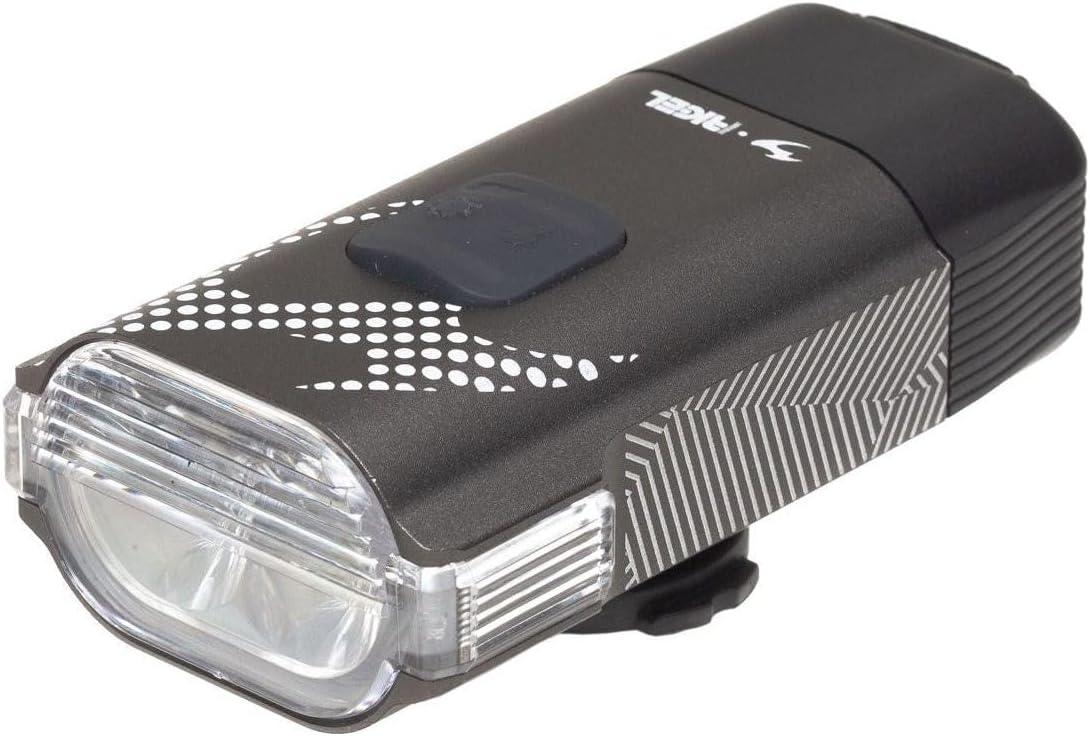
Image: The Moon Rigel Rechargeable Bicycle Headlight, showcasing its compact design and front lens.
Package Contents
Please check the package for the following items:
- Moon Rigel Headlight Unit
- Handlebar Mount (Garmin Style Quick Release)
- USB Type-C Charging Cable
- User Manual (this document)
- Optional: USB Type-C Remote Control (if included with your specific model)
Setup
1. Mounting the Headlight
- Identify a suitable position on your bicycle's handlebar. Ensure the light beam will not be obstructed.
- Attach the quick-release handlebar mount to your handlebar. Secure it firmly using the provided strap or screw mechanism.
- Slide the Moon Rigel Headlight onto the mount until it clicks securely into place. The anti-glare rotating lens allows for inverted mounting if preferred.

Image: The Moon Rigel Headlight securely mounted on a bicycle handlebar, demonstrating its quick-release attachment.
2. Charging the Battery
The Moon Rigel headlight is equipped with a rechargeable battery. Fully charge the battery before first use.
- Locate the USB Type-C charging port on the headlight.
- Connect the provided USB Type-C cable to the headlight and plug the other end into a USB power source (e.g., computer, wall adapter).
- The LED indicator will show the charging status. A full charge typically takes approximately 3 hours. The system includes an automatic cut-off when fully charged.
- Once fully charged, disconnect the charging cable.

Image: Side view of the Moon Rigel Headlight, highlighting the location of the USB Type-C charging port and the main control button.
Operating Instructions
Power On/Off
- To turn the light ON: Press and hold the main power button for approximately 1 second.
- To turn the light OFF: Press and hold the main power button for approximately 1 second.
Changing Modes
The Moon Rigel headlight features 7 different lighting modes, including a variable light system.
- While the light is ON, short press the main power button to cycle through the available lighting modes.
- The light has a mode memory function, which means it will turn on in the last used mode.
Lock System
To prevent accidental activation during transport or storage, the light features a lock system.
- To LOCK: With the light OFF, press and hold the main power button for 3 seconds until the LED indicator flashes.
- To UNLOCK: With the light LOCKED, press and hold the main power button for 3 seconds until the LED indicator flashes.
Battery Indicator
The integrated Matrix LED display provides a low battery indicator to inform you when charging is needed.
- Refer to the LED display for current battery level.
- When the battery is low, the indicator will alert you, prompting a recharge.
Maintenance
- Cleaning: Wipe the light body and lens with a soft, damp cloth. Do not use abrasive cleaners or solvents.
- Storage: If storing the light for an extended period, charge the battery to approximately 50% and store in a cool, dry place. Recharge every 3-6 months to maintain battery health.
- Water Resistance: The light is IPX7 water-resistant, meaning it can withstand immersion in water up to 1 meter for 30 minutes. However, avoid prolonged submersion and ensure the USB port cover is securely closed.
- Overheat Protection: The light features an overheat protection system and a heat sink cooling system. If the light becomes too hot, it may automatically reduce its output to prevent damage.
Troubleshooting
| Problem | Possible Cause | Solution |
|---|---|---|
| Light does not turn on. | Battery is depleted. Light is in lock mode. | Charge the battery. Unlock the light by holding the power button for 3 seconds. |
| Light output is dim. | Low battery. Overheat protection activated. | Recharge the battery. Allow the light to cool down. |
| Light does not charge. | Faulty cable or power source. Charging port obstruction. | Try a different USB Type-C cable and power source. Check the charging port for debris. |
| Mount is not secure. | Mount not tightened properly. Incorrect mount size. | Ensure the mount is firmly secured to the handlebar. Verify mount compatibility with your handlebar diameter. |
Specifications
| Brand | Moon |
| Model Number | MN90110410101 |
| Brightness | 700 Lumens (Max) |
| Power Source | Battery Powered (Rechargeable) |
| Charging Time | Approx. 3 hours |
| Water Resistance Rating | IPX7 (Waterproof) |
| Material | CNC Aluminum Alloy Body, Plastic |
| Mounting Type | Handlebar Mount (Garmin Style Quick Release) |
| Number of Settings | 7 (Variable Light System) |
| Special Features | Matrix LED Display, Low Battery Indicator, Precision Optical Lens, Overheat Protection, Heat Sink Cooling System, Mode Memory, Lock System, Anti-Glare Rotating Lens |
| Dimensions (Package) | 20 x 15 x 4 cm |
| Weight (Product) | 200 grams (approximate, based on package weight) |
Warranty and Support
For warranty information and customer support, please refer to the official Moon website or contact your retailer. Keep your proof of purchase for any warranty claims.
For further assistance, you may also refer to the product page on Amazon: Moon Rigel on Amazon.com.be
Related documentsMN90110410101


Ask a question about this manual
Ask about setup, troubleshooting, compatibility, parts, safety, or missing instructions. Manuals+ will review the question and use this page’s manual context to help answer it.