
Product Overview
The Fila Digital Chronograph Watch, model 38-325-003, is a versatile timepiece designed for daily use. It features a digital display, chronograph functionality, and an alarm. This watch is powered by a Japanese Quartz movement and is water-resistant up to 10 ATM.
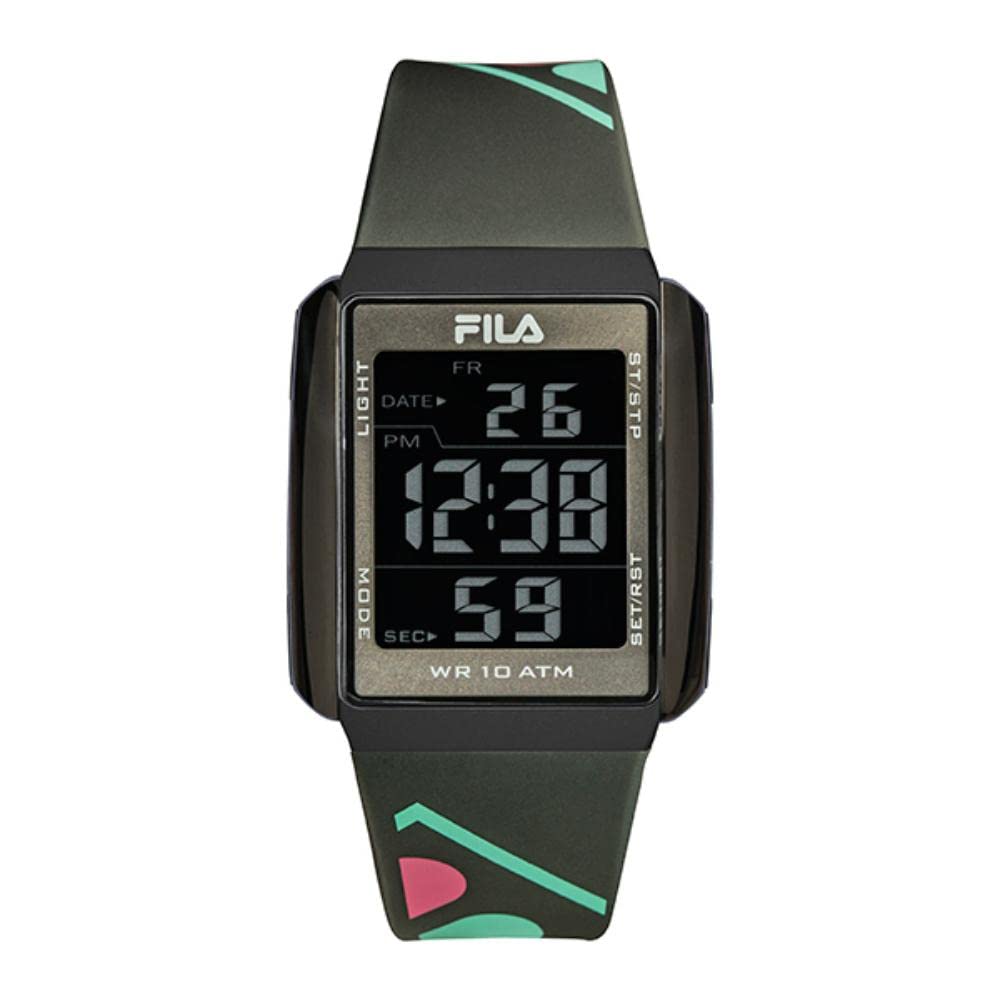
This image shows the Fila Digital Chronograph Watch, model 38-325-003, in grey, displayed on a stand. The digital display shows the time, date, and seconds. Buttons for Light, Mode, Start/Stop, and Set/Reset are visible on the sides. The watch is water-resistant to 10 ATM.
Setup
1. Initial Power On and Time Setting
Your watch comes with a pre-installed CR2 battery. To set the time and date:
- Press the MODE button repeatedly until the time setting mode is displayed (usually indicated by flashing digits).
- Use the SET/RST button to adjust the flashing digit (hours, minutes, seconds).
- Press the ST/STP button to move to the next digit or setting (e.g., from hours to minutes).
- Once all settings (time, date, year) are correct, press the MODE button to exit the setting mode.
2. Setting the Alarm
To set the alarm function:
- Press the MODE button until the alarm setting screen appears.
- Use the SET/RST button to adjust the alarm time.
- Press the ST/STP button to switch between hours and minutes.
- Once the desired alarm time is set, press the MODE button to confirm and exit.
- To activate or deactivate the alarm, typically a quick press of the ST/STP button while in alarm mode will toggle it on/off. An alarm icon should appear on the display when active.
Operating Instructions
1. Time Display
In normal timekeeping mode, the watch displays the current time (hours, minutes, seconds) and date.
2. Using the Chronograph (Stopwatch)
The chronograph function allows you to measure elapsed time:
- Press the MODE button until the chronograph display appears (usually showing "00:00:00").
- Press the ST/STP button to start the stopwatch.
- Press ST/STP again to pause the stopwatch.
- To resume, press ST/STP.
- To reset the stopwatch to zero, press the SET/RST button while the stopwatch is paused.
- Press the MODE button to return to normal timekeeping.
3. Using the Light
To illuminate the display in low-light conditions:
- Press the LIGHT button located on the side of the watch. The backlight will activate for a few seconds.
Maintenance
1. Cleaning Your Watch
- Wipe the watch case and strap with a soft, damp cloth.
- Avoid using harsh chemicals, solvents, or abrasive cleaners, as these can damage the watch's finish.
- For silicone straps, mild soap and water can be used, then rinse thoroughly and dry.
2. Water Resistance (10 ATM)
Your Fila watch is water-resistant up to 10 ATM (100 meters). This means it is suitable for swimming, showering, and snorkeling. However, it is not recommended for diving. Avoid operating buttons underwater to prevent water ingress.
3. Battery Replacement
When the display becomes dim or the watch stops functioning, the battery may need replacement. This watch uses one CR2 battery. Battery replacement should ideally be performed by a qualified watch technician to ensure proper sealing and water resistance.
Troubleshooting
- Display is blank or dim: The battery may be low or depleted. Replace the battery.
- Time is incorrect: Re-set the time following the instructions in the "Setup" section. Ensure you are in the correct 12-hour or 24-hour format if applicable.
- Alarm does not sound: Check if the alarm is activated (look for the alarm icon on the display). Ensure the alarm time is set correctly.
- Buttons are unresponsive: Ensure the watch is not in a locked mode (if applicable). If the issue persists, a battery replacement might be necessary, or contact support.
Specifications
| Brand | Fila |
| Model Number | 38-325-003 |
| Display Type | Digital |
| Movement | Japanese Quartz |
| Special Features | Alarm |
| Power Source | Battery Powered (1 CR2 included) |
| Case Material | Acrylonitrile Butadiene Styrene (ABS) |
| Case Diameter | 40 millimeters |
| Case Thickness | 10 millimeters |
| Watch Glass Material | Mineral Glass |
| Band Material | Silicone |
| Band Color | Grey |
| Band Width | 20 millimeters |
| Band Length | 26 centimeters |
| Clasp Type | Buckle |
| Item Shape | Square |
| Water Resistance | 10 ATM (100 meters) |
| Item Weight | 100 grams |
| Department | Unisex Adult |
Warranty Information
This Fila Digital Chronograph Watch comes with a 6-month limited warranty from the date of purchase. This warranty covers manufacturing defects under normal use. It does not cover damage resulting from misuse, accidents, unauthorized repairs, or normal wear and tear. Please retain your proof of purchase for warranty claims.
Support
For further assistance, troubleshooting not covered in this manual, or warranty inquiries, please contact Fila customer support through their official website or the retailer where the watch was purchased. Have your model number (38-325-003) and proof of purchase ready when contacting support.