
Introduction
This manual provides comprehensive instructions for the installation, operation, and maintenance of your Newgoal 4-Channel WiFi Wireless Smart Switch Inching Self-locking Relay Module. Please read this manual thoroughly before use to ensure proper functionality and safety. This device allows remote control of connected appliances via WiFi (Tuya/SmartLife APP) and a 433MHz RF remote control.
Product Overview
The Newgoal 4-Channel WiFi Wireless Smart Switch is a versatile relay module designed for smart home automation. It features four independent relay channels and supports three distinct operating modes: Inching (Momentary), Self-locking, and Interlock. Control is available through the Tuya/SmartLife mobile application, a 433MHz RF remote, and voice commands via Amazon Alexa or Google Home.

The module integrates WiFi connectivity for seamless integration into your smart home ecosystem and includes a 433MHz RF receiver for local remote control. It is compatible with popular voice assistants for convenient hands-free operation.
Specifications
| Brand | Newgoal |
| Model | Tuya DC4+433 |
| Power Input | USB 5V or AC/DC 7-32V |
| Coil Voltage | 5 volts |
| Maximum Switching Voltage | 32 volts |
| Relay Load | AC 0-250V 10A, DC 0-30V 10A |
| WiFi Standard | 2.4GHz (Does not support Mesh WiFi or 5G WiFi) |
| RF Frequency | 433MHz |
| RF Code Type | Fixed code / Learning code |
| Max RF Range | Up to 98ft (30m) |
| Operation Mode | Automatic |
| Mounting Type | Surface Mount |
| Dimensions (L*W*H) | 69mm * 68mm * 19mm |
Setup
Component Identification

Refer to Figure 2 for the location of power inputs, manual switches/setting buttons, WiFi LED, and relay output terminals.
Wiring Instructions
The relay module requires a power input of either USB 5V or AC/DC 7-32V. The relays themselves are switches without output; the power supply input is solely for powering the PCBA (Printed Circuit Board Assembly). Connect your devices to the relay output terminals (NC, COM, NO) according to your application's requirements.
Tuya/SmartLife APP Pairing
- Download the Tuya Smart or Smart Life app from your mobile device's app store (available on Android and iOS).
- Register or log in to your account.
- Ensure your mobile device is connected to a 2.4GHz WiFi network. The relay module only supports 2.4GHz WiFi and is not compatible with Mesh WiFi systems or 5G WiFi networks.
- Power on the relay module.
- Open the Tuya Smart/Smart Life app and follow the in-app instructions to add a new device. You may need to put the module into pairing mode (refer to app instructions or module's specific pairing button sequence).
- During pairing, ensure the module is close to your WiFi router for a stable connection.
433MHz RF Remote Control Pairing
To pair the 433MHz RF remote control with the module:
- Press and hold each manual switch button on the module for 3 seconds. The module can learn up to 14 different 433MHz codes per channel.
- To clear all learned RF codes, press and hold the manual switch button for 15 seconds.
Operating Modes
The module supports three operating modes: Inching (Momentary), Self-locking, and Interlock. All four channels operate in the same mode; individual channels cannot be set to different modes. You can change the working mode by manually tapping the work mode setting button on the module.
1. Inching (Momentary) Mode
In this mode, the relay activates for a brief period and then automatically deactivates. You can configure two wiring options:
- Turn on 1s and then auto-off: The connected device turns on for 1 second and then turns off.
- Turn off 1s and then auto-on: The connected device turns off for 1 second and then turns on.
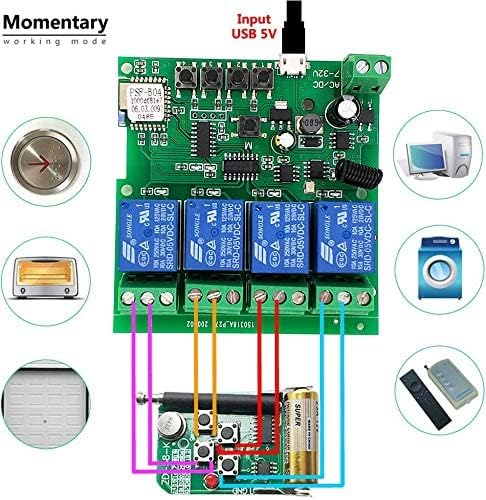
Figure 3 illustrates a typical wiring setup for momentary operation, such as controlling a garage door opener.
2. Self-locking Mode
In self-locking mode, pressing a button on the app or the manual button on the board will toggle the relay's state. The relay remains in its new state until the button is pressed again. This allows you to remotely turn connected devices on or off immediately and keep them in that state.

Figure 4 demonstrates wiring for self-locking mode, commonly used for lighting or other devices that require a persistent on/off state.
3. Interlock Mode
Interlock mode is supported only by 2-gang and 4-gang versions of the module. In this mode, if one relay is activated, all other relays in the group will automatically turn off. This is particularly useful for controlling AC/DC motors where only one direction of movement should be active at a time.

Figure 5 provides a wiring example for interlock mode, demonstrating its application with DC and AC motors.
Remote Control
433MHz RF Remote Control
The included 433MHz RF remote control allows for local operation of the relay module. After pairing the remote with the module (as described in the Setup section), you can use the remote's buttons to control the corresponding relay channels.
Tuya/SmartLife APP Control
Once the module is paired with the Tuya Smart or Smart Life app, you can access various control features:
- Remote Turn On/Off: Control connected devices from anywhere with an internet connection.
- Timing Schedules: Set schedules for devices to turn on or off automatically at specific times.
- Device Sharing: Share control of the module with other family members.
- Group Management: Group multiple smart devices for simultaneous control.
Voice Control (Alexa/Google Home)
The module is compatible with Amazon Alexa and Google Home. After linking your Tuya Smart/Smart Life account to your Alexa or Google Home app, you can use voice commands to control your devices. Supported voice commands are currently available in US/UK English and German.
Maintenance
The Newgoal 4-Channel WiFi Wireless Smart Switch is designed for low maintenance. Keep the module in a dry environment and avoid exposure to extreme temperatures or moisture. Regularly check wiring connections for security. No user-serviceable parts are inside; do not attempt to disassemble the module.
Troubleshooting
- Device not connecting to WiFi: Ensure your router is broadcasting a 2.4GHz network. Move the module closer to the router during pairing. Check that your WiFi password is correct.
- RF remote not working: Verify that the remote is paired correctly by following the RF pairing instructions. Ensure the remote's battery is not depleted.
- Relay not responding: Check the power supply to the module. Ensure the connected device is properly wired to the relay terminals and is functioning correctly.
- Voice control issues: Confirm that your Tuya Smart/Smart Life account is correctly linked to your Alexa or Google Home app. Ensure your voice commands are clear and in a supported language.
Warranty and Support
For warranty information and technical support, please refer to the documentation provided with your purchase or contact Newgoal customer service through the retailer where the product was purchased. Keep your purchase receipt for warranty claims.