
1. Introduction
This manual provides essential information for the safe and efficient use of your BSEED WiFi Smart EU Socket with Energy Monitoring. Please read these instructions carefully before installation and operation, and retain them for future reference.
The BSEED WiFi Smart EU Socket is designed for modern interiors, offering both functionality and an aesthetic appearance. It integrates seamlessly into various home styles and provides smart control and energy consumption monitoring capabilities.
2. Safety Information
- Electrical Safety: Installation should only be performed by a qualified electrician or in accordance with local electrical codes. Ensure power is disconnected before installation or maintenance.
- Child Safety: The product features a child safety design to prevent electric shock.
- Compatibility: This socket insert is designed for use exclusively with BSEED brand glass frames. Do not attempt to use it with frames from other manufacturers.
- Indoor Use Only: This product is intended for indoor use in dry environments.
- Maximum Load: Do not exceed the maximum current rating of 16A. Overloading can cause damage or fire.
- Damage: Do not use the product if it appears damaged. Contact customer support for assistance.
3. Product Overview
The BSEED WiFi Smart EU Socket provides a convenient way to control connected devices and monitor their energy usage via a smartphone application. It features a sleek design and robust construction.

Image 3.1: Front view of the BSEED WiFi Smart EU Socket. This image shows the black socket with two round openings for the EU plug, and two small indicators at the top, one being a button.

Image 3.2: The BSEED WiFi Smart EU Socket shown with the BSEED logo and a WiFi icon. A crucial note indicates that BSEED panels and functions are exclusively compatible with other BSEED articles, emphasizing the need for brand-specific accessories.
Key Features:
- WiFi Connectivity: Connects to your home WiFi network (2.4GHz b/g/n) for remote control.
- Energy Monitoring: Tracks and displays real-time energy consumption of connected devices.
- Smart Control: Compatible with smart home platforms like Smart Life, Tuya, Amazon Alexa, and Google Assistant.
- Child Protection: Integrated safety mechanism to prevent accidental electric shock.
- Modern Design: 86mm x 86mm form factor, designed to complement contemporary interiors.
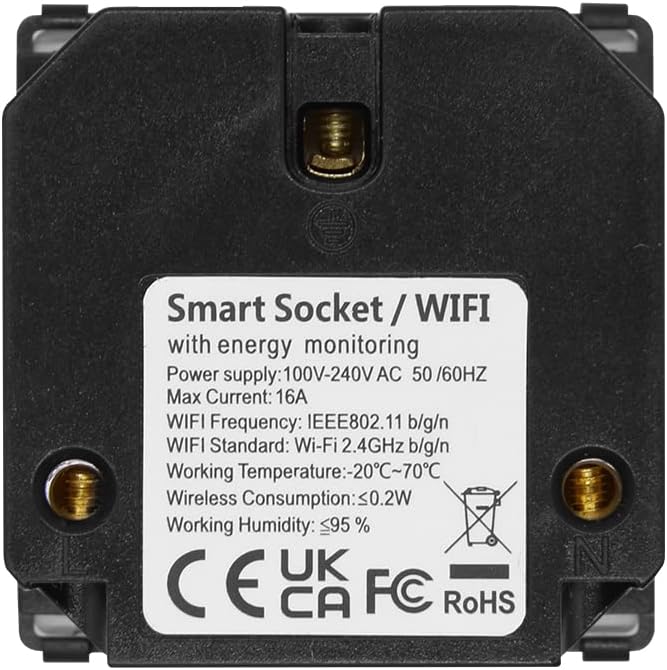
Image 3.3: Back view of the BSEED WiFi Smart EU Socket. The label displays technical specifications including power supply (100-240V AC, 50/60Hz), max current (16A), WiFi frequency (IEEE802.11 b/g/n, 2.4GHz), working temperature (-20°C~70°C), wireless consumption (≤0.2W), and working humidity (≤95%). CE, UKCA, FC, and RoHS certifications are also visible.
4. Specifications
| Feature | Detail |
|---|---|
| Model Number | FK86EUSKIM1BEU |
| Dimensions (L x W x H) | 8.6 x 8.6 x 2.5 cm |
| Weight | 180 g |
| Color | Black (WiFi EU Socket with Consumption Meter) |
| Material | Polycarbonate |
| Power Source | AC |
| Voltage | 100-240V AC, 50/60Hz |
| Max Current | 16A |
| WiFi Standard | IEEE802.11 b/g/n, 2.4GHz |
| Working Temperature | -20°C to 70°C |
| Working Humidity | ≤95% |
| Included Components | Screw |

Image 4.1: Dimensional diagram of the BSEED WiFi Smart EU Socket, indicating measurements of 86mm x 86mm for the front panel and 50mm x 50mm for the internal module, with a depth of 32mm.
5. Setup and Installation
Important: Installation must be carried out by a qualified professional and in compliance with all local electrical regulations. Ensure the main power supply is switched off before beginning installation.
- Prepare Wiring: Ensure the electrical box has the necessary live (L) and neutral (N) wires.
- Connect Wires: Connect the live and neutral wires from your electrical system to the corresponding terminals on the back of the BSEED WiFi Smart EU Socket. Refer to the wiring diagram if provided with the physical product.
- Mount the Socket: Secure the socket module into the wall box using the provided screws.
- Install Glass Frame: Attach the BSEED compatible glass frame (sold separately) over the socket module. Ensure it clicks securely into place.
- Restore Power: Once installation is complete and secure, restore power at the main circuit breaker.
- Initial Power-On: The socket's indicator light should illuminate, indicating it is powered on.
App Pairing (Smart Life/Tuya):
- Download App: Download the "Smart Life" or "Tuya Smart" app from your smartphone's app store.
- Register/Login: Create an account or log in to the app.
- Add Device: In the app, tap "+" to add a new device. Select "Electrical Outlet" or "Socket (Wi-Fi)".
- Enter WiFi Details: Ensure your phone is connected to a 2.4GHz WiFi network. Enter your WiFi network password in the app.
- Pairing Mode: Follow the app's instructions to put the socket into pairing mode. This usually involves pressing and holding the button on the socket for a few seconds until the indicator light blinks rapidly.
- Complete Pairing: The app will detect and connect to the socket. Once connected, you can rename the device and begin using its smart features.

Image 5.1: This image illustrates the compatibility of the smart socket with popular smart home platforms such as Smart Life, Tuya, Amazon Alexa, and Google Assistant, highlighting its integration capabilities.
6. Operating Instructions
Manual Control:
- Power On/Off: Press the physical button on the socket to manually toggle power to the connected device.
App Control:
- Remote On/Off: Use the Smart Life/Tuya app to turn the socket on or off from anywhere with an internet connection.
- Scheduling: Set schedules or timers for the socket to automatically turn on or off at specific times.
- Energy Monitoring: View real-time and historical energy consumption data for devices plugged into the smart socket within the app. This feature helps track and manage electricity usage.
- Scenes/Automations: Create custom scenes or automations within the app to control the socket based on various conditions (e.g., turn on when you arrive home, turn off when leaving).
Voice Control (via Alexa/Google Assistant):
- Link Account: Enable the "Smart Life" or "Tuya Smart" skill in your Amazon Alexa or Google Home app and link your account.
- Discover Devices: Ask Alexa or Google Assistant to discover new devices.
- Voice Commands: Use voice commands such as "Alexa, turn on [Socket Name]" or "Hey Google, turn off [Socket Name]".
7. Maintenance
- Cleaning: Disconnect power before cleaning. Wipe the surface with a soft, dry cloth. Do not use abrasive cleaners or solvents.
- Regular Checks: Periodically check the socket for any signs of damage or loose connections.
- Firmware Updates: Keep the Smart Life/Tuya app updated to ensure you receive the latest firmware for your socket, which may include performance improvements and security enhancements.
8. Troubleshooting
| Problem | Possible Cause | Solution |
|---|---|---|
| Socket not responding/no power | No power supply; loose wiring; circuit breaker tripped. | Check main power supply. Verify wiring connections (with power off). Reset circuit breaker. |
| Cannot pair with app | Incorrect WiFi password; 5GHz WiFi network; socket not in pairing mode; weak WiFi signal. | Ensure correct 2.4GHz WiFi network and password. Put socket into pairing mode (rapid blinking indicator). Move router closer or use a WiFi extender. |
| App shows "Offline" | No internet connection; WiFi router off; socket lost connection. | Check internet connection and router. Restart the socket by turning off/on power at the breaker. Re-pair if necessary. |
| Energy monitoring inaccurate | Temporary software glitch; device not fully compatible. | Restart the socket. Ensure the app is updated. If issues persist, contact support. |
9. Warranty and Support
BSEED products are designed for quality and reliability. For warranty information, please refer to the specific terms provided at the point of purchase or on the official BSEED website. Typically, a standard manufacturer's warranty covers defects in materials and workmanship.
If you encounter any issues or require technical assistance, please contact BSEED customer support through their official channels. When contacting support, please have your product model number (FK86EUSKIM1BEU) and purchase details ready.
For more information and support, visit the official BSEED website or contact your retailer.


