Introduction
This manual provides comprehensive instructions for the proper use and care of your Orient RA-AK03 automatic watch. Featuring the reliable Orient F6B24 automatic/hand-winding/hacking movement, a scratch-resistant sapphire crystal, and complications including a 24-hour dial, day, and date display, this timepiece is designed for precision and durability. Please read this manual thoroughly to ensure optimal performance and longevity of your watch.
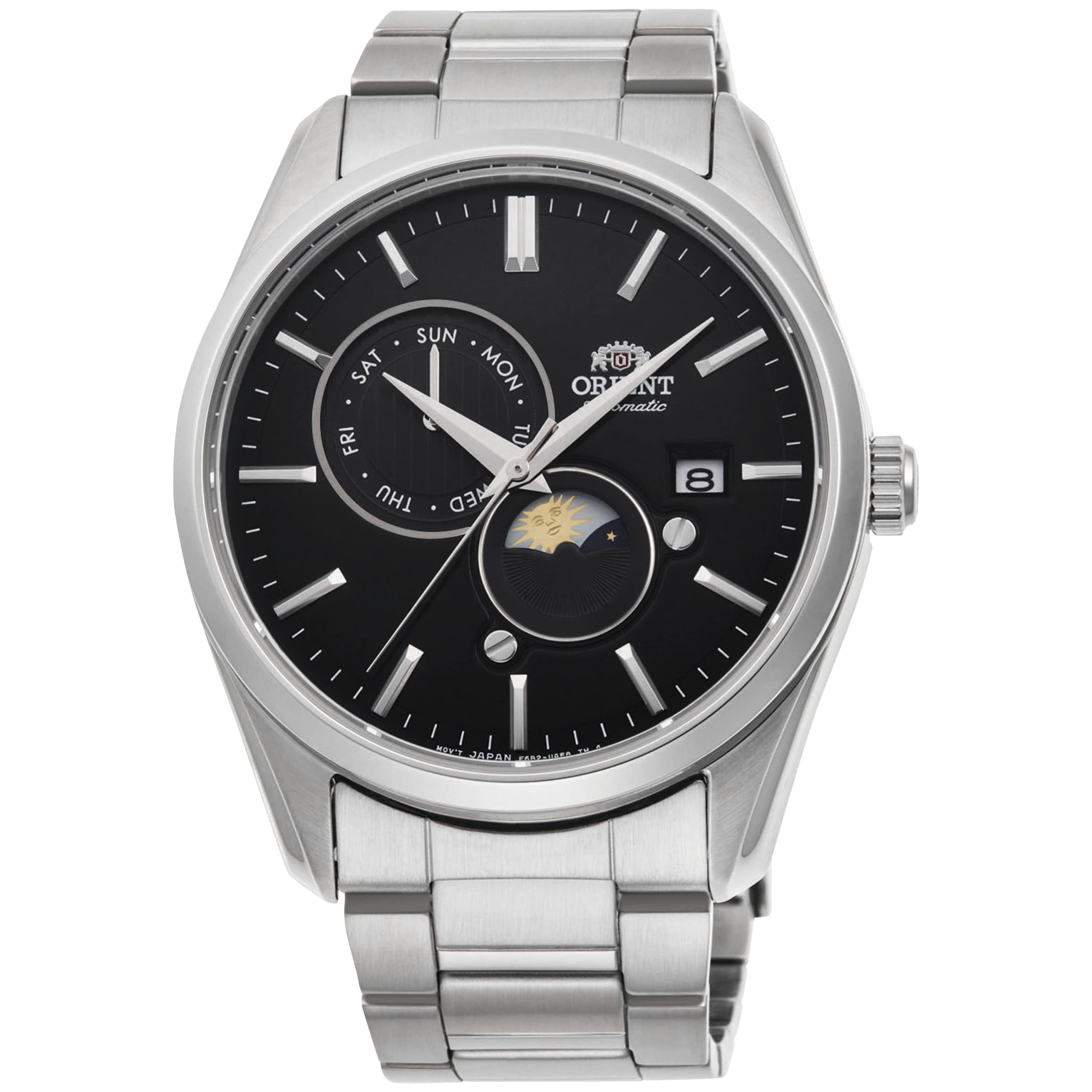
Image: The Orient RA-AK03 watch with its black dial and stainless steel bracelet.
Setup
Initial Winding
Before wearing your watch for the first time, or if it has stopped, manually wind it by rotating the crown clockwise approximately 30-40 times while it is in the normal (pushed-in) position. This will provide sufficient power reserve to start the movement.
Setting the Time
- Pull the crown out to the second click position. The second hand will stop (hacking feature).
- Rotate the crown to set the hour and minute hands to the desired time. Ensure the 24-hour sub-dial also reflects the correct AM/PM period.
- Push the crown back into the normal position to start the watch.
Setting the Date and Day
- Pull the crown out to the first click position.
- Rotate the crown clockwise to set the date.
- Rotate the crown counter-clockwise to set the day of the week.
- Important: Avoid setting the date and day between 9:00 PM and 4:00 AM, as this can interfere with the automatic date change mechanism and potentially damage the movement. If you need to set the date during these hours, first adjust the time outside this range, then set the date, and finally reset the time.
- Push the crown back into the normal position.

Image: The watch face, highlighting the crown's position for setting functions.
Operating Your Watch
Automatic Movement
Your Orient RA-AK03 watch is powered by an automatic movement, meaning it is wound by the motion of your wrist. When worn regularly, the watch will maintain its power reserve. If the watch is not worn for an extended period, it will stop and require manual winding or wearing to restart.
Hand-Winding Capability
In addition to automatic winding, the watch can be manually wound by rotating the crown clockwise in its normal position. This is useful for ensuring a full power reserve or restarting the watch after it has stopped.
Hacking Feature
The watch features a 'hacking' function, which means the second hand stops when the crown is pulled out to the time-setting position. This allows for precise time synchronization.
Complications: Day, Date, and 24-Hour Dial
- Day Display: Located at the 10 o'clock position, indicating the current day of the week.
- Date Display: Positioned at the 3 o'clock position, showing the current numerical date.
- 24-Hour Dial: A sub-dial at the 6 o'clock position that tracks the time in a 24-hour format, often used to distinguish between AM and PM.
Maintenance
Water Resistance
Your watch is water resistant to 50 meters (165 feet). This rating means it is suitable for short periods of recreational swimming. It is not suitable for diving, snorkeling, or prolonged water immersion. Always ensure the crown is fully pushed in before any contact with water.
Cleaning
To maintain the appearance of your watch, wipe it regularly with a soft, dry cloth. For the stainless steel case and bracelet, a slightly damp cloth with mild soap can be used, followed by thorough drying. Avoid using harsh chemicals or abrasive materials.
Sapphire Crystal Care
The sapphire crystal is highly scratch-resistant but not entirely scratch-proof. Avoid direct impact or contact with extremely hard surfaces to prevent damage.

Image: The transparent case back revealing the automatic movement. Keep this area clean for optimal viewing.
Troubleshooting
- Watch not running: Ensure the watch has been sufficiently wound, either manually or by wearing it for several hours. Check that the crown is fully pushed into the normal position.
- Inaccurate time: Mechanical watches typically have a daily accuracy variance. If your watch is consistently gaining or losing a significant amount of time (e.g., more than +/- 30 seconds per day), it may require adjustment by a professional watchmaker.
- Date/Day not changing: Verify that the time is set correctly, especially the AM/PM cycle. The date and day change mechanism typically activates around midnight. If the issue persists, avoid manual adjustment during the restricted hours (9 PM - 4 AM) and consult a service center.
Specifications
| Feature | Detail |
|---|---|
| Movement | Orient F6B24 Automatic / Hand-Winding / Hacking |
| Crystal | Sapphire |
| Case Material | Stainless Steel |
| Case Diameter | 41.5 mm |
| Case Thickness | 13 mm |
| Lug to Lug Length | 48 mm |
| Lug Width | 22 mm |
| Band Material | Stainless Steel |
| Water Resistance | 50 Meters (165 Feet) |
| Complications | 24-Hour Dial, Day, Date |
| Item Weight | 10 ounces |

Image: The watch's stainless steel bracelet with its double push-button safety clasp.
Warranty
For detailed warranty information regarding your Orient RA-AK03 watch, please refer to the warranty card included with your purchase or visit the official Orient website. The warranty typically covers manufacturing defects under normal use conditions.
Support
Should you require further assistance, service, or have questions not covered in this manual, please contact Orient customer support through their official website. Ensure you have your model number (RA-AK0307B30B) readily available for efficient service.


