
1. Introduction
This manual provides comprehensive instructions for the installation, operation, and maintenance of your Qiilu Auxiliary Input Bluetooth Adapter. This adapter allows you to stream audio wirelessly from your Bluetooth-enabled devices (such as smartphones, tablets, or MP3 players) to compatible Alpine car stereo systems. Please read this manual carefully before installation and use to ensure proper functionality and to avoid damage.
2. Product Overview
The Qiilu Auxiliary Input Bluetooth Adapter is designed to integrate seamlessly with specific Alpine car radio models, providing a modern audio streaming solution. It features a compact design for easy installation and high-quality audio transmission.
2.1 Key Features
- Bluetooth Connectivity: Enables wireless audio streaming from compatible devices.
- High-Quality Audio: Designed for clear, lossless, and noise-free sound transmission.
- Compact and Portable: Small size for easy storage and installation.
- Durable Construction: Made from high-quality ABS material for longevity.
- Direct Connection: Plugs directly into the auxiliary input socket on the back of your compatible Alpine radio.
2.2 Package Contents
- 1 x Qiilu Bluetooth AUX Adapter
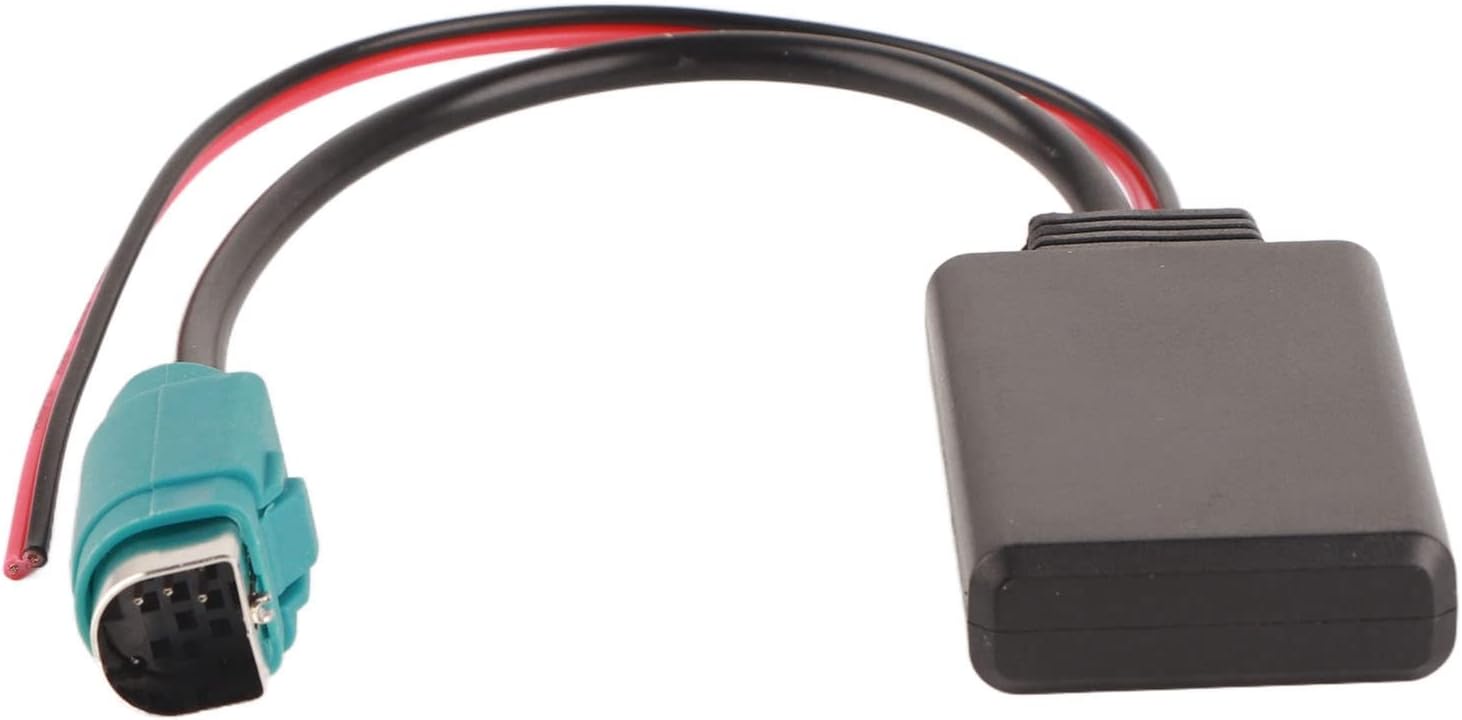
Figure 1: The Qiilu Auxiliary Input Bluetooth Adapter, showing its compact black module and wiring.
3. Setup and Installation
Before beginning installation, ensure your vehicle's ignition is off and the car battery is disconnected to prevent electrical shorts or damage.
3.1 Wiring Instructions
- Locate the power source for the adapter. The adapter requires a 12V power supply.
- Connect the red wire of the adapter to a positive (+) 12V power source in your vehicle. This can often be found behind the radio or in the fuse box.
- Connect the black wire of the adapter to a negative (-) ground point in your vehicle. This can be a metal part of the car chassis or a designated ground wire behind the radio.
- Ensure all connections are secure to prevent intermittent power or signal loss.

Figure 2: Close-up of the adapter's wiring. The red wire connects to positive 12V, and the black wire connects to ground. The blue connector plugs into the radio's auxiliary input.
3.2 Connecting to the Car Radio
- Carefully remove your Alpine car radio from its mounting to access the rear connections. Consult your car's or radio's manual for specific removal instructions.
- Locate the auxiliary input socket on the back of your Alpine radio. This is typically a multi-pin connector.
- Plug the blue signal receiving connector of the Qiilu adapter firmly into the corresponding auxiliary input interface on the back of your radio.
- Once all connections are made, re-connect your car battery and re-install the car radio into its mounting.

Figure 3: The Qiilu adapter's connector plugged into the back of a compatible Alpine car radio, with the radio displaying 'DISC TEXT'.
4. Operating Instructions
4.1 Bluetooth Pairing
- Turn on your car radio and select the AUX input source. The method for selecting AUX input varies by Alpine radio model; refer to your radio's manual if needed.
- On your mobile device (phone, tablet, etc.), enable Bluetooth and search for available devices.
- Look for a device named similar to "BT-MUSIC" or "Qiilu AUX" in the list of available Bluetooth devices.
- Select the adapter to pair. Once paired, your device should indicate a successful connection.
4.2 Playing Audio
After successful pairing, you can now play audio from your mobile device. The audio will be transmitted wirelessly to your Alpine car radio. Use your mobile device to control playback (play, pause, skip tracks) and volume. The car radio's volume control will also adjust the output level.
5. Maintenance
The Qiilu Auxiliary Input Bluetooth Adapter requires minimal maintenance. Keep the adapter and its connections clean and dry. Avoid exposing the unit to extreme temperatures, moisture, or direct sunlight for prolonged periods. Do not attempt to open or modify the adapter, as this will void any potential warranty and could cause damage.
6. Troubleshooting
If you encounter issues with your Qiilu Auxiliary Input Bluetooth Adapter, refer to the following troubleshooting steps:
- No Audio Output:
- Ensure the car radio is set to the correct AUX input source.
- Verify that your mobile device is successfully paired with the adapter and playing audio.
- Check the volume levels on both your mobile device and the car radio.
- Inspect the wiring connections (red to positive, black to negative) and the blue connector to the radio for secure fit. Loose connections can prevent audio transmission.
- If the issue persists, try disconnecting and reconnecting the car battery for a soft reset of the radio and adapter.
- Bluetooth Pairing Issues:
- Ensure the adapter is powered on (car ignition is on, radio is on).
- Turn off and on Bluetooth on your mobile device.
- Delete any previous pairings for the adapter on your mobile device and attempt to pair again.
- Move your mobile device closer to the adapter to rule out range issues.
- Intermittent Audio:
- Check all wiring connections for looseness or corrosion.
- Ensure there are no strong electromagnetic interference sources near the adapter or radio.
- Verify the power supply to the adapter is stable.
7. Specifications
| Item Type | Bluetooth AUX Cable |
| Material | ABS |
| Voltage | 12V |
| Connector Type | Auxiliary |
| Color | Black |
| Item Weight | 0.03 Kilograms |
| Compatible Devices | Alpine DVA-9861/Ri, iDA-X001, iDA-X100, iDA-X200, iDA-X300, IVA-D105R, IVA-D106R, IVA-W200Ri, IVA-W202R, IVA-205R, IVA-W205/E, IVA-W202/R, W502/W505R, CDE-9870R/RM, CDE-9871R/RR, CDE-9872R/RM, CDE-9873RB, CDE-9874R/RR/RBi, CDE-9880R, CDE-9881R/RB, CDE-9882Ri, CDE-9883/R/E, CDE-9885/R, CDE-9887/R, CDA-9835, CDA-9852/E, CDA-9853, CDA-9856/E, CDA-9857/E, CDA-9870/E/R/RM, CDA-9871/R/RR, CDA-9873/E/RB, CDA-9874, CDA-9881/R/RB, CDA-9883R, CDA-9884R, CDA-9885R, CDA-9886R, CDA-9887R. |
8. Warranty Information
This product comes with a standard limited warranty. For specific details regarding warranty coverage, duration, and terms, please refer to the product packaging or contact the manufacturer directly. Keep your purchase receipt as proof of purchase for any warranty claims.
9. Support
For further assistance, technical support, or inquiries regarding your Qiilu Auxiliary Input Bluetooth Adapter, please contact Qiilu customer service through their official website or the retailer from whom you purchased the product. Provide your product model (B09NZG48SZ) and a detailed description of your issue for efficient support.