
Introduction
The Eonon UA12S-PLUS is a state-of-the-art 10.1-inch Double DIN Car Stereo designed to enhance your in-car entertainment and navigation experience. Powered by Android 13 and an Octa-Core processor with 6GB RAM and 64GB ROM, it delivers smooth and responsive performance. Key features include wireless CarPlay and Android Auto, a vibrant QLED touchscreen, built-in 4G LTE, and advanced DSP for superior audio quality. This manual provides essential information for setup, operation, and maintenance of your new car stereo.
Setup
Compatibility and Installation
The UA12S-PLUS is a 10.1-inch Universal Double DIN head unit, compatible with many dash kits. If your original car radio's mounting size is 178x100mm (7.01"x3.94") and has an ISO power cord, direct installation is possible. If dimensions do not match, an extra 2-DIN kit and ISO adapter cable may be required.

Figure 1: Standard 2-DIN compatibility and unit dimensions.

Figure 2: Installation with an extra 2-DIN kit for non-standard openings.

Figure 3: ISO connector compatibility and adapter cable requirement.
What's in the Box
Your Eonon UA12S-PLUS package includes:
- Power cord *1
- GPS antenna *1
- 4G antenna *2
- USB adapter cable *2
- Audio/video adapter cable *2
- Reversing video input cable *1
- 15A fuse *1
- SIM card holder *1
- External microphone *1
- Screws *8
- Instruction manual *1
- Panel disassembling instructions *1
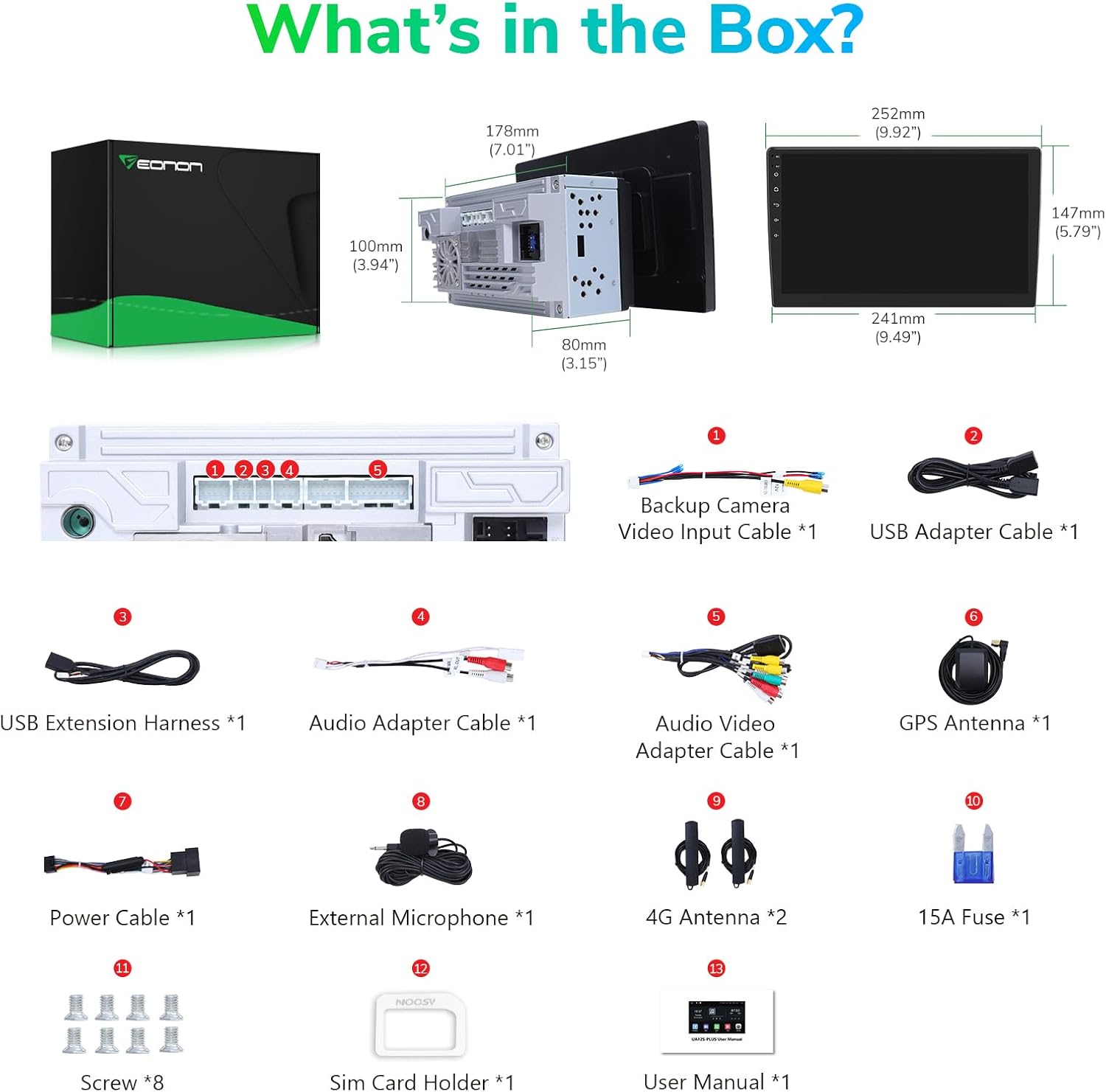
Figure 4: Detailed view of included accessories.
Wiring Diagram
Refer to the following diagram for proper wiring connections:

Figure 5: Comprehensive wiring connections for the UA12S-PLUS.
Installation Video Guide
Video 1: Official Eonon guide on how to install the car stereo in your vehicle.
Operating
Advanced Configuration and Performance
The UA12S-PLUS runs on Android 13, powered by an advanced 11nm chip and an ARM Cortex Octa-Core processor. With 6GB RAM and 64GB ROM, it ensures smooth and responsive operation for all your tasks.

Figure 6: Overview of the UA12S-PLUS interface and key features.

Figure 7: Internal hardware specifications for high performance.
Wireless CarPlay & Android Auto
Enjoy a truly hands-free experience with built-in wireless CarPlay and Android Auto. Activate Siri or Google Assistant with voice commands for music, navigation, calls, and messages. Screen mirroring is also supported.

Figure 8: Seamless integration with your smartphone for enhanced driving safety and convenience.
Video 2: Step-by-step guide on connecting the wireless CarPlay function.
QLED Touchscreen and Display
The 10.1-inch QLED screen offers 1280x720P HD resolution with vibrant colors. Choose from 3 brightness modes (Light, Dark, Auto) for optimal visibility. The 2.5D multi-touch capacitive screen ensures precise control.

Figure 9: High-definition display for clear visuals.

Figure 10: Adjustable brightness modes for comfortable viewing.
Immersive Sound with DSP
Experience superior audio quality with the built-in DSP chip and 4 x 48W surround sound outputs. Customize your sound with the 15-band graphic equalizer and 6 equalization modes. Enjoy AM/FM RDS radio with 18FM/12AM savable stations.

Figure 11: Advanced sound processing for an optimized listening experience.
Connectivity and Accessories
The UA12S-PLUS supports HD 720P/1080P backup camera input, front camera input, and OBD scanner connectivity (accessories not included). It also features CANBUS support for original car functions like SWC and reverse signals.

Figure 12: Expand your stereo's capabilities with compatible accessories.
Video 3: Guide on how to set up various accessories with the UA12S-PLUS.
Software Updates
Keep your unit up-to-date with OTA (Over-The-Air) updates, ensuring improved security and performance. You can upgrade to Android 13 via OTA updates if your unit shipped with an earlier version.

Figure 13: Accessing system updates for optimal performance.
UI Themes and Customization
The stereo comes with 3 customizable UI themes and supports custom wallpapers, allowing you to personalize your interface.

Figure 14: Personalize your user experience with multiple themes.
Steering Wheel Control (SWC)
The unit supports analog SWC signals, allowing you to control basic functions directly from your steering wheel for added convenience and safety.

Figure 15: Control your stereo without taking your hands off the wheel.
Split Screen Functionality
Utilize the split-screen function to run two applications simultaneously, such as navigation and music playback, enhancing multitasking capabilities.
Figure 16: Enhance productivity with simultaneous app usage.
Video 4: Demonstrating the split-screen feature for multitasking.
Maintenance
To ensure the longevity and optimal performance of your Eonon UA12S-PLUS, regular maintenance is recommended:
- Screen Cleaning: Use a soft, lint-free cloth and a screen-safe cleaner to gently wipe the QLED touchscreen. Avoid abrasive materials or harsh chemicals.
- Software Updates: Periodically check for and install OTA software updates to benefit from the latest features, bug fixes, and security enhancements.
- Connection Check: Ensure all cables and connections remain secure, especially after installation or any adjustments.
- Environmental Care: Avoid exposing the unit to extreme temperatures, direct sunlight for prolonged periods, or excessive moisture.
Troubleshooting
If you encounter issues with your Eonon UA12S-PLUS, try the following basic troubleshooting steps:
- Unit Not Powering On: Check all power connections and ensure the vehicle's ignition is on. Verify the 15A fuse is intact.
- No Sound: Check speaker connections, volume levels, and DSP settings. Ensure the correct audio output mode is selected.
- Touchscreen Unresponsive: Try restarting the unit by pressing the RST button for 10 seconds. If the issue persists, ensure the screen is clean and free of debris.
- CarPlay/Android Auto Connection Issues: Verify Bluetooth and Wi-Fi are enabled on both the stereo and your smartphone. Ensure the correct app is selected on the stereo.
- Camera Display Issues: Check the camera input cable connections. Ensure the camera is powered correctly.
For more complex issues, please refer to the detailed user manual (PDF) available on the product's Amazon page or contact Eonon customer support.
Specifications
| Feature | Detail |
|---|---|
| Product Dimensions | 3.94 x 9.92 x 5.79 inches |
| Item Weight | 3.96 pounds |
| Item Model Number | UA12S-PLUS |
| Manufacturer | Eonon |
| Connectivity Technology | Bluetooth, Wi-Fi, USB, HDMI |
| Controller Type | iOS, Android |
| Special Features | Android Auto, Built-In Bluetooth, Apple CarPlay, Voice Control, Built-In Wi-Fi |
| Compatible Devices | Smartphone |
| Total HDMI Ports | 1 |
| Audio Output Mode | Stereo, Surround |
| Surround Sound Channel Configuration | 4.1 |
| Video Encoding | MPG, DAT, TS, AVI, MP4, MOV, 3GP, ASF, VOB, MKV, FLV, RM, RMVB |
Warranty and Support
For warranty information, technical support, or any inquiries regarding your Eonon UA12S-PLUS car stereo, please visit the official Eonon website or contact their customer service team. Keep your purchase receipt handy for warranty claims.
Official User Manual (PDF): Download Here
