
ELS PET MSP01
ELS PET Self Cleaning Cat Litter Box User Manual
Model: MSP01 | Brand: ELS PET
Introduction
This manual provides essential information for the safe and efficient operation of your ELS PET Self Cleaning Cat Litter Box. Please read all instructions carefully before use to ensure optimal performance and safety for your pet.
Safety Information
IMPORTANT SAFETY INSTRUCTIONS:
- Read all instructions before using the appliance.
- Do not push the safety door with your hands directly.
- Ensure the unit is powered off before performing any maintenance or cleaning.
- Use High-Precision gravity detection to prevent the cat from being pinched more safely.
- Only use recommended clumping cat litter.
Product Overview & Components
The ELS PET Self Cleaning Cat Litter Box is designed for convenience and hygiene. It features automatic cleaning, app control, and odor reduction.
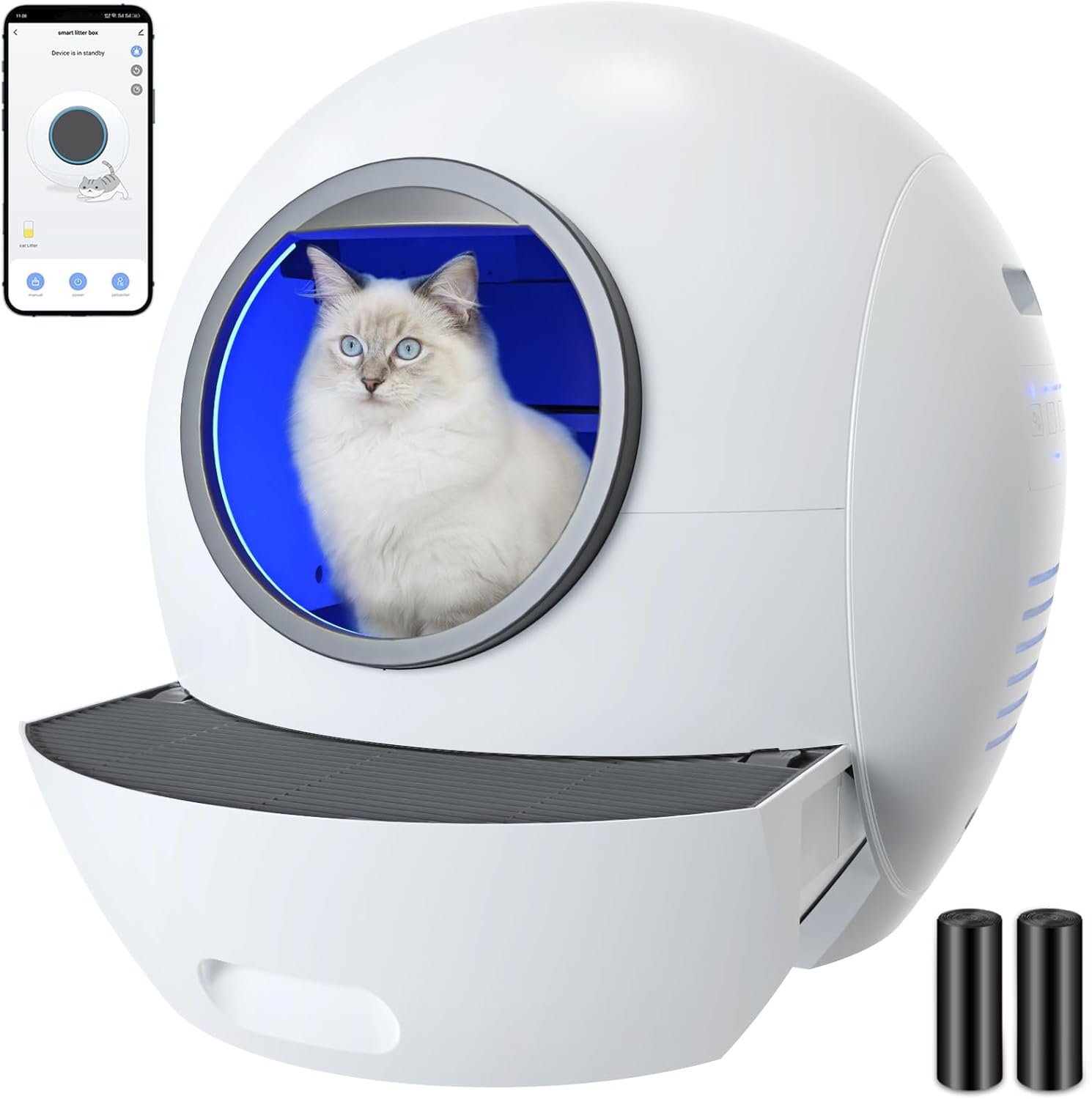
Figure 1: ELS PET Self Cleaning Cat Litter Box (Grey with APP).
Included Accessories:
- Trash bag × 2 rolls
- English Manual
- Power Adapter × 1
- Cat litter scoop × 1
- Trash bag × 4
- Sponge plugs × 2 (one not installed is a replacement)
- Smart shovel × 2 (one not installed is a replacement)
- Cleaning brush × 1

Figure 2: Product List showing included accessories.
Setup Instructions
- Unboxing: Carefully remove the litter box from its packaging.
Video 1: ELS PET Direct - Cat Litter Boxes (Unboxing and Setup). This video demonstrates the initial unboxing process, including removing the unit from the box and unwrapping protective materials.
- Pedestal Installation: Pull out the pedestal of the cat litter box until both sides of the buckle on the pedestal are stuck, and you hear a "BEEP" sound. The light inside turns from red to blue, indicating correct positioning.
- Power Connection: Connect the power adapter to the litter box. The machine will make a beeping sound after being electrified. The door light ring will turn red.
- Remove Door Seal: Tear the door seal or cut the rubber band securing the door.
- Install Sponge Strips: Place the sponge strips at the joint of the inside litter box.
- Add Litter: Add clumping cat litter (bentonite or mixed litter recommended) to the litter box. Refer to the MIN/MAX scale inside the box.

Figure 3: Internal view showing MIN/MAX litter level indicators.
Operating Instructions
Manual Operation:
Press the power button manually to operate normally. The door light circle turns blue to indicate the correct position.
App Control (2.4Ghz Wi-Fi Only):
Control the WiFi-enabled sifting litter box straight from the ELS PET APP.
- Ensure your mobile phone is connected to 2.4Ghz Wi-Fi.
- Open the ELS PET mobile APP.
- Click "create new user" and enter the registered mobile phone number and verification code.
- Click "add device", select "smart cat litter box".
- Click "OK" for the indicator to flash, enter your Wi-Fi password, and wait for pairing.
- Once connected, the indicator light turns on regularly.

Figure 4: Intelligent App Control interface for monitoring and managing the litter box.
Cleaning Modes:
- Auto-cleaning Mode: The litter box automatically cleans after your cat uses it.
- Scheduled-cleaning Mode: Set specific times for cleaning cycles via the app.
- UV Clean Function: Employs UV technology to further minimize odors and keep the litter box clean.

Figure 5: Light Air Purification System for odor reduction.
Safety Features:
The litter box uses high-precision gravity detection to prevent pinching. The app provides real-time push messages for health status monitoring.

Figure 6: Safety Door Protection, automatically stopping if a cat pushes the door.
Maintenance
Waste Bin Emptying:
The 4L capacity trash box means no scooping, cleaning, or refilling for up to two weeks for a single cat. Empty the waste bin regularly.
- Open the rear compartment door.
- Remove the accessory tools and tape connecting the garbage box.
- Take out the garbage box and the garbage bag.
- Wrap all garbage bags in garbage boxes.
- After putting into the cat litter box, close the rear hatch.
Video 2: ELS PET Direct - Cat Litter Boxes (Waste Bin Emptying). This video demonstrates how to remove and empty the waste bin.
Cleaning the Unit:
For thorough cleaning, the unit can be split.
- Open the rear hatch cover.
- Take out the garbage box and the garbage bag.
- Lift the inner hatch door up, push it in, and take it out.
- Long press the power button to shut down the machine.
- Press the cleaning key (No. 4) and wait for the claw to finish its work.
- Take out the claw by holding the thumb on the buttons on both sides, pressing down, and pulling it out.
- To remove the foot pedal, press the buckle with your thumb, gently pull both sides of the left and right, and take it out slowly.
- Lift the white base on the bottom lightly with your hand, then gently lift the cat litter box and pull it out.
Video 3: ELS PET Direct - Cat Litter Boxes (Disassembly for Cleaning). This video demonstrates how to disassemble the unit for deep cleaning.
Troubleshooting
Common Issues:
- Litter Box Stops Working: Some users reported issues after a few months. Try holding the 3rd button on the control panel for 10 seconds to reset factory settings.
- Odor Persistence: While the unit has UV and enclosed waste bins, some odor may still be present. Ensure proper litter type and regular waste disposal.
- Litter Sticking/Overflow: Do not overload with litter. Use lightweight clumping litter. The mechanical shovel is designed to prevent sticking.
- Sponge Strips Pop Out: The red sponge strips (foam pads) may occasionally pop out. Simply push them back into place.
- App Connectivity: Ensure you are on a 2.4Ghz Wi-Fi network.
Specifications
| Feature | Detail |
|---|---|
| Item Weight | 34.9 pounds (15.88 Kilograms) |
| Dimensions (LxWxH) | 25.2 x 24.02 x 24.02 inches (60L Spheric Space) |
| Material | Polypropylene (PP) |
| Waste Bin Capacity | 4L |
| Cat Weight Range | 1.5kg/3.3lbs to 13kg/28.7lbs |
| Wi-Fi Connectivity | 2.4Ghz Wi-Fi Only |
Warranty & Support
ELS PET provides a 1-year guarantee for this product.
For any inquiries or assistance, please contact ELS PET customer service. They aim to provide a satisfying solution within 12 hours.
User Guide (PDF): Download PDF Manual
Related documentsMSP01


Ask a question about this manual
Ask about setup, troubleshooting, compatibility, parts, safety, or missing instructions. Manuals+ will review the question and use this page’s manual context to help answer it.