
1. Introduction
The Topping MX5 is a versatile multi-function audio device combining a power amplifier, headphone amplifier, and digital-to-analog converter (DAC). It is designed to provide high-fidelity audio reproduction from various digital and analog sources.

Image: Front view of the Topping MX5 Multi-Function Power Amplifier, displaying its screen, headphone jack, and volume knob.
2. Package Contents
Verify that all items listed below are included in your package:

Image: Diagram showing the Topping MX5 unit and its included accessories, along with detailed specifications tables.
- 1 x Topping MX5 Unit
- 1 x Power Adaptor
- 1 x Power Cable
- 1 x USB Cable
- 1 x 6.35mm to 3.5mm Adaptor
- 1 x Remote Control
- 1 x Bluetooth Antenna
- 1 x User Manual
- 1 x Warranty Card
3. Setup Instructions
3.1 Connecting Power
- Connect the power adaptor to the DC 26V input port on the rear panel of the MX5.
- Plug the power cable into a suitable electrical outlet.
3.2 Connecting Audio Sources
The MX5 supports various digital and analog inputs:

Image: Rear panel of the Topping MX5, showing USB, Optical, Coaxial, Bluetooth antenna connector, TRS balanced, and RCA single-ended input ports, along with the DC power input.
- USB Input: Connect a computer or other USB audio source using the provided USB cable.
- Optical/Coaxial Input: Connect digital audio sources like CD players or set-top boxes.
- Bluetooth Input: Attach the Bluetooth antenna to the designated connector. Pair your mobile phone or tablet with the MX5.
- TRS Balanced Input: Use 6.35mm TRS cables for balanced analog audio input.
- RCA Single-ended Input: Use RCA cables for single-ended analog audio input.
3.3 Connecting Audio Outputs
- Speaker Output: Connect passive speakers to the speaker terminals. Ensure correct polarity (+/-).
- Headphone Output: Plug headphones into the 6.35mm headphone jack on the front panel. Use the 6.35mm to 3.5mm adaptor if your headphones have a 3.5mm plug.
4. Operating Instructions
4.1 Power On/Off and Standby
Press the power button on the front panel or the remote control to turn the unit on or off. The MX5 supports an Auto On/Off function for all inputs.

Image: Illustration of the Topping MX5 with a circular loading icon, indicating the Auto On/Off feature.
- When a valid signal is detected, the unit will turn on automatically.
- If no valid signal is detected for a specific time, the unit will automatically enter standby mode.
- For analog signals, three sensitivity options are available to ensure accurate detection.
- Note: Digital signal detection is enabled by default. The automatic shutdown time for digital signals is 1 minute. For analog signals, if enabled, the shutdown time is 10 minutes.
4.2 Input Selection
Use the input selector button on the front panel or the remote control to cycle through available inputs (USB, Optical, Coaxial, Bluetooth, TRS, RCA).
4.3 Volume Control
Adjust the volume using the knob on the front panel or the volume buttons on the remote control.
4.4 EQ Function (Treble and Bass Adjustment)
The MX5 allows adjustment of treble and bass levels. Each provides an adjustable range from -10dB to +10dB.
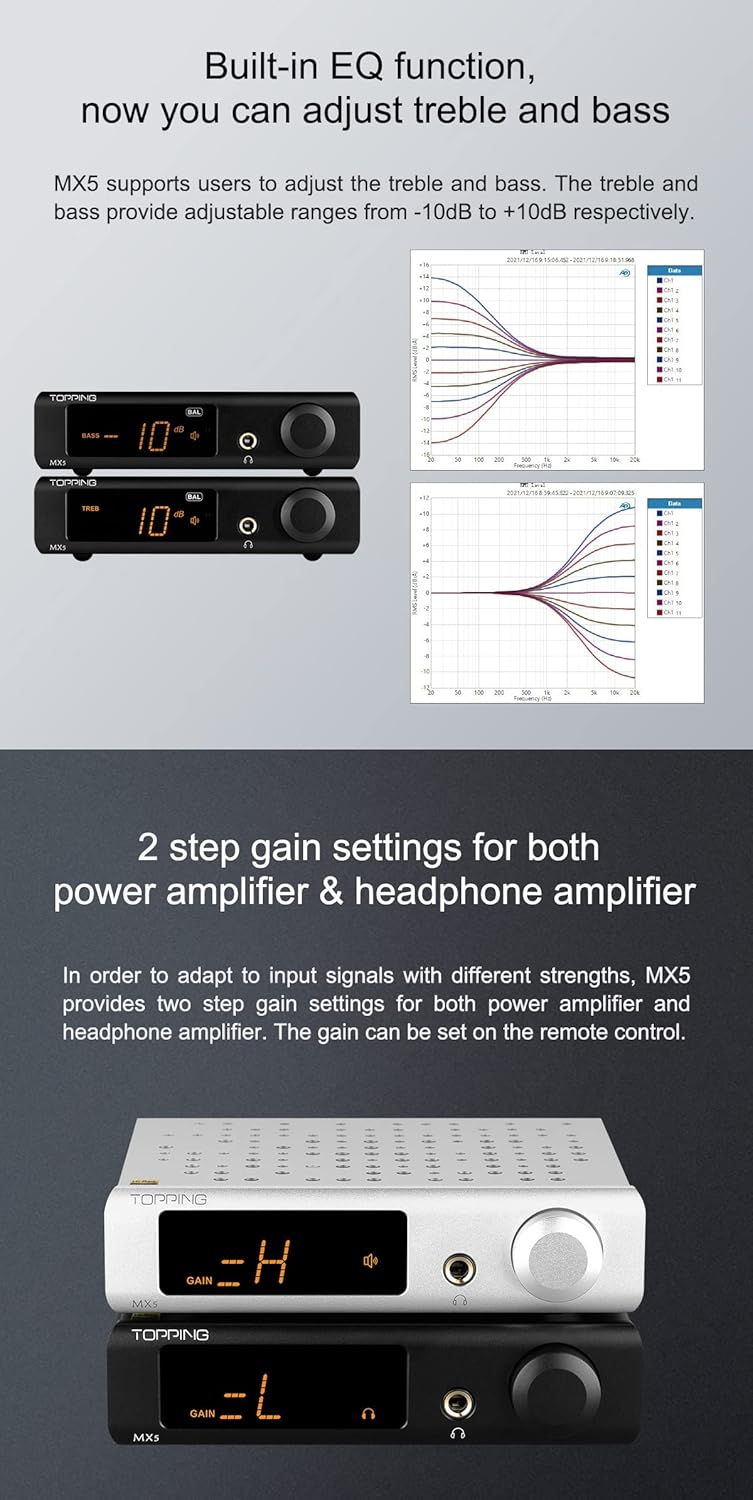
Image: Display of the Topping MX5 showing bass and treble adjustments, alongside frequency response graphs illustrating the effect of EQ settings.
4.5 Gain Settings
Two-step gain settings are available for both the power amplifier and headphone amplifier to adapt to different signal strengths. These can be adjusted via the remote control.
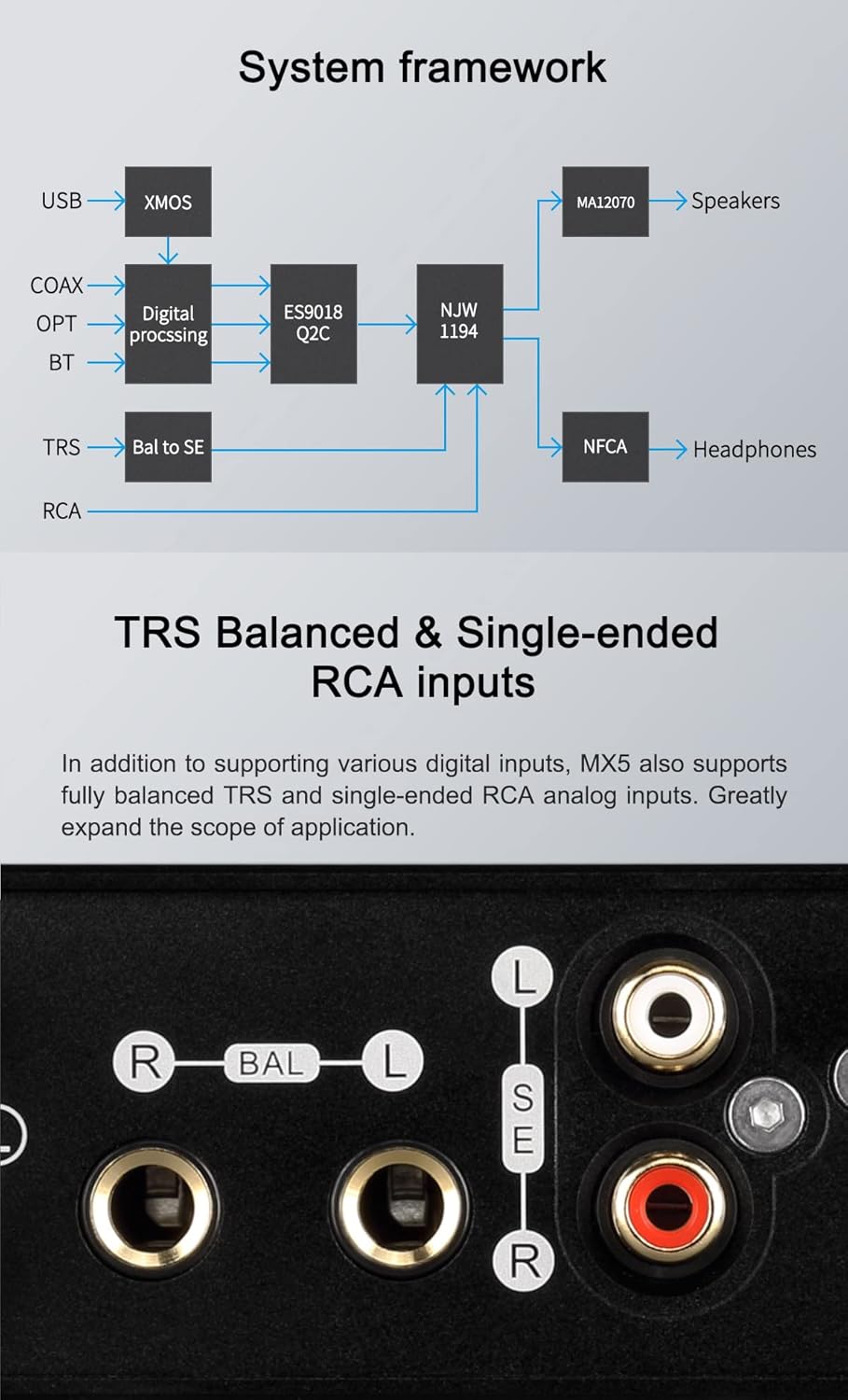
Image: Two Topping MX5 units, one silver displaying "GAIN -H" (High Gain) and one black displaying "GAIN -L" (Low Gain).
4.6 Custom Setting Memories (C1, C2)
The MX5 features two custom setting memories, C1 and C2. To save current settings (input, output, volume, bass, treble, gain), long-press the corresponding memory button. Short-press to recall saved settings.
5. Specifications
| Feature | Detail |
|---|---|
| Brand | Topping |
| Model | MX5 |
| Mounting Type | Coaxial, Plug Mount |
| Number of Channels | 2 |
| Interface Type | Coaxial, USB, Optical, Bluetooth, TRS, RCA |
| Product Dimensions | 6.85"L x 5.67"W (17.4cm x 14.4cm x 4.5cm approx.) |
| Item Weight | 3.47 pounds |
5.1 Power Amplifier Specifications
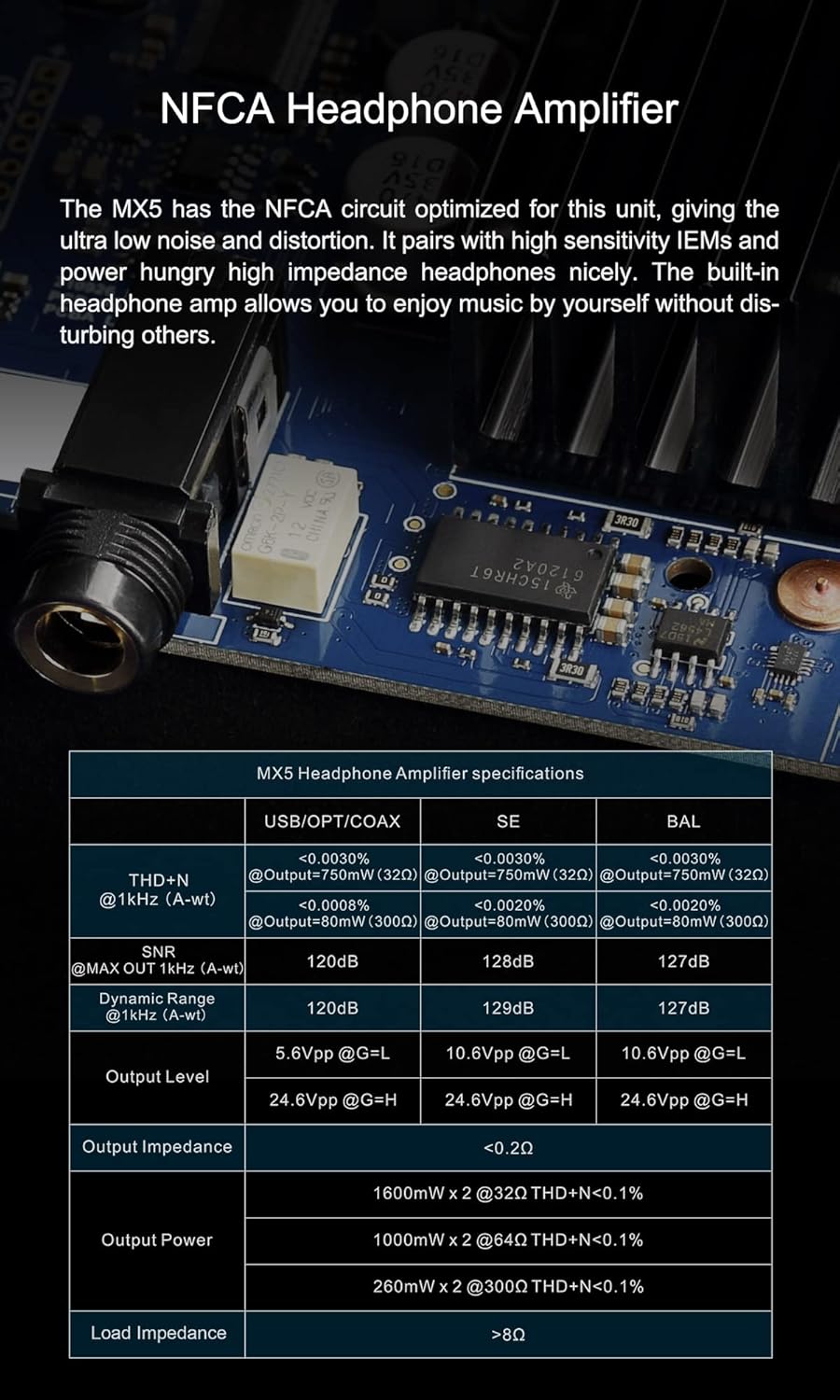
Image: Close-up of the Merus Class D amplifier chip on the MX5 circuit board, accompanied by a table detailing output power specifications.
| Output Power | Details |
|---|---|
| 70W x 2 | @ 4Ω THD+N < 10% |
| 55W x 2 | @ 4Ω THD+N < 1% |
| 42W x 2 | @ 8Ω THD+N < 10% |
| 35W x 2 | @ 8Ω THD+N < 1% |
5.2 Headphone Amplifier Specifications
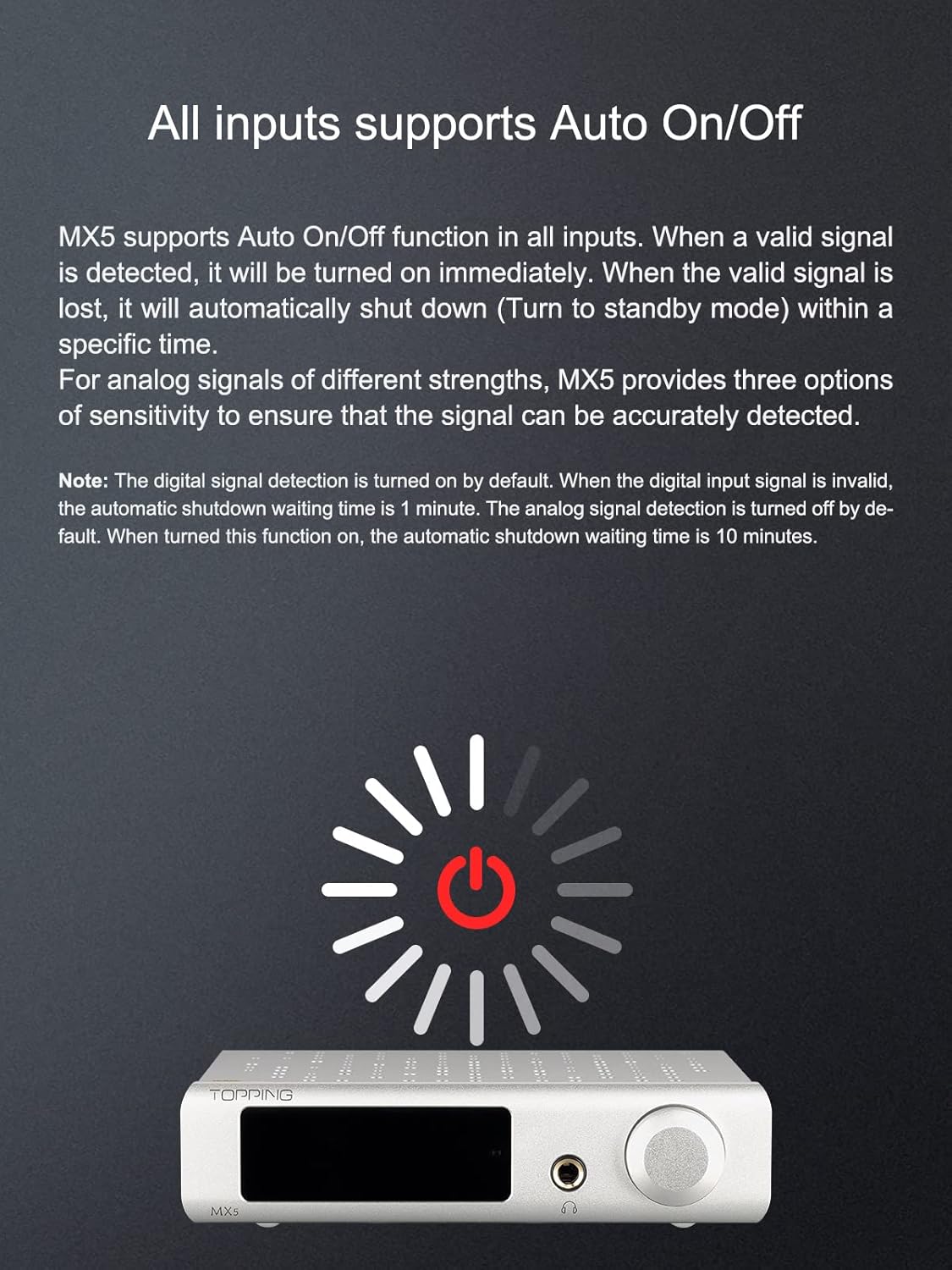
Image: Close-up of the NFCA Headphone Amplifier circuit on the MX5, accompanied by a table detailing headphone amplifier specifications.
| Parameter | USB/OPT/COAX | SE | BAL |
|---|---|---|---|
| THD+N @ 1kHz (A-wt) | <0.0030% @Output=75mW (32Ω) | <0.0030% @Output=75mW (32Ω) | <0.0030% @Output=75mW (32Ω) |
| SNR @MAX OUT 1kHz (A-wt) | 120dB | 128dB | 127dB |
| Dynamic Range @ 1kHz (A-wt) | 120dB | 128dB | 127dB |
| Output Level | 24.6Vpp @G=H | 10.6Vpp @G=L | 10.6Vpp @G=L |
| Output Impedance | <0.2Ω | ||
| Output Power | 1600mW x 2 @ 32Ω THD+N < 0.1% 1000mW x 2 @ 64Ω THD+N < 0.1% 260mW x 2 @ 300Ω THD+N < 0.1% | ||
| Load Impedance | >8Ω | ||
5.3 DAC Specifications (USB, Optical, Coaxial, Bluetooth)
| Input | PCM | DSD (Native) | DSD (Dop) |
|---|---|---|---|
| USB IN | 44.1kHz-384kHz/16bit-32bit | DSD64-DSD256 | DSD64-DSD128 |
| OPT/COAX IN | 44.1kHz-192kHz/16bit-24bit | Not supported | Not supported |
| BT IN | AAC/SBC/APTX/APTX LL/APTX HD | Not supported | Not supported |
6. Maintenance
- Keep the unit clean by wiping it with a soft, dry cloth. Avoid using liquid cleaners or solvents.
- Ensure proper ventilation around the unit to prevent overheating.
- Avoid exposing the unit to extreme temperatures, humidity, or direct sunlight.
- Disconnect the power cable before cleaning or if the unit will be unused for an extended period.
7. Troubleshooting
- No Power:
- Check if the power cable is securely connected to both the MX5 and the power outlet.
- Verify that the power outlet is functional.
- No Sound Output:
- Ensure the correct input source is selected.
- Check all audio cable connections (input and output).
- Verify that the volume is not set to minimum or muted.
- If using headphones, ensure they are properly plugged in and the speaker output is not active (if applicable).
- If using speakers, ensure they are correctly wired and functional.
- Bluetooth Connection Issues:
- Ensure the Bluetooth antenna is securely attached.
- Verify that Bluetooth is enabled on your source device and the MX5 is in pairing mode or already paired.
- Try unpairing and re-pairing the device.
- Reduce the distance between the MX5 and the Bluetooth source device.
- Distorted Sound:
- Check if the input signal level is too high, causing clipping.
- Ensure all cables are in good condition and properly connected.
- Test with a different audio source or cable to isolate the issue.
8. Warranty and Support
This product includes a warranty card in the package. Please refer to the warranty card for specific terms and conditions.
For technical support or inquiries, please contact your retailer or visit the official Topping website. The manufacturer aims for customer satisfaction and offers support for repairs and shipping costs for over one year, and is available to answer questions 24/7.
You can also visit the KGUSS Store on Amazon for additional information and support.


