
Amplicomms BigTel 1580 Solo
Amplicomms BigTel 1580 Solo DECT Cordless Phone User Manual
Model: BigTel 1580 Solo
1. Introduction
Thank you for choosing the Amplicomms BigTel 1580 Solo DECT Cordless Phone. This phone is designed to provide clear communication with enhanced features for ease of use, including large keys, an answering machine, and an audio boost function. This manual will guide you through the setup, operation, and maintenance of your new phone.
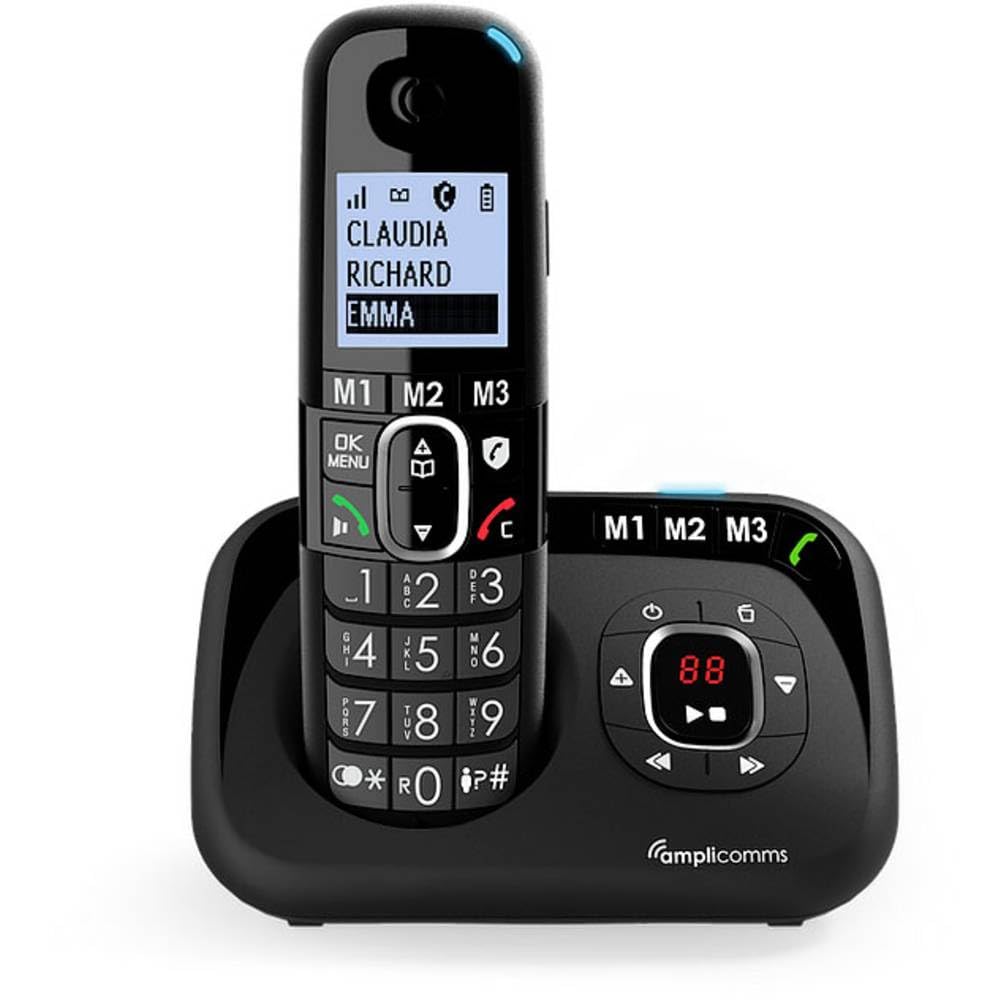
Image: The Amplicomms BigTel 1580 Solo DECT Cordless Phone handset in its charging base.
Key features include:
- Dedicated audio-boost key (+35dB) for clear sound, hearing aid compatible.
- Adjustable ringer volume up to 90dB with visual ring indicator.
- 100-name and number phonebook.
- Unwanted number blocking function (manual or automatic).
- Integrated 30-minute answering machine in the base.
- Three direct memory keys (M1-M3) for important contacts.
- Large, easy-to-read backlit display and large-key keypad.
- Hands-free function with adjustable volume.
2. Package Contents
Please check that all items are present in your package:
- 1 x Handset
- 1 x Handset Charger Base
- 1 x Power Adapter
- 1 x NiMH Rechargeable Battery (AAA size)
- 1 x User Manual
3. Setup
3.1. Battery Installation
- Open the battery compartment cover on the back of the handset.
- Insert the provided NiMH rechargeable batteries (2x AAA) according to the polarity markings (+ and -).
- Close the battery compartment cover securely.
3.2. Connecting the Base Station
- Connect the power adapter to the 'DC IN' socket on the back of the charger base.
- Plug the power adapter into a wall outlet.
- Connect the telephone line cord (not included, typically provided by your service provider) to the 'LINE' socket on the base and then to your telephone wall socket.
3.3. Initial Charging
Place the handset on the charger base. The battery icon on the handset display will indicate charging. For optimal battery performance, charge the handset for at least 12-15 hours before its first use, even if the display shows a full charge.
3.4. Language Setting
Upon first use or after a reset, you may need to set the display language. Navigate through the menu using the arrow keys and confirm your selection (e.g., English) by pressing the 'OK' or 'Menu' button.
4. Operating Instructions
4.1. Making and Receiving Calls
- To Make a Call: Dial the number and press the green call button ☎.
- To Receive a Call: Press the green call button ☎ when the phone rings.
- To End a Call: Press the red end call button ☒.
4.2. Audio Boost Function
Press the dedicated audio boost button (often marked with an ear symbol and '+35dB') on the side of the handset during a call to increase the earpiece volume significantly. This feature is optimized for clear sound and is compatible with hearing aids.

Image: Close-up of the handset showing the audio boost button.
4.3. Phonebook
The phonebook can store up to 100 names and numbers. Access it via the 'Menu' button and navigate to 'Phonebook'. You can add, edit, or delete entries.

Image: Handset display showing phonebook entries.
4.4. Call Blocking
To block unwanted numbers, access the call blocking feature through the menu. You can add numbers manually to a blacklist or set the phone to only allow calls from your VIP numbers (whitelist mode).

Image: Graphic representing the call blocking function.
4.5. Answering Machine
The integrated answering machine in the base has a recording capacity of 30 minutes. You can record your own outgoing message, listen to messages, and delete them directly from the base or the handset.

Image: Close-up of the base unit with answering machine controls.
4.6. Direct Memory Keys (M1-M3)
The handset features three direct memory keys (M1, M2, M3) for quick dialing of frequently used or important numbers. To program these keys, refer to the detailed instructions in the full user manual (if available, or typically found in the phone's menu settings).

Image: Handset showing the M1, M2, M3 direct memory keys.
4.7. Hands-Free Function
During a call, press the hands-free button (speaker icon) to activate the speakerphone. You can adjust the volume using the navigation keys.
5. Maintenance
- Cleaning: Use a soft, damp cloth to clean the phone's surfaces. Do not use abrasive cleaners or solvents.
- Battery Care: Only use the specified rechargeable batteries. If the phone will not be used for an extended period, remove the batteries to prevent leakage.
- Environment: Keep the phone away from direct sunlight, heat sources, and moisture.
6. Troubleshooting
| Problem | Possible Cause / Solution |
|---|---|
| No dial tone / Cannot make calls | Ensure the base station is properly connected to the power outlet and the telephone line. Check if the line is active. |
| Handset not charging | Ensure the handset is correctly placed on the charging cradle. Check power adapter connection. Clean charging contacts. |
| Audio boost not working or insufficient volume | Ensure the audio boost button is pressed during the call. Check general volume settings. If the issue persists, contact support. |
| Answering machine difficult to set up/use | Refer to the detailed answering machine section in the full user manual for step-by-step instructions. Ensure the base unit is powered. |
| Display shows 'Out of Range' | Move closer to the base station. Ensure the base station is powered on. |
7. Specifications
| Feature | Detail |
|---|---|
| Model Number | ATL143341 (also ATL1423341) |
| Phone Type | DECT Cordless Phone |
| Color | Black |
| Material | Plastic |
| Power Source | Wireless (via power adapter) |
| Batteries | 2 x AAA NiMH rechargeable batteries (included) |
| Talk Time | Up to 10 hours |
| Standby Time | Up to 100 hours |
| Answering System Type | DECT (Digital Enhanced Cordless Telecommunications) |
| Answering Machine Capacity | 30 minutes |
| Phonebook Capacity | 100 names and numbers |
| Caller ID | Yes |
| Compatible Devices | Hearing Aid |
| Product Dimensions (Handset) | Approximately 14 x 21 x 8 millimeters (0.55 x 0.83 x 0.31 inches) |
| Product Weight | 562 grams (1.24 lbs) |
8. Warranty and Support
Amplicomms products are designed for reliability and performance. This product comes with a standard manufacturer's warranty. Please refer to the warranty card included in your package for specific terms and conditions, including the warranty period and coverage details.
For technical support, troubleshooting assistance, or warranty claims, please contact Amplicomms customer service. Contact information can typically be found on the Amplicomms official website or on the product packaging.
When contacting support, please have your product model (BigTel 1580 Solo) and serial number (if applicable) ready.
Related documentsBigTel 1580 Solo


Ask a question about this manual
Ask about setup, troubleshooting, compatibility, parts, safety, or missing instructions. Manuals+ will review the question and use this page’s manual context to help answer it.