
YUHAO DY1083-5B/52
YUHAO 52 Inch Brushed Nickel Ceiling Fan User Manual
Model: DY1083-5B/52 | Brand: YUHAO
Introduction
This user manual provides detailed instructions for the installation, operation, and maintenance of your YUHAO 52 Inch Brushed Nickel Ceiling Fan. Designed for both indoor and covered outdoor use, this fan features an energy-efficient DC motor, dimmable LED lighting with adjustable color temperatures, and convenient remote control functionality. Please read this manual thoroughly before installation and use to ensure safe and optimal performance.

Figure 1: YUHAO 52 Inch Brushed Nickel Ceiling Fan with remote control.
Safety Information
Always follow basic safety precautions when installing and operating electrical appliances to reduce the risk of fire, electric shock, and personal injury.
- Disconnect power at the main circuit breaker or fuse box before beginning installation or performing any maintenance.
- All wiring must be in accordance with national and local electrical codes. If you are unfamiliar with electrical wiring, consult a qualified electrician.
- Ensure the installation site is suitable for supporting the fan's weight (approximately 16.76 pounds) and that the ceiling joist or support structure can hold at least 35 pounds.
- Do not operate the fan with damaged wiring or if it has been dropped or damaged in any way.
- Keep hands, clothing, and other objects clear of the fan blades when the fan is in operation.
- This fan is designed for indoor or covered outdoor use. Do not expose to direct water spray.
Package Contents
Verify that all components are present before beginning installation:
- Ceiling Fan Motor Housing
- Fan Blades (5 double-sided wooden blades)
- LED Light Kit (24W replaceable LED light source)
- Remote Control with Wall Mount Bracket
- Downrod
- Mounting Bracket
- Hardware Pack (screws, wire nuts, etc.)
- User Manual

Figure 2: Overview of fan components including motor, blades, light kit, and remote.
Setup (Installation)
Professional installation is recommended for safety and proper function. Ensure power is disconnected before starting.
Installation Steps:
- Mounting Bracket Installation: Secure the mounting bracket to the ceiling junction box. Ensure it is firmly attached and can support the fan's weight.
- Assemble Downrod and Motor: Feed the electrical wires from the motor through the downrod. Secure the downrod to the motor assembly.
- Hang Fan Assembly: Carefully lift the fan assembly and hang it from the mounting bracket using the provided hook or support system. This allows for hands-free wiring.
- Electrical Wiring: Connect the fan's electrical wires to the household wiring according to the wiring diagram in the full manual. Typically, this involves connecting live, neutral, and ground wires. Ensure all connections are secure with wire nuts.
- Receiver Installation: Insert the remote control receiver into the mounting bracket. Connect the receiver wires to the fan and household wires as per the diagram.
- Secure Canopy: Slide the canopy up to the ceiling and secure it to the mounting bracket, covering the wiring connections.
- Attach Fan Blades: Secure each of the five fan blades to the motor housing using the provided screws. Ensure they are tightly fastened.
- Install LED Light Kit: Connect the LED light kit wires to the fan's light wires. Secure the LED light panel to the bottom of the fan motor housing.
- Attach Light Cover: Twist or secure the light cover onto the LED light kit.
Video 1: Official YUHAO Ceiling Fan Installation Guide. This video demonstrates the step-by-step process of assembling and installing the ceiling fan, including wiring connections and securing components.

Figure 3: Fan dimensions (52 inches wide, 14 inches high) and key features including remote control, 6 speeds, timing, forward/reverse, mute, and easy installation.
Operating Instructions
Your YUHAO ceiling fan is controlled by the included remote. Ensure the remote has 2 AAA batteries installed.

Figure 4: Remote control layout showing buttons for fan speed, light control, and directional settings.
Remote Control Functions:
- Fan On/Off: Press the power button (⏻) to turn the fan on or off.
- Fan Speed: Buttons 1-6 control the fan speed, from 1 (lowest) to 6 (highest). The DC motor provides quiet operation, less than 25 decibels.
- Light On/Off: Use the "LIGHT ON" and "LIGHT OFF" buttons to control the LED light independently of the fan.
- Color Temperature (CCT) Adjustment:
- WW (Warm White): 3000K warm color for a cozy ambiance.
- NW (Natural White): 4000K natural color for general lighting.
- DW (Cool White): 6500K cool white for bright, task-oriented lighting.
- Brightness Adjustment: Use the '+' and '-' buttons to dim the light from 0% to 100% brightness. The 24W LED light provides up to 2000 lumens.
- Forward/Reverse Mode: Press the reverse button (↻) to change the direction of the fan blades.
- Summer Mode (Downward Airflow): Circulates air downward to create a cooling effect (over 4500 CFM).
- Winter Mode (Upward Airflow): Circulates air upward to redistribute warm air throughout the room.
- Timer Function: Set the fan to turn off automatically after 1 hour (1H), 3 hours (3H), or 6 hours (6H).
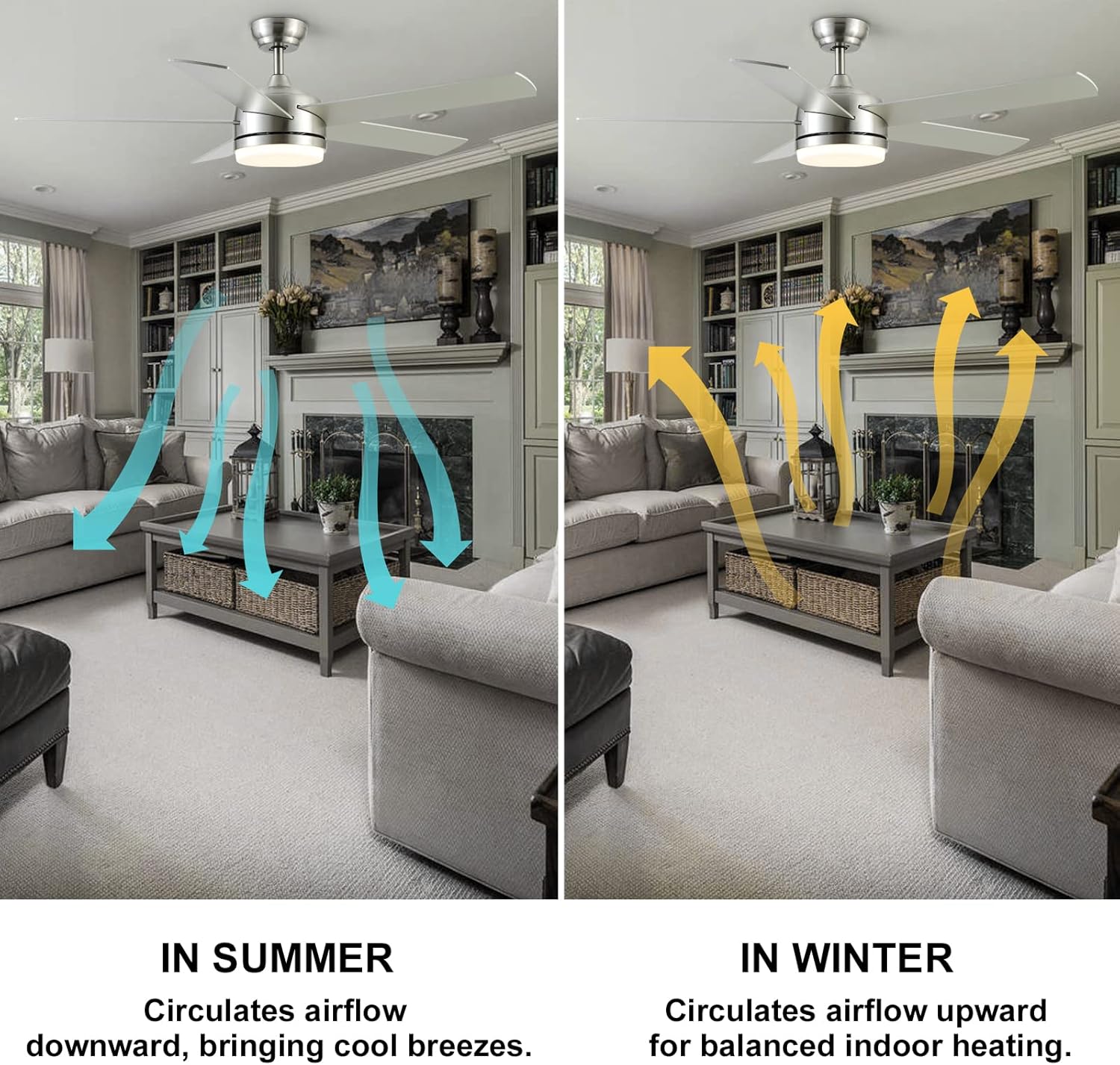
Figure 5: Illustration of fan airflow in summer (downward) and winter (upward) modes for optimal comfort.

Figure 6: The fan's LED light offers smooth dimming from 100% to 20% brightness without flickering or noise.
Maintenance
Regular maintenance ensures the longevity and optimal performance of your ceiling fan.
- Cleaning: To prevent scratching the finish, clean the fan with a soft, damp cloth. Do not use abrasive cleaners or solvents. Dust the blades regularly to maintain airflow efficiency.
- Blade Inspection: Periodically check that all blade screws are tight. Over time, they may loosen, causing the fan to wobble or make noise.
- Light Source: The LED light source is designed for long life. If replacement is ever needed, contact customer support for compatible parts.
Troubleshooting
If you experience issues with your ceiling fan, refer to the following common problems and solutions:
| Problem | Possible Cause | Solution |
|---|---|---|
| Fan does not start | No power to the fan; Loose wire connections; Remote control not paired. | Check circuit breaker/fuses. Ensure all wiring connections are secure. Re-pair the remote control (refer to full manual for pairing instructions). |
| Fan is noisy | Loose fan blades; Loose mounting screws; Motor hum. | Tighten all blade screws. Check and tighten mounting bracket screws. DC motors are designed to be quiet (<25dB), but slight hum may occur. |
| Light does not work | Loose wire connection to light kit; LED light source failure. | Check light kit wiring connections. If LED is faulty, contact customer support for replacement. |
| Remote control not working | Dead batteries; Remote not paired; Obstruction between remote and receiver. | Replace AAA batteries. Re-pair the remote control. Ensure clear line of sight to the fan's receiver. |
| Fan wobbles | Loose blades or blade holders; Unbalanced blades; Loose mounting. | Ensure all blade and motor housing screws are tight. Check for bent blade holders. Use balancing kit if necessary (not included). Verify mounting bracket is secure. |
Specifications
| Feature | Detail |
|---|---|
| Brand | YUHAO |
| Model Name | DY1083-5B/52 |
| Size | 52 Inch |
| Product Dimensions | 52"L x 52"W x 14"H |
| Item Weight | 16.76 pounds |
| Color | Nickel (Brushed Finish) |
| Material | Copper wire Motor, Wooden blades, Metal housing, LED Light |
| Power Source | DC, 120 Volts |
| Light Source Type | LED (24W, approx. 2000 Lumens) |
| Light Color Temperatures | 3000K (Warm), 4000K (Natural), 6500K (Cool White) |
| Brightness | Adjustable (0%~100%) |
| Control Method | Remote Control |
| Fan Speeds | 6 Speeds |
| Special Features | Timer (1H/3H/6H), Reversible Motor, Noiseless (<25dB) |
| Indoor/Outdoor Usage | Indoor or Covered Outdoor |
| Batteries Required | 2 AAA (included) |
Warranty & Customer Support
Your YUHAO ceiling fan comes with a limited warranty. For specific warranty details, please refer to the documentation included in your product packaging.
For any issues, damaged parts, or product support, please contact YUHAO customer service. We are committed to replying to your messages within 24 hours.
How to Contact Customer Service:
- Locate your YUHAO ceiling fan order on the platform where you purchased it.
- Click on "Get Product Support."
- In the dialog box, explicitly state that you need to contact the seller (YUHAO), not the platform's support team.
Related documentsDY1083-5B/52


Ask a question about this manual
Ask about setup, troubleshooting, compatibility, parts, safety, or missing instructions. Manuals+ will review the question and use this page’s manual context to help answer it.