
1. Introduction
Thank you for choosing the Skechers Women's Tennyson Digital Watch, model SR2115. This manual provides essential information for setting up, operating, and maintaining your new watch. Please read it carefully to ensure proper use and longevity of your device.
The Skechers Tennyson Digital Watch combines modern design with practical features, making it suitable for daily wear and light sports activities. Its durable construction and water resistance ensure reliability.
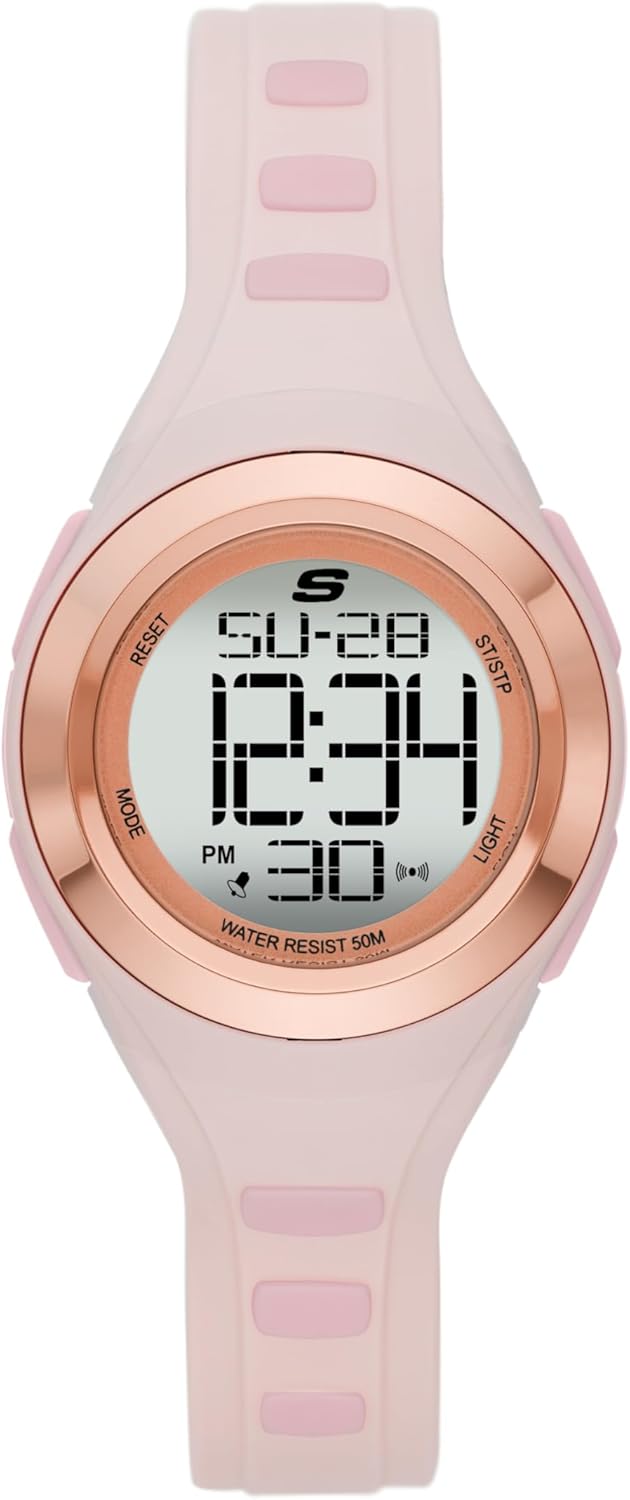
Image: Front view of the Skechers Tennyson Digital Watch, showcasing its digital display and pink polyurethane strap.
Key Features:
- Digital Movement with Positive Display
- 33mm Polycarbonate Case with Mineral Crystal
- 14mm Pink Polyurethane Strap with Buckle Clasp
- Water Resistant up to 50 Meters (suitable for shallow swimming)
- Chronograph Function
- Alarm and Hourly Signal
- Dual Time Display
- Backlight
2. Setup
2.1 Unpacking
Carefully remove the watch from its packaging. Ensure all components, including the watch and this manual, are present.

Image: The Skechers Tennyson Digital Watch presented in its black branded box.
2.2 Initial Power On
Your watch comes with a pre-installed Lithium Ion battery. It should be ready for immediate use. If the display is blank, check for a small plastic tab under the crown (if applicable) or consult the troubleshooting section.
2.3 Setting Time and Date
The watch features multiple buttons for operation. Refer to the diagram below for button identification:

Image: Diagram illustrating the watch's display features and button functions, including Chronograph, Calendar, Dual Time, Alarm, and Backlight.
- Press the MODE button repeatedly until the time setting mode is displayed (usually indicated by flashing digits).
- Use the RESET or START buttons to adjust the flashing digits (hours, minutes, seconds).
- Press MODE again to cycle through date settings (month, day, year) and adjust using RESET or START.
- Once all settings are correct, press MODE to exit the setting mode.
- To switch between 12/24 hour format, press the LIGHT button while in normal time display mode.
2.4 Adjusting the Strap
The polyurethane strap is adjustable using a standard buckle clasp. Find a comfortable fit that is snug but not too tight on your wrist.

Image: The Skechers Tennyson Digital Watch worn on a wrist, demonstrating its fit and appearance.
3. Operating Instructions
3.1 Basic Time Display
In normal mode, the watch displays the current time (hours, minutes, seconds) and date (day, month).
3.2 Using the Chronograph (Stopwatch)
- Press the MODE button until the chronograph mode is displayed (usually indicated by 'CHRONO' or 'STW').
- Press START to begin timing.
- Press START again to pause timing.
- Press RESET to clear the stopwatch to zero.
3.3 Setting Alarms and Hourly Signal
- Press the MODE button until the alarm setting mode is displayed (usually indicated by 'ALARM' or a bell icon).
- Use the RESET or START buttons to set the desired alarm time.
- Press MODE to confirm and exit.
- To activate/deactivate the alarm or hourly signal, press START while in alarm mode. Indicators on the display will show if they are active.
3.4 Backlight Function
Press the LIGHT button to illuminate the display for a few seconds, allowing visibility in low-light conditions.
3.5 Water Resistance
This watch is water resistant up to 50 meters (5 ATM). This means it is suitable for short periods of recreational swimming in shallow water. It is not suitable for diving, snorkeling, or high-impact water sports. Avoid pressing buttons while the watch is submerged to prevent water ingress.
4. Maintenance
4.1 Cleaning Your Watch
Wipe the watch case and strap regularly with a soft, damp cloth. For stubborn dirt, a mild soap solution can be used, followed by rinsing with clean water and drying thoroughly. Avoid harsh chemicals or abrasive materials.
4.2 Battery Information
The watch is powered by one Lithium Ion battery. When the display becomes dim or functions become erratic, it may be time for a battery replacement. It is recommended to have the battery replaced by a qualified watch technician to ensure proper sealing and maintain water resistance.
4.3 Water Resistance Care
To maintain water resistance, ensure the watch is not exposed to extreme temperature changes (e.g., hot showers followed by cold water). Avoid prolonged exposure to steam or hot water, as this can compromise the seals. Have the water resistance seals checked periodically by a professional, especially after battery replacement.
4.4 Strap Care
The polyurethane strap is durable but can be affected by prolonged exposure to direct sunlight, chemicals, or excessive moisture. Clean the strap regularly and avoid bending it sharply to prevent damage.
5. Troubleshooting
Common Issues and Solutions:
- Display is blank or dim: The battery may be low or depleted. Replace the battery.
- Time is incorrect: Re-set the time and date following the instructions in Section 2.3. Ensure the 12/24 hour format is set correctly.
- Buttons are unresponsive: Ensure the watch is not in a locked mode (if applicable, though this model typically does not have one). If submerged, water pressure can make buttons difficult to press. If the issue persists, a professional inspection may be required.
- Condensation inside the watch: This indicates a breach in the water resistance. Stop using the watch immediately and have it inspected by a professional to prevent further damage.
6. Specifications

Image: Diagram illustrating various watch case sizes and thicknesses for reference.
| Feature | Detail |
|---|---|
| Model Number | SR2115 |
| Brand | Skechers |
| Movement Type | Digital Quartz |
| Display Type | Digital |
| Case Material | Polycarbonate |
| Case Diameter | 33 Millimeters |
| Case Thickness | 11 Millimeters |
| Crystal Material | Mineral |
| Strap Material | Polyurethane |
| Strap Width | 14 Millimeters |
| Band Length | 18.5 Centimeters |
| Clasp Type | Buckle |
| Water Resistance | 50 Meters (5 ATM) |
| Power Source | Battery (1 Lithium Ion, included) |
| Special Features | Chronograph |
| Product Dimensions | 10.3 x 7.9 x 7.5 cm; 145 g |
| UPC | 796483568372 |
7. Warranty and Customer Support
7.1 Limited Warranty
Your Skechers Tennyson Digital Watch SR2115 comes with a limited warranty. Please refer to the warranty card included with your purchase for specific terms, conditions, and duration. The warranty typically covers manufacturing defects under normal use.
7.2 Customer Support
For any questions, technical assistance, or warranty claims, please contact Skechers customer support. Contact information can usually be found on the official Skechers website or on the warranty documentation provided with your watch.
When contacting support, please have your watch model number (SR2115) and proof of purchase readily available.