
Introduction
The VECTOR 500 Watt Power Inverter PI500V converts your vehicle's 12V DC power to household 120V AC power and 5V USB power. It offers 500 watts of continuous power when connected directly to a vehicle's battery via terminal posts and battery clamps, or 120 watts when plugged into a 12V DC accessory outlet. This inverter is designed to power and charge various electronic devices, including laptops, phones, and gaming devices, and features multiple safety protections.
Important Safety Information
WARNING: This product contains chemicals known to the State of California to cause cancer and reproductive harm. For more information, visit www.P65Warnings.ca.gov.
Product Features
- Power Output: Delivers 500 watts of household power via battery clamps or 120 watts with the 12V DC plug.
- Easy Connect: Features terminal posts for direct connection to your vehicle's battery with included battery clamps.
- Dual Power Options: Equipped with dual AC outlets and two USB ports to power multiple items simultaneously.
- Safe Operation: Incorporates safety features including short circuit, overload, ground fault, high and low voltage protection.
- Cooling System: A thermal fan automatically activates to prevent overheating and shuts the unit down if operating temperature gets too high.
- LED Indicator: A clear LED indicator shows the unit's power and charging status.
- Durable Design: Constructed with a rugged, impact-resistant polymer housing for enhanced durability.
Package Contents
The VECTOR PI500V Power Inverter package includes the following items:
- Power Inverter Unit (PI500V)
- Battery Clamps (Red and Black)
- 12V DC Plug

Image: Contents of the VECTOR PI500V Power Inverter package, including the inverter unit, battery clamps, and 12V DC plug.
Setup and Connection
The VECTOR PI500V Power Inverter offers two primary methods for connection to a 12V DC power source, depending on your power requirements.
Method 1: Direct Connection to Vehicle Battery (500W Output)
This method provides the full 500 watts of power and is suitable for higher-wattage appliances.
- Ensure your vehicle is turned off and the inverter's power switch is in the OFF position.
- Connect the red (positive) battery clamp to the positive (+) terminal of your vehicle's 12V battery.
- Connect the black (negative) battery clamp to the negative (-) terminal of your vehicle's 12V battery.
- Securely attach the ring terminals of the battery clamps to the corresponding terminal posts on the inverter (red to red, black to black).
- Verify all connections are tight and secure before proceeding.
Method 2: 12V DC Accessory Outlet Connection (120W Output)
This method provides up to 120 watts of power and is convenient for in-cabin use with lower-wattage devices.
- Ensure your vehicle is turned off and the inverter's power switch is in the OFF position.
- Insert the 12V DC plug into your vehicle's accessory outlet (cigarette lighter socket).
- Ensure the connection is firm.
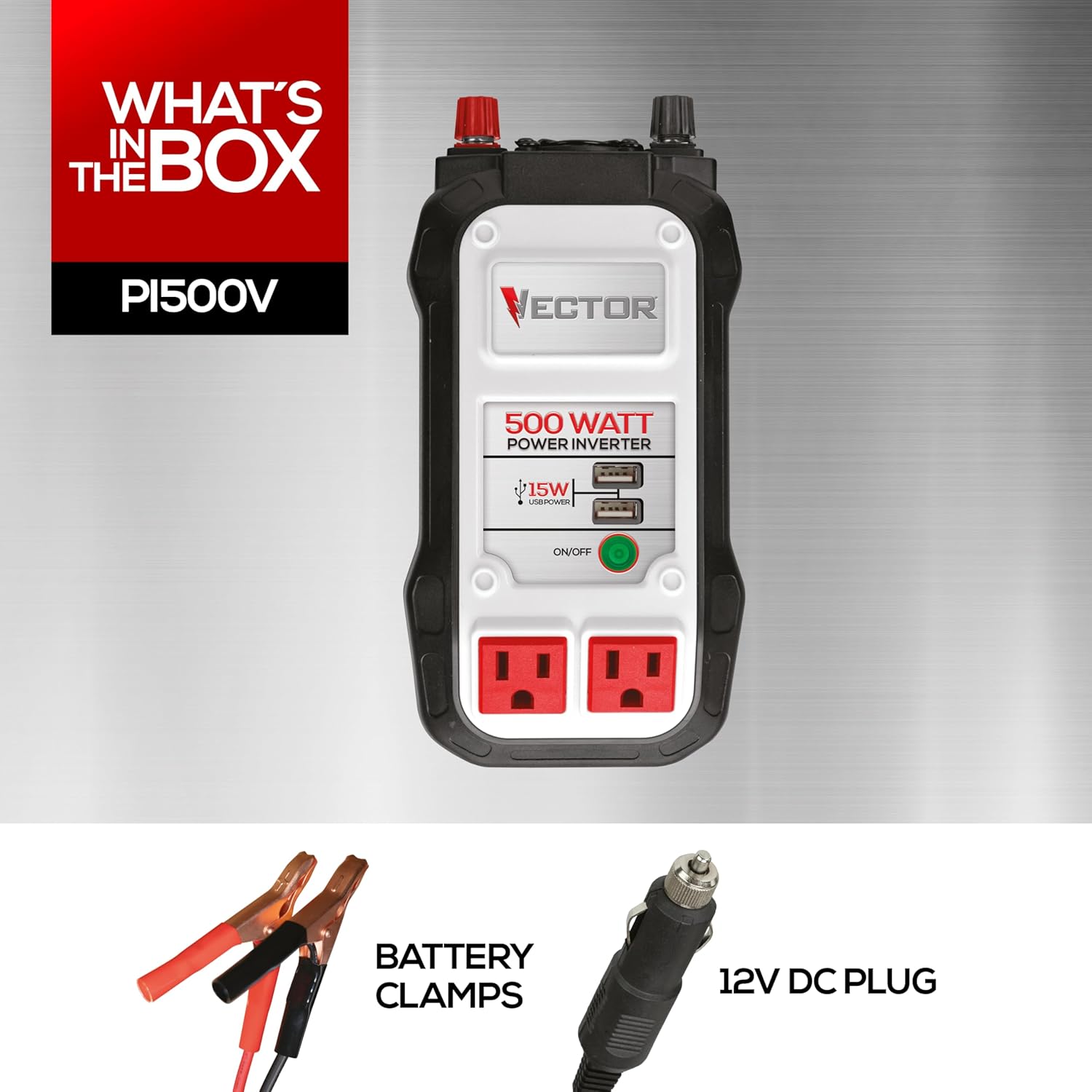
Image: The VECTOR PI500V Power Inverter connected to a vehicle's 12V DC accessory outlet, charging a tablet.
Operating Instructions
Follow these steps to operate your VECTOR PI500V Power Inverter safely and effectively:
- After connecting the inverter to a power source using one of the methods described above, switch the inverter's ON/OFF button to the ON position. The green LED indicator will illuminate to confirm the unit is powered and operating normally.
- Plug your 120V AC appliances into the dual AC outlets or your USB devices into the dual USB charging ports.
- Monitor the LED indicator for status. A steady green light indicates normal operation. If the light flashes or changes color, refer to the Troubleshooting section.
- When finished, switch the inverter's ON/OFF button to the OFF position and disconnect it from the power source.
Powering Devices
The inverter provides 500 watts of continuous power when connected via battery clamps and 120 watts when connected via the 12V DC plug. Always ensure the total wattage of all connected devices does not exceed the inverter's capacity for the chosen connection method to prevent overload.

Image: Front view of the VECTOR PI500V Power Inverter showing dual AC outlets and dual USB ports.
Device Wattage Reference Chart
The following chart provides approximate wattage requirements for common devices. Always refer to the specific device's manual for exact power consumption to ensure compatibility and prevent overloading the inverter.
| Device | Wattage |
|---|---|
| Portable Vacuum | 500W |
| String Trimmer | 475W |
| Hedge Trimmer | 450W |
| Orbital Sander | 400W |
| Jigsaw | 350W |
| 50" TV (LED-LCD) | 300W |
| Oscillating Fan | 200W |
| Desktop Computer | 150W |
| Video Game Console | 120W |
| Incandescent Bulb | 100W |
| Laptop Computer | 90W |
| Scanner | 75W |
| Inkjet Printer | 75W |
| Smartphone | 10W |
| Camcorder Charger | 10W |
| Cordless Screwdriver | 8W |

Image: A chart detailing the approximate wattage consumption of various electronic devices, useful for understanding the inverter's capacity.
Maintenance
Proper maintenance ensures the longevity and optimal performance of your power inverter:
- Cleaning: Keep the inverter clean and free from dust and debris. Use a dry, soft cloth for cleaning. Do not use liquid cleaners.
- Ventilation: Ensure proper ventilation around the unit. Do not block the cooling fan or air vents, as this can lead to overheating.
- Connection Checks: Regularly check all electrical connections (battery clamps, 12V DC plug, and inverter terminals) for tightness and signs of corrosion. Loose connections can cause overheating, arcing, or poor performance.
- Storage: Store the inverter in a cool, dry place away from direct sunlight, moisture, and extreme temperatures when not in use.
Troubleshooting
If the inverter is not functioning as expected, consult the following troubleshooting guide:
- No Power/LED Off:
- Check the power source connection (battery clamps or 12V DC plug). Ensure they are securely attached.
- Verify the vehicle's battery has sufficient charge (typically above 12V).
- Ensure the inverter's ON/OFF switch is in the ON position.
- LED Flashing/Fault Indication:
- This usually indicates an overload, high/low input voltage, or thermal shutdown.
- Disconnect all devices from the inverter, turn it off, and then back on.
- Reduce the total wattage of connected devices if an overload is suspected.
- Check the vehicle's battery voltage if low/high voltage is indicated.
- Allow the unit to cool down if thermal shutdown occurs (ensure vents are clear).
- Device Not Charging/Powering:
- Ensure the device is properly plugged into the inverter's AC outlet or USB port.
- Check the device's power requirements against the inverter's capacity.
- Some sensitive electronic devices may require a pure sine wave inverter for optimal performance.
- Excessive Fan Noise:
- The built-in cooling fan operates automatically when the unit heats up. This is normal.
- If the noise is unusually loud or persistent, ensure the vents are clear and the unit is not overloaded.
Specifications
| Property | Value |
|---|---|
| Brand | VECTOR |
| Model | PI500V |
| Item Weight | 1.3 pounds |
| Product Dimensions | 4 x 2.1 x 8.5 inches |
| Voltage | 12 Volts (DC) |
| Wattage | 500 watts |
| Recommended Uses | Home, Office, Vehicle, Workshop, Job Site, Camping, Power Outage |
| Power Source | Vehicle DC port or direct connection to vehicle battery with clamps |
Official Product Video
Video: An official VECTOR video explaining what a power inverter is and how it functions, including its applications and connection methods.
Warranty and Support
The VECTOR 500 Watt Power Inverter PI500V comes with a 1-year warranty for peace of mind. For technical support, warranty claims, or any product-related inquiries, please refer to the contact information provided in your product packaging or visit the official VECTOR website for assistance.


