
1. Introduction
Welcome to the instruction manual for your new Tiakia Bicycle Phone Holder. This manual provides detailed information on how to properly install, operate, and maintain your phone holder to ensure a secure and reliable experience while cycling or riding your motorcycle. Please read this manual thoroughly before use.
2. Product Overview
The Tiakia Bicycle Phone Holder is designed to securely mount your smartphone on bicycle, mountain bike, road bike, downhill bike, motorcycle, or electric bike handlebars. Constructed from durable aviation-grade aluminum alloy, it features a robust 6-claw design for superior stability and a quick-release mechanism for easy phone access. Its versatile design accommodates a wide range of smartphone sizes and handlebar diameters.

Figure 2.1: Main view of the Tiakia Bicycle Phone Holder.
3. Key Features
- Enhanced 6-Claw Design: Features an upgraded 6-arm telescopic structure for superior stability and protection, ensuring your phone remains secure even on rough terrain.
- Premium Aviation Aluminum Alloy: Manufactured from 6063 aviation-grade aluminum alloy with CNC machining and stainless steel fittings, providing exceptional strength, durability, and resistance to vibration and discoloration.
- Exquisite Details & Protection: Telescopic arms secure the phone's sides, while an adjustable bottom arm prevents blocking side buttons and cameras. All 6 corners are equipped with silicone pads to prevent scratching your phone's screen.
- 1-Second Quick Release: Features a quick-release button on the right side, allowing for phone installation or removal in just 1 second, significantly saving time compared to traditional holders.
- 360° Rotatable Viewing Angle: Equipped with a metal pivot mechanism and spherical gimbal, allowing for free 360-degree rotation to adjust your viewing angle as needed.
- Wide Compatibility: Suitable for smartphones ranging from 4.5 to 7 inches, with a width of 62-90 mm and thickness less than 14 mm. Includes rubber shims to fit handlebar diameters from 22.2 to 35 mm.

Figure 3.1: Overview of key features including phone and handlebar compatibility.

Figure 3.2: Illustration of the firm and reliable clamping method.
4. Package Contents
Please verify that all components are present in your package:
- Tiakia Bicycle Phone Holder (Main Unit)
- Handlebar Mounting Clamp
- Rubber Shims/Spacers (for various handlebar diameters: 22.2mm, 25.4mm, 28.6mm, 31.8mm, 35mm)
- Hex Key (for assembly, if required)
- Instruction Manual (this document)

Figure 4.1: Exploded view showing various components and materials used in the phone holder.
5. Setup and Installation
- Choose Handlebar Location: Select a suitable, clear spot on your bicycle or motorcycle handlebar for mounting the holder.
- Select Appropriate Shim: Identify the correct rubber shim from the provided set that matches your handlebar's diameter (22.2mm, 25.4mm, 28.6mm, 31.8mm, 35mm). Place the shim around the handlebar at the chosen location.
- Attach Mounting Clamp: Open the handlebar mounting clamp and place it around the shim and handlebar. Securely tighten the screw(s) using the provided hex key until the clamp is firm and does not rotate freely. Do not overtighten.
- Adjust Phone Holder Angle: The phone holder unit is attached to the clamp via a spherical joint. Loosen the hand nut on the joint, adjust the phone holder to your desired viewing angle, and then tighten the hand nut firmly to secure the position.
- Adjust Bottom Support Hook Length: The bottom support hook has three screw holes for length adjustment. Choose the appropriate hole to ensure the hook supports your phone without blocking its charging port or bottom buttons.

Figure 5.1: Handlebar compatibility and different shim sizes.
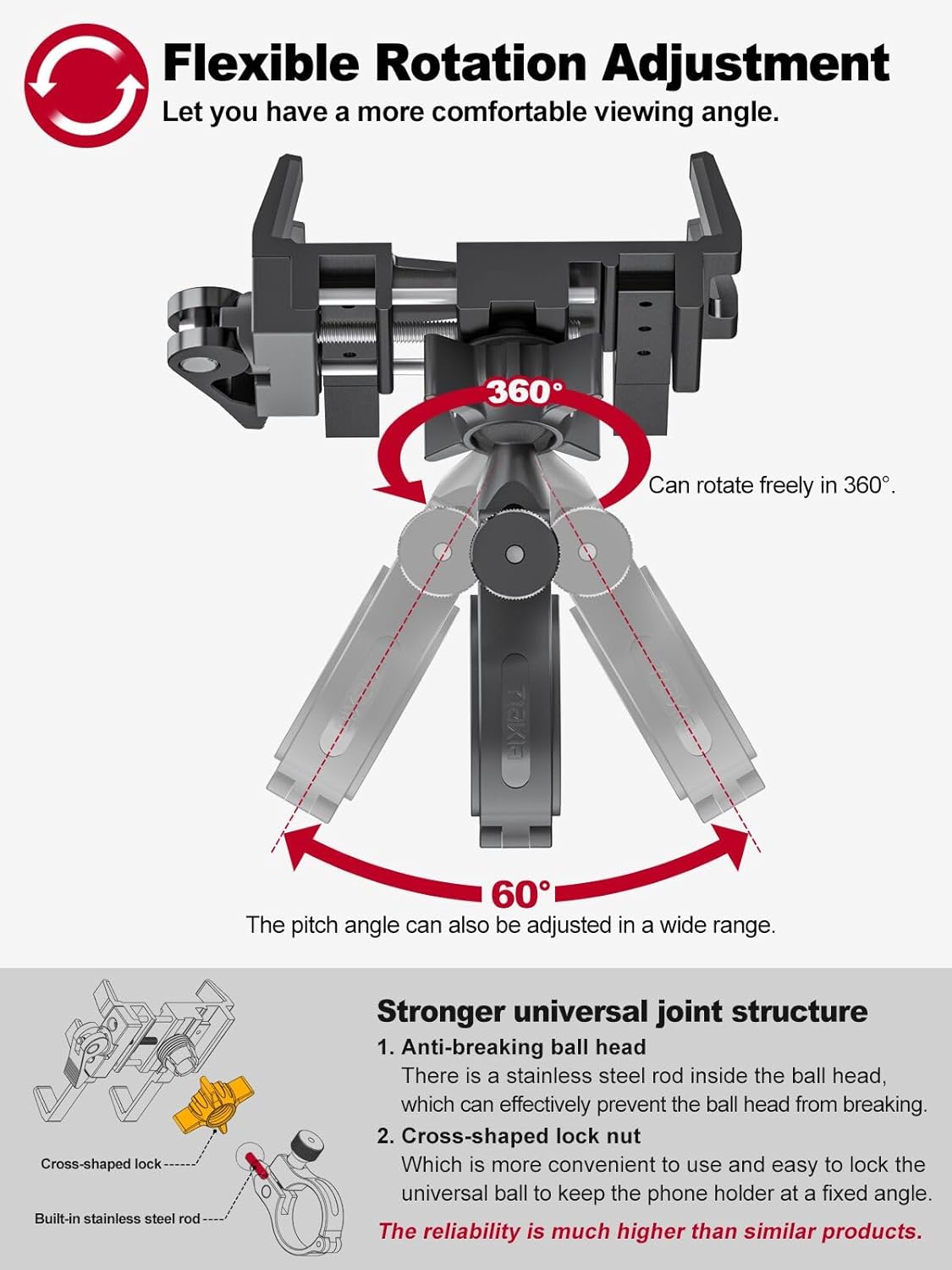
Figure 5.2: Flexible rotation adjustment for optimal viewing.
6. Operating Instructions
- Inserting Your Phone:
- Ensure the quick-release cam handle is in the 'Release' position.
- Gently place your smartphone into the holder, ensuring it rests on the bottom support hook.
- Adjust the width of the holder by rotating the knob on the side until the side arms firmly grip your phone.
- Once the phone is positioned, rotate the cam handle to the 'Lock' position. This will compress the active hook-shaped baffle, securely clamping your phone.
- Removing Your Phone:
- Simply rotate the cam handle to the 'Release' position. The holder will expand, allowing you to easily remove your phone.
- Adjusting Viewing Angle:
- Loosen the hand nut on the spherical joint.
- Rotate the phone holder 360 degrees or adjust its pitch angle to your preferred viewing orientation.
- Tighten the hand nut firmly to lock the angle in place.

Figure 6.1: Quick lock and release operation.
7. Maintenance
To ensure the longevity and optimal performance of your Tiakia Bicycle Phone Holder, follow these simple maintenance guidelines:
- Cleaning: Wipe the holder regularly with a soft, damp cloth to remove dust and dirt. Avoid using harsh chemicals or abrasive cleaners, as they may damage the aluminum alloy or silicone pads.
- Inspection: Periodically check all screws and connections to ensure they are tight. If any part feels loose, gently tighten it. Inspect the silicone pads for wear and tear.
- Storage: When not in use for extended periods, store the phone holder in a clean, dry place away from direct sunlight and extreme temperatures.
8. Troubleshooting
If you encounter any issues with your Tiakia Bicycle Phone Holder, please refer to the following common solutions:
| Problem | Possible Cause | Solution |
|---|---|---|
| Phone is not held securely. | Width not adjusted correctly; cam handle not fully locked; phone too thick/thin. | Ensure the width adjustment knob is tightened and the cam handle is fully in the 'Lock' position. Verify your phone's dimensions are within the specified compatibility range (62-90mm width, <14mm thickness). |
| Holder rotates on handlebar. | Mounting clamp not tight enough; incorrect shim used. | Ensure the mounting clamp screws are securely tightened. Verify you are using the correct rubber shim for your handlebar diameter. |
| Difficulty inserting/removing phone. | Cam handle not in 'Release' position; width adjustment too tight. | Ensure the cam handle is fully in the 'Release' position. Loosen the width adjustment knob slightly before inserting or removing the phone. |
If the problem persists, please contact Tiakia customer support for further assistance.
9. Specifications
| Attribute | Detail |
|---|---|
| Brand | Tiakia |
| Color | Black |
| Compatible Devices | Smartphones |
| Compatible Phone Models | 4.5 - 7 inch smartphones (e.g., Samsung Galaxy S3 and similar sized phones) |
| Phone Width Compatibility | 62 - 90 mm |
| Phone Thickness Compatibility | < 14 mm |
| Mounting Type | Handlebar |
| Handlebar Diameter Compatibility | 22.2 - 35 mm |
| Special Feature | 360° Rotatable |
| Material | 6063-T6 Aviation Aluminum Alloy, PA66 Nylon (15% glass fiber), Silicone |
| Item Dimensions (L x W x H) | 15 x 10.5 x 6.6 cm |
| Weight Limit | 300 Grams |
| Water Resistance Level | Waterproof |
10. Warranty and Support
Tiakia stands behind the quality of its products. For information regarding warranty coverage, returns, or technical support, please refer to the product packaging or contact your point of purchase. You may also visit the official Tiakia website for the most up-to-date support information.
For direct assistance, please contact the seller or manufacturer through the platform where you purchased the product.