
1. Introduction
Thank you for choosing the Bell+Howell Wireless Under Cabinet LED Puck Lights. This product provides versatile, battery-powered lighting solutions for various areas in your home, including kitchens, closets, and stairs. Featuring both touch and remote activation, adjustable brightness, and a timer function, these puck lights offer convenient illumination. Please read this manual thoroughly before installation and operation to ensure proper use and longevity of your product.
2. Safety Information
- Keep batteries out of reach of children.
- Do not mix old and new batteries, or different types of batteries.
- Insert batteries with correct polarity (+/-).
- Remove batteries if the product is not used for an extended period.
- Do not expose the lights to excessive moisture or direct water.
- Do not stare directly into the LED lights when illuminated, as this may cause eye strain.
- This product is for indoor use only.
3. Package Contents
Verify that all items are present in your package:
- 3 x Bell+Howell LED Puck Lights
- 1 x Remote Control
- 9 x AAA Batteries (for puck lights)
- 1 x CR2025 Battery (for remote control, typically pre-installed)
- Adhesive Mounting Pads

Image: Packaging of the Bell+Howell LED Puck Lights, showing three lights and the remote control.
4. Product Features
- Wireless & Battery Operated: No wiring required, powered by AAA batteries for flexible placement.
- Dual Activation: Control lights via touch or the included remote control.
- Adjustable Brightness: Two levels of brightness to suit different lighting needs.
- Timer Function: Set lights to automatically turn off after 10, 30, or 60 minutes.
- Easy Installation: Mounts effortlessly with adhesive backing or screws (not included).
- Versatile Application: Ideal for under cabinets, closets, stairs, shelves, and more.
- Warm Light: Provides 3000K warm white illumination.
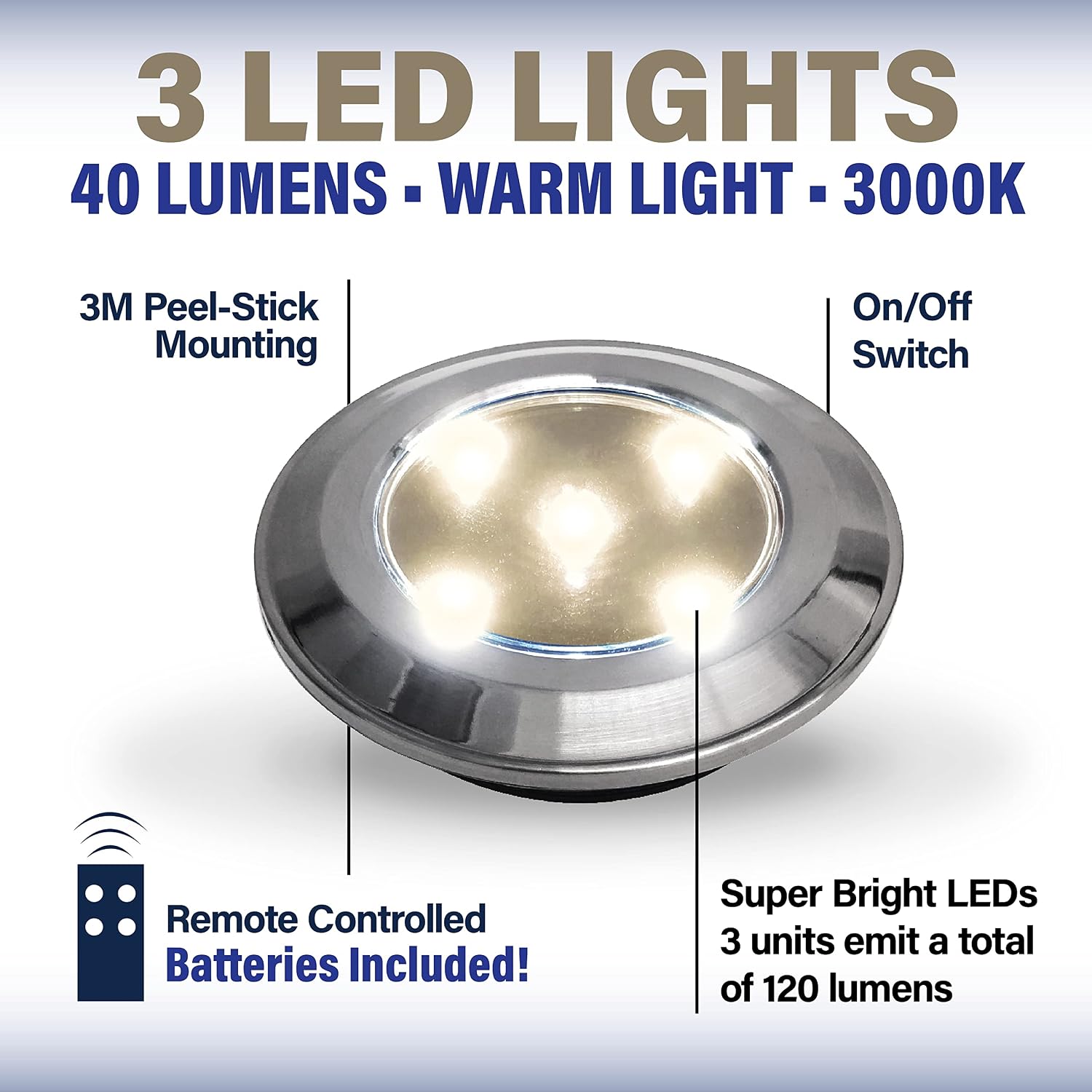
Image: Detailed view of a single puck light highlighting its components and features.
5. Setup and Installation
5.1. Battery Installation (Puck Lights)
- Gently twist the back cover of each puck light counter-clockwise to open.
- Insert 3 AAA batteries into each puck light, ensuring correct polarity (+/-).
- Replace the back cover by aligning and twisting clockwise until secure.
5.2. Battery Installation (Remote Control)
The remote control typically comes with a CR2025 battery pre-installed. If replacement is needed, slide open the battery compartment on the back of the remote and insert a new CR2025 battery with the positive side facing up.
5.3. Mounting the Puck Lights
The puck lights can be mounted using the included adhesive pads:
- Clean the desired mounting surface thoroughly to ensure it is free of dust, grease, and moisture.
- Peel off one side of the protective film from an adhesive pad and firmly attach it to the back of a puck light.
- Peel off the other side of the protective film from the adhesive pad.
- Press the puck light firmly onto the cleaned mounting surface for at least 30 seconds.
- Repeat for all puck lights.
For a more permanent installation, the puck lights can also be mounted using small screws (not included) through the designated holes in the back cover.

Image: Examples of puck light installation in a closet and on stairs.

Image: Puck lights installed under kitchen cabinets for illumination.
6. Operating Instructions
6.1. Touch Activation
- To Turn On/Off: Tap the center of the puck light once.
- To Adjust Brightness: Tap the center of the puck light again after turning it on to cycle between two brightness levels.
6.2. Remote Control Operation
The remote control allows you to operate the puck lights from a distance of up to 33 feet.

Image: The remote control for the puck lights, showing its various functions.
- ON Button (●): Press to turn all paired puck lights ON.
- OFF Button (●): Press to turn all paired puck lights OFF.
- Brightness Adjustment (☀): Press to cycle between two brightness levels (high and low).
- Timer Button (10, 30, 60 Min): Press to activate the auto-off timer. The lights will turn off after the selected duration.
Note: Ensure the remote control is pointed towards the puck lights for optimal signal reception.
7. Maintenance
7.1. Battery Replacement
When the lights dim significantly or stop responding, it's time to replace the batteries. Follow the battery installation steps in Section 5.1 for the puck lights and Section 5.2 for the remote control.
7.2. Cleaning
Wipe the surface of the puck lights with a soft, dry cloth. Do not use abrasive cleaners or immerse the lights in water.
8. Troubleshooting
| Problem | Possible Cause | Solution |
|---|---|---|
| Lights do not turn on. |
|
|
| Lights are dim. |
|
|
| Remote control is unresponsive. |
|
|
9. Specifications
| Model Number | 8205 |
| Brand | Bell+Howell |
| Light Type | LED Puck Light |
| Color Temperature | 3000K (Warm Light) |
| Power Source | Battery Powered (3x AAA per puck light) |
| Remote Control Battery | 1x CR2025 (included) |
| Material | Plastic (Chrome finish) |
| Product Dimensions | 8L x 2W x 8H Centimetres (per puck light) |
| Number of Lights | 3 |
| Installation Type | Flush Mount (Adhesive or Screws) |
10. Warranty and Support
For warranty information or technical support, please refer to the contact details provided on the product packaging or visit the official Bell+Howell website. Keep your purchase receipt as proof of purchase.

