1. Introduction
The CMSTEDCD HDMI EDID Emulator Manager 4K Prophecy 8 is designed to resolve EDID (Extended Display Identification Data) incompatibility issues between various HDMI devices. This device can copy and save EDID data from an end display device or utilize one of 8 preset EDID data modes. It ensures seamless integration of video and audio signals, supporting HDMI 2.0b, 4K@60Hz, HDCP 2.2, 18Gbps bandwidth, HDR, YUV 4:4:4, and CEC pass-through.
2. Key Features
- EDID Management: Solves EDID incompatibility issues with 8 preset modes and a copy function.
- Repeater & Retimer: Amplifies and equalizes HDMI signals for high-quality audio/video, enabling multi-layer cascading.
- HDMI 2.0b Standard: Supports 4K@60Hz with 18Gbps bandwidth.
- HDCP 2.2 Support: Compatible with HDCP 2.2 content protection.
- CEC Pass-through: Allows Consumer Electronics Control signals to pass through.
- Plug-and-Play: Pure hardware architecture, no software or drivers required.
- Low Power Consumption: Designed for 7x24 hour continuous operation.
3. Package Contents
- 1 x CMSTEDCD HDMI EDID Manager (Model: ED001)
- 1 x 5V Power Adapter
- 1 x User Manual

Image: The package includes the HDMI EDID Manager, a 5V power adapter, and the user manual.
4. Product Overview
The CMSTEDCD HDMI EDID Emulator Manager is a compact device designed for easy integration into your HDMI setup. Below are diagrams illustrating its ports and typical connection scenarios.

Image: Front and rear view of the HDMI EDID Manager showing HDMI In, HDMI Out, DC5V power input, EDID Copy button, Power LED, Signal LED, and EDID Switch.

Image: The HDMI EDID Manager with key features: EDID (8 kinds), 4K 60Hz, HDR 18G, HDMI 2.0.
5. Setup Instructions
- Connect Source: Connect your HDMI source device (e.g., laptop, TV box, Blu-Ray DVD, PC) to the HDMI IN port of the EDID Manager using a high-quality HDMI cable.
- Connect Display: Connect your HDMI display device (e.g., projector, monitor, HD TV) to the HDMI OUT port of the EDID Manager using a high-quality HDMI cable.
- Power On: Connect the provided 5V power adapter to the DC5V port on the EDID Manager and plug it into a power outlet. The Power LED (PW) will illuminate.
- Verify Signal: Once connected, the Signal LED (SIG) should illuminate, indicating an active HDMI signal.

Image: A detailed connection diagram showing a laptop, TV box, Blu-Ray DVD, and PC as input sources, connected to the HDMI IN of the EDID Manager. The HDMI OUT is connected to a projector, monitor, or HD TV. Power and signal LEDs are indicated.

Image: An example setup demonstrating how the EDID Manager can be used to ensure proper display resolution when connecting a laptop to a projector, resolving potential display issues.
6. Operating Instructions: EDID Modes
The EDID Manager features a DIP switch to select between 8 preset EDID modes or to copy the EDID from your connected display. This functionality is crucial for ensuring compatibility and optimal resolution.
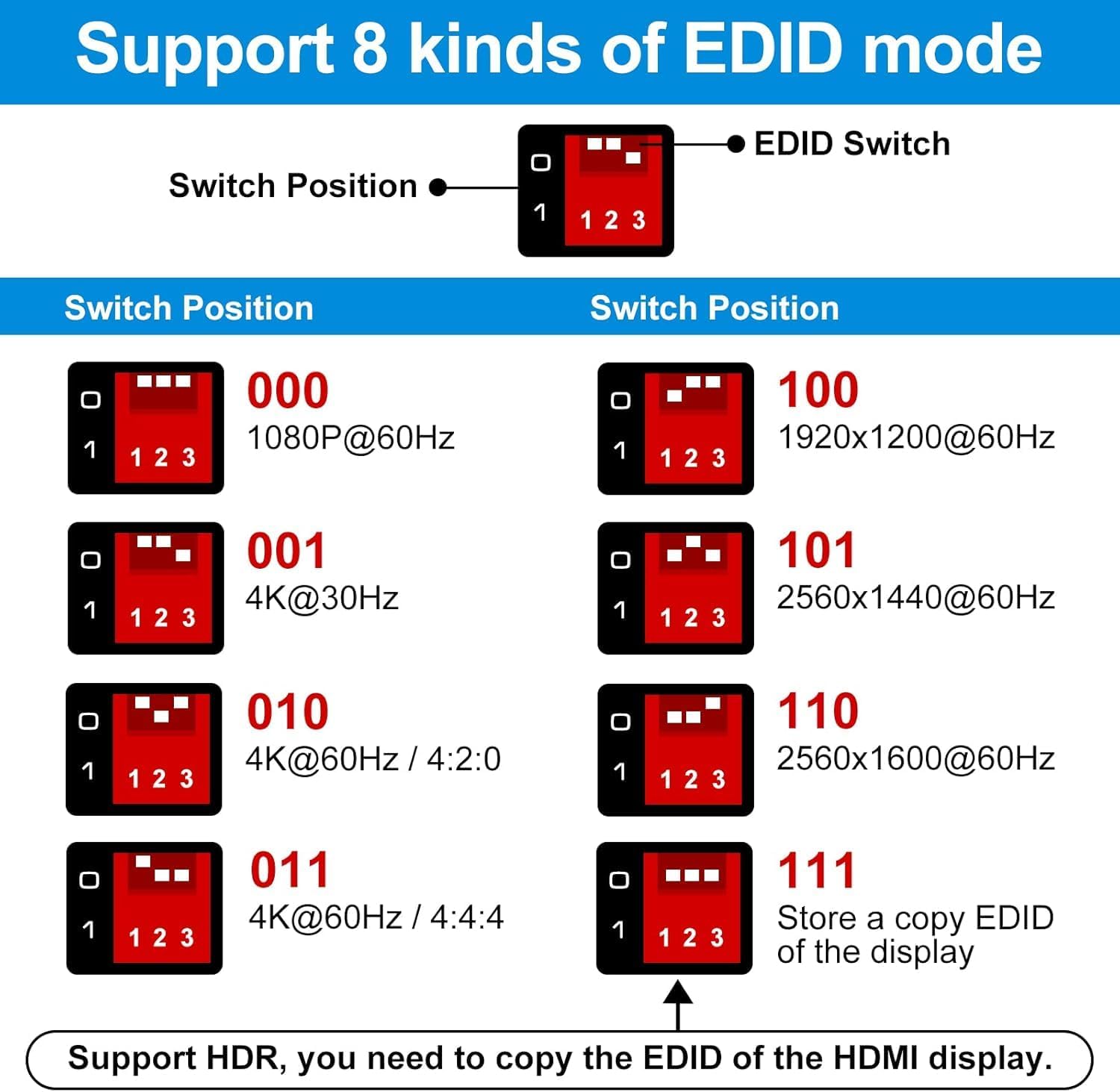
Image: A table illustrating the 8 EDID switch positions and their corresponding resolutions/settings, including 1080P@60Hz, 4K@30Hz, 4K@60Hz (4:2:0), 4K@60Hz (4:4:4), 1920x1200@60Hz, 2560x1440@60Hz, 2560x1600@60Hz, and 'Store a copy EDID of the display'.
Selecting an EDID Mode:
- Refer to the EDID Switch Position table to identify the desired resolution or setting.
- Use a small tool (e.g., a pen tip) to adjust the DIP switches (labeled 1, 2, 3) to the corresponding 'ON' or 'OFF' positions for your chosen mode.
- If copying EDID from your display, set the DIP switches to '111' (all ON) and press the 'COPY' button. The EDID LED will flash, indicating the copy process.
- For HDR support, it is recommended to copy the EDID of your HDMI display.

Image: Demonstrates how the EDID Manager resolves HDMI compatibility issues, showing a laptop connected to a 4K display via an AOC HDMI cable, achieving the correct 3840x2160 resolution with the manager, compared to an incorrect 3440x1440 without it.

Image: Illustrates the device's capability to handle HDCP conversion, specifically from HDCP 2.2 (source) to HDCP 1.4 (display), ensuring content playback on older TVs.
7. Troubleshooting
- No Display/Incorrect Resolution: Ensure all HDMI cables are securely connected. Try different EDID modes using the DIP switch. If your display supports HDR, use the EDID copy function to replicate its EDID data.
- No Audio: Verify that your display and source device audio settings are correct. Ensure the EDID mode selected supports the desired audio format.
- Flickering/Intermittent Signal: Use high-quality HDMI 2.0b certified cables. Ensure the power adapter is securely connected and providing stable power. The repeater/retimer function should help stabilize the signal over longer cable runs.
- HDCP Issues: If connecting a newer source (HDCP 2.2) to an older display (HDCP 1.4), the EDID Manager is designed to facilitate compatibility. Ensure the correct EDID mode is selected.
8. Specifications
| Product Dimensions | 2.28 x 2.05 x 0.87 inches |
| Item Weight | 2.29 ounces |
| Item Model Number | ED001 |
| Manufacturer | CMSTEDCD |
| Compatible Devices | Television, Monitors, Projectors, PCs, Blu-Ray Players, TV Boxes |
| Connector Type | HDMI |
| Color | Black |
| HDMI Version | 2.0b |
| Max Resolution | 4K@60Hz |
| Bandwidth | 18Gbps |
| HDCP Support | HDCP 2.2 |
| HDR Support | Yes |
| CEC Support | Yes |
9. Warranty and Support
CMSTEDCD offers a professional team to provide technical support for your product. We are committed to assisting you with system setup and any operational queries. The product includes a one-year warranty, during which we will replace the new product for you at no charge if any issues arise.
For technical assistance or warranty claims, please contact CMSTEDCD customer support.


