
Introduction
This manual provides instructions for the safe and efficient operation of your EverBrite 1500 Lumen LED Work Light. Please read this manual thoroughly before use and retain it for future reference. This portable, rechargeable work light is designed for various applications, including automotive repair, job site lighting, and outdoor activities.
Important Safety Information
- Do not look directly into the LED light when it is on. The intense brightness can cause temporary vision impairment.
- Keep the work light out of reach of children.
- Do not attempt to disassemble, modify, or repair the light. Refer all servicing to qualified personnel.
- Use only the provided USB cable for charging. Using unauthorized chargers may damage the battery or the device.
- Avoid exposing the light to extreme temperatures, direct sunlight for prolonged periods, or open flames.
- Ensure the charging port cover is securely closed when operating the light in humid or wet environments to maintain its waterproof rating.
Product Overview
Components
The EverBrite 1500 Lumen LED Work Light features a durable aluminum housing, an adjustable bracket, and a built-in rechargeable battery. Familiarize yourself with the key components:
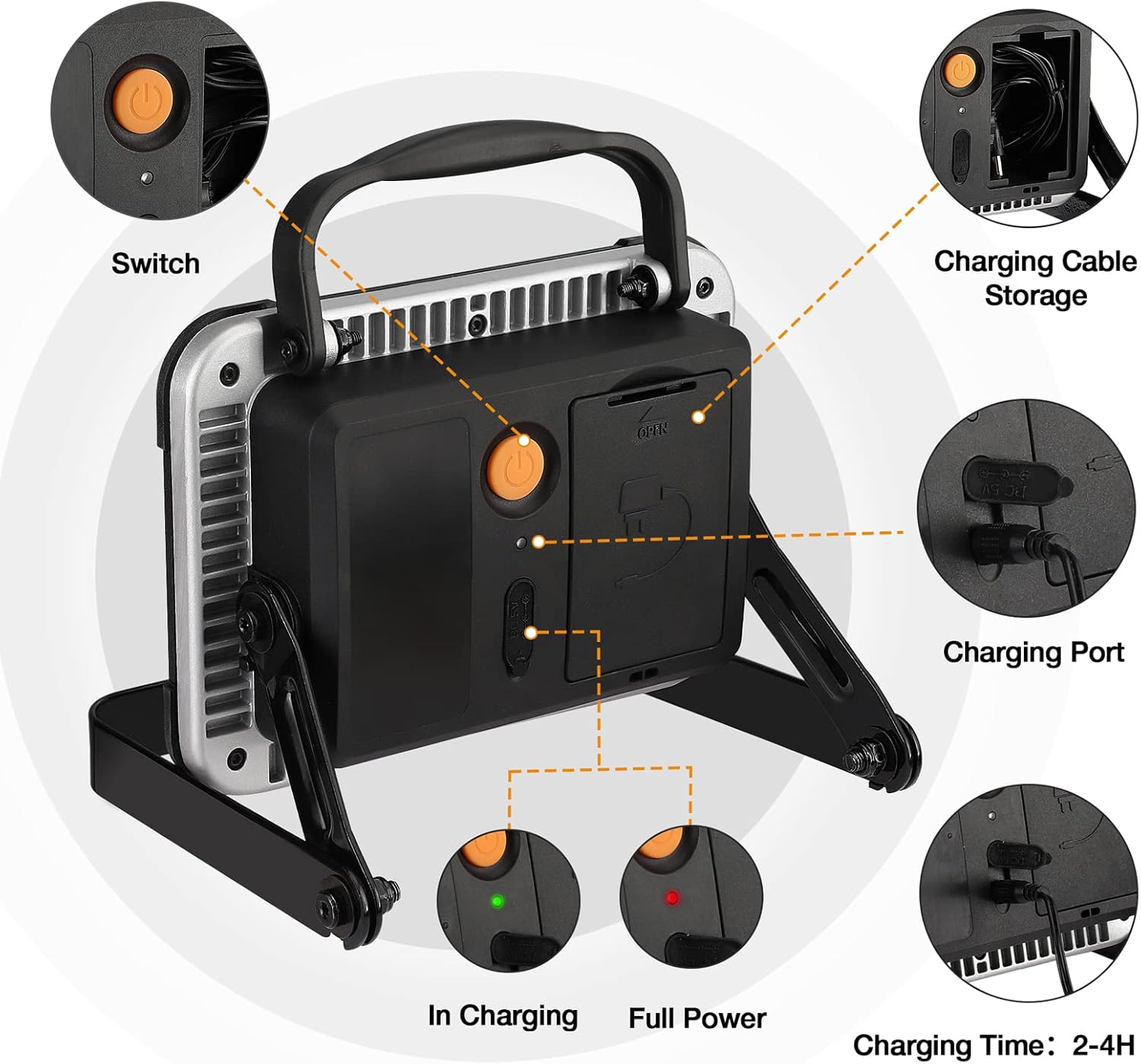
This image highlights key components: the power switch, charging port, charging cable storage compartment, and battery status indicators.
Dimensions
Understanding the product's dimensions can assist in placement and storage:

This image illustrates the physical dimensions of the work light, including its length, width, and height for reference.
Setup
Initial Charging
Before using your EverBrite work light for the first time, ensure it is fully charged. This optimizes battery performance and lifespan.
- Locate the charging port cover on the back of the unit and open it.
- Connect the provided USB charging cable to the charging port.
- Plug the other end of the USB cable into a suitable USB power source (e.g., wall adapter, computer USB port).
- The charging indicator light will illuminate during charging. Once fully charged, the indicator may change color or turn off, depending on the model.

A close-up view of the charging port with the USB cable connected, demonstrating how to charge the device.
Adjusting the Bracket
The integrated adjustable bracket allows you to position the light at various angles for optimal illumination.
- Grasp the work light and the bracket.
- Gently loosen the side knobs on the bracket (if applicable) or apply slight pressure to adjust the angle.
- Position the light to your desired angle.
- Tighten the side knobs (if applicable) to secure the light in place.
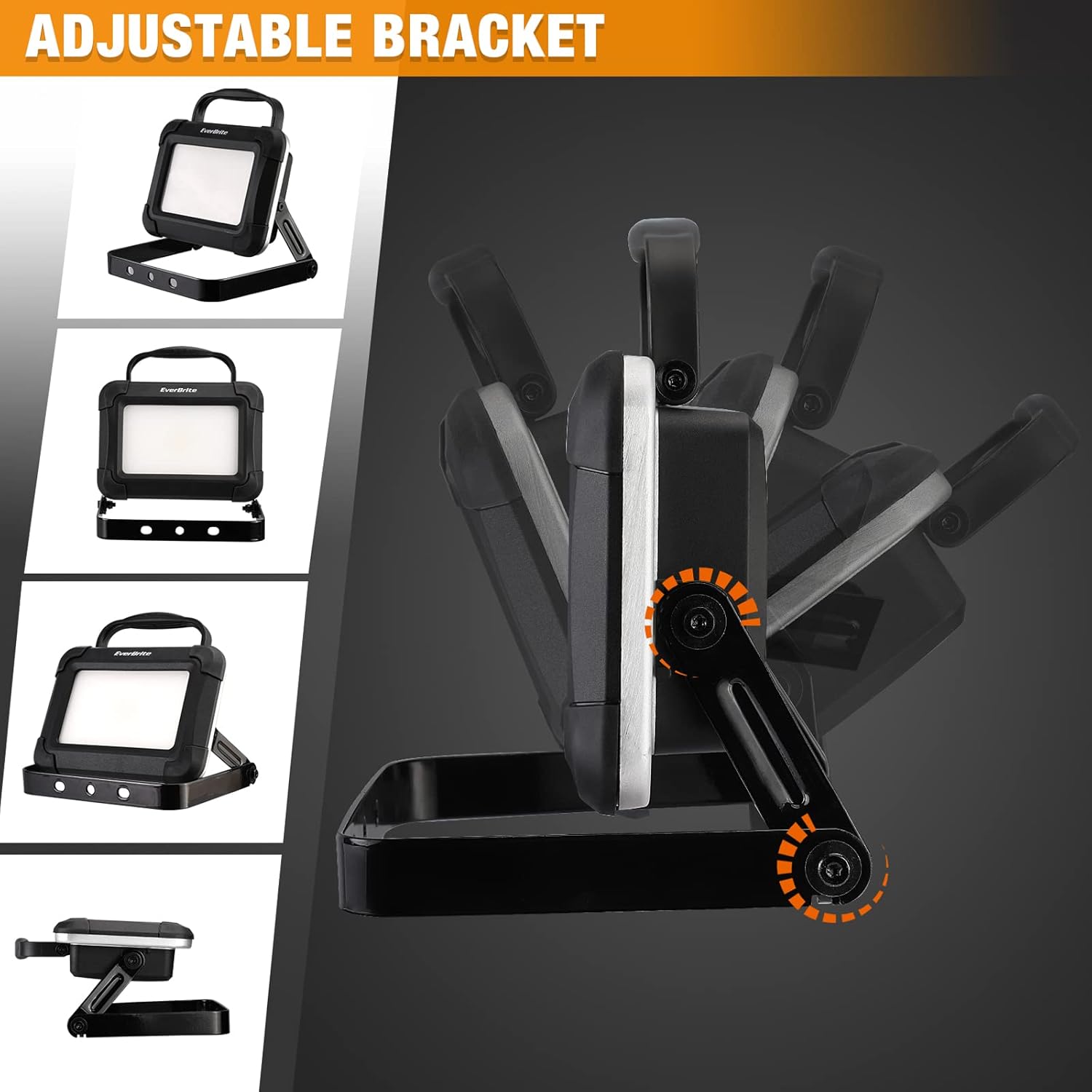
This image shows the work light's adjustable bracket, demonstrating its range of motion for directing light.
Mounting Options
The work light can be used freestanding or mounted to various surfaces.
- Freestanding: Place the light on any stable, flat surface using its adjustable bracket.
- Mounted: The bracket includes holes that can be used to mount the light to a wall or other structure. Ensure appropriate fasteners are used for the mounting surface and that the light is securely attached.

Various mounting configurations are shown, including placing the light on a surface, hanging it, or attaching it to a wall.
Operating Instructions
Power On/Off and Mode Selection
The work light features a simple one-button operation for power and brightness modes.
- Locate the power switch on the back of the unit.
- Press the power switch once to turn the light on to its high brightness mode (1500 Lumens).
- Press the power switch a second time to switch to low brightness mode.
- Press the power switch a third time to turn the light off.

This image illustrates the powerful 1500 Lumen output of the EverBrite work light.
Battery Status Indicators
The LED indicators on the back of the unit provide information about the battery's charge status:
- A green light indicates that the unit is currently charging.
- A red light indicates that the battery is low and requires recharging.
Maintenance
Cleaning
To maintain the appearance and functionality of your work light:
- Wipe the exterior of the light with a soft, damp cloth.
- Do not use abrasive cleaners, solvents, or harsh chemicals, as these can damage the finish or internal components.
Storage
Proper storage helps prolong the life of your work light and its battery:
- Store the work light in a cool, dry place away from direct sunlight and extreme temperatures.
- For long-term storage, ensure the battery is partially charged (around 50%) and recharge it every 3-6 months to prevent deep discharge and maintain battery health.
Cable Storage
The work light features a convenient integrated compartment for storing the USB charging cable.

An image showing the open cable storage compartment on the back of the work light, with the USB cable neatly stored inside.
To use, open the compartment cover, retrieve the cable, and after charging, neatly coil the cable and place it back into the compartment, ensuring the cover is securely closed.
Troubleshooting
If you encounter issues with your EverBrite work light, refer to the following common problems and solutions:
- Light does not turn on:
- Ensure the battery is charged. Connect the light to a power source and check if the charging indicator illuminates.
- Press the power switch firmly.
- Light does not charge:
- Verify the USB cable is securely connected to both the light and the power source.
- Try using a different USB cable or a different USB power adapter to rule out faulty accessories.
- Ensure the charging port is clean and free of debris.
- Reduced brightness or short operating time:
- The battery may be low. Fully recharge the unit.
- Battery performance can decrease over time with repeated charging cycles.
Specifications
| Feature | Detail |
|---|---|
| Brand | EverBrite |
| Model | 1500 Lumen LED Work Light |
| Light Output | 1500 Lumens (Maximum) |
| Light Source Type | LED |
| Power Source | Battery Powered (Internal Rechargeable) |
| Battery Included | Yes (Internal) |
| Material | Aluminum |
| Shape | Rectangular |
| Mounting Type | Bracket Mount |
| Item Weight | 2.49 pounds |
| Package Dimensions | 8.11 x 6.61 x 3.66 inches |
Warranty and Support
Warranty Information
This EverBrite product is covered by a limited warranty. For specific warranty terms and conditions, including duration and coverage details, please refer to any documentation included with your purchase. Retain your proof of purchase for warranty claims.
Customer Support
For technical assistance, troubleshooting guidance beyond this manual, or to inquire about warranty claims, please contact EverBrite customer support. You can typically find contact details on the official EverBrite website or through the retailer where the product was purchased.
Visit the EverBrite Store for more information and support resources.