
Introduction
This manual provides instructions for the proper setup, operation, and maintenance of your WTTHAI RC6001CM replacement remote control. This remote is designed to be compatible with various Marantz MD CD Player models, ensuring full functionality without complex programming.
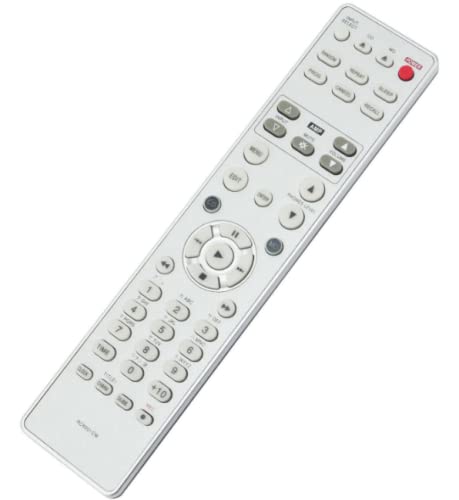
Image 1: Front view of the WTTHAI RC6001CM replacement remote control. This image displays the layout of all buttons, including power, input select, playback controls, numeric keypad, and function buttons.
Package Contents
Verify that your package contains the following item:
- 1 x WTTHAI RC6001CM Remote Control
Note: Batteries and a user manual are not included in the package.
Setup
1. Battery Installation
The RC6001CM remote control requires two 1.5V AAA alkaline batteries (not included).
- Locate the battery compartment on the back of the remote control.
- Slide the battery compartment cover downwards to open it.
- Insert two AAA batteries, ensuring the positive (+) and negative (-) terminals align correctly with the markings inside the compartment.
- Slide the battery compartment cover back into place until it clicks securely.
Image 2: Angled view of the WTTHAI RC6001CM remote control. This perspective highlights the ergonomic design and button placement from a side angle.
2. Initial Use
This remote control is pre-programmed and does not require any setup or pairing. Once batteries are installed, it is ready for immediate use with compatible Marantz MD CD Players.
Compatibility Note: This remote is specifically designed for Marantz MD CD Player models CM6200, CM6000, CM6001, CM7001, CD80, CD19, CD50, CD850, CD52, CD63, CD72, CD93. Ensure your original remote control model matches RC6001CM for guaranteed compatibility.
Operating Instructions
Point the remote control directly at the infrared sensor on your Marantz MD CD Player. Ensure there are no obstructions between the remote and the player.
Basic Functions:
- Power Button: Turns the MD CD Player on or off.
- Input Select: Switches between different input sources (if applicable to your player model).
- Playback Controls:
- Play (►): Starts playback.
- Pause (‖): Pauses playback.
- Stop (■): Stops playback.
- Fast Forward (►►): Advances quickly through a track.
- Rewind (◄◄): Rewinds quickly through a track.
- Skip Forward (►|): Skips to the next track.
- Skip Backward (||◄): Skips to the beginning of the current track or the previous track.
- Numeric Keypad (0-9, +10): Directly selects track numbers.
- Volume Up/Down (AMP section): Adjusts the volume of the connected amplifier (if your Marantz player supports this function via remote).
- Mute (AMP section): Mutes or unmutes the audio output.

Image 3: Another angled view of the WTTHAI RC6001CM remote control, showcasing the full button array and ergonomic contours.
Advanced Functions:
Refer to your Marantz MD CD Player's original manual for specific instructions on using advanced functions such as Menu, Edit, Program, Repeat, and other specialized buttons, as their functionality is dependent on the player model.
Maintenance
- Cleaning: Wipe the remote control with a soft, dry cloth. Do not use liquid cleaners or abrasive materials.
- Battery Replacement: Replace batteries when the remote's response becomes sluggish or stops working. Always replace both batteries at the same time with new ones of the same type.
- Storage: If the remote control will not be used for an extended period, remove the batteries to prevent leakage and potential damage.
- Avoid Damage: Do not drop the remote control, expose it to extreme temperatures, or immerse it in water.
Troubleshooting
| Problem | Possible Cause | Solution |
|---|---|---|
| Remote control does not work. |
|
|
| Some buttons do not respond. |
|
|
| Short operating range. |
|
|
Specifications
- Model: RC6001CM
- Brand: WTTHAI
- Power Supply: 2 x 1.5V AAA Alkaline Batteries (not included)
- Compatible Devices: Marantz MD CD Players (CM6200, CM6000, CM6001, CM7001, CD80, CD19, CD50, CD850, CD52, CD63, CD72, CD93)
- Special Feature: Ergonomic design
- Color: Black
Warranty and Support
Specific warranty information for this product is not provided in the product details. For any issues or support inquiries, please refer to the seller or retailer from whom the product was purchased.
If you encounter any problems with the remote control, it is recommended to contact the seller directly for assistance before leaving feedback.