
1. Introduction
This manual provides essential information for the safe and effective operation, setup, maintenance, and troubleshooting of your LONGFIAN JAY 5AW 5 LPM Oxygen Concentrator. Please read this manual thoroughly before using the device to ensure proper function and user safety. This medical-grade oxygen concentrator is designed to deliver oxygen with a purity of 93% (±3%).
2. Safety Information
Important Safety Precautions:
- Always consult with a healthcare professional before using an oxygen concentrator. This device is intended for medical use and should be used under medical supervision.
- Do not smoke or allow open flames near the oxygen concentrator or oxygen tubing. Oxygen is highly flammable.
- Keep the device away from heat sources, flammable materials, and direct sunlight.
- Ensure adequate ventilation around the unit. Do not block air vents.
- Use only distilled or demineralized water in the humidifier bottle.
- Regularly inspect the power cord for damage. Do not operate the device with a damaged cord.
- Keep out of reach of children and pets.
- In case of power failure or device malfunction, have an alternative oxygen source readily available.
3. Product Components
Familiarize yourself with the main components of your oxygen concentrator:
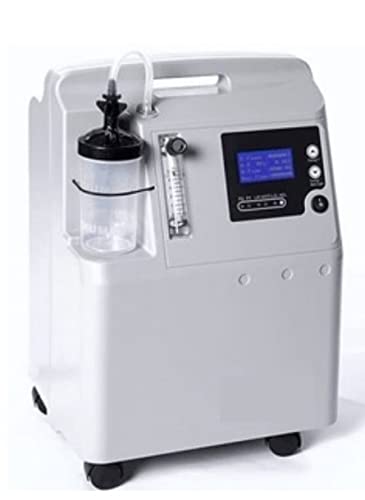
Figure 3.1: Front View of the Oxygen Concentrator. This image shows the main unit with the humidifier bottle attached to the side, the flow meter, and the control panel on the front. The unit is light grey with black accents and has wheels for mobility.

Figure 3.2: Top View of the Oxygen Concentrator. This image provides a clearer view of the control panel, including the display screen, power button, and timing/backlight buttons. The handle for portability is also visible at the top.
- Main Unit: Houses the compressor, sieve beds, and electronic controls.
- Humidifier Bottle: Attaches to the oxygen outlet to humidify the oxygen before delivery.
- Flow Meter: Indicates the oxygen flow rate in liters per minute (LPM).
- Control Panel: Includes the power switch, display screen, and adjustment buttons.
- Air Filter: Located at the back or side, requires regular cleaning.
- Wheels: For easy movement of the unit.
4. Setup
Follow these steps to set up your oxygen concentrator for first use:
- Unpack the Unit: Carefully remove the concentrator and all accessories from the packaging.
- Position the Concentrator: Place the unit on a flat, stable surface, ensuring at least 15 cm (6 inches) of clearance from walls, furniture, or drapes to allow for proper airflow.
- Fill the Humidifier Bottle: Unscrew the humidifier bottle and fill it with distilled or demineralized water up to the indicated maximum fill line. Do not overfill. Screw the cap back on securely.
- Attach the Humidifier Bottle: Connect the humidifier bottle to the oxygen outlet port on the concentrator. Ensure a tight seal to prevent leaks.
- Connect Nasal Cannula/Mask: Attach your nasal cannula or oxygen mask tubing to the outlet on the humidifier bottle.
- Connect Power: Plug the power cord into a grounded electrical outlet. Ensure the voltage matches the device's requirements (AC230V ± 10% or AC110V ± 10%).
5. Operating Instructions
To operate your oxygen concentrator:
- Turn On: Press the power button on the control panel. The unit will start, and the display screen will illuminate. You may hear a brief self-test sequence.
- Adjust Flow Rate: Rotate the knob on the flow meter to set the prescribed oxygen flow rate (0.5-5 L/min). The ball in the flow meter should align with the desired LPM marking.
- Monitor Operation: The display screen may show operational status, including oxygen purity (if applicable) and operating hours.
- Set Timer (if available): If your model has a timer function, use the designated buttons to set the desired operating duration.
- Turn Off: When finished, press the power button again to turn off the unit. Unplug the power cord from the wall outlet.
6. Maintenance
Regular maintenance ensures optimal performance and longevity of your concentrator:
- Humidifier Bottle Cleaning: Clean the humidifier bottle daily with mild soap and water. Rinse thoroughly and air dry. Disinfect weekly with a vinegar solution (1 part white vinegar to 10 parts water), then rinse and dry.
- External Filter Cleaning: The external air filter (usually located at the back or side) should be cleaned weekly. Remove the filter, wash it with warm soapy water, rinse thoroughly, and allow it to air dry completely before reinserting. Do not operate the unit without the filter.
- Cabinet Cleaning: Wipe the exterior of the concentrator with a damp cloth. Do not use abrasive cleaners or solvents.
- Cannula/Mask Replacement: Replace your nasal cannula or mask regularly as recommended by your healthcare provider or the manufacturer.
- Professional Servicing: It is recommended to have the unit serviced by a qualified technician annually or as recommended by the manufacturer for internal filter replacement and performance checks.
7. Troubleshooting
If you encounter issues with your oxygen concentrator, refer to the following common problems and solutions:
| Problem | Possible Cause | Solution |
|---|---|---|
| Unit does not turn on | No power, power cord loose, power switch off | Check power outlet, ensure cord is securely plugged in, turn power switch on. |
| Low oxygen flow | Kinked tubing, humidifier bottle leak, blocked filter | Straighten tubing, check humidifier bottle for leaks and proper seal, clean/replace air filter. |
| Alarm sounds | Low oxygen purity, power failure, system malfunction | Refer to the specific alarm code on the display (if any) and consult a professional if persistent. Ensure power supply is stable. |
| Unusual noise | Unit not level, internal issue | Ensure unit is on a flat surface. If noise persists, contact support. |
If troubleshooting steps do not resolve the issue, contact customer support or a qualified service technician.
8. Specifications
The following are the technical specifications for the LONGFIAN JAY 5AW Oxygen Concentrator:

Figure 8.1: Technical Parameters. This image displays a table of key specifications for the JAY-5AW model, including flow rate, oxygen purity, outlet pressure, net weight, sound level, power consumption, input frequency, and voltage.
| Parameter | Value |
|---|---|
| Model | JAY-5AW |
| Flow Rate | 0.5-5 L/min |
| Oxygen Purity | 93% (±3%) |
| Outlet Pressure | 6-10 PSI (0.04-0.07 MPa) |
| Net Weight | 16 Kgs |
| Sound Level | ≤40 dB |
| Power Consumption | ≤350 W |
| Input Frequency | 50 Hz; 60 Hz |
| Input Voltage | AC230V ± 10%; AC110V ± 10% |
| Product Dimensions (LxWxH) | 42 x 34 x 61 cm |
9. Warranty and Support
This product comes with a standard warranty. An optional 1-year extended warranty may also be available. Please refer to your purchase documentation for specific warranty terms and conditions.
For technical support, service, or warranty claims, please contact the manufacturer or authorized service center:
- Manufacturer: Generic (as per product listing)
- Contact Number: 9891521090
- Packer/Importer: Sachdeva Medline
Always provide your product model (JAY 5 AW) and serial number when contacting support.