
1. Safety Instructions
Always observe general safety regulations when operating power tools. Failure to follow these instructions may result in electric shock, fire, and/or serious injury. Keep this instruction manual for future reference.
- Work Area Safety: Keep the work area clean and well-lit. Cluttered or dark areas invite accidents. Do not operate power tools in explosive atmospheres, such as in the presence of flammable liquids, gases, or dust.
- Electrical Safety: Avoid body contact with earthed or grounded surfaces such as pipes, radiators, ranges, and refrigerators. There is an increased risk of electric shock if your body is earthed or grounded.
- Personal Safety: Always wear eye protection. Use personal protective equipment such as dust masks, non-skid safety shoes, hard hats, or hearing protection when appropriate. Stay alert, watch what you are doing, and use common sense when operating a power tool.
- Tool Use and Care: Do not force the power tool. Use the correct power tool for your application. Disconnect the battery pack from the power tool before making any adjustments, changing accessories, or storing power tools.
- Battery Tool Use and Care: Recharge only with the charger specified by the manufacturer. Use power tools only with specifically designated battery packs.
- Specific Jigsaw Safety: Hold the tool by insulated gripping surfaces when performing an operation where the cutting accessory may contact hidden wiring or its own cord. Cutting accessory contacting a "live" wire may make exposed metal parts of the power tool "live" and could give the operator an electric shock.
- Splinter Protection: The integrated splinter protection helps achieve clean cuts and reduces material breakage.
2. Product Overview
The Einhell TC-JS 18 Li is a cordless jigsaw designed for precise cutting in various materials. It is part of the Power X-Change family, allowing battery interchangeability with other Einhell tools.
2.1 Included Components

Figure 1: The Einhell TC-JS 18 Li Cordless Jigsaw, including the 2.5 Ah battery, charger, transport case, and a selection of wood and metal saw blades.
- Einhell TC-JS 18 Li Cordless Jigsaw
- 1x 2.5 Ah Power X-Change Battery
- 1x Power X-Change Charger
- 3x Wood Saw Blades
- 2x Metal Saw Blades
- E-Box Basic S35 Transport and Storage Case
- Dust Extractor Adapter
2.2 Key Features
- Power X-Change System: Utilizes the Einhell Power X-Change battery system, allowing the 18V battery to be used across a wide range of compatible tools.
- Switchable Pendulum Movement: Enables faster cutting progress and improved chip removal, especially in thicker materials.
- Tool-Free Saw Blade Change: Quick and easy blade replacement without the need for additional tools.
- Dust Blowing Function: Keeps the cutting line clear of sawdust for better visibility and more precise cuts.
- Dust Extraction Adapter: Allows connection to an external dust extraction system for a cleaner work environment.
- Adjustable Saw Shoe: Enables miter cuts up to 45 degrees and features a plastic coating to protect sensitive workpieces.

Figure 2: The Power X-Change battery system, highlighting the versatility of the 18V battery across numerous Einhell tools.

Figure 3: Detail of the saw blade mounting system, designed for quick, tool-free blade changes.

Figure 4: The saw shoe with its protective plastic coating and the blade guide mechanism.
3. Setup
3.1 Charging the Battery
Before first use, fully charge the 2.5 Ah Power X-Change battery using the provided charger. Connect the charger to a power outlet and insert the battery. The charger's indicator lights will show the charging status.
3.2 Installing the Battery
- Ensure the jigsaw is switched off.
- Slide the charged battery pack into the battery receptacle on the jigsaw until it clicks into place.
- To remove, press the release button on the battery pack and slide it out.
3.3 Installing a Saw Blade
Always ensure the battery is removed from the jigsaw before installing or changing saw blades.
- Open the saw blade clamp by pushing the lever or rotating the mechanism (refer to Figure 3).
- Insert the shank of the saw blade fully into the clamp, ensuring the teeth face forward.
- Release the clamp to secure the blade. Gently pull on the blade to confirm it is firmly seated.
- Select the appropriate blade for your material: wood blades for wood, metal blades for metal.
4. Operating Instructions
4.1 Basic Operation
- Ensure the workpiece is securely clamped.
- Place the saw shoe flat on the workpiece.
- Press the ON/OFF switch to start the jigsaw. Allow the blade to reach full speed before beginning the cut.
- Guide the jigsaw along the cutting line with steady, even pressure. Do not force the tool.
- Release the ON/OFF switch to stop the jigsaw. Wait for the blade to stop completely before lifting the tool from the workpiece.

Figure 5: Proper technique for operating the jigsaw, with the saw shoe flat on the workpiece.
4.2 Pendulum Action
The pendulum action feature allows the saw blade to move forward and backward in addition to its up and down motion. This increases cutting speed and efficiency, especially in softer materials like wood. It is generally not recommended for fine cuts or hard materials like metal.
- Locate the pendulum action selector switch (usually a lever or dial on the side of the tool).
- Adjust the pendulum setting according to the material and desired cutting speed. Higher settings provide more aggressive cutting.
4.3 Dust Management
The jigsaw features a dust blowing function to keep the cutting line clear. For a cleaner work environment, connect a vacuum cleaner to the dust extraction adapter.
- Dust Blowing: This function is typically active by default or can be switched on/off via a dedicated button.
- Dust Extraction: Attach the dust extractor adapter to the tool's exhaust port and connect a suitable vacuum hose.
4.4 Adjusting Cutting Angles (Miter Cuts)
The saw shoe can be tilted to make miter cuts up to 45 degrees.
- Loosen the screws or lever that secure the saw shoe to the base of the jigsaw.
- Tilt the saw shoe to the desired angle (e.g., 15°, 30°, 45°). Many jigsaws have detents for common angles.
- Tighten the screws or lever firmly to secure the saw shoe in position.
- Always perform a test cut on scrap material to verify the angle before cutting your final workpiece.
5. Maintenance
Regular maintenance ensures the longevity and optimal performance of your Einhell TC-JS 18 Li jigsaw. Always remove the battery before performing any maintenance.
5.1 Cleaning
- After each use, clean the tool housing with a soft, damp cloth. Do not use harsh cleaning agents or solvents.
- Remove sawdust and debris from the ventilation slots and the saw blade guide area using a brush or compressed air.
- Keep the saw shoe clean to ensure smooth gliding over the workpiece.
5.2 Storage
- Store the jigsaw in its original E-Box Basic S35 transport and storage case (refer to Figure 6) in a dry, secure location, out of reach of children.
- Remove the battery pack from the tool before storage, especially for extended periods.
- Store batteries in a cool, dry place, away from direct sunlight and extreme temperatures.
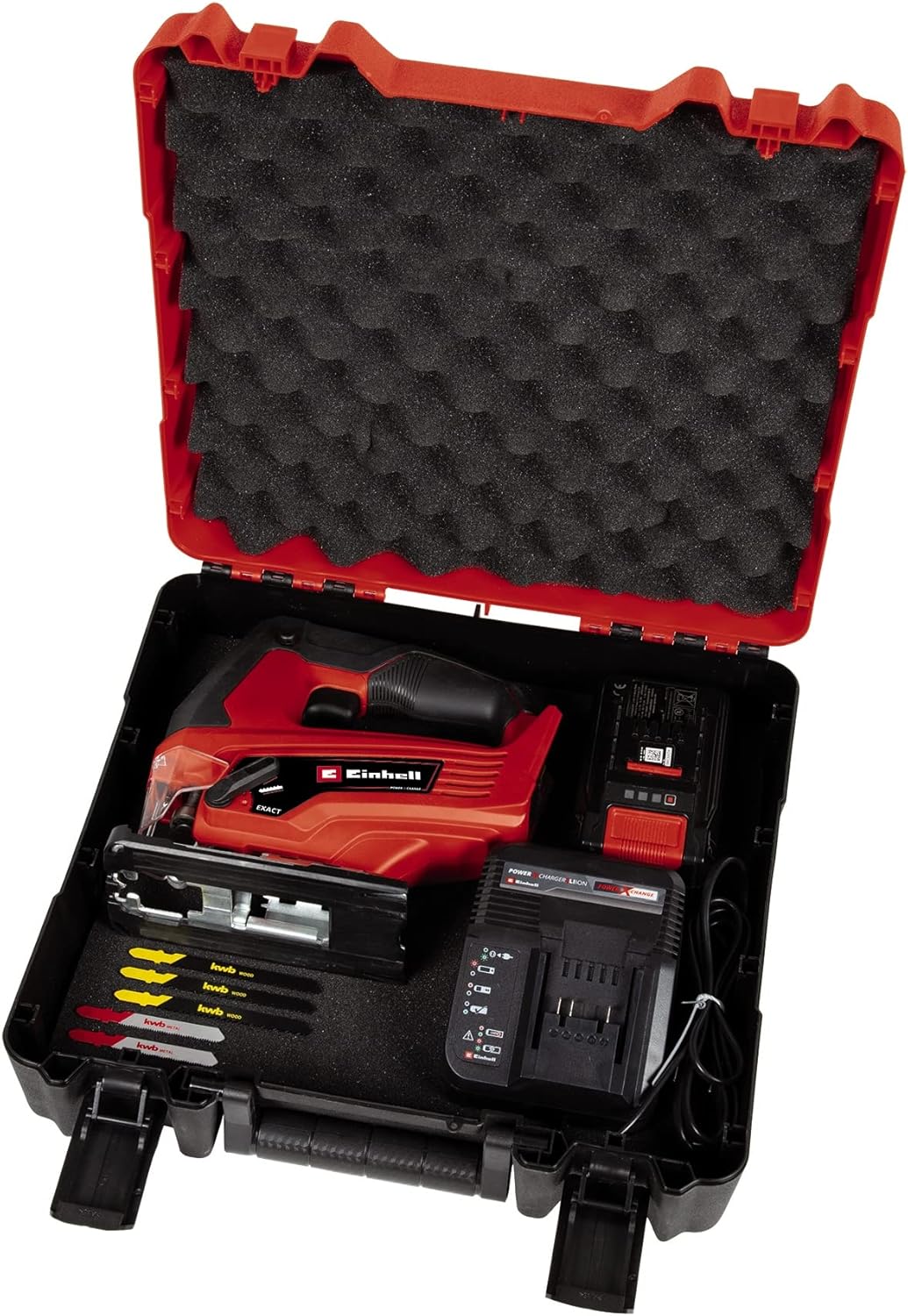
Figure 6: The jigsaw and accessories neatly stored within the E-Box Basic S35 case.
6. Troubleshooting
This section addresses common issues you might encounter with your jigsaw. For problems not listed here, contact Einhell customer support.
| Problem | Possible Cause | Solution |
|---|---|---|
| Jigsaw does not start. | Battery not charged or incorrectly inserted. | Ensure battery is fully charged and correctly inserted until it clicks. |
| Blade not cutting efficiently or binding. | Dull or incorrect blade for material; excessive force; incorrect pendulum setting. | Replace with a sharp, appropriate blade. Reduce feed pressure. Adjust pendulum setting. |
| Excessive vibration or noise. | Loose blade; damaged blade; internal fault. | Check blade for secure installation and damage. Replace if necessary. If problem persists, seek professional service. |
| Inaccurate cuts. | Worn blade; saw shoe not properly aligned; incorrect technique. | Replace blade. Ensure saw shoe is tightened correctly. Maintain steady pressure and follow cutting line. |
7. Technical Specifications
| Feature | Specification |
|---|---|
| Model | TC-JS 18 Li |
| Power Source | Battery Powered (Einhell Power X-Change) |
| Voltage | 18 Volts |
| Wattage | 270 watts |
| Speed | 4500 RPM |
| Cutting Depth (Wood) | 70 mm |
| Cutting Depth (Plastic) | 10 mm |
| Cutting Depth (Steel) | 8 mm |
| Miter Cut Angle | Up to 45 Degrees |
| Blade Material | High Speed Steel (included blades) |
| Item Weight | 2.12 Kilograms (4.66 pounds) |
| Product Dimensions | 13.78"L x 13.46"W x 4.09"H |
| Included Battery | 1x 2.5 Ah Lithium Ion |
| Certification | CE |
8. Warranty and Support
For detailed warranty information, please refer to the warranty card included with your product or visit the official Einhell website. Keep your proof of purchase for any warranty claims.
For technical support, spare parts, or service inquiries, please contact Einhell customer service through their official channels. Contact information can typically be found on the Einhell website or in the product packaging.
Online Resources: For additional information, product registration, and FAQs, please visit the official Einhell website.


