
1. Introduction
Thank you for choosing LUDOS NOVA Wired Earbuds. This manual provides essential information for the proper setup, operation, and maintenance of your new in-ear headphones. Please read this guide thoroughly before using the product to ensure optimal performance and longevity.
2. Safety Information
- Avoid prolonged listening at high volumes to prevent hearing damage.
- Do not use the earbuds in situations where inability to hear ambient sounds could be dangerous (e.g., driving, cycling, walking in traffic).
- Keep the product away from water and moisture.
- Do not attempt to disassemble or modify the earbuds. This will void the warranty.
- Keep out of reach of children. Small parts may pose a choking hazard.
3. Package Contents
Verify that all items are present in your package:
- NOVA Earphones
- Protective Case
- In-Ear Headphones Silicone Tips
- Cable (integrated)
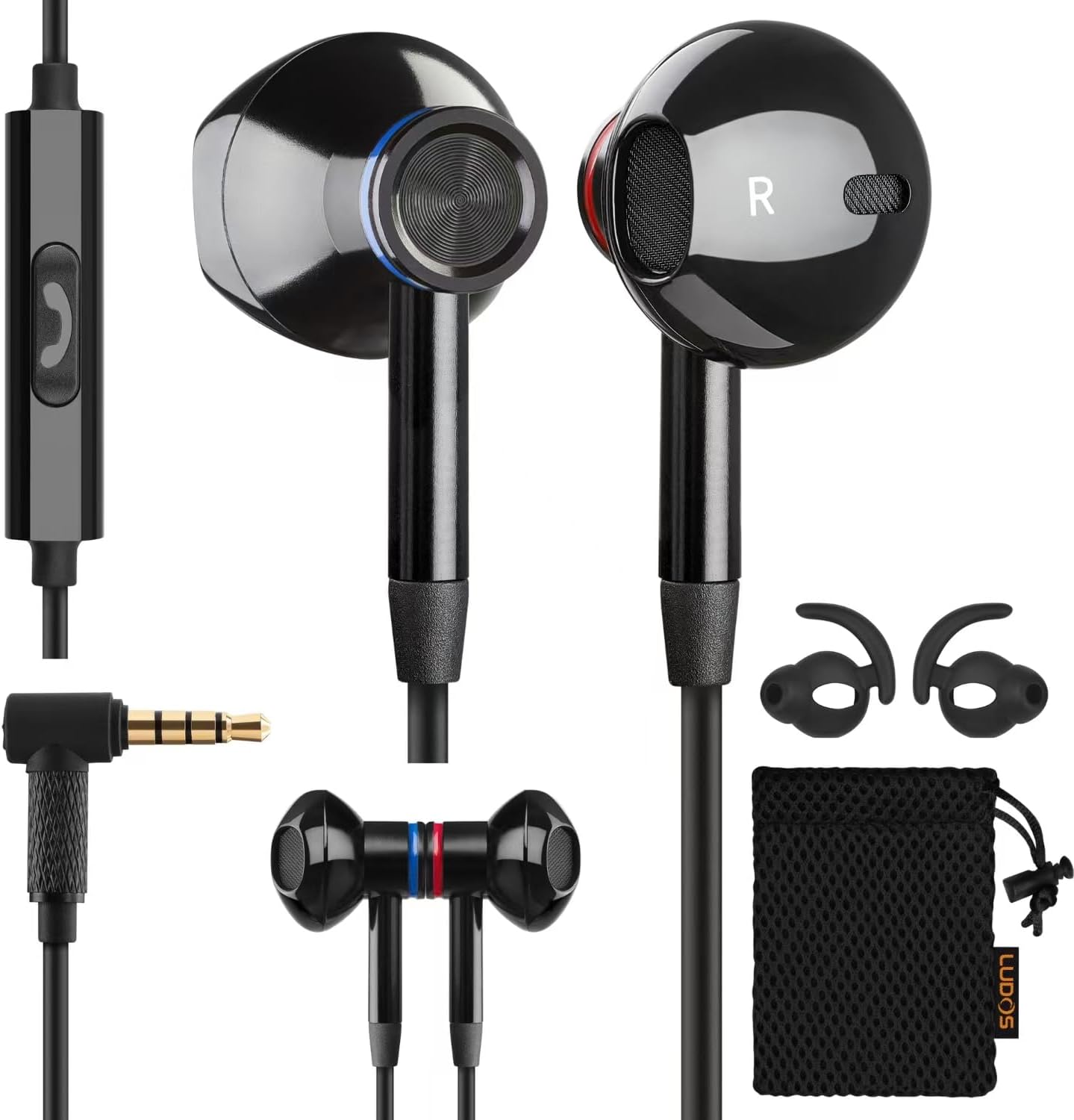
Image: LUDOS NOVA Wired Earbuds, showing the earbuds, in-line microphone/control, 3.5mm jack, extra silicone ear tips, and a protective pouch.
4. Setup
4.1 Connecting to Your Device
- Identify the 3.5mm audio jack on your device (e.g., smartphone, laptop, tablet, PC).
- Insert the 3.5mm plug of the LUDOS NOVA earbuds firmly into the audio jack.
- Ensure the connection is secure for optimal audio quality.
Note: Some newer devices (e.g., certain iPhones or Android phones) may require a separate adapter (not included) to connect to a 3.5mm jack. Please check your device's specifications.

Image: LUDOS NOVA Earbuds connected to a laptop, illustrating universal 3.5mm jack compatibility with various devices like laptops, tablets, and smartphones.
5. Operating Instructions
5.1 In-line Remote Control
The LUDOS NOVA earbuds feature an in-line remote with a single button and an HD microphone for convenient control of audio playback and calls.
- Play/Pause Music: Press the button once.
- Answer/End Call: Press the button once during an incoming call or an active call.
- Next Track: Press the button twice quickly.
- Previous Track: Press the button three times quickly.

Image: Close-up of the LUDOS NOVA in-line remote, highlighting the single control button for answering/hanging up calls and playing/pausing music, along with the HD microphone.
5.2 Wearing the Earbuds
Insert the earbuds gently into your ears. The silicone tips are designed for comfort and to provide sound isolation. Adjust the earbuds until they fit snugly and comfortably to achieve the best audio experience and noise isolation.

Image: A close-up of the LUDOS NOVA earbuds, emphasizing their comfortable design for extended wear.
6. Maintenance
- Clean the silicone ear tips regularly with a soft, dry cloth to remove earwax and debris.
- Store the earbuds in the provided protective case when not in use to prevent tangling and damage.
- Avoid pulling the cable forcefully when disconnecting from a device; always grasp the plug.
- Do not expose the earbuds to extreme temperatures or direct sunlight for extended periods.

Image: An overview of the LUDOS NOVA Earbuds, showcasing premium speakers, HD mic, extra resistant 4.2ft cord, universal 3.5mm jack plug, and the metal protective carrying case.
7. Troubleshooting
| Problem | Possible Cause | Solution |
|---|---|---|
| No sound or low volume |
|
|
| Sound distortion or crackling |
|
|
| Microphone not working |
|
|
8. Specifications
| Feature | Detail |
|---|---|
| Model Name | NOVA |
| Brand | LUDOS |
| Connectivity Technology | Wired |
| Headphones Jack | 3.5 mm Jack |
| Noise Control | Sound Isolation |
| Sensitivity | 92 dB |
| Impedance | 32 Ohms |
| Cable Feature | Tangle Free |
| Item Weight | 40 Grams (1.41 ounces) |
| Material | Metal |
| Control Type | Call Control (Single Button) |
| Compatible Devices | iPhone, iPad, PC, Computer, Laptop, Samsung, Huawei, One Plus, Smartphone, iOS, Android, Tablet, PS4, Xbox One, Switch |
9. Warranty & Support
LUDOS NOVA Wired Earbuds come with a 5-year comprehensive warranty, protecting against unexpected issues. This warranty reflects the high standards of craftsmanship and quality. For any support needs or warranty claims, please refer to the contact information provided with your purchase or visit the official LUDOS website.

Image: A close-up of a LUDOS NOVA earbud with a prominent "5 Years Warranty" shield, indicating product reliability.