
V-MODA RSTONES-Tattoo
V-MODA Crossfade 2 Wireless Headphones User Manual
Model: RSTONES-Tattoo
1. Introduction
The V-MODA Crossfade 2 Wireless headphones offer a versatile audio experience, combining both wireless Bluetooth connectivity and pure analog wired mode. Designed for audiophiles, gamers, musicians, and DJs, these headphones deliver high-resolution audio and exceptional comfort for extended listening sessions. The robust construction, featuring a combination of steel and vegan leather, ensures durability, while the foldable design enhances portability.

Image: V-MODA Crossfade 2 Wireless headphones in Tattoo -Black edition, showcasing the unique design.
2. What's in the Box
Your V-MODA Crossfade 2 Wireless headphones package includes the following items:
- V-MODA Crossfade 2 Wireless Headphones
- Protective Exoskeleton Carry Case
- Kevlar-reinforced 1-button Speakeasy Audio Cable (for wired use)
- V-Micro USB Charging Cable
- User Manual (this document)
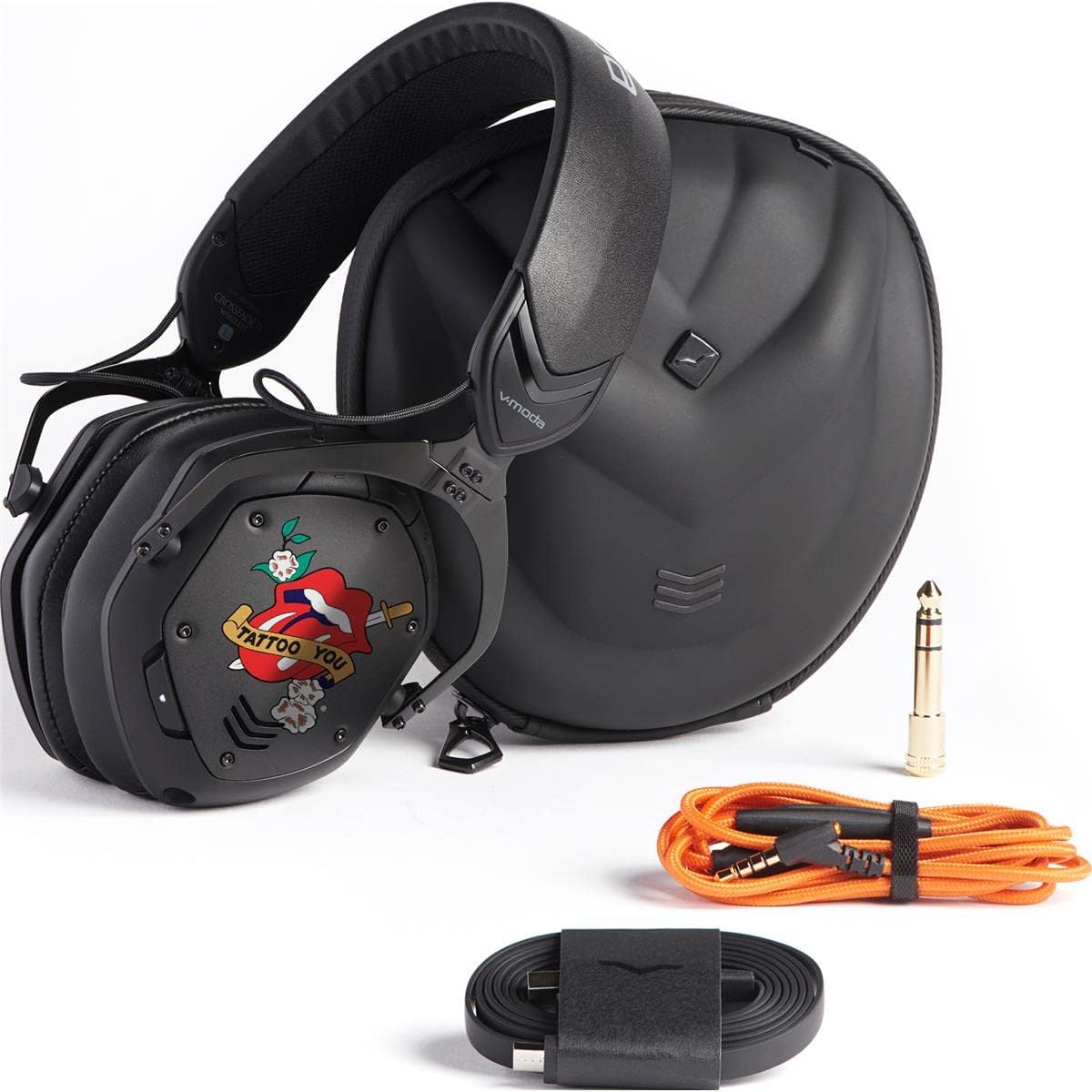
Image: The V-MODA Crossfade 2 Wireless headphones alongside their protective case, audio cable, and charging cable.
3. Features
The V-MODA Crossfade 2 Wireless headphones are engineered with advanced features to provide a superior audio experience:
- Dual-Diaphragm 50mm Drivers: Deliver V-MODA's signature sound with deep, rich bass and clear highs.
- Hi-Resolution CCAW Japanese Coils: Certified by Japan Audio Society (JAS) for Hi-Res Audio when used in wired mode.
- Bluetooth Connectivity: Seamless wireless audio experience with a range of up to 33 feet (10 meters).
- Multi-Point Connection: Pair with two Bluetooth sources simultaneously (e.g., smartphone and laptop).
- Pure Analog Wired Mode: Zero latency audio for critical listening, gaming, and professional use.
- Extended Battery Life: Up to 14+ hours of continuous music playback, entertainment, and calls on a single charge.
- Comfortable Ear Cushions: Large memory foam ear cushions provide ergonomic comfort and natural noise isolation.
- SteelFlex Headband: Durable and flexible headband adapts to your head for a secure and comfortable fit.
- CliqFold Hinge: Patented hinge design allows the headphones to fold into a compact size for portability.
- Built-in Microphone: Hidden microphone optimized for phone calls and voice recognition.
- Durable Construction: Luxuriously crafted with steel and vegan leather, meeting V-MODA's strict durability standards.
4. Setup
4.1 Charging the Headphones
Before initial use, fully charge your Crossfade 2 Wireless headphones.
- Connect the V-Micro USB charging cable to the charging port on the left earcup of the headphones.
- Connect the other end of the USB cable to a powered USB port (e.g., computer, wall adapter).
- The LED indicator will show charging status. A full charge typically takes about 100 minutes.
- Once fully charged, the LED indicator will change (refer to the LED indicator section in the full manual for specific light patterns).
4.2 Bluetooth Pairing
To connect your headphones wirelessly to a device:
- Ensure the headphones are powered off.
- Press and hold the power button on the right earcup until the LED indicator flashes blue rapidly, indicating pairing mode.
- On your device (smartphone, laptop, etc.), enable Bluetooth and search for available devices.
- Select "V-MODA Crossfade 2 Wireless" from the list of found devices.
- Once connected, the LED indicator will turn solid blue.
For multi-point pairing, connect to the first device, then put the headphones back into pairing mode and connect to the second device. The headphones will remember both connections.
5. Operating
5.1 Power On/Off
- To power on: Press and hold the power button until the LED lights up.
- To power off: Press and hold the power button until the LED turns off.
5.2 Wired Mode
For pure analog audio with zero latency, use the included Speakeasy Audio Cable.
- Insert the smaller end of the audio cable into the 3.5mm jack on the right earcup.
- Connect the other end of the cable to your audio source (e.g., phone, computer, audio interface).
- In wired mode, the headphones operate passively, and the battery is not used.
5.3 Controls
The headphones feature intuitive controls on the right earcup:
- Volume Up/Down: Use the dedicated volume buttons.
- Play/Pause: Press the multi-function button once.
- Next Track: Double-press the multi-function button.
- Previous Track: Triple-press the multi-function button.
- Answer/End Call: Press the multi-function button once during an incoming call or active call.
- Reject Call: Press and hold the multi-function button during an incoming call.
- Activate Voice Assistant: Press and hold the multi-function button (e.g., Siri, Google Assistant).
Video: A short promotional video showcasing the V-MODA Crossfade 2 Wireless Rolling Stones Edition headphones, highlighting their design and features.
6. Maintenance
6.1 Cleaning
- Wipe the headphones with a soft, dry cloth.
- For ear cushions, gently wipe with a damp cloth and mild soap if necessary, then dry thoroughly.
- Do not use harsh chemicals or abrasive materials.
6.2 Storage
When not in use, store the headphones in their protective exoskeleton carry case to prevent damage.
Image: The V-MODA Crossfade 2 Wireless headphones folded compactly, ready to be stored in their durable exoskeleton case.
7. Troubleshooting
| Problem | Possible Cause | Solution |
|---|---|---|
| No power/won't turn on | Low battery | Charge the headphones using the V-Micro USB cable. |
| Cannot pair via Bluetooth | Headphones not in pairing mode; device Bluetooth off; too far from device | Ensure headphones are in pairing mode (rapid blue flashing LED). Turn on Bluetooth on your device. Move headphones closer to the device (within 10 meters). |
| No sound in wired mode | Cable not fully inserted; incorrect cable connection | Ensure the audio cable is securely plugged into both the headphone jack and the audio source. |
| Poor audio quality | Interference; low battery; source audio quality | Move away from sources of interference. Charge the headphones. Check the quality of your audio source. |
8. Specifications
- Model Name: Crossfade 2
- Connectivity Technology: Wireless (Bluetooth), Wired (3.5mm Jack)
- Audio Driver Type: Dual-Diaphragm 50mm Dynamic Driver
- Frequency Range: 5 - 40,000 Hz
- Battery Life: Up to 14+ Hours (Wireless)
- Charging Time: Approximately 100 minutes
- Bluetooth Range: 10 Meters (33 feet)
- Material: Faux Leather, Memory Foam, Steel
- Item Weight: 1.63 pounds
- Product Dimensions: 7.2 x 6.1 x 4.4 inches
- Noise Control: Sound Isolation
- Included Components: Headphones, Protective Case, Cable
9. Warranty and Support
V-MODA offers a 1-Year Premier Warranty for the Crossfade 2 Wireless headphones, covering manufacturing defects. Additionally, V-MODA provides an "Immortal Life Replacement Program" where you can get a 50% discount on a replacement pair if your headphones are damaged outside of warranty.
For detailed warranty information, technical support, or to inquire about the Immortal Life Replacement Program, please visit the official V-MODA website or contact their customer support directly.
Visit the V-MODA Store on Amazon for more products and information.
Related documentsRSTONES-Tattoo


Ask a question about this manual
Ask about setup, troubleshooting, compatibility, parts, safety, or missing instructions. Manuals+ will review the question and use this page’s manual context to help answer it.